


在 dbt 中使用 BigQuery DataFrames
如要直接在 BigQuery 中執行模組化 Python 資料轉換,請將 BigQuery DataFrames 與開放原始碼資料建構工具 (dbt) 整合。使用 dbt-bigquery 轉接器執行 Python 模型,即可執行複雜的擷取、載入和轉換 (ELT) 轉換作業,這些作業在 SQL 中表達效率不彰,但仍可受益於 dbt 的強大自動化調度管理、依附元件管理和測試功能。
dbt 總覽
dbt 是開放原始碼指令列架構,專為現代資料倉儲中的資料轉換作業而設計。dbt 可建立可重複使用的 SQL 和 Python 模型,有助於模組化資料轉換作業。這項工具會自動化調度管理目標資料倉儲中的轉換作業,著重於 ELT 管道的轉換步驟。詳情請參閱 dbt 說明文件。
在 dbt 中,Python 模型是一種資料轉換,在 dbt 專案中使用 Python 程式碼定義及執行。您不必編寫 SQL 轉換邏輯,而是編寫 Python 指令碼,再由 dbt 安排在資料倉儲環境中執行。Python 模型可讓您執行資料轉換,這類轉換可能很複雜,或無法以 SQL 有效表示。這項功能可充分發揮 Python 的功能,同時仍能享有 dbt 的專案結構、自動化調度管理、依附元件管理、測試和說明文件功能。詳情請參閱「Python 模型」。
dbt-bigquery 轉接器支援執行 BigQuery DataFrames 中定義的 Python 程式碼。dbt Cloud 和 dbt Core 支援這項功能。
事前準備
如要使用 dbt-bigquery 轉接器,請在專案中啟用下列 API:
- BigQuery API (
bigquery.googleapis.com) - Cloud Storage API (
storage.googleapis.com) - Compute Engine API (
compute.googleapis.com) - Dataform API (
dataform.googleapis.com) - Identity and Access Management API (
iam.googleapis.com) - Vertex AI API (
aiplatform.googleapis.com)
啟用 API 所需的角色
您必須具備 serviceusage.services.enable 權限,才能啟用 API。如果您建立了專案,可能已透過擁有者角色 (roles/owner) 取得這項權限。否則,您可以透過 Service Usage 管理員角色 (roles/serviceusage.serviceUsageAdmin) 取得這項權限。瞭解如何授予角色。
必要的角色
dbt-bigquery 轉接器支援以 OAuth 和服務帳戶為基礎的驗證。以下各節將根據您打算採用的驗證方式,說明所需角色。
OAuth
如果您打算使用 OAuth 向 dbt-bigquery 轉接器驗證,請要求管理員授予下列角色:
- 專案的 BigQuery 使用者角色 (
roles/bigquery.user) - 在儲存資料表的專案或資料集,具備 BigQuery 資料編輯者角色 (
roles/bigquery.dataEditor) - 專案的 Colab Enterprise 使用者角色 (
roles/colabEnterprise.user) - 暫存 Cloud Storage bucket 的儲存空間管理員角色 (
roles/storage.admin),用於暫存程式碼和記錄
服務帳戶
如果您打算使用專案中的服務帳戶向 dbt-bigquery 轉接器進行驗證,請要求管理員將下列角色授予您要使用的服務帳戶:
- BigQuery 使用者角色 (
roles/bigquery.user) - BigQuery 資料編輯者角色 (
roles/bigquery.dataEditor) - Colab Enterprise 使用者角色 (
roles/colabEnterprise.user) - Storage 管理員角色 (
roles/storage.admin)
如果使用服務帳戶進行驗證,也請確認您已為要使用的服務帳戶授予服務帳戶使用者角色 (roles/iam.serviceAccountUser)。
服務帳戶模擬
如果您打算使用 OAuth 向dbt-bigquery轉接器驗證,但希望資料處理和 Notebook 執行作業在執行工作的同一專案中,以服務帳戶的身分進行,請要求管理員授予下列角色:
- 服務帳戶權杖建立者角色 (
roles/iam.serviceAccountTokenCreator) - 服務帳戶使用者 (
roles/iam.serviceAccountUser)
模擬的服務帳戶也必須具備驗證所需的所有角色。
跨專案服務帳戶
如果您打算使用其他專案 (即「憑證專案」) 的服務帳戶,向 dbt-bigquery 轉接器進行驗證,並從執行工作的「執行專案」執行,請要求管理員執行下列操作:
- 停用憑證專案中的
constraints/iam.disableCrossProjectServiceAccountUsage限制。 除了服務帳戶驗證所需的所有角色外,請將下列角色授予憑證專案中的服務帳戶:
- 將 Vertex AI 服務代理角色 (roles/aiplatform.serviceAgent) 授予
service-PROJECT_NUMBER@gcp-sa-aiplatform.iam.gserviceaccount.com - Vertex AI Colab 服務代理角色 (roles/aiplatform.colabServiceAgent) 授予
service-PROJECT_NUMBER@gcp-sa-vertex-nb.iam.gserviceaccount.com - Compute Engine 服務代理角色 (roles/compute.serviceAgent) 授予
service-PROJECT_NUMBER@compute-system.iam.gserviceaccount.com
- 將 Vertex AI 服務代理角色 (roles/aiplatform.serviceAgent) 授予
如果您打算使用 OAuth 向 dbt-bigquery 轉接器進行驗證,但希望資料處理和筆記本執行作業在其他專案的服務帳戶身分下執行,請要求管理員執行下列操作:
- 按照先前所述的跨專案服務帳戶步驟,為其他專案中的服務帳戶設定。
- 將模擬服務帳戶所需的角色授予您和服務帳戶
Shared VPC
如果您在 Shared VPC 環境中使用 Colab Enterprise,請要求管理員授予下列角色和權限:
compute.subnetworks.use權限:將這項權限授予 Colab Enterprise 執行階段在主專案或特定子網路使用的服務帳戶。Compute 網路使用者角色 (roles/compute.networkUser) 包含這項權限。compute.subnetworks.get權限:將這項權限授予主專案或特定子網路上,Colab Enterprise 執行階段使用的服務帳戶。Compute 網路檢視者角色 (roles/compute.networkViewer) 具備這項權限。Compute 網路使用者角色 (
roles/compute.networkUser):將這個角色授予 Shared VPC 主專案中的 Gemini Enterprise Agent Platform 服務代理service-PROJECT_NUMBER@gcp-sa-aiplatform.iam.gserviceaccount.com。Compute 網路使用者角色 (
roles/compute.networkUser):如果使用筆記本執行工作功能,請將這個角色授予 Shared VPC 主專案的 Colab Enterprise 服務代理service-PROJECT_NUMBER@gcp-sa-vertex-nb.iam.gserviceaccount.com。
如要進一步瞭解如何授予角色,請參閱「管理專案、資料夾和組織的存取權」。
Python 執行環境
dbt-bigquery 轉接器會使用 Colab Enterprise 筆記本執行工具服務,執行 BigQuery DataFrames Python 程式碼。dbt-bigquery 轉接器會自動為每個 Python 模型建立並執行 Colab Enterprise 筆記本。您可以選擇要在哪個Google Cloud 專案中執行筆記本。筆記本會執行模型的 Python 程式碼,並由 BigQuery DataFrames 程式庫轉換為 BigQuery SQL。接著,BigQuery SQL 會在設定的專案中執行。下圖顯示控制流程:
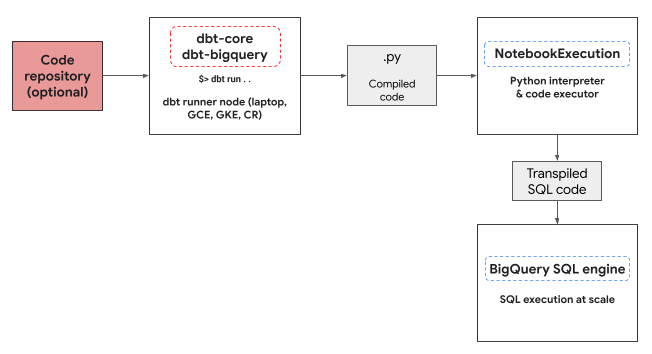
如果專案中沒有可用的筆記本範本,且執行程式碼的使用者有權建立範本,dbt-bigquery 轉接器會自動建立並使用預設筆記本範本。您也可以使用 dbt 設定指定其他筆記本範本。
執行 Notebook 時,需要使用 Cloud Storage bucket 暫存來儲存程式碼和記錄。不過,dbt-bigquery 轉接器會將記錄複製到 dbt 記錄,因此您不必查看 bucket。
支援功能
dbt-bigquery 轉接器支援下列功能,適用於執行 BigQuery DataFrames 的 dbt Python 模型:
- 使用
dbt.source()巨集從現有 BigQuery 資料表載入資料。 - 使用
dbt.ref()巨集從其他 dbt 模型載入資料,以建立依附元件,並使用 Python 模型建立有向無環圖 (DAG)。 - 指定及使用 PyPi 中可與 Python 執行程式碼搭配使用的 Python 套件。詳情請參閱「設定」。
- 為 BigQuery DataFrames 模型指定自訂筆記本執行階段範本。
dbt-bigquery 轉接器支援下列具體化策略:
- 資料表具體化:每次執行時,資料都會重建為資料表。
- 採用合併策略的增量實體化,將新資料或更新資料新增至現有資料表,通常會使用合併策略來處理變更。
設定 dbt 以使用 BigQuery DataFrames
如果您使用的是 dbt Core,則必須使用 profiles.yml 檔案,才能與 BigQuery DataFrames 搭配使用。以下範例使用 oauth 方法:
your_project_name:
  outputs:
    dev:
      compute_region: us-central1
      dataset: your_bq_dateset
      gcs_bucket: your_gcs_bucket
      job_execution_timeout_seconds: 300
      job_retries: 1
      location: US
      method: oauth
      priority: interactive
      project: your_gcp_project
      threads: 1
      type: bigquery
  target: dev
如果您使用 dbt Cloud,可以直接在 dbt Cloud 介面連結資料平台。在這種情況下,您不需要 profiles.yml 檔案。詳情請參閱「關於 profiles.yml」。
以下是 dbt_project.yml 檔案的專案層級設定範例:
# Name your project! Project names should contain only lowercase characters
# and underscores. A good package name should reflect your organization's
# name or the intended use of these models.
name: 'your_project_name'
version: '1.0.0'

# Configuring models
# Full documentation: https://docs.getdbt.com/docs/configuring-models

# In this example config, we tell dbt to build all models in the example/
# directory as views. These settings can be overridden in the individual model
# files using the config(...) macro.

models:
  your_project_name:
    submission_method: bigframes
    notebook_template_id: 7018811640745295872
    packages: ["scikit-learn", "mlflow"]
    timeout: 3000
    # Config indicated by + and applies to all files under models/example/
    example:
      +materialized: view
您也可以在 Python 程式碼中使用 dbt.config 方法設定部分參數。如果這些設定與 dbt_project.yml 檔案衝突,系統會優先採用 dbt.config 的設定。
詳情請參閱「模型設定」和「dbt_project.yml」。
設定
您可以在 Python 模型中使用 dbt.config 方法,設定下列項目。這些設定會覆寫專案層級設定。
| 設定 | 必填 | 用量 |
|---|---|---|
submission_method |
是 | submission_method=bigframes |
notebook_template_id |
否 | 如未指定,系統會建立並使用預設範本。 |
packages |
否 | 視需要指定其他 Python 套件清單。 |
timeout |
否 | 選用:延長工作執行逾時時間。 |
Python 模型範例
以下各節提供情境範例和 Python 模型。
從 BigQuery 資料表載入資料
如要使用現有 BigQuery 資料表的資料做為 Python 模型的來源,請先在 YAML 檔案中定義這個來源。以下範例是在 source.yml 檔案中定義。
version: 2

sources:
  - name: my_project_source   # A custom name for this source group
    database: bigframes-dev   # Your Google Cloud project ID
    schema: yyy_test_us       # The BigQuery dataset containing the table
    tables:
      - name: dev_sql1        # The name of your BigQuery table
接著,您會建構 Python 模型,該模型可以使用這個 YAML 檔案中設定的資料來源:
def model(dbt, session):
    # Configure the model to use BigFrames for submission
    dbt.config(submission_method="bigframes")

    # Load data from the 'dev_sql1' table within 'my_project_source'
    source_data = dbt.source('my_project_source', 'dev_sql1')

    # Example transformation: Create a new column 'id_new'
    source_data['id_new'] = source_data['id'] * 10

    return source_data
參照其他模型
您可以建構依賴其他 dbt 模型輸出的模型,如以下範例所示。這項功能適合用來建立模組化資料管道。
def model(dbt, session):
    # Configure the model to use BigFrames
    dbt.config(submission_method="bigframes")

    # Reference another dbt model named 'dev_sql1'.
    # It assumes you have a model defined in 'dev_sql1.sql' or 'dev_sql1.py'.
    df_from_sql = dbt.ref("dev_sql1")

    # Example transformation on the data from the referenced model
    df_from_sql['id'] = df_from_sql['id'] * 100

    return df_from_sql
指定套件依附元件
如果 Python 模型需要 MLflow 或 Boto3 等特定第三方函式庫,您可以在模型設定中宣告套件,如下例所示。這些套件會安裝在執行環境中。
def model(dbt, session):
    # Configure the model for BigFrames and specify required packages
    dbt.config(
        submission_method="bigframes",
        packages=["mlflow", "boto3"]  # List the packages your model needs
    )

    # Import the specified packages for use in your model
    import mlflow
    import boto3

    # Example: Create a DataFrame showing the versions of the imported packages
    data = {
        "mlflow_version": [mlflow.__version__],
        "boto3_version": [boto3.__version__],
        "note": ["This demonstrates accessing package versions after import."]
    }
    bdf = bpd.DataFrame(data)

    return bdf
指定非預設範本
如要進一步控管執行環境,或使用預先設定的設定,您可以為 BigQuery DataFrames 模型指定非預設的 Notebook 範本,如以下範例所示。
def model(dbt, session):
    dbt.config(
        submission_method="bigframes",
     # ID of your pre-created notebook template
        notebook_template_id="857350349023451yyyy",
    )

    data = {"int": [1, 2, 3], "str": ['a', 'b', 'c']}
    return bpd.DataFrame(data=data)
具體化資料表
dbt 執行 Python 模型時,需要知道如何將結果儲存至資料倉儲。這稱為具體化。
如果是標準資料表具體化,dbt 每次執行時,都會在倉儲中建立資料表,或以模型輸出內容完全取代資料表。這項操作預設會執行,或明確設定 materialized='table' 屬性,如以下範例所示。
def model(dbt, session):
    dbt.config(
        submission_method="bigframes",
     # Instructs dbt to create/replace this model as a table
        materialized='table',
    )

    data = {"int_column": [1, 2], "str_column": ['a', 'b']}
    return bpd.DataFrame(data=data)
採用合併策略的增量實體化功能,可讓 dbt 只更新資料表中的新資料列或修改過的資料列。這項功能適用於大型資料集,因為每次都完整重建資料表可能效率不彰。合併策略是處理這些更新的常見方式。
這種方法會透過下列方式,巧妙整合變更:
- 更新已變更的現有資料列。
- 新增資料列。
- 選用 (視設定而定):刪除來源中已不存在的資料列。
如要使用合併策略,您必須指定 unique_key 屬性,讓 dbt 用於識別模型輸出內容與現有資料表之間的相符資料列,如以下範例所示。
def model(dbt, session):
    dbt.config(
        submission_method="bigframes",
        materialized='incremental',
        incremental_strategy='merge',
        unique_key='int',  # Specifies the column to identify unique rows
    )

    # In this example:
    # - Row with 'int' value 1 remains unchanged.
    # - Row with 'int' value 2 has been updated.
    # - Row with 'int' value 4 is a new addition.
    # The 'merge' strategy will ensure that only the updated row ('int 2')
    # and the new row ('int 4') are processed and integrated into the table.
    data = {"int": [1, 2, 4], "str": ['a', 'bbbb', 'd']}
    return bpd.DataFrame(data=data)
疑難排解
您可以在 dbt 記錄中觀察 Python 執行作業。
此外,您也可以在「Colab Enterprise Executions」(Colab Enterprise 執行作業) 頁面中查看程式碼和記錄 (包括先前的執行作業)。
帳單
搭配 BigQuery DataFrames 使用 dbt-bigquery 轉接器時,會產生下列 Google Cloud 費用:
Notebook 執行作業:系統會依據 Notebook 執行階段執行作業收費。詳情請參閱「Notebook 執行階段定價」。
BigQuery 查詢執行:在筆記本中,BigQuery DataFrames 會將 Python 轉換為 SQL,並在 BigQuery 中執行程式碼。我們會根據您的專案設定和查詢,按照 BigQuery DataFrames 定價所述方式收費。
您可以在 BigQuery 帳單控制台中使用下列帳單標籤,篩選出筆記本執行作業和 dbt-bigquery 轉接器觸發的 BigQuery 執行作業帳單報表:
- BigQuery 執行作業標籤:
bigframes-dbt-api
後續步驟
- 如要進一步瞭解 dbt 和 BigQuery DataFrames,請參閱「搭配使用 BigQuery DataFrames 與 dbt Python 模型」。
- 如要進一步瞭解 dbt Python 模型,請參閱「Python 模型」和「Python 模型設定」。
- 如要進一步瞭解 Colab Enterprise 筆記本,請參閱「使用 Google Cloud 控制台建立 Colab Enterprise 筆記本」。
- 如要進一步瞭解 Google Cloud 合作夥伴,請參閱「Google Cloud Ready - BigQuery 合作夥伴」。