使用 KubernetesPodOperator

Managed Airflow(第 3 代) | Managed Airflow(第 2 代) | Managed Airflow(旧版第 1 代)

本页介绍如何使用 KubernetesPodOperator 将 Kubernetes pod 从 Managed Service for Apache Airflow 部署到作为 Managed Service for Apache Airflow 环境一部分的 Google Kubernetes Engine 集群。

KubernetesPodOperator 会在您环境的集群中启动 Kubernetes Pod。相比之下,Google Kubernetes Engine Operator 在指定集群中运行 Kubernetes Pod,该集群可以是与您的环境无关的独立集群。您还可以使用 Google Kubernetes Engine Operator 来创建和删除集群。

如果您需要以下内容,KubernetesPodOperator 是一个不错的选择:

  • 无法通过公共 PyPI 代码库获得的自定义 Python 依赖项。
  • 无法通过现有 Managed Airflow 工作器映像获得的二进制依赖项。

准备工作

  • 我们建议使用最新版本的 Managed Airflow。 此版本必须至少作为弃用和支持政策的一部分受到支持。
  • 请确保您的环境中有足够的资源。将 Pod 启动到资源耗尽的环境中会导致 Airflow 工作器和 Airflow 调度程序错误。

设置 Managed Service for Apache Airflow 环境资源

创建 Managed Airflow 环境时,您可以指定其性能参数,包括环境集群的性能参数。将 Kubernetes Pod 启动到环境集群可能会导致集群资源(例如 CPU 或内存)争用。由于 Airflow 调度程序和工作器属于同一 GKE 集群,因此如果资源争用导致资源耗尽,则调度程序和工作器将无法正常工作。

为了防止资源耗尽,请采取以下一项或多项措施:

创建节点池

防止 Managed Airflow 环境中的资源耗尽的首选方法是新建节点池并仅使用该池中的资源来配置 Kubernetes Pod

控制台

  1. 在 Google Cloud 控制台中,前往环境页面。

    转到“环境”

  2. 点击您的环境的名称。

  3. 环境详情页面上,转到环境配置标签页。

  4. 资源 > GKE 集群部分中,点击查看集群详情链接。

  5. 按照添加节点池中的说明创建节点池。

gcloud

  1. 确定您的环境的集群的名称:

    gcloud composer environments describe ENVIRONMENT_NAME \
      --location LOCATION \
      --format="value(config.gkeCluster)"
    

    替换:

    • ENVIRONMENT_NAME 替换为环境的名称。
    • LOCATION 替换为环境所在的区域。
  2. 输出会包含环境的集群名称。例如,此值可以是 europe-west3-example-enviro-af810e25-gke

  3. 按照添加节点池中的说明创建节点池。

增加环境中的节点数量

增加 Managed Airflow 环境中的节点数将提高工作负载可用的计算能力,但如果任务需要的 CPU 或 RAM 高于指定机器类型所能提供的,这种增加不会为其提供额外的资源。

如需增加节点数,请更新您的环境

指定适当的机器类型

在 Managed Airflow 环境创建期间,您可以指定机器类型。为确保有可用的资源,请针对 Managed Airflow 环境中的计算类型指定机器类型

最少的配置工作量

为了创建 KubernetesPodOperator,只需要 Pod 的 name、要使用的 imagetask_id 参数。/home/airflow/composer_kube_config 包含用于向 GKE 进行身份验证的凭据。

Airflow 2

kubernetes_min_pod = KubernetesPodOperator(
    # The ID specified for the task.
    task_id="pod-ex-minimum",
    # Name of task you want to run, used to generate Pod ID.
    name="pod-ex-minimum",
    # Entrypoint of the container, if not specified the Docker container's
    # entrypoint is used. The cmds parameter is templated.
    cmds=["echo"],
    # The namespace to run within Kubernetes, default namespace is
    # `default`. In Composer 1 there is the potential for
    # the resource starvation of Airflow workers and scheduler
    # within the Cloud Composer environment,
    # the recommended solution is to increase the amount of nodes in order
    # to satisfy the computing requirements. Alternatively, launching pods
    # into a custom namespace will stop fighting over resources,
    # and using Composer 2 will mean the environment will autoscale.
    namespace="default",
    # Docker image specified. Defaults to hub.docker.com, but any fully
    # qualified URLs will point to a custom repository. Supports private
    # gcr.io images if the Composer Environment is under the same
    # project-id as the gcr.io images and the service account that Composer
    # uses has permission to access the Google Container Registry
    # (the default service account has permission)
    image="marketplace.gcr.io/google/ubuntu2204",
)

Airflow 1

kubernetes_min_pod = kubernetes_pod_operator.KubernetesPodOperator(
    # The ID specified for the task.
    task_id="pod-ex-minimum",
    # Name of task you want to run, used to generate Pod ID.
    name="pod-ex-minimum",
    # Entrypoint of the container, if not specified the Docker container's
    # entrypoint is used. The cmds parameter is templated.
    cmds=["echo"],
    # The namespace to run within Kubernetes, default namespace is
    # `default`. There is the potential for the resource starvation of
    # Airflow workers and scheduler within the Cloud Composer environment,
    # the recommended solution is to increase the amount of nodes in order
    # to satisfy the computing requirements. Alternatively, launching pods
    # into a custom namespace will stop fighting over resources.
    namespace="default",
    # Docker image specified. Defaults to hub.docker.com, but any fully
    # qualified URLs will point to a custom repository. Supports private
    # gcr.io images if the Composer Environment is under the same
    # project-id as the gcr.io images and the service account that Composer
    # uses has permission to access the Google Container Registry
    # (the default service account has permission)
    image="marketplace.gcr.io/google/ubuntu2204",
)

Pod 亲和性配置

在 KubernetesPodOperator 中配置 affinity 参数后,您可以控制要在哪些节点上安排 Pod,例如仅在特定节点池中的节点上安排。在此示例中,操作节点仅在名为 pool-0pool-1 的节点池上运行。您的代管式 Airflow(旧版第 1 代)环境节点在 default-pool 中,因此您的 Pod 不会在您的环境中的节点上运行。

Airflow 2

# Pod affinity with the KubernetesPodOperator
# is not supported with Composer 2
# instead, create a cluster and use the GKEStartPodOperator
# https://cloud.google.com/composer/docs/using-gke-operator
kubernetes_affinity_ex = KubernetesPodOperator(
    task_id="ex-pod-affinity",
    name="ex-pod-affinity",
    namespace="default",
    image="perl:5.34.0",
    cmds=["perl"],
    arguments=["-Mbignum=bpi", "-wle", "print bpi(2000)"],
    # affinity allows you to constrain which nodes your pod is eligible to
    # be scheduled on, based on labels on the node. In this case, if the
    # label 'cloud.google.com/gke-nodepool' with value
    # 'nodepool-label-value' or 'nodepool-label-value2' is not found on any
    # nodes, it will fail to schedule.
    affinity={
        "nodeAffinity": {
            # requiredDuringSchedulingIgnoredDuringExecution means in order
            # for a pod to be scheduled on a node, the node must have the
            # specified labels. However, if labels on a node change at
            # runtime such that the affinity rules on a pod are no longer
            # met, the pod will still continue to run on the node.
            "requiredDuringSchedulingIgnoredDuringExecution": {
                "nodeSelectorTerms": [
                    {
                        "matchExpressions": [
                            {
                                # When nodepools are created in Google Kubernetes
                                # Engine, the nodes inside of that nodepool are
                                # automatically assigned the label
                                # 'cloud.google.com/gke-nodepool' with the value of
                                # the nodepool's name.
                                "key": "cloud.google.com/gke-nodepool",
                                "operator": "In",
                                # The label key's value that pods can be scheduled
                                # on.
                                "values": [
                                    "pool-0",
                                    "pool-1",
                                ],
                            }
                        ]
                    }
                ]
            }
        }
    },
)

Airflow 1

kubernetes_affinity_ex = kubernetes_pod_operator.KubernetesPodOperator(
    task_id="ex-pod-affinity",
    name="ex-pod-affinity",
    namespace="default",
    image="perl:5.34.0",
    cmds=["perl"],
    arguments=["-Mbignum=bpi", "-wle", "print bpi(2000)"],
    # affinity allows you to constrain which nodes your pod is eligible to
    # be scheduled on, based on labels on the node. In this case, if the
    # label 'cloud.google.com/gke-nodepool' with value
    # 'nodepool-label-value' or 'nodepool-label-value2' is not found on any
    # nodes, it will fail to schedule.
    affinity={
        "nodeAffinity": {
            # requiredDuringSchedulingIgnoredDuringExecution means in order
            # for a pod to be scheduled on a node, the node must have the
            # specified labels. However, if labels on a node change at
            # runtime such that the affinity rules on a pod are no longer
            # met, the pod will still continue to run on the node.
            "requiredDuringSchedulingIgnoredDuringExecution": {
                "nodeSelectorTerms": [
                    {
                        "matchExpressions": [
                            {
                                # When nodepools are created in Google Kubernetes
                                # Engine, the nodes inside of that nodepool are
                                # automatically assigned the label
                                # 'cloud.google.com/gke-nodepool' with the value of
                                # the nodepool's name.
                                "key": "cloud.google.com/gke-nodepool",
                                "operator": "In",
                                # The label key's value that pods can be scheduled
                                # on.
                                "values": [
                                    "pool-0",
                                    "pool-1",
                                ],
                            }
                        ]
                    }
                ]
            }
        }
    },
)

示例采用当前配置时,任务将失败。查看日志可发现任务失败,因为节点池 pool-0pool-1 不存在。

如需确保 values 中的节点池存在,请进行以下任一配置更改:

  • 如果您之前创建了节点池,请将 pool-0pool-1 替换为您的节点池名称,然后重新上传 DAG。

  • 创建一个节点池并将其命名为 pool-0pool-1。您可以同时创建两者,但任务只需一个即可成功。

  • pool-0pool-1 替换为 Airflow 使用的默认池 default-pool,然后再次上传您的 DAG。

进行更改后,等待几分钟,让您的环境更新。然后再次运行 ex-pod-affinity 任务,并验证 ex-pod-affinity 任务是否成功。

其他配置

此示例展示了您可以在 KubernetesPodOperator 中配置的其他参数。

如需了解详情,请参阅以下资源:

Airflow 2

kubernetes_full_pod = KubernetesPodOperator(
    task_id="ex-all-configs",
    name="pi",
    namespace="default",
    image="perl:5.34.0",
    # Entrypoint of the container, if not specified the Docker container's
    # entrypoint is used. The cmds parameter is templated.
    cmds=["perl"],
    # Arguments to the entrypoint. The docker image's CMD is used if this
    # is not provided. The arguments parameter is templated.
    arguments=["-Mbignum=bpi", "-wle", "print bpi(2000)"],
    # The secrets to pass to Pod, the Pod will fail to create if the
    # secrets you specify in a Secret object do not exist in Kubernetes.
    secrets=[],
    # Labels to apply to the Pod.
    labels={"pod-label": "label-name"},
    # Timeout to start up the Pod, default is 120.
    startup_timeout_seconds=120,
    # The environment variables to be initialized in the container
    # env_vars are templated.
    env_vars={"EXAMPLE_VAR": "/example/value"},
    # If true, logs stdout output of container. Defaults to True.
    get_logs=True,
    # Determines when to pull a fresh image, if 'IfNotPresent' will cause
    # the Kubelet to skip pulling an image if it already exists. If you
    # want to always pull a new image, set it to 'Always'.
    image_pull_policy="Always",
    # Annotations are non-identifying metadata you can attach to the Pod.
    # Can be a large range of data, and can include characters that are not
    # permitted by labels.
    annotations={"key1": "value1"},
    # Optional resource specifications for Pod, this will allow you to
    # set both cpu and memory limits and requirements.
    # Prior to Airflow 2.3 and the cncf providers package 5.0.0
    # resources were passed as a dictionary. This change was made in
    # https://github.com/apache/airflow/pull/27197
    # Additionally, "memory" and "cpu" were previously named
    # "limit_memory" and "limit_cpu"
    # resources={'limit_memory': "250M", 'limit_cpu': "100m"},
    container_resources=k8s_models.V1ResourceRequirements(
        limits={"memory": "250M", "cpu": "100m"},
    ),
    # Specifies path to kubernetes config. If no config is specified will
    # default to '~/.kube/config'. The config_file is templated.
    config_file="/home/airflow/composer_kube_config",
    # If true, the content of /airflow/xcom/return.json from container will
    # also be pushed to an XCom when the container ends.
    do_xcom_push=False,
    # List of Volume objects to pass to the Pod.
    volumes=[],
    # List of VolumeMount objects to pass to the Pod.
    volume_mounts=[],
    # Affinity determines which nodes the Pod can run on based on the
    # config. For more information see:
    # https://kubernetes.io/docs/concepts/configuration/assign-pod-node/
    # Pod affinity with the KubernetesPodOperator
    # is not supported with Composer 2
    # instead, create a cluster and use the GKEStartPodOperator
    # https://cloud.google.com/composer/docs/using-gke-operator
    affinity={},
)

Airflow 1

kubernetes_full_pod = kubernetes_pod_operator.KubernetesPodOperator(
    task_id="ex-all-configs",
    name="pi",
    namespace="default",
    image="perl:5.34.0",
    # Entrypoint of the container, if not specified the Docker container's
    # entrypoint is used. The cmds parameter is templated.
    cmds=["perl"],
    # Arguments to the entrypoint. The docker image's CMD is used if this
    # is not provided. The arguments parameter is templated.
    arguments=["-Mbignum=bpi", "-wle", "print bpi(2000)"],
    # The secrets to pass to Pod, the Pod will fail to create if the
    # secrets you specify in a Secret object do not exist in Kubernetes.
    secrets=[],
    # Labels to apply to the Pod.
    labels={"pod-label": "label-name"},
    # Timeout to start up the Pod, default is 120.
    startup_timeout_seconds=120,
    # The environment variables to be initialized in the container
    # env_vars are templated.
    env_vars={"EXAMPLE_VAR": "/example/value"},
    # If true, logs stdout output of container. Defaults to True.
    get_logs=True,
    # Determines when to pull a fresh image, if 'IfNotPresent' will cause
    # the Kubelet to skip pulling an image if it already exists. If you
    # want to always pull a new image, set it to 'Always'.
    image_pull_policy="Always",
    # Annotations are non-identifying metadata you can attach to the Pod.
    # Can be a large range of data, and can include characters that are not
    # permitted by labels.
    annotations={"key1": "value1"},
    # Optional resource specifications for Pod, this will allow you to
    # set both cpu and memory limits and requirements.
    # Prior to Airflow 1.10.4, resource specifications were
    # passed as a Pod Resources Class object,
    # If using this example on a version of Airflow prior to 1.10.4,
    # import the "pod" package from airflow.contrib.kubernetes and use
    # resources = pod.Resources() instead passing a dict
    # For more info see:
    # https://github.com/apache/airflow/pull/4551
    resources={"limit_memory": "250M", "limit_cpu": "100m"},
    # Specifies path to kubernetes config. If no config is specified will
    # default to '~/.kube/config'. The config_file is templated.
    config_file="/home/airflow/composer_kube_config",
    # If true, the content of /airflow/xcom/return.json from container will
    # also be pushed to an XCom when the container ends.
    do_xcom_push=False,
    # List of Volume objects to pass to the Pod.
    volumes=[],
    # List of VolumeMount objects to pass to the Pod.
    volume_mounts=[],
    # Affinity determines which nodes the Pod can run on based on the
    # config. For more information see:
    # https://kubernetes.io/docs/concepts/configuration/assign-pod-node/
    affinity={},
)

使用 Jinja 模板

Airflow 支持在 DAG 中使用 Jinja 模板

您必须在操作节点 (operator) 中声明所需的 Airflow 参数(task_idnameimage)。如以下示例所示,您可以搭配使用 Jinja 和所有其他参数生成模板,包括cmdsargumentsenv_varsconfig_file

示例中的 env_vars 参数是从名为 my_valueAirflow 变量设置的。示例 DAG 从 Airflow 中的 vars 模板变量获取其值。Airflow 具有更多变量,可用于访问不同类型的信息。例如,您可以使用 conf 模板变量来访问 Airflow 配置选项的值。如需了解详情以及 Airflow 中可用的变量列表,请参阅 Airflow 文档中的模板参考

在不更改 DAG 或创建 env_vars 变量的情况下,示例中的 ex-kube-templates 任务会因变量不存在而失败。在 Airflow 界面中或使用 Google Cloud CLI 创建此变量:

Airflow 界面

  1. 转到 Airflow 界面

  2. 在工具栏中,选择 Admin > Variables

  3. List Variable 页面上,点击 Add a new record

  4. Add Variable 页面上,输入以下信息:

    • Key:my_value
    • Val:example_value
  5. 点击保存

如果您的环境使用 Airflow 1,请改为运行以下命令:

  1. 转到 Airflow 界面

  2. 在工具栏中,选择 Admin > Variables

  3. Variables 页面上,点击 Create 标签页。

  4. Variable 页面上,输入以下信息:

    • Key:my_value
    • Val:example_value
  5. 点击保存

gcloud

输入以下命令:

gcloud composer environments run ENVIRONMENT \
    --location LOCATION \
    variables set -- \
    my_value example_value

如果您的环境使用 Airflow 1,请改为运行以下命令:

gcloud composer environments run ENVIRONMENT \
    --location LOCATION \
    variables -- \
    --set my_value example_value

  • ENVIRONMENT 替换为环境的名称。
  • LOCATION 替换为环境所在的区域。

以下示例演示了如何将 Jinja 模板与 KubernetesPodOperator 搭配使用:

Airflow 2

kubernetes_template_ex = KubernetesPodOperator(
    task_id="ex-kube-templates",
    name="ex-kube-templates",
    namespace="default",
    image="bash",
    # All parameters below are able to be templated with jinja -- cmds,
    # arguments, env_vars, and config_file. For more information visit:
    # https://airflow.apache.org/docs/apache-airflow/stable/macros-ref.html
    # Entrypoint of the container, if not specified the Docker container's
    # entrypoint is used. The cmds parameter is templated.
    cmds=["echo"],
    # DS in jinja is the execution date as YYYY-MM-DD, this docker image
    # will echo the execution date. Arguments to the entrypoint. The docker
    # image's CMD is used if this is not provided. The arguments parameter
    # is templated.
    arguments=["{{ ds }}"],
    # The var template variable allows you to access variables defined in
    # Airflow UI. In this case we are getting the value of my_value and
    # setting the environment variable `MY_VALUE`. The pod will fail if
    # `my_value` is not set in the Airflow UI.
    env_vars={"MY_VALUE": "{{ var.value.my_value }}"},
    # Sets the config file to a kubernetes config file specified in
    # airflow.cfg. If the configuration file does not exist or does
    # not provide validcredentials the pod will fail to launch. If not
    # specified, config_file defaults to ~/.kube/config
    config_file="{{ conf.get('core', 'kube_config') }}",
)

Airflow 1

kubernetes_template_ex = kubernetes_pod_operator.KubernetesPodOperator(
    task_id="ex-kube-templates",
    name="ex-kube-templates",
    namespace="default",
    image="bash",
    # All parameters below are able to be templated with jinja -- cmds,
    # arguments, env_vars, and config_file. For more information visit:
    # https://airflow.apache.org/docs/apache-airflow/stable/macros-ref.html
    # Entrypoint of the container, if not specified the Docker container's
    # entrypoint is used. The cmds parameter is templated.
    cmds=["echo"],
    # DS in jinja is the execution date as YYYY-MM-DD, this docker image
    # will echo the execution date. Arguments to the entrypoint. The docker
    # image's CMD is used if this is not provided. The arguments parameter
    # is templated.
    arguments=["{{ ds }}"],
    # The var template variable allows you to access variables defined in
    # Airflow UI. In this case we are getting the value of my_value and
    # setting the environment variable `MY_VALUE`. The pod will fail if
    # `my_value` is not set in the Airflow UI.
    env_vars={"MY_VALUE": "{{ var.value.my_value }}"},
    # Sets the config file to a kubernetes config file specified in
    # airflow.cfg. If the configuration file does not exist or does
    # not provide validcredentials the pod will fail to launch. If not
    # specified, config_file defaults to ~/.kube/config
    config_file="{{ conf.get('core', 'kube_config') }}",
)

使用 Kubernetes Secret 和 ConfigMap

Kubernetes Secret 是包含敏感数据的对象。Kubernetes ConfigMap 是包含键值对形式的非机密数据的对象。

在 Managed Airflow(第 2 代)中,您可以使用 Google Cloud CLI、API 或 Terraform 创建 Secret 和 ConfigMap,然后通过 KubernetesPodOperator 访问它们。

关于 YAML 配置文件

使用 Google Cloud CLI 和 API 创建 Kubernetes Secret 或 ConfigMap 时,您需要提供 YAML 格式的文件。此文件必须采用与 Kubernetes Secret 和 ConfigMap 相同的格式。Kubernetes 文档提供了许多 ConfigMap 和 Secret 代码示例。如需开始使用,您可以参阅使用 Secret 安全地分发凭据页面和 ConfigMaps

与 Kubernetes Secret 中相同,在 Secret 中定义值时,请使用 base64 表示法。

如需对值进行编码,您可以使用以下命令(这是获取 base64 编码值的方法之一):

echo "postgresql+psycopg2://root:example-password@127.0.0.1:3306/example-db" -n | base64

输出:

cG9zdGdyZXNxbCtwc3ljb3BnMjovL3Jvb3Q6ZXhhbXBsZS1wYXNzd29yZEAxMjcuMC4wLjE6MzMwNi9leGFtcGxlLWRiIC1uCg==

本指南后面的示例中使用了以下两个 YAML 文件示例。Kubernetes Secret 的 YAML 配置文件示例:

apiVersion: v1
kind: Secret
metadata:
  name: airflow-secrets
data:
  sql_alchemy_conn: cG9zdGdyZXNxbCtwc3ljb3BnMjovL3Jvb3Q6ZXhhbXBsZS1wYXNzd29yZEAxMjcuMC4wLjE6MzMwNi9leGFtcGxlLWRiIC1uCg==

另一个演示如何包含文件的示例。与上一个示例中一样,先对文件 (cat ./key.json | base64) 的内容进行编码,然后在 YAML 文件中提供此值:

apiVersion: v1
kind: Secret
metadata:
  name: service-account
data:
  service-account.json: |
    ewogICJ0eXBl...mdzZXJ2aWNlYWNjb3VudC5jb20iCn0K

ConfigMap 的 YAML 配置文件示例。您无需在 ConfigMap 中使用 base64 表示法:

apiVersion: v1
kind: ConfigMap
metadata:
  name: example-configmap
data:
  example_key: example_value

管理 Kubernetes Secret

在 Managed Airflow(第 2 代)中,您可以使用 Google Cloud CLI 和 kubectl 创建 Secret:

  1. 获取有关环境集群的信息:

    1. 运行以下命令:

      gcloud composer environments describe ENVIRONMENT \
          --location LOCATION \
          --format="value(config.gkeCluster)"
      

      替换:

      • ENVIRONMENT 替换为您的环境名称。
      • LOCATION 替换为 Managed Airflow 环境所在的区域。

      此命令的输出使用以下格式:projects/<your-project-id>/zones/<zone-of-composer-env>/clusters/<your-cluster-id>

    2. 为了获取 GKE 集群 ID,请复制 /clusters/ 后面的输出内容(以 -gke 结尾)。

    3. 要获取该可用区,请复制 /zones/ 后面的输出内容。

  2. 使用以下命令连接到您的 GKE 集群:

    gcloud container clusters get-credentials CLUSTER_ID \
      --project PROJECT \
      --zone ZONE
    

    • CLUSTER_ID:环境的集群 ID。
    • PROJECT_ID项目 ID
    • ZONE 替换为环境的集群所在的可用区。
  3. 创建 Kubernetes Secret:

    以下命令演示了创建 Kubernetes Secret 的两种不同方法。--from-literal 方法使用键值对。--from-file 方法使用文件内容。

    • 如需通过提供键值对来创建 Kubernetes Secret,请运行以下命令。此示例创建了一个名为 airflow-secrets 的 Secret,其中包含一个值为 test_valuesql_alchemy_conn 字段。

      kubectl create secret generic airflow-secrets \
        --from-literal sql_alchemy_conn=test_value
      
    • 如需通过提供文件内容来创建 Kubernetes Secret,请运行以下命令。此示例创建了一个名为 service-account 的 Secret,其中包含一个 service-account.json 字段,该字段的值取自本地 ./key.json 文件的内容。

      kubectl create secret generic service-account \
        --from-file service-account.json=./key.json
      

在 DAG 中使用 Kubernetes Secret

此示例展示了使用 Kubernetes Secret 的两种方法:作为环境变量,以及由 Pod 装载的卷。

第一个 Secret airflow-secrets 设置为名为 SQL_CONN 的 Kubernetes 环境变量(而不是 Airflow 或 Managed Airflow 环境变量)。

第二个 Secret service-account 将包含服务账号令牌的文件 service-account.json 装载到 /var/secrets/google

Secret 对象如下所示:

Airflow 2

secret_env = Secret(
    # Expose the secret as environment variable.
    deploy_type="env",
    # The name of the environment variable, since deploy_type is `env` rather
    # than `volume`.
    deploy_target="SQL_CONN",
    # Name of the Kubernetes Secret
    secret="airflow-secrets",
    # Key of a secret stored in this Secret object
    key="sql_alchemy_conn",
)
secret_volume = Secret(
    deploy_type="volume",
    # Path where we mount the secret as volume
    deploy_target="/var/secrets/google",
    # Name of Kubernetes Secret
    secret="service-account",
    # Key in the form of service account file name
    key="service-account.json",
)

Airflow 1

secret_env = secret.Secret(
    # Expose the secret as environment variable.
    deploy_type="env",
    # The name of the environment variable, since deploy_type is `env` rather
    # than `volume`.
    deploy_target="SQL_CONN",
    # Name of the Kubernetes Secret
    secret="airflow-secrets",
    # Key of a secret stored in this Secret object
    key="sql_alchemy_conn",
)
secret_volume = secret.Secret(
    deploy_type="volume",
    # Path where we mount the secret as volume
    deploy_target="/var/secrets/google",
    # Name of Kubernetes Secret
    secret="service-account",
    # Key in the form of service account file name
    key="service-account.json",
)

第一个 Kubernetes Secret 的名称在 secret_env 变量中定义。此 Secret 名为 airflow-secretsdeploy_type 参数指定必须将其公开为环境变量。环境变量的名称为 SQL_CONN,如 deploy_target 参数中所指定。最后,将 SQL_CONN 环境变量的值设置为 sql_alchemy_conn 键的值。

第二个 Kubernetes Secret 的名称在 secret_volume 变量中定义。此 Secret 名为 service-account。它显示为卷,如 deploy_type 参数中所指定。要装载的文件的路径 deploy_target/var/secrets/google。最后,存储在 deploy_target 中的 Secret 的 keyservice-account.json

操作节点配置类似于如下所示:

Airflow 2

kubernetes_secret_vars_ex = KubernetesPodOperator(
    task_id="ex-kube-secrets",
    name="ex-kube-secrets",
    namespace="default",
    image="ubuntu",
    startup_timeout_seconds=300,
    # The secrets to pass to Pod, the Pod will fail to create if the
    # secrets you specify in a Secret object do not exist in Kubernetes.
    secrets=[secret_env, secret_volume],
    # env_vars allows you to specify environment variables for your
    # container to use. env_vars is templated.
    env_vars={
        "EXAMPLE_VAR": "/example/value",
        "GOOGLE_APPLICATION_CREDENTIALS": "/var/secrets/google/service-account.json ",
    },
)

Airflow 1

kubernetes_secret_vars_ex = kubernetes_pod_operator.KubernetesPodOperator(
    task_id="ex-kube-secrets",
    name="ex-kube-secrets",
    namespace="default",
    image="ubuntu",
    startup_timeout_seconds=300,
    # The secrets to pass to Pod, the Pod will fail to create if the
    # secrets you specify in a Secret object do not exist in Kubernetes.
    secrets=[secret_env, secret_volume],
    # env_vars allows you to specify environment variables for your
    # container to use. env_vars is templated.
    env_vars={
        "EXAMPLE_VAR": "/example/value",
        "GOOGLE_APPLICATION_CREDENTIALS": "/var/secrets/google/service-account.json ",
    },
)

有关 CNCF Kubernetes 提供方的信息

KubernetesPodOperator 在 apache-airflow-providers-cncf-kubernetes 提供程序中实现。

如需详细了解 CNCF Kubernetes 提供方 的版本说明,请参阅 CNCF Kubernetes 提供方 网站

版本 6.0.0

在 CNCF Kubernetes 提供程序软件包的 6.0.0 版中,KubernetesPodOperator 默认使用 kubernetes_default 连接。

如果您在 5.0.0 版中指定了自定义连接,运算符仍会使用此自定义连接。如需切换回使用 kubernetes_default 连接,您可能需要相应地调整 DAG。

版本 5.0.0

与 4.4.0 版相比,此版本引入了一些向后不兼容的更改。最重要的错误与 5.0.0 版中未使用的 kubernetes_default 连接有关。

  • 需要修改 kubernetes_default 连接。Kubernetes 配置路径必须设置为 /home/airflow/composer_kube_config(如下图所示)。或者,必须将 config_file 添加到 KubernetesPodOperator 配置中(如以下代码示例所示)。
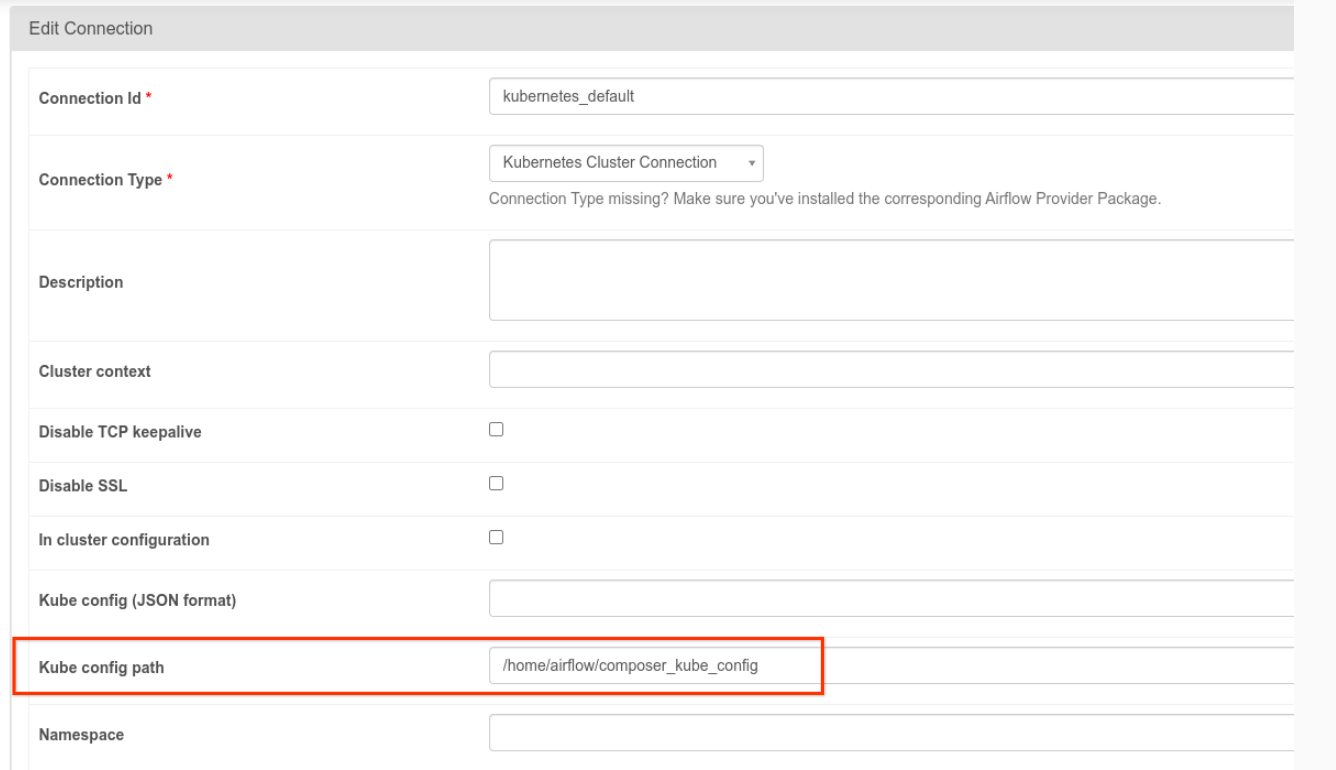
Airflow 界面中的 Kube 配置路径字段
图 1。Airflow 界面,修改 kubernetes_default 连接(点击可放大)
  • 使用 KubernetesPodOperator 按以下方式修改任务的代码:
KubernetesPodOperator(
  # config_file parameter - can be skipped if connection contains this setting
  config_file="/home/airflow/composer_kube_config",
  # definition of connection to be used by the operator
  kubernetes_conn_id='kubernetes_default',
  ...
)

如需详细了解版本 5.0.0,请参阅 CNCF Kubernetes 提供方版本说明

问题排查

本部分提供了一些建议,可帮助您排查常见的 KubernetesPodOperator 问题:

查看日志

在排查问题时,您可以按以下顺序检查日志:

  1. Airflow 任务日志:

    1. 在 Google Cloud 控制台中,前往环境页面。

      转到“环境”

    2. 在环境列表中,点击您的环境名称。环境详情页面会打开。

    3. 前往 DAG 标签页。

    4. 点击 DAG 的名称,然后点击 DAG 运行,即可查看详情和日志。

  2. Airflow 调度器日志:

    1. 前往环境详情页面。

    2. 前往日志标签页。

    3. 检查 Airflow 调度程序日志。

  3. Google Cloud 控制台中 GKE 工作负载下的 Pod 日志。这些日志包括 Pod 定义 YAML 文件、Pod 事件和 Pod 详情。

非零返回代码

使用 KubernetesPodOperator(和 GKEStartPodOperator)时,容器入口点的返回代码确定任务是否成功。返回非零代码表示失败。

常见模式是执行一个 Shell 脚本作为容器入口点,以将容器内的多个操作分组到一起。

如果您要编写这样的脚本,建议您在脚本的顶部加入 set -e 命令,因而脚本中失败的命令会终止脚本并将故障传播至 Airflow 任务实例。

Pod 超时

KubernetesPodOperator 的默认超时时间为 120 秒,这会导致在较大的映像下载完成之前发生超时。您可以通过在创建 KubernetesPodOperator 时更改 startup_timeout_seconds 参数来增加超时值。

如果某个 pod 超时,您可从 Airflow 界面中查看相应任务专属的日志。例如:

Executing <Task(KubernetesPodOperator): ex-all-configs> on 2018-07-23 19:06:58.133811
Running: ['bash', '-c', u'airflow run kubernetes-pod-example ex-all-configs 2018-07-23T19:06:58.133811 --job_id 726 --raw -sd DAGS_FOLDER/kubernetes_pod_operator_sample.py']
Event: pod-name-9a8e9d06 had an event of type Pending
...
...
Event: pod-name-9a8e9d06 had an event of type Pending
Traceback (most recent call last):
  File "/usr/local/bin/airflow", line 27, in <module>
    args.func(args)
  File "/usr/local/lib/python2.7/site-packages/airflow/bin/cli.py", line 392, in run
    pool=args.pool,
  File "/usr/local/lib/python2.7/site-packages/airflow/utils/db.py", line 50, in wrapper
    result = func(*args, **kwargs)
  File "/usr/local/lib/python2.7/site-packages/airflow/models.py", line 1492, in _run_raw_task
    result = task_copy.execute(context=context)
  File "/usr/local/lib/python2.7/site-packages/airflow/contrib/operators/kubernetes_pod_operator.py", line 123, in execute
    raise AirflowException('Pod Launching failed: {error}'.format(error=ex))
airflow.exceptions.AirflowException: Pod Launching failed: Pod took too long to start

如果 Managed Airflow 服务账号缺少必要的 IAM 权限来执行手头的任务,也会出现 Pod 超时。如需验证是否属于这种情况,请使用 GKE 信息中心查看 Pod 级错误,找到特定工作负载的日志;或者使用 Cloud Logging。

无法建立新连接

GKE 集群默认启用自动升级。 如果集群中的某个节点池正在升级,您可能会看到以下错误:

<Task(KubernetesPodOperator): gke-upgrade> Failed to establish a new
connection: [Errno 111] Connection refused

如需检查您的集群是否正在升级,请在 Google Cloud 控制台中前往 Kubernetes 集群页面,然后查看您的环境的集群名称旁是否有加载图标。

后续步骤