

Access control with IAM
This document describes how to use Identity and Access Management to control how Config Connector can create and manage Google Cloud resources.
To install Config Connector, you authenticate by creating an IAM service account and then using Workload Identity Federation for GKE to bind the IAM service accounts with the Kubernetes service accounts. IAM lets Config Connector take action on specific resources. By limiting the permissions assigned to your service accounts, you have greater control over what kinds of resources Config Connector can create.
You can choose to manage resources with a single service account or multiple service accounts.
Single service account
When you install Config Connector with the GKE add-on or manual
installation, you can set cluster mode in your ConfigConnector
CustomResource.
With cluster mode, you can use a single IAM service account to
create and manage resources, even if you are using Config Connector to manage
multiple projects.
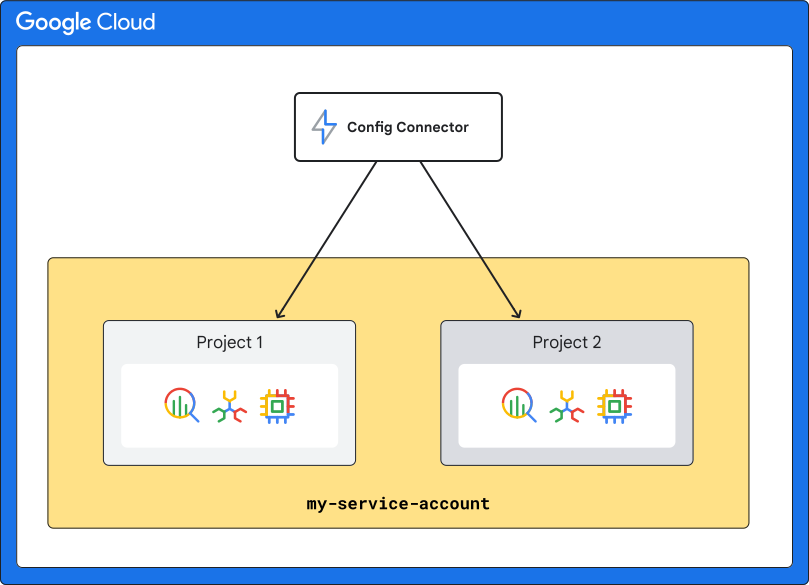
The following diagram shows you how this mode works, where the same service account, which is called my-service-account, manages two projects:
Multiple service accounts
You can use multiple service accounts by setting namespaced mode in your
ConfigConnector
CustomResource.
Namespaced mode lets you divide permissions based on the respective concerns of
different IAM service accounts and isolate permissions among
different Kubernetes namespaces since you can associate a different service
account for each namespace.
Choose namespaced mode if you:
- Want to isolate IAM permissions at Kubernetes namespace level.
- Expect to manage a large number of Google Cloud resources from multiple Google Cloud projects on a single cluster.
As an example, you create one IAM service account for each project, organize resources from each project in the same Kubernetes namespace, and then bind the corresponding IAM service account to the Kubernetes namespace. This lets you separate IAM permissions for each project so that each project has a distinct, unrelated set of permissions.
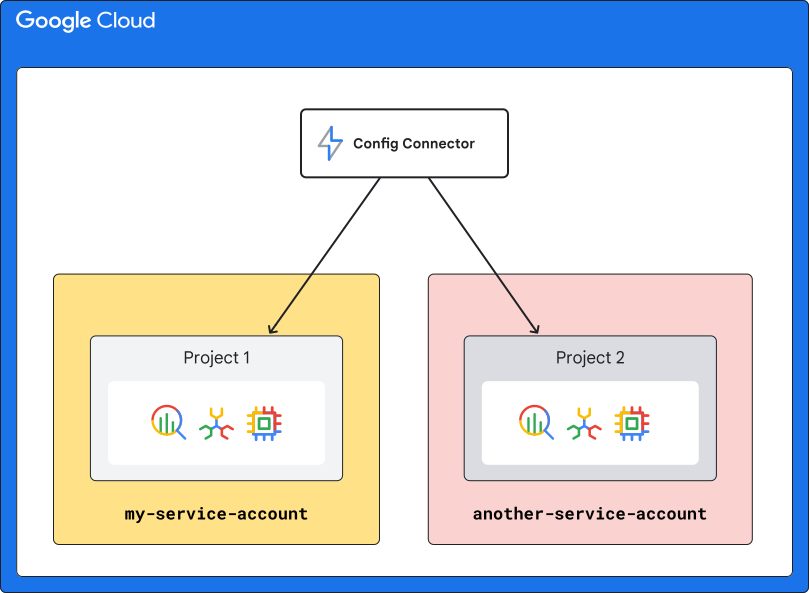
The following diagram shows you an overview of how namespaced mode works, where each of project is managed by a different service account. Project 1 is managed by my-service-account, and Project 2 is managed by another-service-account:
In namespaced mode, each IAM service account is bound to a
namespace by default. When you create resources within that namespace,
Config Connector uses this service account to create Google Cloud
resources. There is a dedicated Config Connector cnrm-controller-manager pod
for each namespace which impersonates the IAM service account
associated with the namespace.
To learn how to configure namespaced mode, see Installing Config Connector using a namespaced mode.