

Database Migration Service supports two approaches for migrating SQL Server databases to Cloud SQL for SQL Server:
- Backup and restore migrations: Migrate from self-managed SQL Server, Amazon RDS, or Cloud SQL for SQL Server sources by staging full backup and transaction log files in a Cloud Storage bucket.
- Distributed Availability Group (DAG) migrations: Migrate from self-managed SQL Server Enterprise Edition instances directly over a private network connection by using SQL Server Distributed Availability Group, without exporting backup files to Cloud Storage.
Backup and restore migrations
You can migrate SQL Server databases to Cloud SQL for SQL Server instances with Database Migration Service by using a backup and restore flow.
For self-managed or Amazon RDS sources, you first upload the full database backup and transaction log files to a Cloud Storage bucket. Database Migration Service then actively monitors your bucket, and continuously replicates your data to the destination Cloud SQL for SQL Server instance.
For Cloud SQL for SQL Server sources, Database Migration Service automatically handles all required backup file exports.
This section covers the following features for homogeneous SQL Server backup and restore migrations:
Supported source and destination lists all SQL Server versions supported by Database Migration Service.
Continuous migrations data flow provides an end-to-end overview of how your data moves in Google Cloud during the migration process.
Encryption looks at how you can migrate with encrypted SQL Server backup files.
Monitoring gives an introduction for logs and metrics that can help you observe the progress and health of your migration job.
Supported source and destination databases
You can use Database Migration Service to migrate between the same SQL Server version and edition, or from earlier versions of SQL Server to later versions supported in Cloud SQL, as long as you follow the version compatibility guidelines. For more information, see the supported version and edition upgrades for your SQL Server version in Microsoft documentation. For example, see Supported version and edition upgrades (SQL Server 2025).
The following table lists all supported SQL Server source and destination databases:
| Source databases | Destination databases |
|---|---|
| Amazon RDS | Cloud SQL for SQL Server versions 2025, 2022, 2019, 2017 |
| Self-managed SQL Server
(on premises or on any cloud VM that you fully control) | |
| Cloud SQL for SQL Server (with automated backup exports by Database Migration Service) |
Continuous migrations data flow
For homogeneous SQL Server migrations to Cloud SQL, Database Migration Service supports the continuous migration flow. In this approach, your data is first loaded from a full database backup file, then from a differential backup file, and then continuously updated based on transaction log files you upload to a dedicated Cloud Storage bucket.
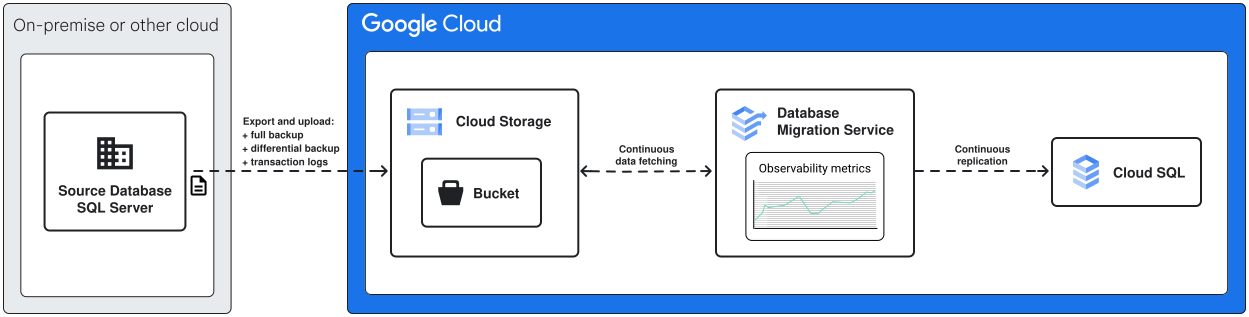
At a high level, your data moves through the migration phases as follows:
Cloud SQL for SQL Server sources
For Cloud SQL for SQL Server sources:
- You configure your source Cloud SQL for SQL Server instance to support Point-in-Time recovery (PITR) and assign the necessary permissions for the Cloud SQL and Database Migration Service service accounts.
- When you create and run the migration job, Database Migration Service first creates a full backup of your database, stores it in the provided Cloud Storage bucket, and then loads it to the destination instance.
- Once the full dump is complete, Database Migration Service continues to export transaction log files from your source Cloud SQL for SQL Server instance and load it to the destination.
You can stop the ongoing replication and promote the migration job when you want to switch your application to so that it uses the Cloud SQL for SQL Server destination instance as the production database. For a detailed step-by-step migration guide, see Cloud SQL for SQL Server migration guide for Cloud SQL sources.
Self-managed and AWS sources
For self-managed and AWS sources:
- You upload your backup files to Cloud Storage.
Continuous SQL Server migrations for self-managed sources require that you first take a full backup of your source database, and then upload the backup file to a Cloud Storage bucket. For subsequent updates, you can optionally provide a differential backup file, and then upload transaction log files. You can also automate continuous transaction log creation and uploads.
For more information on automating continuous transaction log creation and uploads, see Schedule transaction log backups.
For details on how Database Migration Service uses different types of backup files in homogeneous SQL Server migrations, see Supported backup file types.
- When the migration job starts, Database Migration Service loads the latest full database backup to the destination Cloud SQL for SQL Server instance.
- Once the initial load is complete, Database Migration Service switches to the incremental
load phase. At this point, Database Migration Service performs the following:
-
If your migration job is configured to use a differential backup file,
Database Migration Service scans the `diff` folder and loads differential backup
files to your destination instance. If your migration job is configured
to use a differential backup file, but Database Migration Service can't find it
in the Cloud Storage bucket, the migration job shows an error
while continuously searching the `diff` folder for the differential
backup file.
Database Migration Service loads differential backup files only once, at the beginning of the incremental load phase. When the migration job proceeds to work with transaction log files no new differential backup files are recognized when you upload them to the `diff` folder.
- Now Database Migration Service continuously scans your Cloud Storage bucket for transaction log backup files to replicate on your destination instance.
-
If your migration job is configured to use a differential backup file,
Database Migration Service scans the `diff` folder and loads differential backup
files to your destination instance. If your migration job is configured
to use a differential backup file, but Database Migration Service can't find it
in the Cloud Storage bucket, the migration job shows an error
while continuously searching the `diff` folder for the differential
backup file.
- As new data shows up in your source database, you can keep exporting the transaction log backup files and uploading them to the same Cloud Storage bucket. Database Migration Service picks up all new transaction log backup files and replicates them on the destination database.
You can stop the ongoing replication and promote the migration job when you want to switch your application to so that it uses the Cloud SQL for SQL Server destination instance as the production database. For a detailed step-by-step migration guide, see Cloud SQL for SQL Server migration guide.
Encryption
For self-managed and Amazon RDS sources, Database Migration Service provides full support for encrypted SQL Server backups. If you upload your encryption key to Google Cloud, Database Migration Service can safely decrypt your data and load it to the Cloud SQL for SQL Server destination instance without compromising your data security.
For more details, see Encrypted SQL Server backup files.
Distributed Availability Group (DAG) migrations
For self-managed SQL Server Enterprise Edition instances, you can migrate databases directly over a private network connection with SQL Server Distributed Availability Group (DAG), without exporting backup or transaction log files to Cloud Storage.
This section provides a quick overview of SQL Server Distributed Availability Group migrations:
Supported source and destination lists the SQL Server editions and versions supported for DAG migrations.
Continuous migrations data flow summarizes how your data moves between Availability Groups during the migration process.
Encryption describes how data in transit is secured between your source and destination instances.
Monitoring introduces the logs and metrics that help you observe the progress and health of your migration job.
For a complete comparison with backup-and-restore migrations, architectural details, and limitations, see About Distributed Availability Group (DAG) migrations.
Supported source and destination databases
Distributed Availability Group migrations require Enterprise Edition on both the source SQL Server instance and the destination Cloud SQL for SQL Server instance:
| Source databases | Destination databases |
|---|---|
| Self-managed SQL Server Enterprise Edition versions 2025, 2022, 2019, 2017
(on premises or on any cloud VM that you fully control, with Always On availability groups enabled) |
Cloud SQL for SQL Server Enterprise Edition versions 2025, 2022, 2019, 2017 |
Continuous migrations data flow
In a Distributed Availability Group migration, Database Migration Service configures a Distributed Availability Group between your source Availability Group and a managed secondary Availability Group on your destination Cloud SQL for SQL Server instance, streaming both the initial full load and ongoing database changes directly over a private network connection.

At a high level, a Distributed Availability Group migration works as follows:
- You configure bidirectional private IP connectivity, prepare a source Availability Group, and create a Linked Server on the destination Cloud SQL for SQL Server instance.
- When you start the migration job, Database Migration Service creates a Distributed Availability Group and streams the initial full load of all databases in the source Availability Group directly over the network to Cloud SQL for SQL Server.
- After the initial full load completes, Database Migration Service continuously
replicates ongoing database changes (
CDCphase), while allowing you to query the destination databases in read-only mode. - When you promote the migration job, Database Migration Service switches the
Cloud SQL for SQL Server instance to the read/write primary and enters the
FAILBACKphase to replicate new writes back to your source instance. During theFAILBACKphase, you can either runpromotewith the--failbackflag to switch the primary role back to your source instance, or stop replication and delete the migration job to complete the migration and perform the necessary cleanup once your cutover is verified.
For full details on how DAG migrations work, see About Distributed Availability Group (DAG) migrations. For a step-by-step walkthrough, see Migrate from self-managed SQL Server using Distributed Availability Groups.
Encryption
Distributed Availability Group migrations don't export backup files to
Cloud Storage. Instead, all initial full load data and ongoing database
changes transferred between your source Availability Group and your destination
Cloud SQL for SQL Server Availability Group are authenticated with certificates and
encrypted in transit using AES encryption over your private network
connection.
Monitoring
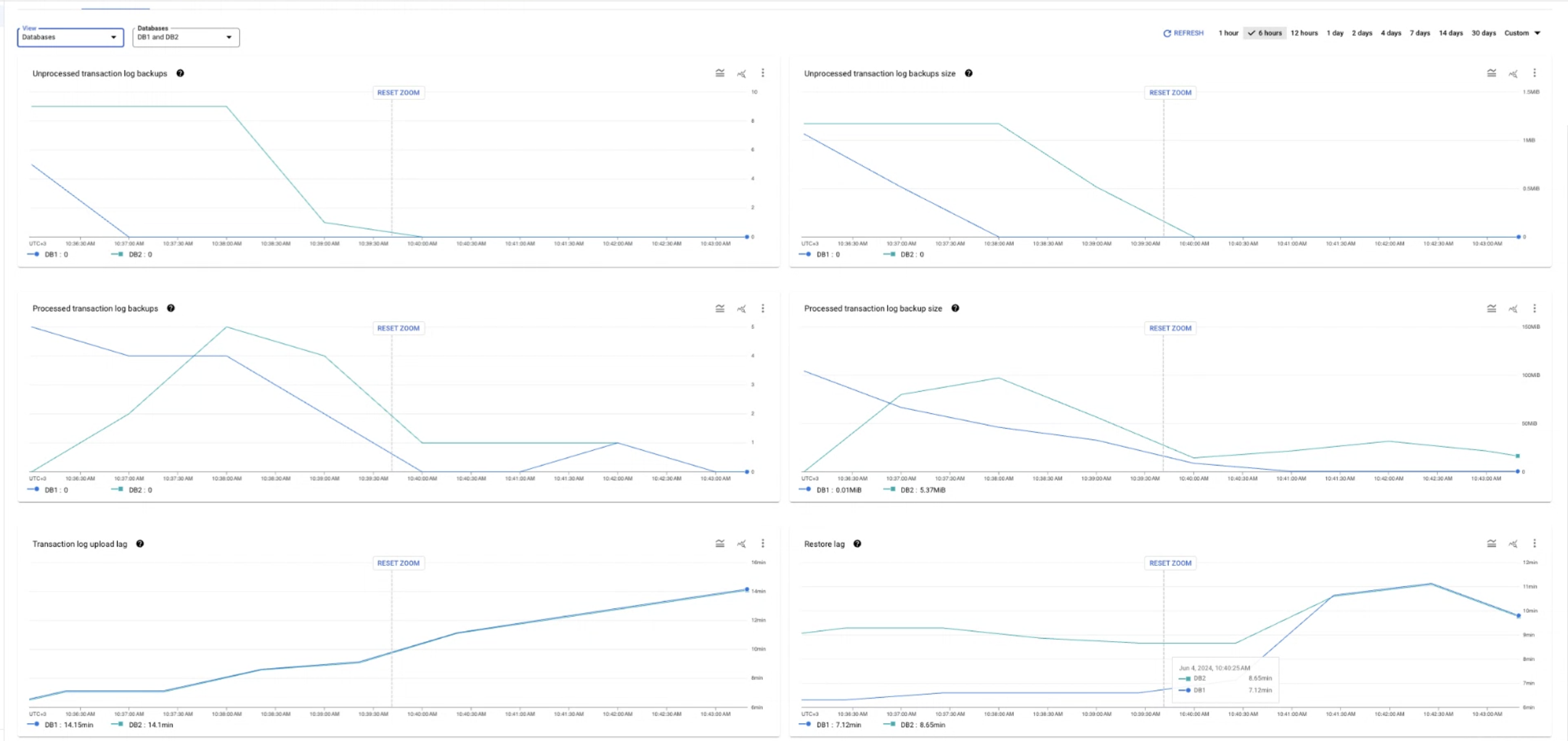
Database Migration Service provides extensive logging and observability capabilities to help you monitor the progress of both backup-and-restore and Distributed Availability Group migrations. These features include real-time diagnostics for replication delay (restore lag), transaction log backup file processing for backup-based migrations, destination storage usage, and detailed logs for Cloud SQL for SQL Server destination instance health and migration job state.
For more details, see Migration job metrics.
What's next
To learn more about SQL Server data and feature support in Database Migration Service, see Known limitations.
To get a complete, step-by-step migration walkthrough, see: