


Gemini Enterprise Agent Platform 流水线模板库中包含 Google 编写的流水线模板和组件,可用于创建流水线运行或嵌入自己的流水线中。
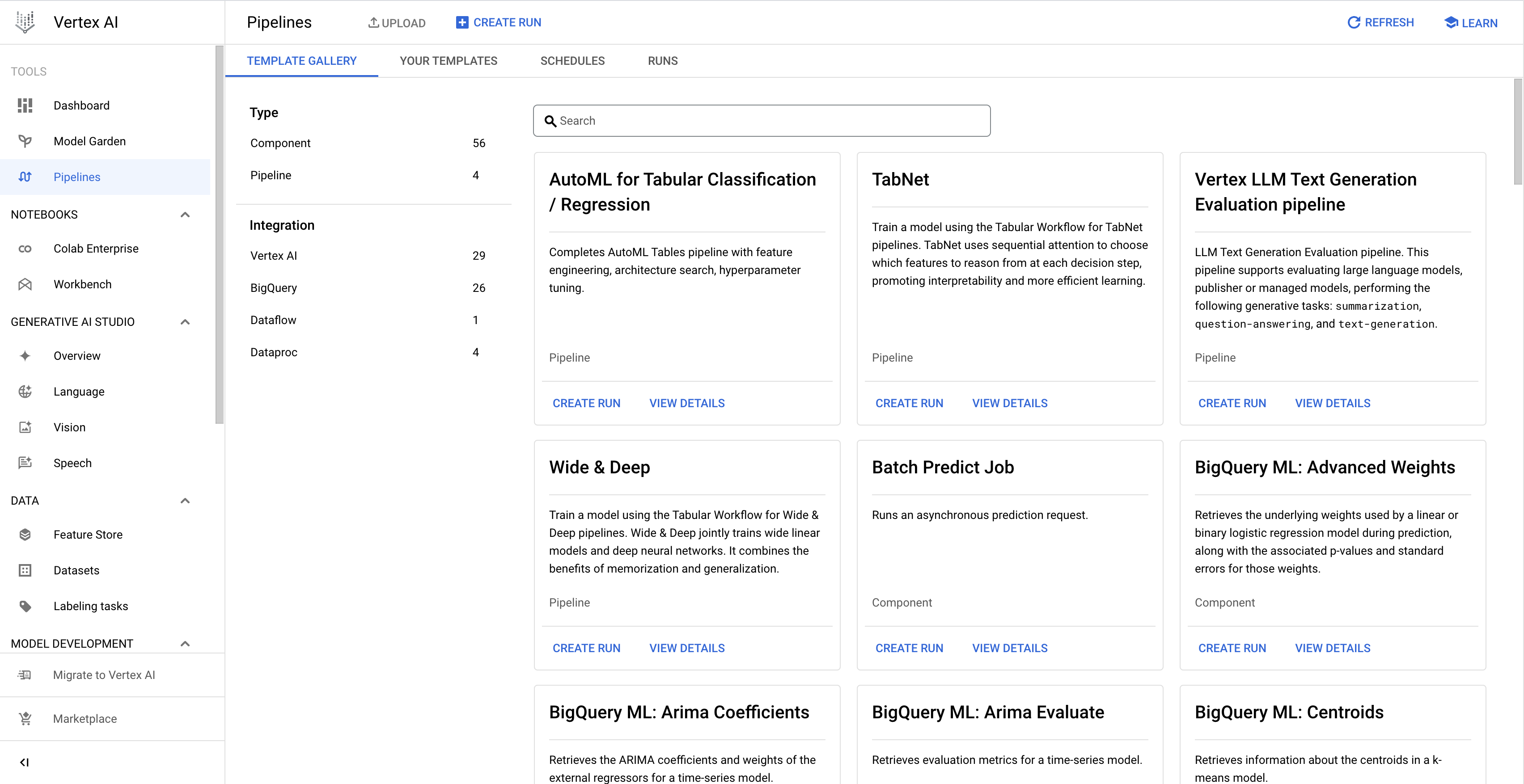
从模板库创建流水线运行
按照以下说明通过模板库中由 Google 编写的模板创建流水线运行。或者,您也可以创建自己的自定义流水线模板,然后基于该模板创建流水线运行。如需详细了解如何创建和使用自定义流水线模板,请参阅创建、上传和使用流水线模板。
控制台
使用以下说明从模板库创建流水线运行:
在 Google Cloud 控制台的代理平台部分中,前往流水线页面上的模板库标签页。
可选:如需过滤流水线模板列表,请在左侧窗格中选择过滤条件。例如,如需仅显示流水线模板,请选择类型下的模板。
在与您要使用的模板对应的卡片上,点击创建运行以打开创建流水线运行页面。
在运行详情部分中,执行以下操作:
- 可选:修改唯一标识流水线运行的默认运行名称。
  1. Optional: To schedule recurring pipeline runs, specify the **Run schedule**, as follows:

      1. Select **Recurring**.

      1. Under **Start time**, specify when the schedule becomes active.

          * To schedule the first run to occur immediately after schedule creation, select **Immediately**.

          * To schedule the first run to occur at a specific time and date, select **On**.

      1. In the **Frequency** field, specify the frequency to schedule and execute the
      pipeline runs, using a cron schedule expression based on
      [unix-cron](https://man7.org/linux/man-pages/man5/crontab.5.html).

      1. Under **Ends**, specify when the schedule ends.

          * To indicate that the schedule creates pipeline runs indefinitely, select **Never**.

          * To indicate that the schedule ends on a specific date and time, select **On**, and specify the end date and time for the schedule.

      1. Optional: To specify that the pipeline run uses a custom service account,
      Customer-managed encryption keys (CMEK), or a peered VPC network, click
      **Advanced options**, and then follow these instructions:

          *  To specify a service account, select a service account from the
            **Service account** drop-down list.

              If you don't specify a service account,
              Agent Platform Pipelines runs your pipeline using the default
              Compute Engine service account.

              Learn more about [configuring a service account for use with
              Agent Platform Pipelines](/gemini-enterprise-agent-platform/machine-learning/pipelines/configure-project#service-account).

          *  To use a CMEK, select **Use a customer-managed encryption key**. The **Select a customer-managed key** drop-down list appears. In the **Select a customer-managed key** drop-down list, select the key that you want to use.

          *  To use a peered VPC network in this pipeline run, enter the VPC
          network name in the **Peered VPC network** box.

  1. Click **Continue**.
在运行时配置部分中,配置流水线运行,如下所示:
在 Cloud Storage 位置下,点击浏览以选择用于存储流水线输出工件的 Cloud Storage 存储桶,然后点击选择。
可选:如需为流水线运行配置失败政策和缓存,请点击高级选项,然后按照以下说明操作:
在失败政策下,指定整个流水线的失败政策。详细了解流水线故障政策。
如需将流水线配置为在一个任务失败后继续安排任务,请选择运行所有步骤,直到完成。默认情况下,此选项处于选中状态。
如需将流水线配置为在一个任务失败后失败,请选择只要有一个步骤失败,就让这个运行作业失败。
在缓存配置下,指定整个流水线的缓存配置。
如需将任务级缓存配置用于流水线中的任务,请选择不替换任务级缓存配置。
如需为流水线中的所有任务启用缓存,并替换任何任务级缓存配置,请选择为所有步骤启用“从缓存读取”(最快)。
如需为流水线中的所有任务关闭缓存,并替换任何任务级缓存配置,请选择为所有步骤停用“从缓存读取”(最快)。
可选:如果您的流水线具有参数,请在流水线参数下指定流水线运行参数。
如需创建流水线运行,请点击提交。