

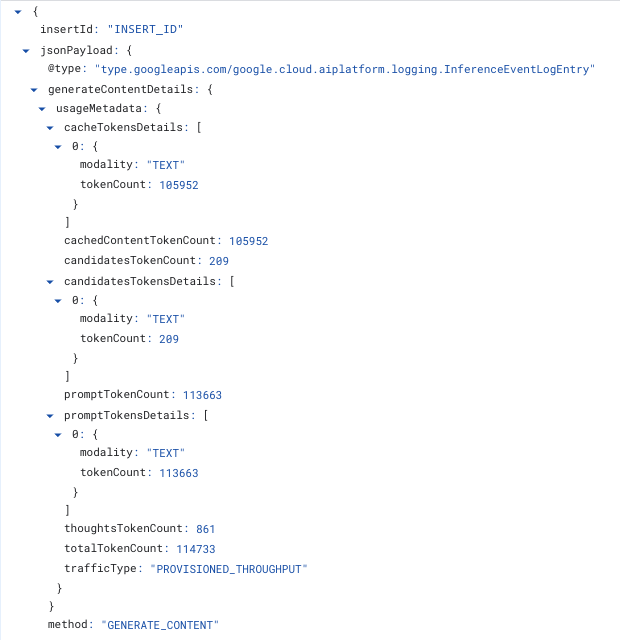
Agent Platform can write one structured log entry for every inference request your project serves. Each entry records metadata about the request: the model, the region, token counts (including input tokens, output tokens, cached tokens, thought tokens), Provisioned Throughput burndowns, end-to-end request latency, error code, and any header labels or request labels you attach. Entries go to Cloud Logging, and you can query them with SQL in Observability Analytics. To turn logging on, see Enable inference request metadata logs.
Inference request logging records metadata only. It doesn't record prompts or responses. If you need prompt and response content, use request-response logging instead.
This page describes how to enable inference request metadata logs, what each entry contains, and how to query them.
Use cases
Inference request metadata logs answer questions that aggregate metrics cannot:
- Attribute token spend to a team, an application or a tenant, by attaching your own header labels, request labels or both to each request.
- See which individual requests counted against your Provisioned Throughput quota and which were served on demand.
- Break throughput, latency and error rate down by header labels or request labels.
- Measure caching behavior per request rather than in aggregate.
- Gain visibility into usage at second level, for example why a project received 429 errors, or why Provisioned Throughput spilled over. For the steps to resolve 429 errors, see Troubleshoot error code 429. To find the seconds that received them, see Error rate and latency by region.
Supported API methods for logging
Inference request metadata logs are supported for the following:
- Gemini models that use
generateContentorstreamGenerateContent, including image generation through those methods. - Claude models that use
rawPredictorstreamRawPredict. Other partner models aren't logged. For Claude field names, see Token counts for Claude models.
Provisioned Throughput and every pay-as-you-go option are supported.
The following aren't supported:
chatCompletions.embedContent,predict, andcountTokens. Models that generate images throughpredict, such as Imagen, aren't logged.- Requests to fine-tuned models, including Gemini models tuned with supervised fine-tuning.
- Tuning jobs, batch inference, and any other long-running operation.
- Models that you deploy yourself in a custom container.
Enable inference request metadata logs
You can configure inference request metadata logs for a whole project, or for a specific model in a specific region. If you need to enable at org level, please reach out to your account team. Logging configurations can take a few minutes to take effect.
Before you begin
- Make sure you have the following IAM permissions on the project:
aiplatform.endpoints.setPublisherModelConfigandaiplatform.endpoints.fetchPublisherModelConfigto change and read the setting, andlogging.buckets.get,logging.buckets.list,logging.buckets.updateandlogging.operations.getto upgrade the log bucket. For predefined roles that include these permissions, see Access control and Access control for Logging. - Decide whether to
upgrade the
_Defaultlog bucket to Observability Analytics. You need the upgrade to query entries with SQL or to view detailed metrics in the Google Cloud console. The upgrade takes several minutes and can't be undone. Entries written before the upgrade can't be queried with SQL afterward. - Review Cloud Logging pricing. Entries are stored for the bucket's retention period, 30 days by default, and Cloud Logging ingestion and storage charges apply. To estimate your cost, see Pricing.
Enable in the console
Enabling in the console turns on logging for every model in the project, both
Gemini and Claude, on Provisioned Throughput and every
pay-as-you-go option that the logs support. It also upgrades the _Default log
bucket if it hasn't been upgraded. It sets the project-wide default described
in Configuration precedence. Before you start, check the
permissions and bucket upgrade.
In the Google Cloud console, go to the Provisioned Throughput page.
Do one of the following:
- In the banner that reads Gemini Enterprise Agent Platform is upgrading observability, click Enable.
- In the toolbar, click Metrics settings. Select Enable detailed metrics, and then click Save.

Figure 1. The observability upgrade banner on the Provisioned Throughput page. 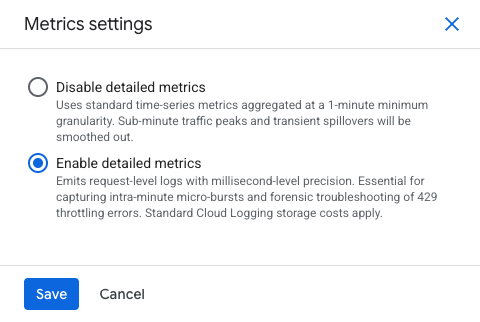
Figure 2. The Metrics settings panel, with Enable detailed metrics selected. In the Enable detailed metrics? dialog, review the logging and bucket upgrade details, and then click Enable.
The dialog closes as soon as logging is on. The bucket upgrade continues in the
background and can take several minutes. While it runs, the banner reads
"Detailed metrics are on, and this project's _Default log bucket is being
upgraded to Observability Analytics."
If the banner instead reports that the bucket hasn't been upgraded, click Upgrade to retry. If it reports that the bucket can't be upgraded, per-request logs can't be queried. Click Metrics settings and select Disable detailed metrics to stop the charges.
Configuration precedence
Agent Platform resolves the setting for each request in this order:
- The per-model and per-region setting, if one is set.
- The project-wide default, if the per-model setting is unset.
- If neither is set, logging is off.
The per-model setting takes precedence over the project default. You can enable logging across the project and turn it off for one high-volume model in one region, or the reverse.
Enable with the REST API
You configure inference request metadata logs with the setPublisherModelConfig
method, setting inferenceEventLoggingConfig.state to ENABLED.
To set the project-wide default, address the project:
curl -X POST \
  -H "Authorization: Bearer $(gcloud auth print-access-token)" \
  -H "Content-Type: application/json" \
  "https://aiplatform.googleapis.com/v1beta1/projects/PROJECT_ID:setPublisherModelConfig" \
  -d '{
        "publisherModelConfig": {
          "inferenceEventLoggingConfig": {"state": "ENABLED"}
        },
        "updateMask": "inferenceEventLoggingConfig"
      }'
To override one model in one region, address the publisher model:
curl -X POST \
  -H "Authorization: Bearer $(gcloud auth print-access-token)" \
  -H "Content-Type: application/json" \
  "https://aiplatform.googleapis.com/v1beta1/projects/PROJECT_ID/locations/LOCATION/publishers/PUBLISHER/models/MODEL:setPublisherModelConfig" \
  -d '{
        "publisherModelConfig": {
          "inferenceEventLoggingConfig": {"state": "ENABLED"}
        },
        "updateMask": "inferenceEventLoggingConfig"
      }'
Set PUBLISHER to google for Gemini models and to anthropic for
Claude models. For example, to enable logging for Claude Sonnet 4.5 on the
global endpoint, use publishers/anthropic/models/claude-sonnet-4-5 with
LOCATION set to global. For Claude model IDs, see
Claude models.
The method returns a long-running operation.
Get logging configuration
Read the current configuration with the fetchPublisherModelConfig method. Use
the project to read the project-wide default, or a publisher model to read its
override.
curl -X GET \
  -H "Authorization: Bearer $(gcloud auth print-access-token)" \
  "https://aiplatform.googleapis.com/v1beta1/projects/PROJECT_ID:fetchPublisherModelConfig"
curl -X GET \
  -H "Authorization: Bearer $(gcloud auth print-access-token)" \
  "https://aiplatform.googleapis.com/v1beta1/projects/PROJECT_ID/locations/LOCATION/publishers/PUBLISHER/models/MODEL:fetchPublisherModelConfig"
The response contains the settings that are set on that resource:
{
  "inferenceEventLoggingConfig": {
    "state": "ENABLED"
  }
}
Verify that logging works
- Send one request to a model you enabled.
In Logs Explorer, run the following query. Most entries appear within 12 seconds; allow up to 5 minutes.
logName="projects/PROJECT_ID/logs/aiplatform.googleapis.com%2Finference_request"To confirm that SQL works, open Observability Analytics and run any example query. If the query reports that the dataset wasn't found, the log bucket upgrade hasn't finished.
Disable logging
In the Google Cloud console, go to the Provisioned Throughput page, click Metrics settings, select Disable detailed metrics, and then click Save. This reverses Enable in the console.
With the REST API, follow these steps.
Disable logging by setting inferenceEventLoggingConfig.state to DISABLED on
the same resource you enabled it on.
curl -X POST \
  -H "Authorization: Bearer $(gcloud auth print-access-token)" \
  -H "Content-Type: application/json" \
  "https://aiplatform.googleapis.com/v1beta1/projects/PROJECT_ID:setPublisherModelConfig" \
  -d '{
        "publisherModelConfig": {
          "inferenceEventLoggingConfig": {"state": "DISABLED"}
        },
        "updateMask": "inferenceEventLoggingConfig"
      }'
Because a per-model setting takes precedence over the project default, disabling at the project level doesn't switch off a model that is explicitly enabled. Clear or disable the per-model setting as well.
Where logs are written
Entries are written to the following log:
projects/PROJECT_NUMBER/logs/aiplatform.googleapis.com%2Finference_request
From there you have the standard Cloud Logging destinations:
- Observability Analytics: Query the entries with SQL in Observability Analytics in the Google Cloud console.
- Linked BigQuery dataset: Link a dataset to read the same data from BigQuery. For details, see Query a linked BigQuery dataset.
- Aggregated sinks: Collect entries from every project under a folder or
organization with a single sink. Filter on
logName="projects/*/logs/aiplatform.googleapis.com%2Finference_request".
To collect entries from every project in a folder or organization, see Aggregated sinks overview.
Entries become queryable a short time after the request completes. Most entries are queryable within 12 seconds; allow up to 5 minutes.
Log entry schema
Each entry has two parts that you query separately: the monitored resource and its labels, which identify what served the request, and the JSON payload, which records what the request did. The following sections describe both.
Resource labels
For shared publisher models the monitored resource type is
aiplatform.googleapis.com/PublisherModel, with the following labels.
| Label | Type | Notes |
|---|---|---|
resource_container |
STRING |
The project that served the request. |
location |
STRING |
The region that served the request, for example us-central1. Requests sent to the global endpoint report global. |
publisher |
STRING |
The model publisher, for example google or anthropic. |
model_user_id |
STRING |
The model, for example gemini-2.5-pro. |
Payload fields
| Field name | Type | Notes |
|---|---|---|
method |
ENUM |
GENERATE_CONTENT, STREAM_GENERATE_CONTENT, RAW_PREDICT or STREAM_RAW_PREDICT. |
trafficType |
ENUM |
The consumption option that served the request. Current values are PROVISIONED_THROUGHPUT, ON_DEMAND, ON_DEMAND_FLEX and ON_DEMAND_PRIORITY. Absent on failed requests. |
requestStartTime |
TIMESTAMP |
The time the serving frontend admitted the request. |
requestDuration |
STRING |
End-to-end serving latency, formatted as a duration string such as 3.53s. |
generateContentDetails.usageMetadata |
JSON |
Token counts for generateContent and streamGenerateContent, including per-modality breakdowns. Image output appears here as an IMAGE entry in candidatesTokensDetails. |
rawPredictDetails.usageMetadata |
JSON |
Token counts for rawPredict and streamRawPredict, including partner models. |
provisionedThroughput |
JSON |
Present for Provisioned Throughput traffic. |
httpHeaders |
JSON |
Captured request headers. |
error |
JSON |
Present only when severity is ERROR. |
principal |
JSON |
The service account that issued the request, when available. |
The LogEntry.labels field carries gen_ai.operation.name, which follows the
OpenTelemetry GenAI semantic conventions. Both generateContent and
streamGenerateContent report generate_content. Both rawPredict and
streamRawPredict report raw_predict.
Provisioned Throughput fields
| Field name | Type | Notes |
|---|---|---|
ptChargedInputTokenCount |
INT64 |
Input tokens counted against your Provisioned Throughput quota, after burndown rates are applied. |
ptChargedOutputTokenCount |
INT64 |
Output tokens counted against your Provisioned Throughput quota, after burndown rates are applied. |
accountingResource |
STRING |
The project whose Provisioned Throughput commitment the request drew against. |
Identify spillover requests
A request spills over when it was eligible for Provisioned Throughput but
was served on demand because your throughput was used up. A spillover entry has
a trafficType of ON_DEMAND and no provisionedThroughput object. An
ordinary pay-as-you-go request looks the same, so use the following rules to
tell them apart:
- If you sent
X-Vertex-AI-LLM-Request-Typewith a value ofshared, you routed the request to pay-as-you-go on purpose. It isn't spillover. - If you sent no
X-Vertex-AI-LLM-Request-Typeheader, or a value other thandedicatedorshared, and the entry reportsON_DEMAND, the request spilled over, provided that you have Provisioned Throughput for that model in that region. - If you don't have Provisioned Throughput for the model, every
ON_DEMANDentry is ordinary pay-as-you-go.
For the header values, see Use Provisioned Throughput.
For a query that counts spillover requests, see Spillover by minute.
Identify downgraded requests
A request is downgraded when you asked for one pay-as-you-go option and it was
served on another. Compare the X-Vertex-AI-LLM-Shared-Request-Type header you
sent with the trafficType that served the request:
| Header value you sent | trafficType when served as requested |
|---|---|
priority |
ON_DEMAND_PRIORITY |
flex |
ON_DEMAND_FLEX |
Any other trafficType on a successful entry means the request was downgraded,
or that the model doesn't offer the option you asked for. For a query, see
Downgrades by model.
Error codes
Failed requests are written with a severity of ERROR and carry an error
object with a gRPC status code and a canonical reason. The reason is a fixed
string. It never contains prompt text, response text or your header values.
| Code | Status | Typical HTTP status |
|---|---|---|
8 |
Resource has been exhausted, for example a quota limit. | 429 |
4 |
Deadline expired before the operation completed. | 504 |
14 |
The service is unavailable. | 503 |
13 |
Internal error encountered. | 500 |
3 |
Request contains an invalid argument. | 400 |
7 |
The caller doesn't have permission. | 403 |
5 |
Requested entity was not found. | 404 |
Attach custom header labels
To attribute usage to your own dimensions, such as a team, an application or a
tenant, send request headers with the prefix
x-goog-agent-platform-observability-label-:
x-goog-agent-platform-observability-label-team: payments
x-goog-agent-platform-observability-label-application: invoice-ocr
Each header appears in the entry under jsonPayload.httpHeaders. Header labels
work on Gemini models with generateContent and
streamGenerateContent, and on Claude models with rawPredict and
streamRawPredict, on Provisioned Throughput and every pay-as-you-go
option.
For example API calls with header labels, the log entries they produce, supported models, limits, and how header labels compare with request labels, see Custom metadata labels. To query them, see Usage by custom header label.
Query logs with Logs Explorer
Use Logs Explorer to find and inspect individual inference requests. It needs no setup beyond having logging enabled, and it reads the log directly, so entries are visible as soon as they arrive.
In the Google Cloud console, go to the Logs Explorer page and enter a query in the query-editor field using the Logging query language. For more information about the panes and controls, see Logs Explorer interface.
Start from the log name, which selects every inference request entry in the project:
logName="projects/PROJECT_ID/logs/aiplatform.googleapis.com%2Finference_request"
Add terms to narrow the results. Terms on separate lines are combined with AND.
- To select requests served from one region, add
resource.labels.location="us-central1". - To select one API method, add
jsonPayload.method="GENERATE_CONTENT". - To select Provisioned Throughput traffic only, add
jsonPayload.trafficType="PROVISIONED_THROUGHPUT". - To select quota errors only, add
severity=ERRORandjsonPayload.error.code=8. - To select one custom header label value, add
jsonPayload.httpHeaders."x-goog-agent-platform-observability-label-team".values="payments".
Logs Explorer filters and displays entries. It doesn't aggregate them. To count, group or chart your entries, use Observability Analytics. In the Query results toolbar, click Analyze results to carry your current query across. That button appears only after the log bucket is upgraded.
Query and analyze logs with Observability Analytics
You can use Observability Analytics to query and analyze logs.
Before you begin
Observability Analytics answers questions that Logs Explorer can't. Logs Explorer finds and displays individual entries, which is what you want when you are chasing one request. Observability Analytics runs SQL across the whole set, so it can count, group, join and compute percentiles. Every question in this section needs aggregation: spend per team, burndown per project, and p95 latency per region can't be answered one entry at a time.
This requires the _Default log bucket in your project to be upgraded to use
Observability Analytics. For more
information, see Configure log buckets.
The following examples run in Observability Analytics. Replace PROJECT_ID
with your project.
Throughput by region and model
SELECT
  JSON_VALUE(resource.labels.location)      AS region,
  JSON_VALUE(resource.labels.model_user_id) AS model,
  JSON_VALUE(json_payload.trafficType)      AS traffic_type,
  COUNT(*)                                  AS requests,
  SUM(CAST(JSON_VALUE(json_payload.generateContentDetails.usageMetadata.promptTokenCount) AS INT64))     AS input_tokens,
  SUM(CAST(JSON_VALUE(json_payload.generateContentDetails.usageMetadata.candidatesTokenCount) AS INT64)) AS output_tokens
FROM `PROJECT_ID.global._Default._Default`
WHERE log_id = "aiplatform.googleapis.com/inference_request"
  AND timestamp > TIMESTAMP_SUB(CURRENT_TIMESTAMP(), INTERVAL 24 HOUR)
GROUP BY region, model, traffic_type
ORDER BY requests DESC
Provisioned Throughput burndown by project
SELECT
  JSON_VALUE(resource.labels.location) AS region,
  JSON_VALUE(json_payload.provisionedThroughput.accountingResource) AS pt_project,
  COUNTIF(JSON_VALUE(json_payload.trafficType) = "PROVISIONED_THROUGHPUT") AS pt_requests,
  COUNTIF(JSON_VALUE(json_payload.trafficType) = "ON_DEMAND")              AS on_demand_requests,
  SUM(CAST(JSON_VALUE(json_payload.provisionedThroughput.ptChargedInputTokenCount)  AS INT64)) AS pt_input_tokens,
  SUM(CAST(JSON_VALUE(json_payload.provisionedThroughput.ptChargedOutputTokenCount) AS INT64)) AS pt_output_tokens
FROM `PROJECT_ID.global._Default._Default`
WHERE log_id = "aiplatform.googleapis.com/inference_request"
  AND timestamp > TIMESTAMP_SUB(CURRENT_TIMESTAMP(), INTERVAL 24 HOUR)
GROUP BY region, pt_project
ORDER BY pt_input_tokens DESC
Usage by custom header label
SELECT
  JSON_VALUE(json_payload.httpHeaders
    ["x-goog-agent-platform-observability-label-team"].values[0]) AS team,
  COUNT(*) AS requests,
  SUM(CAST(JSON_VALUE(json_payload.generateContentDetails.usageMetadata.totalTokenCount) AS INT64)) AS total_tokens
FROM `PROJECT_ID.global._Default._Default`
WHERE log_id = "aiplatform.googleapis.com/inference_request"
  AND timestamp > TIMESTAMP_SUB(CURRENT_TIMESTAMP(), INTERVAL 7 DAY)
GROUP BY team
ORDER BY total_tokens DESC
Consumed tokens per minute, Gemini and Claude side by side
This query reports consumed tokens per minute in one column per publisher. Each
column weights token types the same way as the
publisher/online_serving/consumed_token_throughput metric does for that
publisher, so each column matches Cloud Monitoring. Gemini and
Claude weight output and cache tokens differently, so don't add the two columns
together. For the Claude fields, see
Token counts for Claude models.
SELECT
  TIMESTAMP_TRUNC(timestamp, MINUTE) AS minute_ts,
  SUM(IF(JSON_VALUE(resource.labels.publisher) = "google",
    IFNULL(CAST(JSON_VALUE(json_payload.generateContentDetails.usageMetadata.promptTokenCount) AS INT64), 0)
      + IFNULL(CAST(JSON_VALUE(json_payload.generateContentDetails.usageMetadata.toolUsePromptTokenCount) AS INT64), 0)
      - 0.9 * IFNULL(CAST(JSON_VALUE(json_payload.generateContentDetails.usageMetadata.cachedContentTokenCount) AS INT64), 0)
      + IFNULL(CAST(JSON_VALUE(json_payload.generateContentDetails.usageMetadata.candidatesTokenCount) AS INT64), 0)
      + IFNULL(CAST(JSON_VALUE(json_payload.generateContentDetails.usageMetadata.thoughtsTokenCount) AS INT64), 0), 0)) AS gemini_consumed_tokens,
  SUM(IF(JSON_VALUE(resource.labels.publisher) = "anthropic",
    IFNULL(CAST(JSON_VALUE(json_payload.rawPredictDetails.usageMetadata.input_tokens) AS INT64), 0)
      + 0.1  * IFNULL(CAST(JSON_VALUE(json_payload.rawPredictDetails.usageMetadata.cache_read_input_tokens) AS INT64), 0)
      + 1.25 * IFNULL(CAST(JSON_VALUE(json_payload.rawPredictDetails.usageMetadata.cache_creation_input_tokens) AS INT64), 0)
      + 0.75 * IFNULL(CAST(JSON_VALUE(json_payload.rawPredictDetails.usageMetadata.cache_creation.ephemeral_1h_input_tokens) AS INT64), 0)
      + 5    * IFNULL(CAST(JSON_VALUE(json_payload.rawPredictDetails.usageMetadata.output_tokens) AS INT64), 0), 0)) AS claude_consumed_tokens
FROM `PROJECT_ID.global._Default._Default`
WHERE log_id = "aiplatform.googleapis.com/inference_request"
  AND timestamp > TIMESTAMP_SUB(CURRENT_TIMESTAMP(), INTERVAL 24 HOUR)
GROUP BY minute_ts
ORDER BY minute_ts DESC
Cache hit rate across Gemini and Claude
Cache hit rate is cached input tokens divided by total input tokens. Gemini input includes tool-use tokens, because the cache can cover them. Claude input is uncached input plus cache reads plus cache writes. For how each publisher caches, see Context caching overview and Claude prompt caching.
SELECT
  JSON_VALUE(resource.labels.model_user_id) AS model,
  JSON_VALUE(json_payload.trafficType)      AS traffic_type,
  ROUND(100 * SAFE_DIVIDE(
    SUM(IFNULL(CAST(JSON_VALUE(json_payload.generateContentDetails.usageMetadata.cachedContentTokenCount) AS INT64), 0)
      + IFNULL(CAST(JSON_VALUE(json_payload.rawPredictDetails.usageMetadata.cache_read_input_tokens) AS INT64), 0)),
    SUM(GREATEST(
          IFNULL(CAST(JSON_VALUE(json_payload.generateContentDetails.usageMetadata.promptTokenCount) AS INT64), 0)
          + IFNULL(CAST(JSON_VALUE(json_payload.generateContentDetails.usageMetadata.toolUsePromptTokenCount) AS INT64), 0),
          IFNULL(CAST(JSON_VALUE(json_payload.generateContentDetails.usageMetadata.cachedContentTokenCount) AS INT64), 0))
      + IFNULL(CAST(JSON_VALUE(json_payload.rawPredictDetails.usageMetadata.input_tokens) AS INT64), 0)
      + IFNULL(CAST(JSON_VALUE(json_payload.rawPredictDetails.usageMetadata.cache_read_input_tokens) AS INT64), 0)
      + IFNULL(CAST(JSON_VALUE(json_payload.rawPredictDetails.usageMetadata.cache_creation_input_tokens) AS INT64), 0))), 1) AS cache_hit_rate_pct
FROM `PROJECT_ID.global._Default._Default`
WHERE log_id = "aiplatform.googleapis.com/inference_request"
  AND JSON_VALUE(json_payload.trafficType) IS NOT NULL
  AND timestamp > TIMESTAMP_SUB(CURRENT_TIMESTAMP(), INTERVAL 7 DAY)
GROUP BY model, traffic_type
ORDER BY model, traffic_type
Downgrades by model
This query compares the pay-as-you-go option each request asked for with the option that served it. For how downgrades are identified, see Identify downgraded requests.
WITH entries AS (
  SELECT
    JSON_VALUE(resource.labels.model_user_id) AS model,
    severity,
    JSON_VALUE(json_payload.trafficType)      AS served,
    (SELECT LOWER(v)
     FROM UNNEST(JSON_VALUE_ARRAY(json_payload.httpHeaders["x-vertex-ai-llm-shared-request-type"].values)) AS v
     WHERE LOWER(v) IN ("priority", "flex")
     LIMIT 1)                                 AS requested
  FROM `PROJECT_ID.global._Default._Default`
  WHERE log_id = "aiplatform.googleapis.com/inference_request"
    AND timestamp > TIMESTAMP_SUB(CURRENT_TIMESTAMP(), INTERVAL 7 DAY)
)
SELECT
  model,
  requested,
  COUNTIF(served = CONCAT("ON_DEMAND_", UPPER(requested))) AS served_as_requested,
  COUNTIF(served IS NOT NULL
          AND served != CONCAT("ON_DEMAND_", UPPER(requested))) AS downgraded,
  COUNTIF(severity = "ERROR")                              AS failed
FROM entries
WHERE requested IS NOT NULL
GROUP BY model, requested
ORDER BY downgraded DESC
Spillover by minute
This query counts spillover requests per minute for each model that had Provisioned Throughput traffic in the window. For how spillover is identified, see Identify spillover requests.
WITH entries AS (
  SELECT
    timestamp,
    JSON_VALUE(resource.labels.location)      AS region,
    JSON_VALUE(resource.labels.model_user_id) AS model,
    JSON_VALUE(json_payload.trafficType)      AS traffic_type,
    EXISTS(
      SELECT 1
      FROM UNNEST(JSON_VALUE_ARRAY(json_payload.httpHeaders["x-vertex-ai-llm-request-type"].values)) AS v
      WHERE LOWER(v) IN ("dedicated", "shared")) AS routed_by_header
  FROM `PROJECT_ID.global._Default._Default`
  WHERE log_id = "aiplatform.googleapis.com/inference_request"
    AND severity = "INFO"
    AND timestamp > TIMESTAMP_SUB(CURRENT_TIMESTAMP(), INTERVAL 24 HOUR)
),
pt_models AS (
  SELECT DISTINCT region, model FROM entries WHERE traffic_type = "PROVISIONED_THROUGHPUT"
)
SELECT
  TIMESTAMP_TRUNC(e.timestamp, MINUTE) AS minute_ts,
  e.region,
  e.model,
  COUNTIF(e.traffic_type = "PROVISIONED_THROUGHPUT")              AS pt_requests,
  COUNTIF(e.traffic_type = "ON_DEMAND" AND NOT e.routed_by_header) AS spillover_requests
FROM entries AS e
JOIN pt_models USING (region, model)
GROUP BY minute_ts, e.region, e.model
HAVING spillover_requests > 0
ORDER BY minute_ts DESC
Error rate and latency by region
SELECT
  JSON_VALUE(resource.labels.location) AS region,
  TIMESTAMP_TRUNC(timestamp, MINUTE)   AS minute_ts,
  COUNT(*)                             AS total,
  COUNTIF(severity = "ERROR")          AS errors,
  COUNTIF(CAST(JSON_VALUE(json_payload.error.code) AS INT64) = 8) AS resource_exhausted,
  APPROX_QUANTILES(
    CAST(REGEXP_REPLACE(JSON_VALUE(json_payload.requestDuration), r"s$", "") AS FLOAT64),
    100)[OFFSET(95)] AS p95_latency_seconds
FROM `PROJECT_ID.global._Default._Default`
WHERE log_id = "aiplatform.googleapis.com/inference_request"
  AND timestamp > TIMESTAMP_SUB(CURRENT_TIMESTAMP(), INTERVAL 6 HOUR)
GROUP BY region, minute_ts
ORDER BY minute_ts DESC
Token counts for Claude models
Claude models report usage under rawPredictDetails.usageMetadata, with the
Claude API field names. Both rawPredict and streamRawPredict write the same
fields; for streaming, the log merges the usage reported in the stream.
| Field | What it counts |
|---|---|
input_tokens |
Input tokens that weren't read from or written to the cache. |
cache_read_input_tokens |
Input tokens read from the prompt cache. |
cache_creation_input_tokens |
Input tokens written to the prompt cache, both TTLs combined. |
cache_creation.ephemeral_5m_input_tokens |
Cache writes with a 5-minute TTL. |
cache_creation.ephemeral_1h_input_tokens |
Cache writes with a 1-hour TTL. |
output_tokens |
Output tokens, including extended thinking. Don't add thinking tokens separately. |
Total Claude input is input_tokens plus cache_read_input_tokens plus
cache_creation_input_tokens. Gemini differs: promptTokenCount
already includes cached tokens.
Claude entries carry no modality breakdown. Header labels work the same way for Gemini and Claude; see Attach custom header labels.
Pricing
Inference request metadata logging writes to Cloud Logging and is billed as Cloud Logging ingestion and storage. Querying through Observability Analytics is billed as Cloud Monitoring usage. Linking a BigQuery dataset doesn't add BigQuery storage charges.
Entry size depends on your requests, for example on how many header labels they carry. To estimate your cost, enable logging for a representative workload for a day, measure the ingested volume with Log volume analysis, and then project your monthly volume in the Google Cloud pricing calculator.
What's next
- Learn how to monitor models with metrics.
- Learn how to monitor cost using custom metadata labels.
- Use request-response logging if you need prompt and response content.
- Read about Provisioned Throughput.
- View detailed metrics for Provisioned Throughput in the Google Cloud console.
- Troubleshoot 429 errors.
- Collect entries from every project in a folder or organization with aggregated sinks.