


本頁面說明如何使用 Agent Platform SDK 中的 GenAI 用戶端,評估各種用途的生成式 AI 模型和應用程式。
事前準備
-
登入 Google Cloud 帳戶。如果您未曾使用過 Google Cloud,歡迎 建立帳戶,親自體驗實際使用我們產品的成效。新客戶還能獲得價值 $300 美元的免費抵免額,用於執行、測試及部署工作負載。
In the Google Cloud console, on the project selector page, select or create a Google Cloud project.
Roles required to select or create a project
- Select a project: Selecting a project doesn't require a specific IAM role—you can select any project that you've been granted a role on.
-
Create a project: To create a project, you need the Project Creator role
(
roles/resourcemanager.projectCreator), which contains theresourcemanager.projects.createpermission. Learn how to grant roles.
Verify that billing is enabled for your Google Cloud project.
In the Google Cloud console, on the project selector page, select or create a Google Cloud project.
Roles required to select or create a project
- Select a project: Selecting a project doesn't require a specific IAM role—you can select any project that you've been granted a role on.
-
Create a project: To create a project, you need the Project Creator role
(
roles/resourcemanager.projectCreator), which contains theresourcemanager.projects.createpermission. Learn how to grant roles.
Verify that billing is enabled for your Google Cloud project.
安裝 Agent Platform SDK:
!pip install google-cloud-aiplatform[evaluation]設定憑證。如果您在 Colaboratory 中執行本教學課程,請執行下列指令:
from google.colab import auth auth.authenticate_user()如為其他環境,請參閱「向 Agent Platform 進行驗證」。
初始化 GenAI 用戶端
執行下列指令,初始化 GenAI 用戶端:
from vertexai import Client

client = Client(project="YOUR_PROJECT_ID", location="YOUR_LOCATION")
其中:
YOUR_PROJECT_ID:您的 Google Cloud 專案 ID。YOUR_LOCATION:雲端區域,例如us-central1。
生成回覆
使用 run_inference() 為資料集生成模型回覆:
準備資料集,做為 Pandas DataFrame:
import pandas as pd

eval_df = pd.DataFrame({
  "prompt": [
      "Explain software 'technical debt' using a concise analogy of planting a garden.",
      "Write a Python function to find the nth Fibonacci number using recursion with memoization, but without using any imports.",
      "Write a four-line poem about a lonely robot, where every line must be a question and the word 'and' cannot be used.",
      "A drawer has 10 red socks and 10 blue socks. In complete darkness, what is the minimum number of socks you must pull out to guarantee you have a matching pair?",
      "An AI discovers a cure for a major disease, but the cure is based on private data it analyzed without consent. Should the cure be released? Justify your answer."
  ]
})
使用
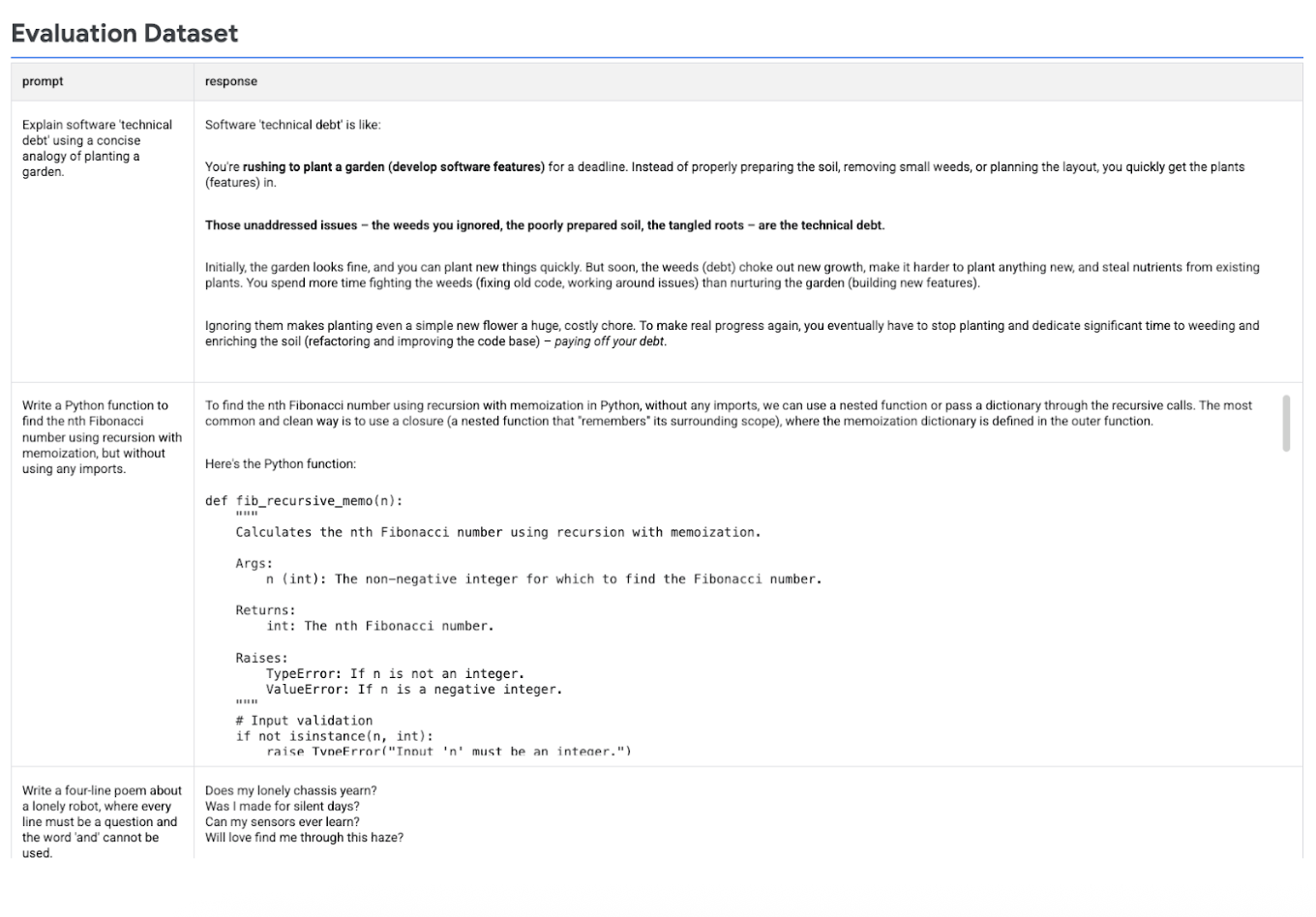
run_inference()生成模型回覆:eval_dataset = client.evals.run_inference( model="gemini-2.5-flash", src=eval_df, )以視覺化方式呈現推論結果:在
EvaluationDataset物件上呼叫.show(),檢查模型輸出內容,以及原始提示和參考資料:eval_dataset.show()
下圖顯示評估資料集,其中包含提示和對應的生成回覆:
執行評估作業
執行 evaluate() 來評估模型回覆:
使用預設的
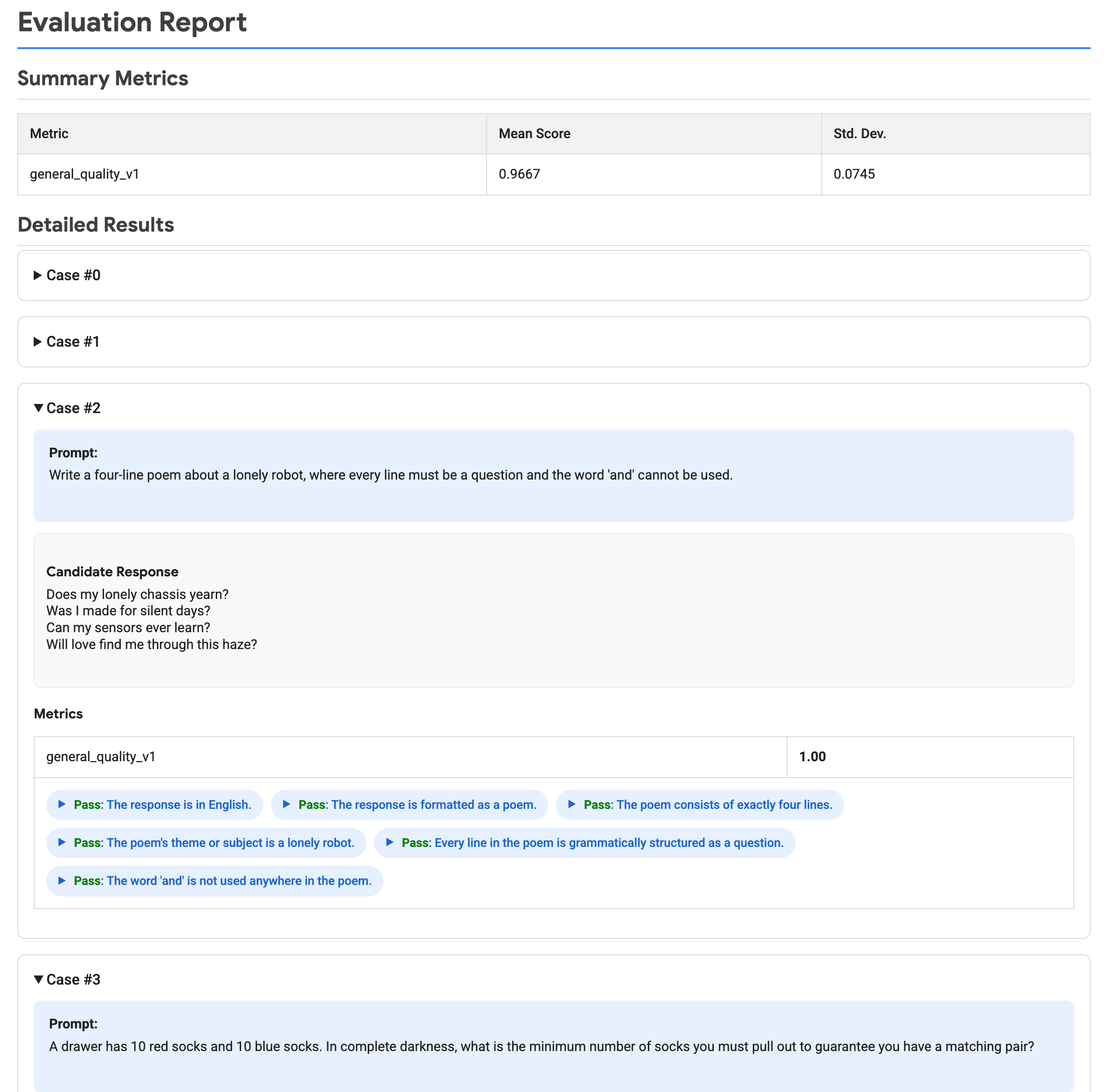
GENERAL_QUALITY自動調整評分量表指標,評估模型回覆:eval_result = client.evals.evaluate(dataset=eval_dataset)在
EvaluationResult物件上呼叫.show(),以圖表呈現評估結果,顯示摘要指標和詳細結果:eval_result.show()
下圖顯示評估報告,其中包含摘要指標和各組提示/回覆的詳細結果。
清除所用資源
本教學課程不會建立任何 Gemini Enterprise Agent Platform 資源。