


本頁說明如何使用 Security Command Center 的 BigQuery 匯出功能,將新發現和更新的發現串流至 BigQuery 資料集。除非更新現有發現項目,否則不會傳送至 BigQuery。
BigQuery 是 Google Cloud的全代管數據分析資料倉儲,不僅具成本效益,還能處理 PB 規模的資料,以近乎即時的方式分析大量資料。您可以使用 BigQuery 針對新發現和更新的發現執行查詢、篩選資料以找出所需內容,以及產生自訂報表。如要進一步瞭解 BigQuery,請參閱 BigQuery 說明文件。
總覽
啟用這項功能後,系統會將寫入 Security Command Center 的新發現項目,以近乎即時的方式匯出至 BigQuery 資料表。接著,您可以將資料整合至現有工作流程,並建立自訂分析。您可以在組織、資料夾和專案層級啟用這項功能,根據需求匯出調查結果。
建議使用這項功能將 Security Command Center 發現項目匯出至 BigQuery,因為這項功能完全由系統全代管,不需要執行手動作業或編寫自訂程式碼。
資料集結構
這項功能會將每項新發現及其後續更新,新增為 findings 表格中的新資料列,並依 source_id、finding_id 和 event_time 分類。這會建立多筆具有相同 source_id 和 finding_id 值,但 event_time 值不同的發現記錄。這個資料集結構可讓您查看各項發現的狀態隨時間變化情形。
請注意,資料集中可能存在重複項目。如要剖析這些值,可以使用 DISTINCT 子句,如第一個範例查詢所示。
每個資料集都包含 findings 資料表,其中含有下列欄位:
| 欄位 | 說明 |
|---|---|
source_id |
Security Command Center 指派給
發現項目來源的專屬 ID。舉例來說,Cloud 異常偵測來源的所有發現事項都具有相同的 範例: |
finding_id |
代表發現項目的專屬 ID。在機構的來源中,這個 ID 是唯一值。必須是英數字元,且長度不得超過 32 個半形字元。 |
event_time |
事件發生的時間,或是發現項目更新的時間。舉例來說,如果發現項目代表開放的防火牆, 範例: 如要進一步瞭解更新活動時間的變更,請參閱「尋找生命週期總覽」。 |
bulk_export_id |
如果是大量匯出,這個值是 UUID。 如果是持續匯出作業,這個欄位會是空白。 |
finding |
評估資料記錄,例如安全性、風險、健康狀態或隱私權,這些資料會匯入 Security Command Center 以供呈現、通知、分析、政策測試和強制執行。舉例來說,App Engine 應用程式中的跨網站指令碼攻擊 (XSS) 安全漏洞就是一項發現。
如要進一步瞭解巢狀欄位,請參閱
|
resource |
與這項發現項目相關聯的 Google Cloud 資源資訊。
如要進一步瞭解巢狀欄位,請參閱
|
費用
使用這項功能會產生 BigQuery 費用。詳情請參閱 BigQuery 計價方式一文。
事前準備
您必須先完成這些步驟,才能啟用這項功能。
設定權限
如要完成本指南,您必須具備下列 Identity and Access Management (IAM) 角色:
在要匯出發現項目的組織、資料夾或專案中,執行下列其中一項操作:
- 安全中心 BigQuery Export 編輯者
(
roles/securitycenter.bigQueryExportsEditor)。 - 安全中心管理員
(
roles/securitycenter.admin)。
如要進一步瞭解 Security Command Center 角色,請參閱存取控管。
- 安全中心 BigQuery Export 編輯者
(
在 BigQuery 資料集上,BigQuery 資料擁有者(
roles/bigquery.dataOwner)。
建立 BigQuery 資料集
建立 BigQuery 資料集。詳情請參閱「建立資料集」。
規劃資料落地
如果 Security Command Center 啟用資料落地控管機制,定義串流匯出至 BigQuery 的設定 (BigQueryExport 資源) 會受到資料落地控管機制限制,並儲存在您選取的Security Command Center 位置。
如要將 Security Command Center 位置中的發現項目匯出至 BigQuery,您必須在與發現項目相同的 Security Command Center 位置中設定 BigQuery Export。
由於 BigQuery Export 作業使用的篩選器可能包含受居住地控管限制的資料,因此請務必先指定正確位置,再建立篩選器。Security Command Center 不會限制您建立匯出作業的位置。
BigQuery Export 內容只會儲存在建立時的位置,無法在其他位置查看或編輯。
建立 BigQuery Export 後,您就無法變更其位置。如要變更位置,請刪除 BigQuery Export,然後在新位置重新建立。
如要瞭解啟用資料落地設定後如何使用 Security Command Center,請參閱「Security Command Center 區域端點」。
Security Command Center 如何將發現項目匯出至 BigQuery
以下各節說明 Security Command Center 如何將新發現項目、更新的發現項目和已刪除的發現項目匯出至 BigQuery。
匯出新發現項目和更新的發現項目
更新發現項目屬性時,Security Command Center 會擷取快照,並嘗試將快照傳送至 BigQuery。
這次嘗試會產生下列其中一個結果:
如果快照中的發現項目屬性符合 BigQuery Export 中定義的匯出篩選器,系統就會將快照傳送至 BigQuery,並在 BigQuery 中成為該發現項目的目前記錄。
如果發現項目的屬性與篩選條件不符,系統就不會將快照傳送至 BigQuery。如果 BigQuery 中有先前發現項目的快照,即使該快照未反映 Security Command Center 的近期更新,仍會是資料集中最新的可用記錄。
舉例來說,如果 BigQuery Export 的篩選條件包含「有效」狀態,系統就會產生處於有效狀態的新發現項目,並成功將該發現項目快照匯出至 BigQuery。
稍後,Security Command Center 中該發現項目的狀態會更新為「非使用中」。 更新會觸發將新發現項目快照匯出至 BigQuery,但由於狀態值不再符合篩選條件,篩選條件會封鎖發現項目快照的匯出作業。
因此,BigQuery 中的發現項目快照仍處於有效狀態,但 Security Command Center 中的相同發現項目則處於無效狀態。
這也會導致 Security Command Center 中的有效發現項目數量,與 BigQuery 中的有效發現項目數量不符。BigQuery 中的有效發現項目數量幾乎一律大於 Security Command Center。
舉例來說,如果匯出篩選器指定「有效」狀態,且系統產生 100 項「有效」狀態的發現項目,則這 100 項都會匯出至 BigQuery。隨後,Security Command Center 將其中 50 項發現項目更新為非使用中,而篩選器會封鎖更新觸發的匯出作業,因為狀態值不再符合篩選器。因此,在 BigQuery 中,所有 100 項調查結果仍處於有效狀態,但在 Security Command Center 中,只有 50 項調查結果仍處於有效狀態。
匯出已刪除的發現項目
Security Command Center 會根據資料保留政策,定期刪除發現項目。您可以設定 Security Command Center 是否要將已刪除的發現項目快照匯出至 BigQuery。
建立或更新匯出設定時,您可以啟用刪除通知。啟用刪除通知後,Security Command Center 會將發現項目快照傳送至 BigQuery,並將 deleted_finding 欄位設為 true,event_time 欄位則設為發現項目遭刪除的時間。這樣一來,您就能執行查詢來追蹤已刪除的發現項目。
修改匯出設定中的刪除通知選項時,變更只會套用至日後刪除的調查結果。啟用這個選項前刪除的發現項目不會追溯匯出。
將 Security Command Center 的發現項目匯出至 BigQuery
如要匯出發現項目,請先啟用 Security Command Center API。
啟用 Security Command Center API
如要啟用 Security Command Center API,請按照下列步驟操作:
前往 Google Cloud 控制台的「API 程式庫」頁面。
選取要啟用 Security Command Center API 的專案。
在「搜尋」方塊中輸入
Security Command Center,然後點選搜尋結果中的「Security Command Center」。在隨即顯示的 API 頁面中,按一下「啟用」。
專案已啟用 Security Command Center API。接著,您會使用 gcloud CLI 建立新的 BigQuery 匯出設定。
在 VPC Service Controls 中授予範圍存取權
如果您使用 VPC Service Controls,且 BigQuery 資料集屬於服務範圍內的專案,您必須授予專案存取權,才能匯出調查結果。
如要授予專案存取權,請為您要匯出調查結果的主體和專案建立輸入和輸出規則。這些規則可允許存取受保護的資源,並讓 BigQuery 驗證使用者是否具備 BigQuery 資料集的 setIamPolicy 權限。
設定新的 BigQuery 匯出作業前
控制台
前往 service perimeter
-
前往 Google Cloud 控制台的「VPC Service Controls」頁面。
- 選取您的機構。
-
在下拉式清單中,選取包含要授予存取權的 service perimeter 的存取政策。
與存取權政策相關聯的 service perimeter 會顯示在清單中。
-
按一下要更新的服務範圍名稱。
如要找出需要修改的 service perimeter,請檢查記錄檔中顯示
RESOURCES_NOT_IN_SAME_SERVICE_PERIMETER違規事項的項目。在這些項目中,檢查servicePerimeterName欄位:accessPolicies/ACCESS_POLICY_ID/servicePerimeters/SERVICE_PERIMETER_NAME
- 按一下「Edit」(編輯)。
新增 egress 規則
- 按一下「輸出政策」。
- 按一下「Add an egress rule」(新增輸出規則)。
-
在「From」部分,設定下列詳細資料:
- 在「身分」>「身分」部分,選取「選取身分和群組」。
- 按一下「Add identities」(新增身分)。
- 輸入用來呼叫 Security Command Center API 的主體電子郵件地址。
- 選取主體或按下 ENTER 鍵,然後按一下「新增身分」。
-
在「收件者」部分,設定下列詳細資料:
- 依序選取「資源」>「專案」,然後選取「所有專案」。
- 在「作業或 IAM 角色」部分,選取「選取作業」。
-
點選「新增作業」,然後新增下列作業:
- 新增 bigquery.googleapis.com 服務。
- 按一下「所有方法」。
- 按一下「新增所有方法」。
- 新增 bigquery.googleapis.com 服務。
新增 ingress 規則
- 按一下「輸入政策」。
- 按一下「Add an ingress rule」(新增輸入規則)。
-
在「From」部分,設定下列詳細資料:
- 在「身分」>「身分」部分,選取「選取身分和群組」。
- 按一下「Add identities」(新增身分)。
- 輸入用來呼叫 Security Command Center API 的主體電子郵件地址。
- 選取主體或按下 ENTER 鍵,然後按一下「新增身分」。
-
在「收件者」部分,設定下列詳細資料:
- 在「資源」>「專案」中,選取「選取專案」。
- 按一下「新增專案」,然後新增包含 BigQuery 資料集的專案。
- 在「作業或 IAM 角色」部分,選取「選取作業」。
-
點選「新增作業」,然後新增下列作業:
- 新增 bigquery.googleapis.com 服務。
- 按一下「所有方法」。
- 按一下「新增所有方法」。
- 新增 bigquery.googleapis.com 服務。
- 按一下 [儲存]。
gcloud
-
如果尚未設定配額專案,請先設定。選擇已啟用 Access Context Manager API 的專案。
gcloud config set billing/quota_project QUOTA_PROJECT_ID
將
QUOTA_PROJECT_ID替換為要用於帳單和配額的專案 ID。 -
建立名為
egress-rule.yaml的檔案,並在當中加入下列內容:- egressFrom: identities: - PRINCIPAL_ID egressTo: operations: - serviceName: bigquery.googleapis.com methodSelectors: - method: '*' resources: - '*'
將
PRINCIPAL_ID替換為用於呼叫 Security Command Center API 的主體 ID。 -
建立名為
ingress-rule.yaml的檔案,並在當中加入下列內容:- ingressFrom: identities: - PRINCIPAL_ID sources: - accessLevel: '*' ingressTo: operations: - serviceName: bigquery.googleapis.com methodSelectors: - method: '*' resources: - projects/PROJECT_ID
將
PRINCIPAL_ID替換為用於呼叫 Security Command Center API 的主體 ID。將
PROJECT_ID替換為包含 BigQuery 資料集的專案 ID。 -
將輸出規則新增至範圍:
gcloud access-context-manager perimeters update PERIMETER_NAME \
    --set-egress-policies=egress-rule.yaml
更改下列內容:
-
PERIMETER_NAME:perimeter 的名稱。例如:accessPolicies/1234567890/servicePerimeters/example_perimeter。如要找出需要修改的 service perimeter,請檢查記錄檔中顯示
RESOURCES_NOT_IN_SAME_SERVICE_PERIMETER違規事項的項目。在這些項目中,檢查「servicePerimeterName」欄位:accessPolicies/ACCESS_POLICY_ID/servicePerimeters/SERVICE_PERIMETER_NAME
-
-
將輸入規則新增至範圍:
gcloud access-context-manager perimeters update PERIMETER_NAME \
    --set-ingress-policies=ingress-rule.yaml
更改下列內容:
-
PERIMETER_NAME:perimeter 的名稱。例如:accessPolicies/1234567890/servicePerimeters/example_perimeter。如要找出需要修改的 service perimeter,請檢查記錄檔中顯示
RESOURCES_NOT_IN_SAME_SERVICE_PERIMETER違規事項的項目。在這些項目中,檢查「servicePerimeterName」欄位:accessPolicies/ACCESS_POLICY_ID/servicePerimeters/SERVICE_PERIMETER_NAME
-
詳情請參閱「輸入和輸出規則」。
設定新的 BigQuery 匯出作業
在這個步驟中,您會建立匯出設定,將發現項目匯出至 BigQuery 執行個體。您可以在專案、資料夾或組織層級建立匯出設定。舉例來說,如要將專案的發現項目匯出至 BigQuery 資料集,請在專案層級建立匯出設定,只匯出與該專案相關的發現項目。(選用) 您可以指定篩選條件,只匯出特定發現項目。
請務必在適當層級建立匯出設定。舉例來說,如果您在專案 B 中建立匯出設定,從專案 A 匯出結果,並定義 resource.project_display_name: project-a-id 等篩選器,則設定不會匯出任何結果。
您最多可以為貴機構建立 500 項 BigQuery 匯出設定。您可以將同一個資料集用於多個匯出設定。如果使用相同的資料集,所有更新都會套用至同一個發現項目表格。
建立第一個匯出設定時,系統會自動為您建立服務帳戶。這個服務帳戶必須具備在資料集中建立或更新發現項目資料表的權限,以及將發現項目匯出至資料表的權限。格式為「service-org-ORGANIZATION_ID@gcp-sa-scc-notification.iam.gservicaccount.com」,並在 BigQuery 資料集層級獲派 BigQuery 資料編輯者 (roles/bigquery.dataEditor) 角色。
gcloud
前往 Google Cloud 控制台。
選取已啟用 Security Command Center API 的專案。
按一下「啟用 Cloud Shell」。

如要建立新的匯出設定,請執行下列指令:
gcloud scc bqexports create BIGQUERY_EXPORT \
    --dataset=DATASET_NAME \
    --folder=FOLDER_ID | --organization=ORGANIZATION_ID | --project=PROJECT_ID \
    --location=LOCATION \
    [--description=DESCRIPTION] \
    [--filter=FILTER] \
    [--deletion-notifications-enabled]
更改下列內容:
BIGQUERY_EXPORT,並為這項匯出設定命名。DATASET_NAME,例如projects/PROJECT_ID/datasets/DATASET_ID。FOLDER_ID、ORGANIZATION_ID或PROJECT_ID,並將其換成資料夾、機構或專案的名稱。您必須設定其中一個選項。如果是資料夾和組織,名稱就是資料夾 ID 或組織 ID。如果是專案,名稱就是專案編號或專案 ID。LOCATION:要建立匯出設定的Security Command Center 位置;如果已啟用資料落地功能,請使用eu、sa或us;否則請使用global值。DESCRIPTION,其中包含匯出設定的人類可讀說明。這個變數為選用項目。FILTER,並使用運算式定義要匯出哪些調查結果。舉例來說,如要依 XSS_SCRIPTING 類別篩選,請輸入"category=\"XSS_SCRIPTING\"。這個變數為選用項目。
使用下列標記設定是否要接收已刪除發現項目的通知。如未指定任一旗標,預設行為是不匯出已刪除的發現項目。
--deletion-notifications-enabled:啟用通知,以便接收因資料保留政策而刪除的發現項目。啟用後,系統會將已刪除的發現項目匯出至 BigQuery,並附上deleted_finding = true。這項標記僅適用於日後的刪除事件。啟用這項旗標前刪除的發現項目不會追溯匯出。--no-deletion-notifications-enabled:停用已刪除發現項目的通知。
Terraform
如要瞭解如何套用或移除 Terraform 設定,請參閱「基本 Terraform 指令」。詳情請參閱 Terraform 供應商參考文件。
為機構建立匯出設定:
為資料夾建立匯出設定:
為專案建立匯出設定:
Java
如要向 Security Command Center 進行驗證,請設定應用程式預設憑證。詳情請參閱「 為本機開發環境設定 ADC」。
Python
如要向 Security Command Center 進行驗證,請設定應用程式預設憑證。詳情請參閱「 為本機開發環境設定 ADC」。
建立匯出設定後,您應該會在 15 分鐘內在 BigQuery 資料集中看到發現項目。建立 BigQuery 資料表後,符合篩選條件和範圍的任何新發現項目和更新項目,都會近乎即時地顯示在資料表中。
如要查看結果,請參閱「查看結果」。
為新的 BigQuery 匯出作業建立連入規則
如果您使用 VPC Service Controls,且 BigQuery 資料集屬於服務範圍內的專案,則必須為新的「匯出至 BigQuery」作業建立輸入規則。
控制台
前往 service perimeter
-
重新開啟上一節中的服務安全防護範圍。
新增 ingress 規則
- 按一下「輸入政策」。
- 按一下「Add an ingress rule」(新增輸入規則)。
-
在「From」部分,設定下列詳細資料:
- 在「身分」>「身分」部分,選取「選取身分和群組」。
- 按一下「Add identities」(新增身分)。
輸入用來識別 BigQuery 匯出設定服務代理程式的電子郵件地址。這個地址的格式如下:
service-org-ORGANIZATION_ID@gcp-sa-scc-notification.iam.gserviceaccount.com
請將
ORGANIZATION_ID替換成組織 ID。- 選取服務代理或按下 ENTER 鍵,然後按一下「新增身分」。
-
在「收件者」部分,設定下列詳細資料:
- 在「資源」>「專案」中,選取「選取專案」。
- 按一下「新增專案」,然後新增包含 BigQuery 資料集的專案。
- 在「作業或 IAM 角色」部分,選取「選取作業」。
-
點選「新增作業」,然後新增下列作業:
- 新增 bigquery.googleapis.com 服務。
- 按一下「所有方法」。
- 按一下「新增所有方法」。
- 新增 bigquery.googleapis.com 服務。
- 按一下 [儲存]。
gcloud
-
如果尚未設定配額專案,請先設定。選擇已啟用 Access Context Manager API 的專案。
gcloud config set billing/quota_project QUOTA_PROJECT_ID
將
QUOTA_PROJECT_ID替換為要用於帳單和配額的專案 ID。 -
建立名為
ingress-rule.yaml的檔案,並在當中加入下列內容:- ingressFrom: identities: - serviceAccount:service-org-ORGANIZATION_ID@gcp-sa-scc-notification.iam.gserviceaccount.com sources: - accessLevel: '*' ingressTo: operations: - serviceName: bigquery.googleapis.com methodSelectors: - method: '*' resources: - projects/PROJECT_ID
請將
ORGANIZATION_ID替換成組織 ID。將
PROJECT_ID替換為包含 BigQuery 資料集的專案 ID。 -
將輸入規則新增至範圍:
gcloud access-context-manager perimeters update PERIMETER_NAME \
    --set-ingress-policies=ingress-rule.yaml
更改下列內容:
-
PERIMETER_NAME:perimeter 的名稱。例如:accessPolicies/1234567890/servicePerimeters/example_perimeter。如要找出需要修改的 service perimeter,請檢查記錄檔中顯示
RESOURCES_NOT_IN_SAME_SERVICE_PERIMETER違規事項的項目。在這些項目中,檢查「servicePerimeterName」欄位:accessPolicies/ACCESS_POLICY_ID/servicePerimeters/SERVICE_PERIMETER_NAME
-
詳情請參閱「輸入和輸出規則」。
所選專案、使用者和服務帳戶現在可以存取受保護的資源,並匯出調查結果。
如果按照本指南的所有步驟操作,且匯出功能正常運作,現在可以刪除下列項目:
- 主體的輸入規則
- 主體的輸出規則
這些規則僅用於設定匯出設定。不過,如要讓匯出設定繼續運作,您必須保留先前建立的輸入規則,讓 Security Command Center 將發現項目匯出至服務邊界後方的 BigQuery 資料集。
查看匯出設定的詳細資料
gcloud
前往 Google Cloud 控制台。
選取已啟用 Security Command Center API 的專案。
按一下「啟用 Cloud Shell」。
如要驗證匯出設定的詳細資料,請執行下列指令:
gcloud scc bqexports get BIGQUERY_EXPORT \
    --folder=FOLDER_ID | --organization=ORGANIZATION_ID | --project=PROJECT_ID \
    --location=LOCATION
更改下列內容:
BIGQUERY_EXPORT,並為這項匯出設定命名。FOLDER_ID、ORGANIZATION_ID或PROJECT_ID,並將其換成資料夾、機構或專案的名稱。您必須設定其中一個選項。如果是資料夾和組織,名稱就是資料夾 ID 或組織 ID。如果是專案,名稱就是專案編號或專案 ID。LOCATION:要建立匯出設定的Security Command Center 位置;如果已啟用資料落地功能,請使用eu、sa或us;否則請使用global值。舉例來說,如要從機構組織 (機構組織 ID 設為
123) 取得名為my-bq-export的匯出設定,請執行下列指令:gcloud scc bqexports get my-bq-export \ --organization=123 \ --location=global
更新匯出設定
如有需要,您可以修改現有匯出設定的篩選器、資料集和說明。匯出設定的名稱無法變更。
gcloud
前往 Google Cloud 控制台。
選取已啟用 Security Command Center API 的專案。
按一下「啟用 Cloud Shell」。
如要更新匯出設定,請執行下列指令:
gcloud scc bqexports update BIGQUERY_EXPORT \
    --dataset=DATASET_NAME \
    --folder=FOLDER_ID | --organization=ORGANIZATION_ID | --project=PROJECT_ID \
    --location=LOCATION \
    [--description=DESCRIPTION] \
    [--filter=FILTER] \
    [--deletion-notifications-enabled]
更改下列內容:
- 將
BIGQUERY_EXPORT替換為要更新的匯出設定名稱。 DATASET_NAME,例如projects/PROJECT_ID/datasets/DATASET_ID。FOLDER_ID、ORGANIZATION_ID或PROJECT_ID,並將其換成資料夾、機構或專案的名稱。您必須設定其中一個選項。如果是資料夾和組織,名稱就是資料夾 ID 或組織 ID。如果是專案,名稱就是專案編號或專案 ID。LOCATION:要更新匯出設定的Security Command Center 位置;如果已啟用資料落地功能,請使用eu、sa或us;否則請使用global值。DESCRIPTION,其中包含匯出設定的人類可讀說明。這個變數為選用項目。FILTER,並使用運算式定義要匯出哪些調查結果。舉例來說,如要依 XSS_SCRIPTING 類別篩選,請輸入"category=\"XSS_SCRIPTING\"。這個變數為選用項目。
使用下列標記設定是否要接收已刪除發現項目的通知。如未指定任一旗標,預設行為是不匯出已刪除的發現項目。
--deletion-notifications-enabled:啟用發現項目通知 根據保留政策刪除。啟用後,系統會將已刪除的發現項目匯出至 BigQuery,並附上deleted_finding = true。這項標記僅適用於日後的刪除事件。啟用這個標記前刪除的調查結果不會溯及既往匯出。--no-deletion-notifications-enabled:停用已刪除發現項目的通知。
- 將
查看所有匯出設定
您可以查看機構、資料夾或專案中的所有匯出設定。
gcloud
前往 Google Cloud 控制台。
選取已啟用 Security Command Center API 的專案。
按一下「啟用 Cloud Shell」。
如要列出匯出設定,請執行下列指令:
gcloud scc bqexports list \
    --folder=FOLDER_ID | --organization=ORGANIZATION_ID | --project=PROJECT_ID \
    --location=LOCATION \
    [--limit=LIMIT] \
    [--page-size=PAGE_SIZE]
更改下列內容:
FOLDER_ID、ORGANIZATION_ID或PROJECT_ID,並將其換成資料夾、機構或專案的名稱。您必須設定其中一個選項。如果是資料夾和組織,名稱就是資料夾 ID 或組織 ID。如果是專案,名稱就是專案編號或專案 ID。如果您指定組織 ID,清單會列出該機構中定義的所有匯出設定,包括資料夾和專案層級的設定。如果您指定資料夾 ID,清單會列出在資料夾層級定義的所有匯出設定,以及該資料夾內專案中的設定。如果指定專案編號或專案 ID,清單只會顯示該專案的所有匯出設定。
LOCATION:要列出匯出設定的Security Command Center 位置;如果已啟用資料落地功能,請使用eu、sa或us;否則請使用global值。LIMIT,即可查看所需匯出設定的數量。這個變數為選用項目。PAGE_SIZE,並提供頁面大小值。這個變數為選用項目。
Java
如要向 Security Command Center 進行驗證,請設定應用程式預設憑證。詳情請參閱「 為本機開發環境設定 ADC」。
Python
如要向 Security Command Center 進行驗證,請設定應用程式預設憑證。詳情請參閱「 為本機開發環境設定 ADC」。
刪除匯出設定
如果不再需要匯出設定,可以將其刪除。
gcloud
前往 Google Cloud 控制台。
選取已啟用 Security Command Center API 的專案。
按一下「啟用 Cloud Shell」。
如要刪除匯出設定,請執行下列指令:
gcloud scc bqexports delete BIGQUERY_EXPORT \
    --folder=FOLDER_ID | --organization=ORGANIZATION_ID | --project=PROJECT_ID \
    --location=LOCATION
更改下列內容:
- 將
BIGQUERY_EXPORT替換為要刪除的匯出設定名稱。 FOLDER_ID、ORGANIZATION_ID或PROJECT_ID,並將其換成資料夾、機構或專案的名稱。您必須設定其中一個選項。如果是資料夾和組織,名稱就是資料夾 ID 或組織 ID。如果是專案,名稱就是專案編號或專案 ID。LOCATION:要刪除匯出設定的 Security Command Center 位置;如果已啟用資料落地功能,請使用eu、sa或us;否則請使用值global。舉例來說,如要從機構 (組織 ID 設為
123) 刪除名為my-bq-export的匯出設定,請執行:gcloud scc bqexports delete my-bq-export \ --organization=123 \ --location=global
- 將
Java
如要向 Security Command Center 進行驗證,請設定應用程式預設憑證。詳情請參閱「 為本機開發環境設定 ADC」。
Python
如要向 Security Command Center 進行驗證,請設定應用程式預設憑證。詳情請參閱「 為本機開發環境設定 ADC」。
刪除匯出設定後,您就可以從 Google 數據分析移除資料。詳情請參閱「移除、刪除及還原資料來源」。
在 BigQuery 中查看發現項目
建立匯出設定後,新發現項目會匯出至您指定專案的 BigQuery 資料集。
如要在 BigQuery 中查看發現項目,請按照下列步驟操作:
前往 BigQuery 中的專案。
選取專案。
在「Explorer」窗格中,展開專案的節點。
展開資料集。
點選「findings」資料表。
在開啟的分頁中,按一下「預覽」。系統會顯示一組範例資料。
實用查詢
本節提供用於分析發現結果資料的查詢範例。在下列範例中,請將 DATASET 換成您指派給資料集的名稱,並將 PROJECT_ID 換成資料集的專案名稱。
如要排解遇到的錯誤,請參閱「錯誤訊息」一文。
每天建立及更新的發現項目數量
SELECT
    FORMAT_DATETIME("%Y-%m-%d", event_time) AS date,
    count(DISTINCT finding_id)
FROM `PROJECT_ID.DATASET.findings`
GROUP BY date
ORDER BY date DESC
每項發現的最新記錄
SELECT
    * EXCEPT(row)
FROM (
    SELECT *, ROW_NUMBER() OVER(
        PARTITION BY finding_id
        ORDER BY event_time DESC, finding.mute_update_time DESC
    ) AS row
    FROM `PROJECT_ID.DATASET.findings`
)
WHERE row = 1
目前有效的發現項目 (依時間排序)
WITH latestFindings AS (
    SELECT * EXCEPT(row)
    FROM (
        SELECT *, ROW_NUMBER() OVER(
            PARTITION BY finding_id
            ORDER BY event_time DESC, finding.mute_update_time DESC
        ) AS row
        FROM `PROJECT_ID.DATASET.findings`
    ) WHERE row = 1
)
SELECT finding_id, event_time, finding
FROM latestFindings
WHERE finding.state = "ACTIVE"
ORDER BY event_time DESC
專案中的現有發現項目
WITH latestFindings AS (
    SELECT * EXCEPT(row)
    FROM (
        SELECT *, ROW_NUMBER() OVER(
            PARTITION BY finding_id
            ORDER BY event_time DESC, finding.mute_update_time DESC
        ) AS row
        FROM `PROJECT_ID.DATASET.findings`
    ) WHERE row = 1
)
SELECT finding_id, event_time, finding, resource
FROM latestFindings
WHERE resource.project_display_name = 'PROJECT'
將 PROJECT 替換為專案名稱。
資料夾中的現有發現項目
WITH latestFindings AS(
    SELECT * EXCEPT(row)
    FROM (
        SELECT *, ROW_NUMBER() OVER(
            PARTITION BY finding_id
            ORDER BY event_time DESC, finding.mute_update_time DESC
        ) AS row
        FROM `PROJECT_ID.DATASET.findings`
    ) WHERE row = 1
)
SELECT finding_id, event_time, finding, resource
FROM latestFindings
CROSS JOIN UNNEST(resource.folders) AS folder
WHERE folder.resource_folder_display_name = 'FOLDER'
將 FOLDER 替換為資料夾名稱。
掃描器「Logging Scanner」目前的發現項目
WITH latestFindings AS (
    SELECT * EXCEPT(row)
    FROM (
        SELECT *, ROW_NUMBER() OVER(
            PARTITION BY finding_id
            ORDER BY event_time DESC, finding.mute_update_time DESC
        ) AS row
        FROM `PROJECT_ID.DATASET.findings`
    ) WHERE row = 1
)
SELECT finding_id, event_time, finding
FROM latestFindings
CROSS JOIN UNNEST(finding.source_properties) AS source_property
WHERE source_property.key = "ScannerName"
  AND source_property.value = "LOGGING_SCANNER"
目前有效的「Persistence: IAM Anomalous Grant」類型發現項目
WITH latestFindings AS(
    SELECT * EXCEPT(row)
    FROM (
        SELECT *, ROW_NUMBER() OVER(
            PARTITION BY finding_id
            ORDER BY event_time DESC, finding.mute_update_time DESC
        ) AS row
        FROM `PROJECT_ID.DATASET.findings`
    ) WHERE row = 1
)
SELECT finding_id, event_time, finding
FROM latestFindings
WHERE finding.state = "ACTIVE"
  AND finding.category = "Persistence: IAM Anomalous Grant"
將特定類型的有效發現項目與 Cloud 稽核記錄建立關聯
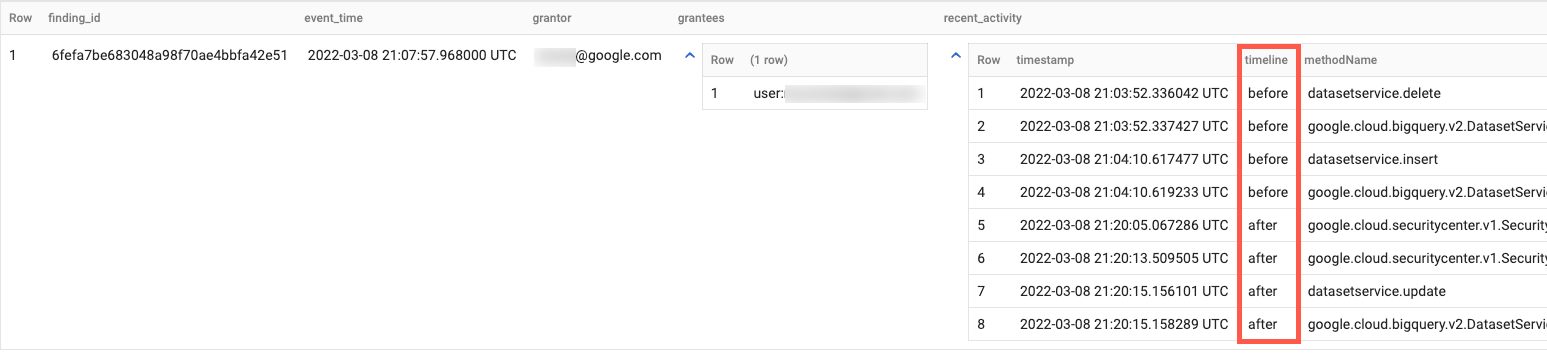
這個查詢範例會顯示異常 IAM 授權動作前後時間範圍內,授權者的管理員活動動作順序,協助您使用 Cloud 稽核記錄調查 Event Threat Detection 的異常 IAM 授權發現項目。以下查詢會比對發現項目時間戳記前後 1 小時的系統管理員活動記錄。
WITH latestFindings AS(
    SELECT * EXCEPT(row)
    FROM (
        SELECT *, ROW_NUMBER() OVER(
            PARTITION BY finding_id
            ORDER BY event_time DESC, finding.mute_update_time DESC
        ) AS row
        FROM `PROJECT_ID.DATASET.findings`
    ) WHERE row = 1
)
SELECT
  finding_id,
  ANY_VALUE(event_time) as event_time,
  ANY_VALUE(finding.access.principal_email) as grantor,
  JSON_VALUE_ARRAY(ANY_VALUE(finding.source_properties_json), '$.properties.sensitiveRoleGrant.members') as grantees,
  ARRAY_AGG(
    STRUCT(
      timestamp,
      IF(timestamp < event_time, 'before', 'after') as timeline,
      protopayload_auditlog.methodName,
      protopayload_auditlog.resourceName,
      protopayload_auditlog.serviceName
    )
    ORDER BY timestamp ASC
  ) AS recent_activity
FROM (
  SELECT
    f.*,
    a.*,
  FROM latestFindings AS f
  LEFT JOIN `PROJECT_ID.DATASET.cloudaudit_googleapis_com_activity` AS a
  ON a.protopayload_auditlog.authenticationInfo.principalEmail = f.finding.access.principal_email
  WHERE f.finding.state = "ACTIVE"
    AND f.finding.category = "Persistence: IAM Anomalous Grant"
    AND a.timestamp >= TIMESTAMP_SUB(f.event_time, INTERVAL 1 HOUR)
    AND a.timestamp <= TIMESTAMP_ADD(f.event_time, INTERVAL 1 HOUR)
  )
GROUP BY
  finding_id
ORDER BY
  event_time DESC
輸出結果會與下列內容相似:
在數據分析中建立圖表
數據分析可讓您建立互動式報表和資訊主頁。
一般來說,透過數據分析存取 BigQuery 時,會產生 BigQuery 用量費用。詳情請參閱「使用數據分析透過圖表呈現 BigQuery 資料」。
如要建立圖表,以視覺化方式呈現按嚴重程度和類別分類的發現項目資料,請按照下列步驟操作:
- 開啟數據分析並登入。
- 按照提示提供其他資訊,並設定其他偏好設定。 詳閱服務條款,如果同意,請繼續操作。
- 按一下「空白報表」。
- 在「連結至資料」分頁中,按一下「BigQuery」資訊卡。
- 如果系統提示,請授權數據分析存取 BigQuery 專案。
連結至調查結果資料:
- 在「專案」部分,選取資料集的專案。或者在「我的專案」分頁中輸入專案 ID 進行搜尋。
- 在「Dataset」(資料集) 部分,按一下資料集名稱。
- 在「Table」(資料表) 中,按一下「findings」(發現)。
- 按一下「新增」。
- 在對話方塊中,按一下「加入報表」。
加入報表後,按一下「新增圖表」。
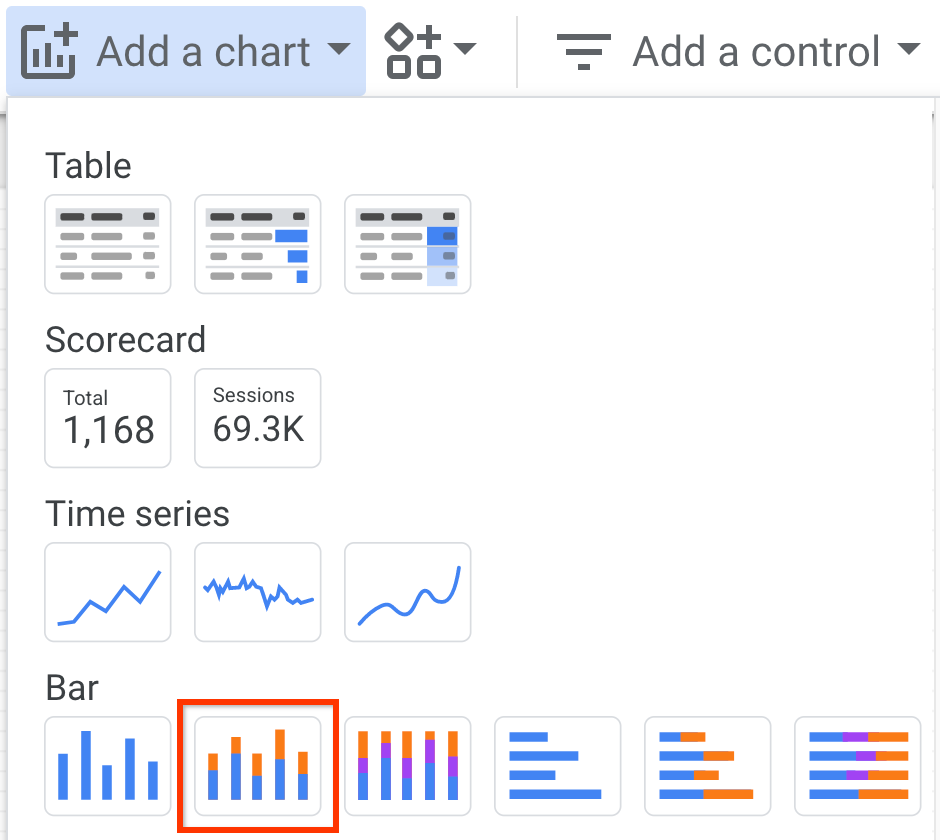
按一下「堆疊柱狀圖」,然後點選要放置圖表的位置。
在「圖表」>「長條」窗格的「資料」分頁中,設定下列欄位:
- 在「維度」欄位中,選取「finding.severity」。
- 在「細分維度」欄位中,選取「finding.category」。
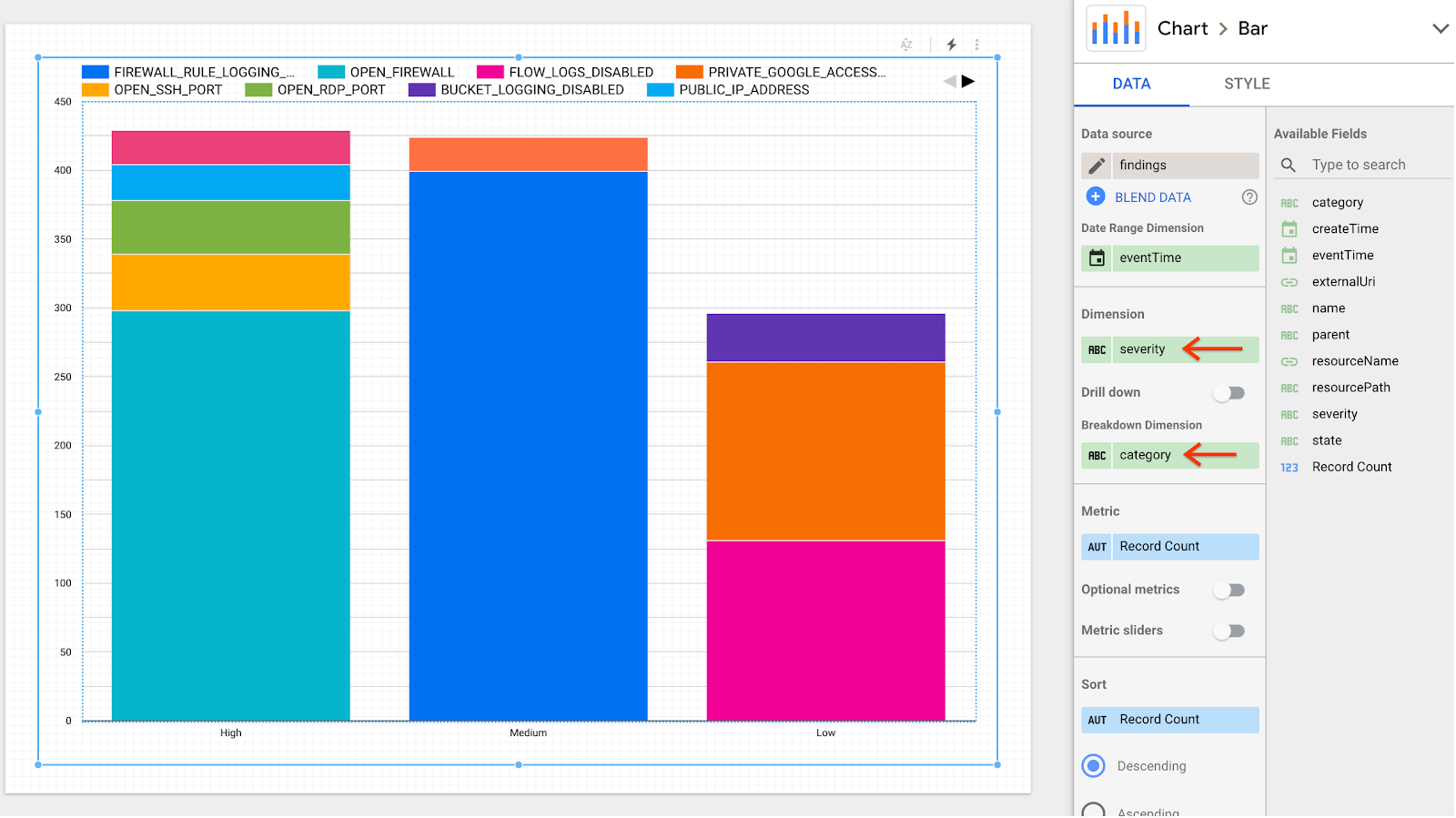
報表更新後會顯示多個資料欄,並依嚴重程度和類別列出發現結果。
後續步驟
- 瞭解如何大量匯出至 BigQuery。
- 瞭解如何在 BigQuery 中執行查詢。