


本教學課程說明如何使用 Cloud Service Mesh 輸出閘道和其他 Google Cloud 控制項,保護部署在 Google Kubernetes Engine 叢集的工作負載傳出的流量 (輸出)。本教學課程是在 GKE 叢集使用 Cloud Service Mesh egress 閘道的最佳做法的輔助指南。
本教學課程的目標對象包括網路、平台和資安工程師,他們負責管理一或多個軟體推送團隊使用的 Google Kubernetes Engine 叢集。本文所述的控制項特別適合必須證明符合法規 (例如 GDPR 和 PCI) 的組織。
目標
- 設定執行 Cloud Service Mesh 的基礎架構:
- 自訂虛擬私有雲網路和私人子網路
- Cloud NAT:用於網路連線能力
- 私人 GKE 叢集,具有額外的節點集區,用於輸出閘道 Pod
- 限制輸出虛擬私有雲防火牆規則;只有閘道節點可以連線至外部主機
- Private Google Access:用於連線至 Container Registry 和 Google API
- 安裝 Cloud Service Mesh。
- 安裝在專屬節點集區上執行的輸出閘道 Proxy。
- 透過 egress 閘道,為外部流量設定多租戶路由規則:
- 命名空間
team-x中的應用程式可以連線至example.com - 命名空間
team-y中的應用程式可以連線至httpbin.org
- 命名空間
- 使用
Sidecar資源,限制每個命名空間的 Sidecar Proxy 輸出設定範圍。 - 設定授權政策,強制執行輸出規則。
- 設定輸出閘道,將純 HTTP 要求升級為 TLS (TLS 啟動)。
- 設定 egress 閘道,讓 TLS 流量通過。
- 設定 Kubernetes 網路政策,做為額外的輸出控管機制。
- 使用 Private Google Access 和 Identity and Access Management (IAM) 權限,設定直接存取 Google API。
費用
在本文件中,您會使用下列 Google Cloud計費元件:
- Compute Engine
- Google Kubernetes Engine (GKE)
- Container Registry
- Cloud Service Mesh
- Cloud Load Balancing
- Cloud NAT
- Networking
- Cloud Storage
您可以使用 Pricing Calculator,根據預測用量估算費用。
完成本教學課程後,您可以刪除建立的資源,以免持續產生費用。詳情請參閱「清除所用資源」一節。
事前準備
-
在 Google Cloud 控制台的專案選取器頁面中,選取或建立 Google Cloud 專案。
選取或建立專案所需的角色
- 選取專案:選取專案時,不需具備特定 IAM 角色,只要您在專案中獲派角色,即可選取該專案。
-
建立專案:如要建立專案,您必須具備專案建立者角色 (
roles/resourcemanager.projectCreator),其中包含resourcemanager.projects.create權限。瞭解如何授予角色。
-
在 Google Cloud 控制台啟用 Cloud Shell。
建立目前使用的目錄,以便在教學課程中使用:
mkdir -p ~/WORKING_DIRECTORY
cd ~/WORKING_DIRECTORY
建立殼層指令碼,為教學課程初始化環境。請根據專案和偏好設定,替換及編輯變數。如果殼層工作階段過期,請使用
source指令執行這個指令碼,重新初始化環境:cat << 'EOF' > ./init-egress-tutorial.sh #! /usr/bin/env bash PROJECT_ID=YOUR_PROJECT_ID REGION=REGION ZONE=ZONE gcloud config set project ${PROJECT_ID} gcloud config set compute/region ${REGION} gcloud config set compute/zone ${ZONE} EOF啟用
compute.googleapis.com:gcloud services enable compute.googleapis.com --project=YOUR_PROJECT_ID將指令碼設為執行檔,並使用
source指令執行,初始化環境。如果系統提示啟用compute.googleapis.com,請選取「Y」:chmod +x ./init-egress-tutorial.sh source ./init-egress-tutorial.sh
設定基礎架構
建立虛擬私有雲網路和子網路
建立新的虛擬私有雲網路:
gcloud compute networks create vpc-network \
    --subnet-mode custom
為叢集建立子網路,並預先指派 Pod 和服務的次要 IP 位址範圍。啟用 Private Google Access,讓只有內部 IP 位址的應用程式可以連線至 Google API 和服務:
gcloud compute networks subnets create subnet-gke \
    --network vpc-network \
    --range 10.0.0.0/24 \
    --secondary-range pods=10.1.0.0/16,services=10.2.0.0/20 \
    --enable-private-ip-google-access
設定 Cloud NAT
Cloud NAT 可讓沒有外部 IP 位址的工作負載連線至網際網路上的目的地,並接收來自這些目的地的傳入回應。
建立 Cloud Router:
gcloud compute routers create nat-router \
    --network vpc-network
在路由器中新增網路位址轉譯 (NAT) 設定:
gcloud compute routers nats create nat-config \
    --router nat-router \
    --nat-all-subnet-ip-ranges \
    --auto-allocate-nat-external-ips
為每個 GKE 節點集區建立服務帳戶
建立兩個服務帳戶,供兩個 GKE 節點集區使用。每個節點集區都會指派個別的服務帳戶,以便您將 VPC 防火牆規則套用至特定節點。
建立服務帳戶,供預設節點集區中的節點使用:
gcloud iam service-accounts create sa-application-nodes \
    --description="SA for application nodes" \
    --display-name="sa-application-nodes"
建立服務帳戶,供閘道節點集區中的節點使用:
gcloud iam service-accounts create sa-gateway-nodes \
    --description="SA for gateway nodes" \
    --display-name="sa-gateway-nodes"
將權限授予服務帳戶
將一組最少的 IAM 角色新增至應用程式和閘道服務帳戶。這些角色是記錄、監控及從 Container Registry 提取私人容器映像檔的必要角色。
    project_roles=(
        roles/logging.logWriter
        roles/monitoring.metricWriter
        roles/monitoring.viewer
        roles/storage.objectViewer
    )
    for role in "${project_roles[@]}"
    do
        gcloud projects add-iam-policy-binding ${PROJECT_ID} \
            --member="serviceAccount:sa-application-nodes@${PROJECT_ID}.iam.gserviceaccount.com" \
            --role="$role"
        gcloud projects add-iam-policy-binding ${PROJECT_ID} \
            --member="serviceAccount:sa-gateway-nodes@${PROJECT_ID}.iam.gserviceaccount.com" \
            --role="$role"
    done
建立防火牆規則
在下列步驟中,您會將防火牆規則套用至虛擬私有雲網路,預設拒絕所有輸出流量。叢集必須具備特定連線能力,才能運作,且閘道節點必須能連線至虛擬私有雲以外的目的地。一組最少的特定防火牆規則會覆寫預設的全部拒絕規則,允許必要的連線能力。
建立預設 (低優先順序) 防火牆規則,拒絕虛擬私有雲網路的所有輸出流量:
gcloud compute firewall-rules create global-deny-egress-all \
    --action DENY \
    --direction EGRESS \
    --rules all \
    --destination-ranges 0.0.0.0/0 \
    --network vpc-network \
    --priority 65535 \
    --description "Default rule to deny all egress from the network."
建立規則,只允許具備閘道服務帳戶的節點連上網際網路:
gcloud compute firewall-rules create gateway-allow-egress-web \
    --action ALLOW \
    --direction EGRESS \
    --rules tcp:80,tcp:443 \
    --target-service-accounts sa-gateway-nodes@${PROJECT_ID}.iam.gserviceaccount.com \
    --network vpc-network \
    --priority 1000 \
    --description "Allow the nodes running the egress gateways to connect to the web"
允許節點連至 Kubernetes 控制層:
gcloud compute firewall-rules create allow-egress-to-api-server \
    --action ALLOW \
    --direction EGRESS \
    --rules tcp:443,tcp:10250 \
    --target-service-accounts sa-application-nodes@${PROJECT_ID}.iam.gserviceaccount.com,sa-gateway-nodes@${PROJECT_ID}.iam.gserviceaccount.com \
    --destination-ranges 10.5.0.0/28 \
    --network vpc-network \
    --priority 1000 \
    --description "Allow nodes to reach the Kubernetes API server."
選用:如果使用代管 Cloud Service Mesh,就不需要這項防火牆規則。
Cloud Service Mesh 會使用 Webhook,將 Sidecar Proxy 插入工作負載。允許 GKE API 伺服器呼叫由節點上執行的服務網格控制層公開的 Webhook:
gcloud compute firewall-rules create allow-ingress-api-server-to-webhook \
    --action ALLOW \
    --direction INGRESS \
    --rules tcp:15017 \
    --target-service-accounts sa-application-nodes@${PROJECT_ID}.iam.gserviceaccount.com,sa-gateway-nodes@${PROJECT_ID}.iam.gserviceaccount.com \
    --source-ranges 10.5.0.0/28 \
    --network vpc-network \
    --priority 1000 \
    --description "Allow the API server to call the webhooks exposed by istiod discovery"
允許叢集上執行的節點和 Pod 之間進行輸出連線。GKE 會自動建立對應的輸入規則。Service 連線不需要任何規則,因為 iptables 轉送鏈一律會將 Service IP 位址轉換為 Pod IP 位址。
gcloud compute firewall-rules create allow-egress-nodes-and-pods \
    --action ALLOW \
    --direction EGRESS \
    --rules all \
    --target-service-accounts sa-application-nodes@${PROJECT_ID}.iam.gserviceaccount.com,sa-gateway-nodes@${PROJECT_ID}.iam.gserviceaccount.com \
    --destination-ranges 10.0.0.0/24,10.1.0.0/16 \
    --network vpc-network \
    --priority 1000 \
    --description "Allow egress to other Nodes and Pods"
允許存取 Private Google Access 使用的保留 IP 位址組合,以便提供 Google API、Container Registry 和其他服務:
gcloud compute firewall-rules create allow-egress-gcp-apis \ --action ALLOW \ --direction EGRESS \ --rules tcp \ --target-service-accounts sa-application-nodes@${PROJECT_ID}.iam.gserviceaccount.com,sa-gateway-nodes@${PROJECT_ID}.iam.gserviceaccount.com \ --destination-ranges 199.36.153.8/30 \ --network vpc-network \ --priority 1000 \ --description "Allow access to the VIPs used by Google Cloud APIs (Private Google Access)"允許 Google Cloud 健康狀態檢查工具服務存取叢集中執行的 Pod。詳情請參閱健康狀態檢查。
gcloud compute firewall-rules create allow-ingress-gcp-health-checker \
    --action ALLOW \
    --direction INGRESS \
    --rules tcp:80,tcp:443 \
    --target-service-accounts sa-application-nodes@${PROJECT_ID}.iam.gserviceaccount.com,sa-gateway-nodes@${PROJECT_ID}.iam.gserviceaccount.com \
    --source-ranges 35.191.0.0/16,130.211.0.0/22,209.85.152.0/22,209.85.204.0/22 \
    --network vpc-network \
    --priority 1000 \
    --description "Allow workloads to respond to Google Cloud health checks"
設定 Google Cloud API 的私人存取權
Private Google Access 啟用只有內部 IP 位址的 VM 和 Pod 存取 Google API 和服務。雖然 Google API 和服務是透過外部 IP 提供,但使用 Private Google Access 時,節點的流量不會離開 Google 網路。
啟用 Cloud DNS API:
gcloud services enable dns.googleapis.com
建立私人 DNS 區域、CNAME 和 A 記錄,讓節點和工作負載能使用 Private Google Access 和 private.googleapis.com 主機名稱連線至 Google API 和服務:
gcloud dns managed-zones create private-google-apis \
    --description "Private DNS zone for Google APIs" \
    --dns-name googleapis.com \
    --visibility private \
    --networks vpc-network

gcloud dns record-sets transaction start --zone private-google-apis

gcloud dns record-sets transaction add private.googleapis.com. \
    --name "*.googleapis.com" \
    --ttl 300 \
    --type CNAME \
    --zone private-google-apis

gcloud dns record-sets transaction add "199.36.153.8" \
"199.36.153.9" "199.36.153.10" "199.36.153.11" \
    --name private.googleapis.com \
    --ttl 300 \
    --type A \
    --zone private-google-apis

gcloud dns record-sets transaction execute --zone private-google-apis
設定 Container Registry 的私人存取權
建立私人 DNS 區域、CNAME 和 A 記錄,讓節點可以使用 Private Google Access 和 gcr.io 主機名稱連線至 Container Registry:
gcloud dns managed-zones create private-gcr-io \
    --description "private zone for Container Registry" \
    --dns-name gcr.io \
    --visibility private \
    --networks vpc-network

gcloud dns record-sets transaction start --zone private-gcr-io

gcloud dns record-sets transaction add gcr.io. \
    --name "*.gcr.io" \
    --ttl 300 \
    --type CNAME \
    --zone private-gcr-io

gcloud dns record-sets transaction add "199.36.153.8" "199.36.153.9" "199.36.153.10" "199.36.153.11" \
    --name gcr.io \
    --ttl 300 \
    --type A \
    --zone private-gcr-io

gcloud dns record-sets transaction execute --zone private-gcr-io
建立私人 GKE 叢集
找出 Cloud Shell 的外部 IP 位址,以便將其新增至允許存取叢集 API 伺服器的網路清單:
SHELL_IP=$(dig TXT -4 +short @ns1.google.com o-o.myaddr.l.google.com)閒置一段時間後,Cloud Shell VM 的外部 IP 位址可能會變更。如果發生這種情況,您必須更新叢集的授權網路清單。在初始化指令碼中加入下列指令:
cat << 'EOF' >> ./init-egress-tutorial.sh
SHELL_IP=$(dig TXT -4 +short @ns1.google.com o-o.myaddr.l.google.com)
gcloud container clusters update cluster1 \
    --enable-master-authorized-networks \
    --master-authorized-networks ${SHELL_IP//\"}/32
EOF
啟用 Google Kubernetes Engine API:
gcloud services enable container.googleapis.com建立私人 GKE 叢集:
gcloud container clusters create cluster1 \
    --enable-ip-alias \
    --enable-private-nodes \
    --release-channel "regular" \
    --enable-master-authorized-networks \
    --master-authorized-networks ${SHELL_IP//\"}/32 \
    --master-ipv4-cidr 10.5.0.0/28 \
    --enable-dataplane-v2 \
    --service-account "sa-application-nodes@${PROJECT_ID}.iam.gserviceaccount.com" \
    --machine-type "e2-standard-4" \
    --network "vpc-network" \
    --subnetwork "subnet-gke" \
    --cluster-secondary-range-name "pods" \
    --services-secondary-range-name "services" \
    --workload-pool "${PROJECT_ID}.svc.id.goog" \
    --zone ${ZONE}
叢集會在幾分鐘內建立完成。叢集具有內部 IP 位址的私人節點。Pod 和服務會從您建立虛擬私有雲子網路時定義的指定次要範圍中,獲派 IP。
如果 Cloud Service Mesh 採用叢集內控制層,叢集節點必須使用至少有 4 個 vCPU 的機型。
Google 建議叢集訂閱「正規」發布管道,確保節點執行的 Kubernetes 版本受 Cloud Service Mesh 支援。
如要進一步瞭解使用叢集內控制層執行 Cloud Service Mesh 的必要條件,請參閱叢集內必要條件。
如要進一步瞭解執行代管 Cloud Service Mesh 的需求和限制,請參閱「代管 Cloud Service Mesh 支援的功能」。
叢集已啟用 Workload Identity Federation for GKE。Cloud Service Mesh 必須使用 Workload Identity Federation for GKE,這也是從 GKE 工作負載存取 Google API 的建議方式。
建立名為 gateway 的節點集區。這個節點集區是部署輸出閘道的位置。
dedicated=gateway:NoScheduletaint 會新增至閘道節點集區中的每個節點。gcloud container node-pools create "gateway" \ --cluster "cluster1" \ --machine-type "e2-standard-4" \ --node-taints dedicated=gateway:NoSchedule \ --service-account "sa-gateway-nodes@${PROJECT_ID}.iam.gserviceaccount.com" \ --num-nodes "1"Kubernetes 的 taint 和容許條件可確保只有 egress 閘道 Pod 會在閘道節點集區中的節點上執行。
下載憑證,以便透過 kubectl 連線至叢集:
gcloud container clusters get-credentials cluster1確認閘道節點具有正確的污點:
kubectl get nodes -l cloud.google.com/gke-nodepool=gateway -o yaml \
-o=custom-columns='name:metadata.name,taints:spec.taints[?(@.key=="dedicated")]'
輸出結果會與下列內容相似:
name                                 taints
gke-cluster1-gateway-9d65b410-cffs   map[effect:NoSchedule key:dedicated value:gateway]
安裝及設定 Cloud Service Mesh
請按照下列其中一份 Cloud Service Mesh 安裝指南操作:
安裝 Cloud Service Mesh 後,請停止操作並返回本教學課程,不要安裝 ingress 或 egress 閘道。
安裝 egress 閘道
為 egress 閘道建立 Kubernetes 命名空間:
kubectl create namespace istio-egress啟用命名空間,以便插入。步驟取決於控制層實作。
代管 (TD)
將預設插入標籤套用至命名空間:
kubectl label namespace istio-egress \
    istio.io/rev- istio-injection=enabled --overwrite
代管 (Istiod)
建議做法:執行下列指令,將預設插入標籤套用至命名空間:
  kubectl label namespace istio-egress \
      istio.io/rev- istio-injection=enabled --overwrite
如果您是使用代管 Istiod 控制層的現有使用者:建議您使用預設插入,但系統支援以修訂版本為基礎的插入。請按照下列操作說明進行:
執行下列指令,找出可用的發布版本:
kubectl -n istio-system get controlplanerevision輸出結果會與下列內容相似:
NAME AGE asm-managed-rapid 6d7h在輸出內容中,
NAME欄下方的值是修訂版本標籤,對應至 Cloud Service Mesh 版本的可用發布管道。將修訂版本標籤套用至命名空間:
kubectl label namespace istio-egress \
    istio-injection- istio.io/rev=REVISION_LABEL --overwrite
叢集內
建議做法:執行下列指令,將預設插入標籤套用至命名空間:
  kubectl label namespace istio-egress \
      istio.io/rev- istio-injection=enabled --overwrite
建議您使用預設插入,但我們也支援修訂版本插入: 請按照下列操作說明:
使用下列指令,找出
istiod的修訂版本標籤:kubectl get deploy -n istio-system -l app=istiod -o \ jsonpath={.items[*].metadata.labels.'istio\.io\/rev'}'{"\n"}'將修訂版本標籤套用至命名空間。在下列指令中,
REVISION_LABEL代表您在上一步記下的istiod修訂版本標籤值。kubectl label namespace istio-egress \ istio-injection- istio.io/rev=REVISION_LABEL --overwrite
為輸出閘道建立運算子資訊清單:
cat << EOF > egressgateway-operator.yaml
apiVersion: install.istio.io/v1alpha1
kind: IstioOperator
metadata:
  name: egressgateway-operator
  annotations:
    config.kubernetes.io/local-config: "true"
spec:
  profile: empty
  revision: REVISION
  components:
    egressGateways:
    - name: istio-egressgateway
      namespace: istio-egress
      enabled: true
  values:
    gateways:
      istio-egressgateway:
        injectionTemplate: gateway
        tolerations:
          - key: "dedicated"
            operator: "Equal"
            value: "gateway"
        nodeSelector:
          cloud.google.com/gke-nodepool: "gateway"
EOF
下載
istioctl工具。即使您使用的是 Cloud Service Mesh 1.15 以下版本,也必須使用 1.16.2-asm.2 以上版本。請參閱「下載正確的 istioctl 版本」。解壓縮下載的封存檔後,請設定環境變數來保存
istioctl工具的路徑,並將其新增至初始化指令碼:ISTIOCTL=$(find "$(pwd -P)" -name istioctl) echo "ISTIOCTL=\"${ISTIOCTL}\"" >> ./init-egress-tutorial.sh使用運算子資訊清單和
istioctl建立輸出閘道安裝資訊清單:${ISTIOCTL} manifest generate \ --filename egressgateway-operator.yaml \ --output egressgateway \ --cluster-specific安裝輸出閘道:
kubectl apply --recursive --filename egressgateway/確認輸出閘道正在
gateway節點集區中的節點上執行:kubectl get pods -n istio-egress -o wide輸出閘道 Pod 具有
gateway節點集區中節點的affinity,以及可讓 Pod 在受污染閘道節點上執行的容許條件。檢查 egress 閘道 Pod 的節點親和性和容許條件:kubectl -n istio-egress get pod -l istio=egressgateway \ -o=custom-columns='name:metadata.name,node-affinity:spec.affinity.nodeAffinity.requiredDuringSchedulingIgnoredDuringExecution.nodeSelectorTerms,tolerations:spec.tolerations[?(@.key=="dedicated")]'輸出結果會與下列內容相似:
name                                   node-affinity                                                                                   tolerations
istio-egressgateway-754d9684d5-jjkdz   [map[matchExpressions:[map[key:cloud.google.com/gke-nodepool operator:In values:[gateway]]]]]   map[key:dedicated operator:Equal value:gateway]
啟用 Envoy 存取記錄
啟用 Envoy 存取記錄的步驟,取決於 Cloud Service Mesh 類型 (代管或叢集內):
受管理
按照操作說明,在代管 Cloud Service Mesh 中啟用存取記錄。
叢集內
請按照操作說明,在叢集內 Cloud Service Mesh 中啟用存取記錄。
準備網格和測試應用程式
確認已啟用 STRICT 雙向 TLS。在
istio-system命名空間中,為網格套用預設PeerAuthentication政策:cat <<EOF | kubectl apply -f - apiVersion: "security.istio.io/v1beta1" kind: "PeerAuthentication" metadata: name: "default" namespace: "istio-system" spec: mtls: mode: STRICT EOF在特定命名空間中建立
PeerAuthentication資源,即可覆寫這項設定。建立命名空間,用於部署測試工作負載。本教學課程的後續步驟會說明如何為每個命名空間設定不同的輸出路由規則。
kubectl create namespace team-x
kubectl create namespace team-y
為命名空間加上標籤,以便 Kubernetes 網路政策選取:
kubectl label namespace team-x team=x
kubectl label namespace team-y team=y
如要讓 Cloud Service Mesh 自動插入 Proxy sidecar,請在工作負載命名空間設定控制層修訂版本標籤:
kubectl label ns team-x istio.io/rev- istio-injection=enabled --overwrite
kubectl label ns team-y istio.io/rev- istio-injection=enabled --overwrite
建立 YAML 檔案,用於測試部署作業:
cat << 'EOF' > ./test.yaml
apiVersion: v1
kind: ServiceAccount
metadata:
  name: test
---
apiVersion: v1
kind: Service
metadata:
  name: test
  labels:
    app: test
spec:
  ports:
  - port: 80
    name: http
  selector:
    app: test
---
apiVersion: apps/v1
kind: Deployment
metadata:
  name: test
spec:
  replicas: 1
  selector:
    matchLabels:
      app: test
  template:
    metadata:
      labels:
        app: test
    spec:
      serviceAccountName: test
      containers:
      - name: test
        image: gcr.io/google.com/cloudsdktool/cloud-sdk:slim
        command: ["/bin/sleep", "infinity"]
        imagePullPolicy: IfNotPresent
EOF
將測試應用程式部署至
team-x命名空間:kubectl -n team-x create -f ./test.yaml確認測試應用程式已部署至預設集區中的節點,且已插入 Proxy 邊車容器。重複執行下列指令,直到 Pod 的狀態為
Running:kubectl -n team-x get po -l app=test -o wide輸出結果會與下列內容相似:
NAME                   READY   STATUS    RESTARTS   AGE   IP          NODE                                      NOMINATED NODE   READINESS GATES
test-d5bdf6f4f-9nxfv   2/2     Running   0          19h   10.1.1.25   gke-cluster1-default-pool-f6c7a51f-wbzj
2 個容器皆為
Running。一個容器是測試應用程式,另一個則是 Proxy Sidecar。Pod 正在預設節點集區中的節點上執行。
確認無法從測試容器向外部網站發出 HTTP 要求:
kubectl -n team-x exec -it \ $(kubectl -n team-x get pod -l app=test -o jsonpath={.items..metadata.name}) \ -c test -- curl -v http://example.comglobal-deny-egress-all防火牆規則拒絕上游連線,因此 Sidecar Proxy 產生錯誤訊息。
使用 Sidecar 資源限制 Sidecar Proxy 設定範圍
您可以使用 Sidecar 資源,限制為 Sidecar Proxy 設定的輸出事件監聽器範圍。為減少設定膨脹和記憶體用量,建議您為每個命名空間套用預設 Sidecar 資源。
Cloud Service Mesh 在 sidecar 中執行的 Proxy 是 Envoy。在 Envoy 術語中,cluster 是邏輯上相似的上游端點群組,用做負載平衡的目的地。
執行
istioctl proxy-config指令,檢查為測試 Pod 設定的 Envoy Sidecar Proxy 傳出叢集:${ISTIOCTL} pc c $(kubectl -n team-x get pod -l app=test \ -o jsonpath={.items..metadata.name}).team-x --direction outbound清單中約有 11 個 Envoy 叢集,包括一些輸出閘道。
將 Proxy 設定限制為已在輸出和
team-x命名空間中,使用服務項目明確定義的輸出路徑。將Sidecar資源套用至team-x命名空間:cat <<EOF | kubectl apply -f - apiVersion: networking.istio.io/v1beta1 kind: Sidecar metadata: name: default namespace: team-x spec: outboundTrafficPolicy: mode: REGISTRY_ONLY egress: - hosts: - 'istio-egress/*' - 'team-x/*' EOF將傳出流量政策模式設為
REGISTRY_ONLY,會限制 Proxy 設定,只納入透過定義服務項目明確新增至網格服務註冊資料庫的外部主機。設定
egress.hosts會指定 Sidecar Proxy 僅選取使用exportTo屬性提供的輸出命名空間路徑。「team-x/*」部分包含在team-x命名空間中,於本機設定的所有路徑。查看 Envoy Sidecar Proxy 中設定的傳出叢集,並與套用
Sidecar資源前設定的叢集清單進行比較:${ISTIOCTL} pc c $(kubectl -n team-x get pod -l app=test \ -o jsonpath={.items..metadata.name}).team-x --direction outbound您會看到輸出閘道的叢集,以及測試 Pod 本身的叢集。
設定 Cloud Service Mesh,透過 egress 閘道轉送流量
為通訊埠 80 的 HTTP 流量設定
Gateway。Gateway會選取您部署至輸出命名空間的輸出閘道 Proxy。Gateway設定會套用至輸出命名空間,並處理任何主機的流量。cat <<EOF | kubectl apply -f - apiVersion: networking.istio.io/v1beta1 kind: Gateway metadata: name: egress-gateway namespace: istio-egress spec: selector: istio: egressgateway servers: - port: number: 80 name: https protocol: HTTPS hosts: - '*' tls: mode: ISTIO_MUTUAL EOF為輸出閘道建立
DestinationRule,並使用雙向 TLS 進行驗證和加密。為所有外部主機使用單一共用目的地規則。cat <<EOF | kubectl apply -f - apiVersion: networking.istio.io/v1beta1 kind: DestinationRule metadata: name: target-egress-gateway namespace: istio-egress spec: host: istio-egressgateway.istio-egress.svc.cluster.local subsets: - name: target-egress-gateway-mTLS trafficPolicy: tls: mode: ISTIO_MUTUAL EOF在 egress 命名空間中建立
ServiceEntry,在網格的team-x命名空間服務註冊資料庫中,明確註冊 example.com:cat <<EOF | kubectl apply -f - apiVersion: networking.istio.io/v1beta1 kind: ServiceEntry metadata: name: example-com-ext namespace: istio-egress labels: # Show this service and its telemetry in the Cloud Service Mesh page of the Google Cloud console service.istio.io/canonical-name: example.com spec: hosts: - example.com ports: - number: 80 name: http protocol: HTTP - number: 443 name: tls protocol: TLS resolution: DNS location: MESH_EXTERNAL exportTo: - 'team-x' - 'istio-egress' EOF建立
VirtualService,透過輸出閘道將流量轉送至 example.com。比對條件有兩個:第一個條件會將流量導向輸出閘道,第二個條件則會將流量從輸出閘道導向目的地主機。exportTo屬性可控管哪些命名空間能使用虛擬服務。cat <<EOF | kubectl apply -f - apiVersion: networking.istio.io/v1beta1 kind: VirtualService metadata: name: example-com-through-egress-gateway namespace: istio-egress spec: hosts: - example.com gateways: - istio-egress/egress-gateway - mesh http: - match: - gateways: - mesh port: 80 route: - destination: host: istio-egressgateway.istio-egress.svc.cluster.local subset: target-egress-gateway-mTLS port: number: 80 weight: 100 - match: - gateways: - istio-egress/egress-gateway port: 80 route: - destination: host: example.com port: number: 80 weight: 100 exportTo: - 'istio-egress' - 'team-x' EOF執行
istioctl analyze,檢查是否有設定錯誤:${ISTIOCTL} analyze -n istio-egress --revision REVISION輸出結果會與下列內容相似:
✔ No validation issues found when analyzing namespace: istio-egress.透過輸出閘道傳送多個要求至外部網站:
for i in {1..4}
do
    kubectl -n team-x exec -it $(kubectl -n team-x get pod -l app=test \
        -o jsonpath={.items..metadata.name}) -c test -- \
    curl -s -o /dev/null -w "%{http_code}\n" http://example.com
done
四個回應都會顯示
200狀態碼。檢查 Proxy 存取記錄,確認要求是否透過 egress 閘道導向。首先,請檢查與測試應用程式一起部署的 Proxy sidecar 存取記錄:
kubectl -n team-x logs -f $(kubectl -n team-x get pod -l app=test \
    -o jsonpath={.items..metadata.name}) istio-proxy
每傳送一項要求,就會看到類似以下的記錄項目:
[2020-09-14T17:37:08.045Z] "HEAD / HTTP/1.1" 200 - "-" "-" 0 0 5 4 "-" "curl/7.67.0" "d57ea5ad-90e9-46d9-8b55-8e6e404a8f9b" "example.com" "10.1.4.12:8080" outbound|80||istio-egressgateway.istio-egress.svc.cluster.local 10.1.0.17:42140 93.184.216.34:80 10.1.0.17:60326 - -也請檢查 egress 閘道存取記錄:
kubectl -n istio-egress logs -f $(kubectl -n istio-egress get pod -l istio=egressgateway \
    -o jsonpath="{.items[0].metadata.name}") istio-proxy
針對您傳送的每項要求,您會看到類似下列內容的輸出閘道存取記錄項目:
[2020-09-14T17:37:08.045Z] "HEAD / HTTP/2" 200 - "-" "-" 0 0 4 3 "10.1.0.17" "curl/7.67.0" "095711e6-64ef-4de0-983e-59158e3c55e7" "example.com" "93.184.216.34:80" outbound|80||example.com 10.1.4.12:37636 10.1.4.12:8080 10.1.0.17:44404 outbound_.80_.target-egress-gateway-mTLS_.istio-egressgateway.istio-egress.svc.cluster.local -
為第二個命名空間設定不同的轉送
為第二個外部主機設定路由,瞭解如何為不同團隊設定不同的外部連線能力。
為
team-y命名空間建立Sidecar資源:cat <<EOF | kubectl apply -f - apiVersion: networking.istio.io/v1beta1 kind: Sidecar metadata: name: default namespace: team-y spec: outboundTrafficPolicy: mode: REGISTRY_ONLY egress: - hosts: - 'istio-egress/*' - 'team-y/*' EOF將測試應用程式部署至
team-y命名空間:kubectl -n team-y create -f ./test.yaml註冊第二個外部主機,並匯出至
team-x和team-y命名空間:cat <<EOF | kubectl apply -f - apiVersion: networking.istio.io/v1beta1 kind: ServiceEntry metadata: name: httpbin-org-ext namespace: istio-egress labels: # Show this service and its telemetry in the Cloud Service Mesh page of the Google Cloud console service.istio.io/canonical-name: httpbin.org spec: hosts: - httpbin.org ports: - number: 80 name: http protocol: HTTP - number: 443 name: tls protocol: TLS resolution: DNS location: MESH_EXTERNAL exportTo: - 'istio-egress' - 'team-x' - 'team-y' EOF建立虛擬服務,透過 egress 閘道將流量轉送至 httpbin.org:
cat <<EOF | kubectl apply -f -
apiVersion: networking.istio.io/v1beta1
kind: VirtualService
metadata:
  name: httpbin-org-through-egress-gateway
  namespace: istio-egress
spec:
  hosts:
  - httpbin.org
  gateways:
  - istio-egress/egress-gateway
  - mesh
  http:
  - match:
    - gateways:
      - mesh
      port: 80
    route:
    - destination:
        host: istio-egressgateway.istio-egress.svc.cluster.local
        subset: target-egress-gateway-mTLS
        port:
          number: 80
      weight: 100
  - match:
    - gateways:
      - istio-egress/egress-gateway
      port: 80
    route:
    - destination:
        host: httpbin.org
        port:
          number: 80
      weight: 100
  exportTo:
  - 'istio-egress'
  - 'team-x'
  - 'team-y'
EOF
執行
istioctl analyze,檢查是否有設定錯誤:${ISTIOCTL} analyze -n istio-egress --revision REVISION您會看到:
✔ No validation issues found when analyzing namespace: istio-egress.從
team-y測試應用程式向 httpbin.org 提出要求:kubectl -n team-y exec -it $(kubectl -n team-y get pod -l app=test -o \ jsonpath={.items..metadata.name}) -c test -- curl -I http://httpbin.org您會看到
200 OK回應。此外,請從
team-x測試應用程式向 httpbin.org 提出要求:kubectl -n team-x exec -it $(kubectl -n team-x get pod -l app=test \ -o jsonpath={.items..metadata.name}) -c test -- curl -I http://httpbin.org您會看到
200 OK回應。嘗試從
team-y命名空間向 example.com 發出要求:kubectl -n team-y exec -it $(kubectl -n team-y get pod -l app=test \ -o jsonpath={.items..metadata.name}) -c test -- curl -I http://example.com要求失敗,因為未設定
example.com主機的傳出路徑。
使用授權政策進一步控管流量
在本教學課程中,輸出閘道的授權政策是在istio-egress命名空間中建立。您可以設定 Kubernetes RBAC,讓只有網路管理員可以存取 istio-egress 命名空間。
建立
AuthorizationPolicy,讓team-x命名空間中的應用程式在使用通訊埠 80 傳送要求時,可以連線至 example.com,但無法連線至其他外部主機。輸出閘道 Pod 上對應的targetPort為 8080。cat <<EOF | kubectl apply -f - apiVersion: security.istio.io/v1beta1 kind: AuthorizationPolicy metadata: name: egress-team-x-to-example-com namespace: istio-egress spec: action: ALLOW rules: - from: - source: namespaces: - 'team-x' to: - operation: hosts: - 'example.com' when: - key: destination.port values: ["8080"] EOF確認您可以從
team-x命名空間中的測試應用程式向 example.com 提出要求:kubectl -n team-x exec -it $(kubectl -n team-x get pod -l app=test \ -o jsonpath={.items..metadata.name}) -c test -- curl -I http://example.com您會看到
200 OK回應。嘗試從
team-x命名空間中的測試應用程式,向 httpbin.org 發出要求:kubectl -n team-x exec -it $(kubectl -n team-x get pod -l app=test \ -o jsonpath={.items..metadata.name}) -c test -- curl -s -w " %{http_code}\n" \ http://httpbin.org要求失敗,並顯示
RBAC: access denied訊息和 403 禁止狀態碼。授權政策通常需要一點時間才會生效,因此您可能需要等待幾秒鐘。授權政策可讓您精細控管要允許或拒絕哪些流量。套用下列授權政策,允許
team-y命名空間中的測試應用程式使用通訊埠 80 傳送要求時,透過特定網址路徑向 httpbin.org 發出要求。輸出閘道 Pod 上對應的targetPort為 8080。cat <<EOF | kubectl apply -f - apiVersion: security.istio.io/v1beta1 kind: AuthorizationPolicy metadata: name: egress-team-y-to-httpbin-teapot namespace: istio-egress spec: action: ALLOW rules: - from: - source: namespaces: - 'team-y' to: - operation: hosts: - httpbin.org paths: ['/status/418'] when: - key: destination.port values: ["8080"] EOF嘗試從
team-y命名空間中的測試應用程式連線至 httpbin.org:kubectl -n team-y exec -it $(kubectl -n team-y get pod -l app=test \ -o jsonpath={.items..metadata.name}) -c test -- curl -s -w " %{http_code}\n" \ http://httpbin.org要求失敗,並顯示 RBAC:存取遭拒訊息和 403 禁止狀態碼。
現在,請從同一個應用程式向 httpbin.org/status/418 發出要求:
kubectl -n team-y exec -it $(kubectl -n team-y get pod -l app=test \
    -o jsonpath={.items..metadata.name}) -c test -- curl http://httpbin.org/status/418
由於路徑與授權政策中的模式相符,因此要求成功。輸出結果會與下列內容相似:
   -=[ teapot ]=-
      _...._
    .'  _ _ `.
   | ."` ^ `". _,
   \_;`"---"`|//
     |       ;/
     \_     _/
       `"""`
在 egress 閘道啟動 TLS
您可以設定輸出閘道,將純 HTTP 要求upgrade (發出) 為 TLS 或雙向 TLS。允許應用程式發出純 HTTP 要求,並搭配 Istio 雙向 TLS 和 TLS 啟動功能,可帶來多項優勢。詳情請參閱最佳做法指南。
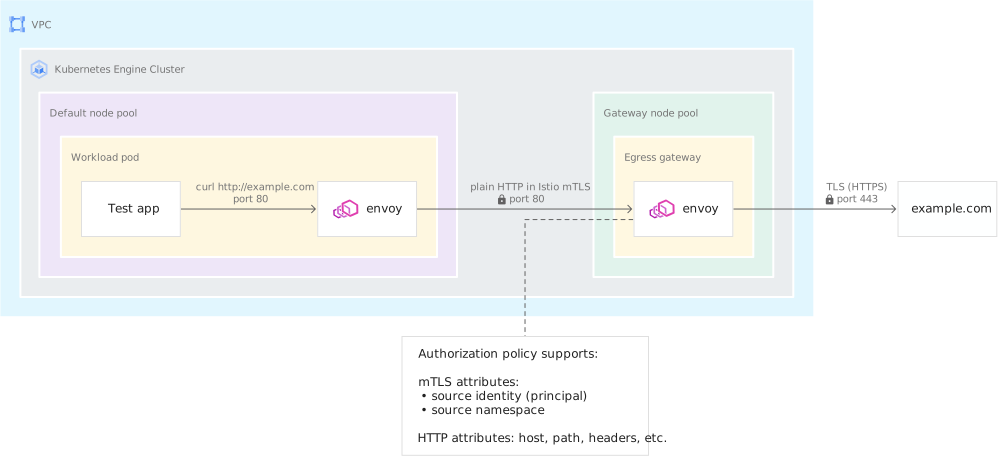
建立
DestinationRule. The DestinationRule,指定閘道向 example.com 發起 TLS 連線。cat <<EOF | kubectl apply -f - apiVersion: networking.istio.io/v1beta1 kind: DestinationRule metadata: name: example-com-originate-tls namespace: istio-egress spec: host: example.com subsets: - name: example-com-originate-TLS trafficPolicy: portLevelSettings: - port: number: 443 tls: mode: SIMPLE sni: example.com EOF更新 example.com 的虛擬服務,將傳送至閘道通訊埠 80 的要求,
upgraded至傳送至目的地主機的通訊埠 443 上的 TLS:cat <<EOF | kubectl apply -f - apiVersion: networking.istio.io/v1alpha3 kind: VirtualService metadata: name: example-com-through-egress-gateway namespace: istio-egress spec: hosts: - example.com gateways: - mesh - istio-egress/egress-gateway http: - match: - gateways: - mesh port: 80 route: - destination: host: istio-egressgateway.istio-egress.svc.cluster.local subset: target-egress-gateway-mTLS port: number: 80 - match: - gateways: - istio-egress/egress-gateway port: 80 route: - destination: host: example.com port: number: 443 subset: example-com-originate-TLS weight: 100 EOF從
team-x命名空間中的測試應用程式,向 example.com 提出多項要求:for i in {1..4} do kubectl -n team-x exec -it $(kubectl -n team-x get pod -l app=test \ -o jsonpath={.items..metadata.name}) -c test -- curl -I http://example.com done和之前一樣,要求成功並傳回
200 OK回應。查看輸出閘道記錄,確認閘道透過發起 TLS 連線,將要求轉送至目的地主機:
kubectl -n istio-egress logs -f $(kubectl -n istio-egress get pod -l istio=egressgateway \
    -o jsonpath="    {.items[0].metadata.name}") istio-proxy
輸出結果會與下列內容相似:
[2020-09-24T17:58:02.548Z] "HEAD / HTTP/2" 200 - "-" "-" 0 0 6 5 "10.1.1.15" "curl/7.67.0" "83a77acb-d994-424d-83da-dd8eac902dc8" "example.com" "93.184.216.34:443" outbound|443|example-com-originate-TLS|example.com 10.1.4.31:49866 10.1.4.31:8080 10.1.1.15:37334 outbound_.80_.target-egress-gateway-mTLS_.istio-egressgateway.istio-egress.svc.cluster.local -Proxy sidecar 使用通訊埠 80 將要求傳送至閘道,並使用通訊埠 443 啟動 TLS,將要求傳送至目的地主機。
HTTPS/TLS 連線直通
現有應用程式與外部服務通訊時,可能已使用 TLS 連線。您可以設定輸出閘道,讓 TLS 連線通過而不解密。
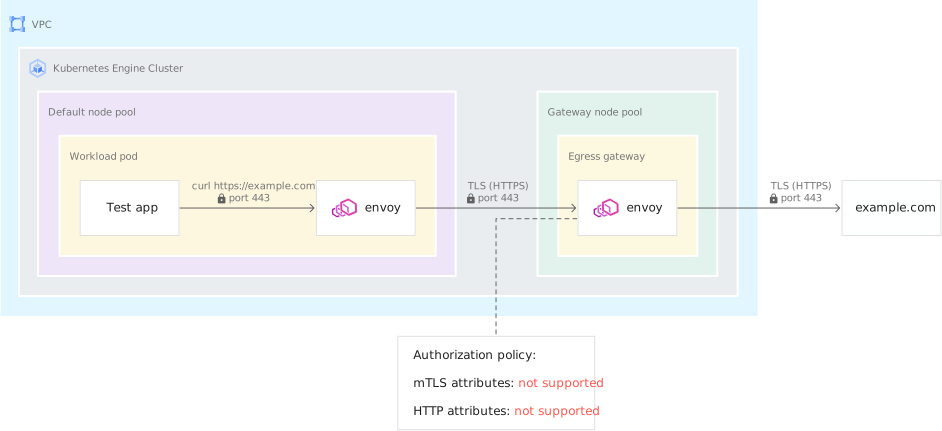
修改設定,讓輸出閘道使用 TLS 傳遞功能連至通訊埠 443:
cat <<EOF | kubectl apply -f -
apiVersion: networking.istio.io/v1beta1
kind: Gateway
metadata:
  name: egress-gateway
  namespace: istio-egress
spec:
  selector:
    istio: egressgateway
  servers:
  - port:
      number: 80
      name: https
      protocol: HTTPS
    hosts:
      - '*'
    tls:
      mode: ISTIO_MUTUAL
  - port:
      number: 443
      name: tls
      protocol: TLS
    hosts:
    - '*'
    tls:
      mode: PASSTHROUGH
EOF
更新指向 egress 閘道的
DestinationRule,為閘道上的通訊埠 443 新增第二個子集。這個新的子集不會使用雙向 TLS。Istio mTLS 不支援 TLS 連線直通。通訊埠 80 上的連線仍會使用 mTLS:cat <<EOF | kubectl apply -f - apiVersion: networking.istio.io/v1alpha3 kind: DestinationRule metadata: name: target-egress-gateway namespace: istio-egress spec: host: istio-egressgateway.istio-egress.svc.cluster.local subsets: - name: target-egress-gateway-mTLS trafficPolicy: portLevelSettings: - port: number: 80 tls: mode: ISTIO_MUTUAL - name: target-egress-gateway-TLS-passthrough EOF更新 example.com 的虛擬服務,讓通訊埠 443 的 TLS 流量通過閘道:
cat <<EOF | kubectl apply -f -
apiVersion: networking.istio.io/v1alpha3
kind: VirtualService
metadata:
  name: example-com-through-egress-gateway
  namespace: istio-egress
spec:
  hosts:
  - example.com
  gateways:
  - mesh
  - istio-egress/egress-gateway
  http:
  - match:
    - gateways:
      - mesh
      port: 80
    route:
    - destination:
        host: istio-egressgateway.istio-egress.svc.cluster.local
        subset: target-egress-gateway-mTLS
        port:
          number: 80
  - match:
    - gateways:
      - istio-egress/egress-gateway
      port: 80
    route:
    - destination:
        host: example.com
        port:
          number: 443
        subset: example-com-originate-TLS
      weight: 100
  tls:
  - match:
    - gateways:
      - mesh
      port: 443
      sniHosts:
      - example.com
    route:
    - destination:
        host: istio-egressgateway.istio-egress.svc.cluster.local
        subset: target-egress-gateway-TLS-passthrough
        port:
          number: 443
  - match:
    - gateways:
      - istio-egress/egress-gateway
      port: 443
      sniHosts:
      - example.com
    route:
    - destination:
        host: example.com
        port:
          number: 443
      weight: 100
  exportTo:
  - 'istio-egress'
  - 'team-x'
EOF
更新 httpbin.org 的虛擬服務,讓通訊埠 443 的 TLS 流量通過閘道:
cat <<EOF | kubectl apply -f -
apiVersion: networking.istio.io/v1beta1
kind: VirtualService
metadata:
  name: httpbin-org-through-egress-gateway
  namespace: istio-egress
spec:
  hosts:
  - httpbin.org
  gateways:
  - istio-egress/egress-gateway
  - mesh
  http:
  - match:
    - gateways:
      - mesh
      port: 80
    route:
    - destination:
        host: istio-egressgateway.istio-egress.svc.cluster.local
        subset: target-egress-gateway-mTLS
        port:
          number: 80
      weight: 100
  - match:
    - gateways:
      - istio-egress/egress-gateway
      port: 80
    route:
    - destination:
        host: httpbin.org
        port:
          number: 80
      weight: 100
  tls:
  - match:
    - gateways:
      - mesh
      port: 443
      sniHosts:
      - httpbin.org
    route:
    - destination:
        host: istio-egressgateway.istio-egress.svc.cluster.local
        subset: target-egress-gateway-TLS-passthrough
        port:
          number: 443
  - match:
    - gateways:
      - istio-egress/egress-gateway
      port: 443
      sniHosts:
      - httpbin.org
    route:
    - destination:
        host: httpbin.org
        port:
          number: 443
      weight: 100
  exportTo:
  - 'istio-egress'
  - 'team-x'
  - 'team-y'
EOF
新增授權政策,接受傳送至 egress 閘道服務通訊埠 443 的任何流量。閘道 Pod 上對應的
targetPort為 8443。cat <<EOF | kubectl apply -f - apiVersion: security.istio.io/v1beta1 kind: AuthorizationPolicy metadata: name: egress-all-443 namespace: istio-egress spec: action: ALLOW rules: - when: - key: destination.port values: ["8443"] EOF執行
istioctl analyze,檢查是否有設定錯誤:${ISTIOCTL} analyze -n istio-egress --revision REVISION您會看到:
✔ No validation issues found when analyzing namespace: istio-egress.從
team-x命名空間中的測試應用程式,向 example.com 發出一般 HTTP 要求:kubectl -n team-x exec -it $(kubectl -n team-x get pod -l app=test \ -o jsonpath={.items..metadata.name}) -c test -- curl -I http://example.com要求成功,並傳回
200 OK回應。現在,請從
team-x命名空間中的測試應用程式,發出多個 TLS (HTTPS) 要求:for i in {1..4} do kubectl -n team-x exec -it $(kubectl -n team-x get pod -l app=test \ -o jsonpath={.items..metadata.name}) -c test -- curl -s -o /dev/null \ -w "%{http_code}\n" \ https://example.com done您會看到 200 個回應。
再次查看輸出閘道記錄:
kubectl -n istio-egress logs -f $(kubectl -n istio-egress get pod -l istio=egressgateway \
    -o jsonpath="{.items[0].metadata.name}") istio-proxy
您會看到類似下方的記錄項目:
[2020-09-24T18:04:38.608Z] "- - -" 0 - "-" "-" 1363 5539 10 - "-" "-" "-" "-" "93.184.216.34:443" outbound|443||example.com 10.1.4.31:51098 10.1.4.31:8443 10.1.1.15:57030 example.com -HTTPS 要求會視為 TCP 流量,並透過閘道傳遞至目的地主機,因此記錄中不會包含任何 HTTP 資訊。
使用 Kubernetes NetworkPolicy 做為額外控管機制
在許多情況下,應用程式可以略過 Sidecar Proxy。您可以使用 Kubernetes NetworkPolicy,額外指定工作負載可建立的連線。套用單一網路政策後,系統會拒絕所有未明確允許的連線。
本教學課程僅考量網路政策的輸出連線和輸出選取器。如果您在自己的叢集上使用網路政策控管輸入,則必須建立與輸出政策對應的輸入政策。舉例來說,如果您允許從 team-x 命名空間中的工作負載輸出至 team-y 命名空間,則也必須允許從 team-x 命名空間輸入至 team-y 命名空間。
允許部署在
team-x命名空間中的工作負載和 Proxy 連線至istiod和輸出閘道:cat <<EOF | kubectl apply -f - apiVersion: networking.k8s.io/v1 kind: NetworkPolicy metadata: name: allow-egress-to-control-plane namespace: team-x spec: podSelector: {} policyTypes: - Egress egress: - to: - namespaceSelector: matchLabels: "kubernetes.io/metadata.name": istio-system podSelector: matchLabels: istio: istiod - namespaceSelector: matchLabels: "kubernetes.io/metadata.name": istio-egress podSelector: matchLabels: istio: egressgateway EOF允許工作負載和 Proxy 查詢 DNS:
cat <<EOF | kubectl apply -f -
apiVersion: networking.k8s.io/v1
kind: NetworkPolicy
metadata:
  name: allow-egress-to-dns
  namespace: team-x
spec:
  podSelector: {}
  policyTypes:
    - Egress
  egress:
  - to:
    - namespaceSelector:
        matchLabels:
          "kubernetes.io/metadata.name": kube-system
    ports:
    - port: 53
      protocol: UDP
    - port: 53
      protocol: TCP
EOF
允許工作負載和 Proxy 連線至提供 Google API 和服務的 IP,包括 Cloud Service Mesh 憑證授權單位:
cat <<EOF | kubectl apply -f -
apiVersion: networking.k8s.io/v1
kind: NetworkPolicy
metadata:
  name: allow-egress-to-google-apis
  namespace: team-x
spec:
  podSelector: {}
  policyTypes:
    - Egress
  egress:
  - to:
    - ipBlock:
        cidr: 199.36.153.4/30
    - ipBlock:
        cidr: 199.36.153.8/30
EOF
允許工作負載和 Proxy 連線至 GKE 中繼資料伺服器:
cat <<EOF | kubectl apply -f -
apiVersion: networking.k8s.io/v1
kind: NetworkPolicy
metadata:
  name: allow-egress-to-metadata-server
  namespace: team-x
spec:
  podSelector: {}
  policyTypes:
    - Egress
  egress:
  - to: # For GKE data plane v2
    - ipBlock:
        cidr: 169.254.169.254/32
  - to: # For GKE data plane v1
    - ipBlock:
        cidr: 127.0.0.1/32 # Prior to 1.21.0-gke.1000
    - ipBlock:
        cidr: 169.254.169.252/32 # 1.21.0-gke.1000 and later
    ports:
    - protocol: TCP
      port: 987
    - protocol: TCP
      port: 988
EOF
選用:允許
team-x命名空間中的工作負載和 Proxy 相互連線:cat <<EOF | kubectl apply -f - apiVersion: networking.k8s.io/v1 kind: NetworkPolicy metadata: name: allow-egress-to-same-namespace namespace: team-x spec: podSelector: {} ingress: - from: - podSelector: {} egress: - to: - podSelector: {} EOF選用:允許
team-x命名空間中的工作負載和 Proxy 連線至其他團隊部署的工作負載:cat <<EOF | kubectl apply -f - apiVersion: networking.k8s.io/v1 kind: NetworkPolicy metadata: name: allow-egress-to-team-y namespace: team-x spec: podSelector: {} policyTypes: - Egress egress: - to: - namespaceSelector: matchLabels: "kubernetes.io/metadata.name": team-y EOFSidecar Proxy 之間的連線會保留。套用新的網路政策時,現有連線不會關閉。重新啟動 team-x 命名空間中的工作負載,確保現有連線已關閉:
kubectl -n team-x rollout restart deployment確認您仍可從
team-x命名空間中的測試應用程式,向 example.com 提出 HTTP 要求:kubectl -n team-x exec -it $(kubectl -n team-x get pod -l app=test \ -o jsonpath={.items..metadata.name}) -c test -- curl -I http://example.com要求成功,並傳回
200 OK回應。
使用 Private Google Access 和 IAM 權限直接存取 Google API
Google 的 API 和服務是透過外部 IP 位址公開。如果 Pod 具有虛擬私有雲原生別名 IP 位址,並使用Private Google Access連線至 Google API,流量就不會離開 Google 網路。
設定本教學課程的基礎架構時,您已為 GKE Pod 使用的子網路啟用 Private Google Access。為允許存取 Private Google Access 使用的 IP 位址,您建立了路由、虛擬私有雲防火牆規則和私人 DNS 區域。這項設定可讓 Pod 直接連至 Google API,不必透過輸出閘道傳送流量。您可以使用 Workload Identity Federation for GKE 和 IAM,控管特定 Kubernetes 服務帳戶 (以及命名空間) 可使用的 API。Istio 授權不會生效,因為輸出閘道不會處理與 Google API 的連線。
您必須先使用 IAM 授予權限,Pod 才能呼叫 Google API。本教學課程使用的叢集已設定為使用 Workload Identity Federation for GKE,可讓您直接將 IAM 角色授予 Kubernetes ServiceAccounts。
測試應用程式 Pod 必須能存取 Google 中繼資料伺服器 (以 DaemonSet 形式執行),才能取得臨時憑證,呼叫 Google API。為 GKE 中繼資料伺服器建立服務項目:
cat <<EOF | kubectl apply -f -
apiVersion: networking.istio.io/v1beta1
kind: ServiceEntry
metadata:
  name: metadata-google-internal
  namespace: istio-egress
  labels:
    # Show this service and its telemetry in the Cloud Service Mesh page of the Google Cloud console
    service.istio.io/canonical-name: metadata.google.internal
spec:
  hosts:
  - metadata.google.internal
  ports:
  - number: 80
    name: http
    protocol: HTTP
  - number: 443
    name: tls
    protocol: TLS
  resolution: DNS
  location: MESH_EXTERNAL
  exportTo:
  - 'istio-egress'
  - 'team-x'
EOF
此外,請為 private.googleapis.com 和 storage.googleapis.com 建立服務項目:
cat <<EOF | kubectl apply -f -
apiVersion: networking.istio.io/v1beta1
kind: ServiceEntry
metadata:
  name: private-googleapis-com
  namespace: istio-egress
  labels:
    # Show this service and its telemetry in the Cloud Service Mesh page of the Google Cloud console
    service.istio.io/canonical-name: googleapis.com
spec:
  hosts:
  - private.googleapis.com
  - storage.googleapis.com
  ports:
  - number: 80
    name: http
    protocol: HTTP
  - number: 443
    name: tls
    protocol: TLS
  resolution: DNS
  location: MESH_EXTERNAL
  exportTo:
  - 'istio-egress'
  - 'team-x'
EOF
確認測試應用程式 Pod 可使用 Workload Identity Federation for GKE 驗證身分:
kubectl -n team-x exec -it $(kubectl -n team-x get pod -l app=test \
    -o jsonpath={.items..metadata.name}) -c test -- gcloud auth list
您會看到 workload identity pool (
${PROJECT_ID}.svc.id.goog) 列為有效且唯一的身分。在 Cloud Storage bucket 中建立測試檔案:
echo "Hello, World!" > /tmp/hello
gcloud storage buckets create gs://${PROJECT_ID}-bucket
gcloud storage cp /tmp/hello gs://${PROJECT_ID}-bucket/
授予 Kubernetes ServiceAccount 權限,允許列出及查看 bucket 中的檔案:
PROJECT_NUMBER=$(gcloud projects describe ${PROJECT_ID} --format="value(projectNumber)")
gcloud storage buckets add-iam-policy-binding gs://${PROJECT_ID}-bucket/ \
    --member=principal://iam.googleapis.com/projects/${PROJECT_NUMBER}/locations/global/workloadIdentityPools/${PROJECT_ID}.svc.id.goog/subject/ns/team-x/sa/test \
    --role=roles/storage.objectViewer \
    --condition=None
確認測試應用程式可以存取測試 bucket:
kubectl -n team-x exec -it \
$(kubectl -n team-x get pod -l app=test -o jsonpath={.items..metadata.name}) \
-c test \
-- gcloud storage cat gs://${PROJECT_ID}-bucket/hello
您會看到:
Hello, World!
清除所用資源
為避免因為本教學課程所用資源,導致系統向 Google Cloud 帳戶收取費用,請刪除含有相關資源的專案,或者保留專案但刪除個別資源。
如要避免系統向您的 Google Cloud 帳戶收取這個教學課程所用資源的費用,請完成下列各節中的步驟:
刪除專案
如要避免付費,最簡單的方法就是刪除您為了本教學課程所建立的專案。
- 前往 Google Cloud 控制台的「Manage resources」(管理資源) 頁面。
- 在專案清單中選取要刪除的專案,然後點選「Delete」(刪除)。
- 在對話方塊中輸入專案 ID,然後按一下 [Shut down] (關閉) 以刪除專案。
後續步驟
- 閱讀隨附的最佳做法指南。
- 參閱 GKE 強化指南。
- 瞭解如何使用 CA 服務,自動管理 Cloud Service Mesh 輸入閘道的 TLS 憑證。
- 瞭解如何使用 GKE Enterprise Configuration Management,管理所有基礎架構的設定和政策。
- 如要查看更多參考架構、圖表和最佳做法,請瀏覽 Cloud Architecture Center。