


Chirp 3 是最新一代的 Google 多語言自動語音辨識 (ASR) 專用生成模型,可根據意見回饋和使用體驗滿足使用者需求。Chirp 3 的準確度和速度都優於先前的 Chirp 模型,並提供說話者區分和自動偵測語言功能。
模型詳細資料
Chirp 3:語音轉錄功能僅適用於 Speech-to-Text API V2。
型號 ID
使用 API 時,只要在辨識要求中指定適當的模型 ID,或在 Google Cloud 控制台中指定模型名稱,即可像使用其他模型一樣使用 Chirp 3:轉錄。在辨識結果中指定適當的 ID。
| 型號 | 型號 ID |
|---|---|
| Chirp 3 | chirp_3 |
API 方法
並非所有辨識方法都支援相同的語言可用性組合,因為 Speech-to-Text API V2 提供 Chirp 3,因此支援下列辨識方法:
| API 版本 | API 方法 | 支援 |
|---|---|---|
| V2 | Speech.StreamingRecognize (適用於串流和即時音訊) | 支援 |
| V2 | Speech.Recognize (適用於短於一分鐘的音訊) | 支援 |
| V2 | Speech.BatchRecognize (一般適用於 1 分鐘到 1 小時的長音訊,但如果啟用字詞層級的時間戳記,則最長可達 20 分鐘) | 支援 |
區域可用性
Chirp 3 目前在下列 Google Cloud 區域推出,未來將擴大適用範圍:
| Google Cloud 可用區 | 發布準備完成度 |
|---|---|
us (multi-region) |
正式發布版 |
eu (multi-region) |
正式發布版 |
如要查看各轉錄模型支援的 Google Cloud 區域、語言和語言代碼,以及功能,請按照本文說明使用 Locations API。
語音轉錄功能支援的語言
Chirp 3 支援下列語言的StreamingRecognize、Recognize 和 BatchRecognize轉錄功能:
| 語言 | BCP-47 Code |
上線準備 |
| 加泰隆尼亞文 (西班牙) | ca-ES | 正式發布版 |
| 簡體中文 | cmn-Hans-CN | 正式發布版 |
| 克羅埃西亞文 (克羅埃西亞) | hr-HR | 正式發布版 |
| 丹麥文 (丹麥) | da-DK | 正式發布版 |
| 荷蘭文 (荷蘭) | nl-NL | 正式發布版 |
| 英文 (澳洲) | en-AU | 正式發布版 |
| 英文 (印度) | en-IN | 正式發布版 |
| 英文 (英國) | en-GB | 正式發布版 |
| 英文 (美國) | en-US | 正式發布版 |
| 芬蘭文 (芬蘭) | fi-FI | 正式發布版 |
| 法文 (加拿大) | fr-CA | 正式發布版 |
| 法文 (法國) | fr-FR | 正式發布版 |
| 德文 (德國) | de-DE | 正式發布版 |
| 希臘文 (希臘) | el-GR | 正式發布版 |
| 北印度文 (印度) | hi-IN | 正式發布版 |
| 義大利文 (義大利) | it-IT | 正式發布版 |
| 日文 (日本) | ja-JP | 正式發布版 |
| 韓文 (韓國) | ko-KR | 正式發布版 |
| 波蘭文 (波蘭) | pl-PL | 正式發布版 |
| 葡萄牙文 (巴西) | pt-BR | 正式發布版 |
| 葡萄牙語 (葡萄牙) | pt-PT | 正式發布版 |
| 羅馬尼亞文 (羅馬尼亞) | ro-RO | 正式發布版 |
| 俄文 (俄羅斯) | ru-RU | 正式發布版 |
| 西班牙文 (西班牙) | es-ES | 正式發布版 |
| 西班牙文 (美國) | es-US | 正式發布版 |
| 瑞典文 (瑞典) | sv-SE | 正式發布版 |
| 土耳其文 (土耳其) | tr-TR | 正式發布版 |
| 烏克蘭文 (烏克蘭) | uk-UA | 正式發布版 |
| 越南文 (越南) | vi-VN | 正式發布版 |
| 南非荷蘭文 (南非) | af-ZA | 預覽 |
| 阿爾巴尼亞文 (阿爾巴尼亞) | sq-AL | 預覽 |
| 阿姆哈拉文 (衣索比亞) | am-ET | 預覽 |
| 阿拉伯文 (阿爾及利亞) | ar-DZ | 預覽 |
| 阿拉伯文 (巴林) | ar-BH | 預覽 |
| 阿拉伯文 (埃及) | ar-EG | 預覽 |
| 阿拉伯文 (以色列) | ar-IL | 預覽 |
| 阿拉伯文 (約旦) | ar-JO | 預覽 |
| 阿拉伯文 (科威特) | ar-KW | 預覽 |
| 阿拉伯文 (黎巴嫩) | ar-LB | 預覽 |
| 阿拉伯文 (茅利塔尼亞) | ar-MR | 預覽 |
| 阿拉伯文 (摩洛哥) | ar-MA | 預覽 |
| 阿拉伯文 (阿曼) | ar-OM | 預覽 |
| 阿拉伯文 (卡達) | ar-QA | 預覽 |
| 阿拉伯文 (沙烏地阿拉伯) | ar-SA | 預覽 |
| 阿拉伯文 (巴勒斯坦國) | ar-PS | 預覽 |
| 阿拉伯文 (敘利亞) | ar-SY | 預覽 |
| 阿拉伯文 (突尼西亞) | ar-TN | 預覽 |
| 阿拉伯文 (阿拉伯聯合大公國) | ar-AE | 預覽 |
| 阿拉伯文 (葉門) | ar-YE | 預覽 |
| 阿拉伯文 | ar-XA | 預覽 |
| 亞美尼亞文 (亞美尼亞) | hy-AM | 預覽 |
| 阿薩姆文 (印度) | as-IN | 預覽 |
| 阿斯圖里亞斯文 (西班牙) | ast-ES | 預覽 |
| 亞塞拜然文 (亞塞拜然) | az-AZ | 預覽 |
| 巴斯克文 (西班牙) | eu-ES | 預覽 |
| 孟加拉文 (孟加拉) | bn-BD | 預覽 |
| 孟加拉文 (印度) | bn-IN | 預覽 |
| 保加利亞文 (保加利亞) | bg-BG | 預覽 |
| 緬甸文 (緬甸) | my-MM | 預覽 |
| 中庫德文 (伊拉克) | ar-IQ | 預覽 |
| 中文,粵語 (繁體,香港) | yue-Hant-HK | 預覽 |
| 中文,華語 (繁體,台灣) | cmn-Hant-TW | 預覽 |
| 捷克文 (捷克共和國) | cs-CZ | 預覽 |
| 英文 (菲律賓) | en-PH | 預覽 |
| 愛沙尼亞文 (愛沙尼亞) | et-EE | 預覽 |
| 菲律賓文 (菲律賓) | fil-PH | 預覽 |
| 加里西亞文 (西班牙) | gl-ES | 預覽 |
| 喬治亞文 (喬治亞) | ka-GE | 預覽 |
| 古吉拉特文 (印度) | gu-IN | 預覽 |
| 豪薩文 (奈及利亞) | ha-NG | 預覽 |
| 希伯來文 (以色列) | iw-IL | 預覽 |
| 匈牙利文 (匈牙利) | hu-HU | 預覽 |
| 冰島文 (冰島) | is-IS | 預覽 |
| 印尼文 (印尼) | id-ID | 預覽 |
| 爪哇文 (印尼) | jv-ID | 預覽 |
| 卡納達文 (印度) | kn-IN | 預覽 |
| 哈薩克文 (哈薩克) | kk-KZ | 預覽 |
| 高棉文 (柬埔寨) | km-KH | 預覽 |
| 吉爾吉斯 (吉爾吉斯) | ky-KG | 預覽 |
| 寮文 (寮國) | lo-LA | 預覽 |
| 拉脫維亞文 (拉脫維亞) | lv-LV | 預覽 |
| 立陶宛文 (立陶宛) | lt-LT | 預覽 |
| 盧森堡文 (盧森堡) | lb-LU | 預覽 |
| 馬其頓文 (北馬其頓) | mk-MK | 預覽 |
| 馬來文 (馬來西亞) | ms-MY | 預覽 |
| 馬拉雅拉姆文 (印度) | ml-IN | 預覽 |
| 馬耳他文 (馬爾他) | mt-MT | 預覽 |
| 毛利文 (紐西蘭) | mi-NZ | 預覽 |
| 馬拉地文 (印度) | mr-IN | 預覽 |
| 蒙古文 (蒙古) | mn-MN | 預覽 |
| 尼泊爾文 (尼泊爾) | ne-NP | 預覽 |
| 北索托文 (南非) | nso-ZA | 預覽 |
| 挪威文 (挪威) | no-NO | 預覽 |
| 奧里亞文 (印度) | or-IN | 預覽 |
| 波斯文 (伊朗) | fa-IR | 預覽 |
| 旁遮普文 (古爾穆基文,印度) | pa-Guru-IN | 預覽 |
| 塞爾維亞文 (塞爾維亞) | sr-RS | 預覽 |
| 斯洛伐克文 (斯洛伐克) | sk-SK | 預覽 |
| 斯洛維尼亞文 (斯洛維尼亞) | sl-SI | 預覽 |
| 西班牙文 (墨西哥) | es-MX | 預覽 |
| 斯瓦希里文 (肯亞) | sw-KE | 預覽 |
| 斯瓦希里文 | sw | 預覽 |
| 泰米爾文 (印度) | ta-IN | 預覽 |
| 泰盧固文 (印度) | te-IN | 預覽 |
| 泰文 (泰國) | th-TH | 預覽 |
| 烏茲別克文 (烏茲別克) | uz-UZ | 預覽 |
| 威爾斯文 (英國) | cy-GB | 預覽 |
| 沃洛夫文 (塞內加爾) | wo-SN | 預覽 |
| 科薩文 (南非) | xh-ZA | 預覽 |
| 約魯巴文 (奈及利亞) | yo-NG | 預覽 |
| 祖魯文 (南非) | zu-ZA | 預覽 |
說話者分段標記支援的語言
Chirp 3 僅支援BatchRecognize和Recognize的轉錄和說話者辨識功能,支援語言如下:
| 語言 | BCP-47 代碼 |
| 中文 (簡體,中國) | cmn-Hans-CN |
| 德文 (德國) | de-DE |
| 英文 (英國) | en-GB |
| 英文 (印度) | en-IN |
| 英文 (美國) | en-US |
| 西班牙文 (西班牙) | es-ES |
| 西班牙文 (美國) | es-US |
| 法文 (加拿大) | fr-CA |
| 法文 (法國) | fr-FR |
| 北印度文 (印度) | hi-IN |
| 義大利文 (義大利) | it-IT |
| 日文 (日本) | ja-JP |
| 韓文 (韓國) | ko-KR |
| 葡萄牙文 (巴西) | pt-BR |
功能支援與限制
Chirp 3 支援下列功能:
| 功能 | 說明 | 發布階段 |
|---|---|---|
| 自動加上標點符號 | 由模型自動生成,可選擇停用。 | 正式發布版 |
| 自動大寫 | 由模型自動生成,可選擇停用。 | 正式發布版 |
| 語句層級時間戳記 | 由模型自動生成。僅適用於 Speech.StreamingRecognize |
正式發布版 |
| 說話者分段標記 | 自動識別單一聲道音訊樣本中的不同說話者。僅適用於 Speech.BatchRecognize |
正式發布版 |
| 語音調整 (偏誤) | 以詞組或字詞的形式向模型提供提示,提高特定字詞或專有名詞的辨識準確率。 | 正式發布版 |
| 不限語言的音訊轉錄 | 自動推斷並轉錄最常用的語言。 | 正式發布版 |
| 自訂提示 | 向模型提供自訂轉錄格式設定指令。 | 預覽 |
Chirp 3 不支援下列功能:
| 功能 | 說明 |
|---|---|
| 字詞層級時間戳記 | 由模型自動生成,可選擇啟用,但預期會導致轉錄品質下降。僅適用於Speech.Recognize和Speech.BatchRecognize |
| 字詞層級信賴度分數 | API 會傳回值,但並非真正的信心分數。 |
使用 Chirp 3 轉錄
瞭解如何使用 Chirp 3 執行轉錄工作。
執行串流語音辨識
Python
import os

from google.cloud.speech_v2 import SpeechClient
from google.cloud.speech_v2.types import cloud_speech
from google.api_core.client_options import ClientOptions

PROJECT_ID = os.getenv("GOOGLE_CLOUD_PROJECT")
REGION = "us"

def transcribe_streaming_chirp3(
   audio_file: str
) -> cloud_speech.StreamingRecognizeResponse:
   """Transcribes audio from audio file stream using the Chirp 3 model of Google Cloud Speech-to-Text v2 API.

   Args:
       audio_file (str): Path to the local audio file to be transcribed.
           Example: "resources/audio.wav"

   Returns:
       cloud_speech.RecognizeResponse: The response from the Speech-to-Text API V2 containing
       the transcription results.
   """

   # Instantiates a client
   client = SpeechClient(
       client_options=ClientOptions(
           api_endpoint=f"{REGION}-speech.googleapis.com",
       )
   )

   # Reads a file as bytes
   with open(audio_file, "rb") as f:
       content = f.read()

   # In practice, stream should be a generator yielding chunks of audio data
   chunk_length = len(content) // 5
   stream = [
       content[start : start + chunk_length]
       for start in range(0, len(content), chunk_length)
   ]
   audio_requests = (
       cloud_speech.StreamingRecognizeRequest(audio=audio) for audio in stream
   )

   recognition_config = cloud_speech.RecognitionConfig(
       auto_decoding_config=cloud_speech.AutoDetectDecodingConfig(),
       language_codes=["en-US"],
       model="chirp_3",
   )
   streaming_config = cloud_speech.StreamingRecognitionConfig(
       config=recognition_config
   )
   config_request = cloud_speech.StreamingRecognizeRequest(
       recognizer=f"projects/{PROJECT_ID}/locations/{REGION}/recognizers/_",
       streaming_config=streaming_config,
   )

   def requests(config: cloud_speech.RecognitionConfig, audio: list) -> list:
       yield config
       yield from audio

   # Transcribes the audio into text
   responses_iterator = client.streaming_recognize(
       requests=requests(config_request, audio_requests)
   )
   responses = []
   for response in responses_iterator:
       responses.append(response)
       for result in response.results:
           print(f"Transcript: {result.alternatives[0].transcript}")

   return responses
執行同步語音辨識
Python
import os

from google.cloud.speech_v2 import SpeechClient
from google.cloud.speech_v2.types import cloud_speech
from google.api_core.client_options import ClientOptions

PROJECT_ID = os.getenv("GOOGLE_CLOUD_PROJECT")
REGION = "us"

def transcribe_sync_chirp3(
   audio_file: str
) -> cloud_speech.RecognizeResponse:
   """Transcribes an audio file using the Chirp 3 model of Google Cloud Speech-to-Text V2 API.
   Args:
       audio_file (str): Path to the local audio file to be transcribed.
           Example: "resources/audio.wav"
   Returns:
       cloud_speech.RecognizeResponse: The response from the Speech-to-Text API containing
       the transcription results.
   """

   # Instantiates a client
   client = SpeechClient(
       client_options=ClientOptions(
           api_endpoint=f"{REGION}-speech.googleapis.com",
       )
   )

   # Reads a file as bytes
   with open(audio_file, "rb") as f:
       audio_content = f.read()

   config = cloud_speech.RecognitionConfig(
       auto_decoding_config=cloud_speech.AutoDetectDecodingConfig(),
       language_codes=["en-US"],
       model="chirp_3",
   )

   request = cloud_speech.RecognizeRequest(
       recognizer=f"projects/{PROJECT_ID}/locations/{REGION}/recognizers/_",
       config=config,
       content=audio_content,
   )

   # Transcribes the audio into text
   response = client.recognize(request=request)

   for result in response.results:
       print(f"Transcript: {result.alternatives[0].transcript}")

   return response
執行批次語音辨識
Python
import os

from google.cloud.speech_v2 import SpeechClient
from google.cloud.speech_v2.types import cloud_speech
from google.api_core.client_options import ClientOptions

PROJECT_ID = os.getenv("GOOGLE_CLOUD_PROJECT")
REGION = "us"

def transcribe_batch_3(
   audio_uri: str,
) -> cloud_speech.BatchRecognizeResults:
   """Transcribes an audio file from a Google Cloud Storage URI using the Chirp 3 model of Google Cloud Speech-to-Text v2 API.
   Args:
       audio_uri (str): The Google Cloud Storage URI of the input audio file.
           E.g., gs://[BUCKET]/[FILE]
   Returns:
       cloud_speech.RecognizeResponse: The response from the Speech-to-Text API containing
       the transcription results.
   """

   # Instantiates a client
   client = SpeechClient(
       client_options=ClientOptions(
           api_endpoint=f"{REGION}-speech.googleapis.com",
       )
   )

   config = cloud_speech.RecognitionConfig(
       auto_decoding_config=cloud_speech.AutoDetectDecodingConfig(),
       language_codes=["en-US"],
       model="chirp_3",
   )

   file_metadata = cloud_speech.BatchRecognizeFileMetadata(uri=audio_uri)

   request = cloud_speech.BatchRecognizeRequest(
       recognizer=f"projects/{PROJECT_ID}/locations/{REGION}/recognizers/_",
       config=config,
       files=[file_metadata],
       recognition_output_config=cloud_speech.RecognitionOutputConfig(
           inline_response_config=cloud_speech.InlineOutputConfig(),
       ),
   )

   # Transcribes the audio into text
   operation = client.batch_recognize(request=request)

   print("Waiting for operation to complete...")
   response = operation.result(timeout=120)

   for result in response.results[audio_uri].transcript.results:
       print(f"Transcript: {result.alternatives[0].transcript}")

   return response.results[audio_uri].transcript
使用 Chirp 3 功能
透過程式碼範例,瞭解如何使用最新功能:
執行不限語言的轉錄作業
Chirp 3 可自動辨識音訊中使用的主要語言並轉錄成文字,這對多語言應用程式來說至關重要。如要達成這個目標,請按照程式碼範例所示設定 language_codes=["auto"]:
Python
import os

from google.cloud.speech_v2 import SpeechClient
from google.cloud.speech_v2.types import cloud_speech
from google.api_core.client_options import ClientOptions

PROJECT_ID = os.getenv("GOOGLE_CLOUD_PROJECT")
REGION = "us"

def transcribe_sync_chirp3_auto_detect_language(
   audio_file: str
) -> cloud_speech.RecognizeResponse:
   """Transcribes an audio file and auto-detect spoken language using Chirp 3.
   Please see https://cloud.google.com/speech-to-text/docs/encoding for more
   information on which audio encodings are supported.
   Args:
       audio_file (str): Path to the local audio file to be transcribed.
           Example: "resources/audio.wav"
   Returns:
       cloud_speech.RecognizeResponse: The response from the Speech-to-Text API containing
       the transcription results.
   """
   # Instantiates a client
   client = SpeechClient(
       client_options=ClientOptions(
           api_endpoint=f"{REGION}-speech.googleapis.com",
       )
   )

   # Reads a file as bytes
   with open(audio_file, "rb") as f:
       audio_content = f.read()

   config = cloud_speech.RecognitionConfig(
       auto_decoding_config=cloud_speech.AutoDetectDecodingConfig(),
       language_codes=["auto"],  # Set language code to auto to detect language.
       model="chirp_3",
   )

   request = cloud_speech.RecognizeRequest(
       recognizer=f"projects/{PROJECT_ID}/locations/{REGION}/recognizers/_",
       config=config,
       content=audio_content,
   )

   # Transcribes the audio into text
   response = client.recognize(request=request)

   for result in response.results:
       print(f"Transcript: {result.alternatives[0].transcript}")
       print(f"Detected Language: {result.language_code}")

   return response
執行語言限制轉錄
Chirp 3 可以自動識別音訊檔案中的主要語言並轉錄。您也可以根據預期的特定語言代碼設定條件,例如:["en-US", "fr-FR"],這樣模型資源就會著重於最有可能的語言,以提供更可靠的結果,如以下程式碼範例所示:
Python
import os

from google.cloud.speech_v2 import SpeechClient
from google.cloud.speech_v2.types import cloud_speech
from google.api_core.client_options import ClientOptions

PROJECT_ID = os.getenv("GOOGLE_CLOUD_PROJECT")
REGION = "us"

def transcribe_sync_3_auto_detect_language(
   audio_file: str
) -> cloud_speech.RecognizeResponse:
   """Transcribes an audio file and auto-detect spoken language using Chirp 3.
   Please see https://cloud.google.com/speech-to-text/docs/encoding for more
   information on which audio encodings are supported.
   Args:
       audio_file (str): Path to the local audio file to be transcribed.
           Example: "resources/audio.wav"
   Returns:
       cloud_speech.RecognizeResponse: The response from the Speech-to-Text API containing
       the transcription results.
   """
   # Instantiates a client
   client = SpeechClient(
       client_options=ClientOptions(
           api_endpoint=f"{REGION}-speech.googleapis.com",
       )
   )

   # Reads a file as bytes
   with open(audio_file, "rb") as f:
       audio_content = f.read()

   config = cloud_speech.RecognitionConfig(
       auto_decoding_config=cloud_speech.AutoDetectDecodingConfig(),
       language_codes=["en-US", "fr-FR"],  # Set language codes of the expected spoken locales
       model="chirp_3",
   )

   request = cloud_speech.RecognizeRequest(
       recognizer=f"projects/{PROJECT_ID}/locations/{REGION}/recognizers/_",
       config=config,
       content=audio_content,
   )

   # Transcribes the audio into text
   response = client.recognize(request=request)

   for result in response.results:
       print(f"Transcript: {result.alternatives[0].transcript}")
       print(f"Detected Language: {result.language_code}")

   return response
執行轉錄和說話者分段標記
使用 Chirp 3 執行轉錄和說話者辨識工作。
Python
import os

from google.cloud.speech_v2 import SpeechClient
from google.cloud.speech_v2.types import cloud_speech
from google.api_core.client_options import ClientOptions

PROJECT_ID = os.getenv("GOOGLE_CLOUD_PROJECT")
REGION = "us"

def transcribe_batch_chirp3(
   audio_uri: str,
) -> cloud_speech.BatchRecognizeResults:
   """Transcribes an audio file from a Google Cloud Storage URI using the Chirp 3 model of Google Cloud Speech-to-Text V2 API.
   Args:
       audio_uri (str): The Google Cloud Storage URI of the input
         audio file. E.g., gs://[BUCKET]/[FILE]
   Returns:
       cloud_speech.RecognizeResponse: The response from the
         Speech-to-Text API containing the transcription results.
   """

   # Instantiates a client.
   client = SpeechClient(
       client_options=ClientOptions(
           api_endpoint=f"{REGION}-speech.googleapis.com",
       )
   )

   config = cloud_speech.RecognitionConfig(
       auto_decoding_config=cloud_speech.AutoDetectDecodingConfig(),
       language_codes=["en-US"],  # Use "auto" to detect language.
       model="chirp_3",
       features=cloud_speech.RecognitionFeatures(
           # Enable diarization by setting empty diarization configuration.
           diarization_config=cloud_speech.SpeakerDiarizationConfig(),
       ),
   )

   file_metadata = cloud_speech.BatchRecognizeFileMetadata(uri=audio_uri)

   request = cloud_speech.BatchRecognizeRequest(
       recognizer=f"projects/{PROJECT_ID}/locations/{REGION}/recognizers/_",
       config=config,
       files=[file_metadata],
       recognition_output_config=cloud_speech.RecognitionOutputConfig(
           inline_response_config=cloud_speech.InlineOutputConfig(),
       ),
   )

   # Creates audio transcription job.
   operation = client.batch_recognize(request=request)

   print("Waiting for transcription job to complete...")
   response = operation.result(timeout=120)

   for result in response.results[audio_uri].transcript.results:
       print(f"Transcript: {result.alternatives[0].transcript}")
       print(f"Detected Language: {result.language_code}")
       print(f"Speakers per word: {result.alternatives[0].words}")

   return response.results[audio_uri].transcript
透過模型調整功能提高準確率
Chirp 3 可透過模型調整機制,提升特定音訊的轉錄準確度。您可以提供特定字詞和詞組的清單,提高模型辨識這些字詞和詞組的機率。這項功能特別適合處理特定領域的詞彙、專有名詞或獨特的詞彙。
Python
import os

from google.cloud.speech_v2 import SpeechClient
from google.cloud.speech_v2.types import cloud_speech
from google.api_core.client_options import ClientOptions

PROJECT_ID = os.getenv("GOOGLE_CLOUD_PROJECT")
REGION = "us"

def transcribe_sync_chirp3_model_adaptation(
   audio_file: str
) -> cloud_speech.RecognizeResponse:
   """Transcribes an audio file using the Chirp 3 model with adaptation, improving accuracy for specific audio characteristics or vocabulary.
   Args:
       audio_file (str): Path to the local audio file to be transcribed.
           Example: "resources/audio.wav"
   Returns:
       cloud_speech.RecognizeResponse: The response from the Speech-to-Text API containing
       the transcription results.
   """

   # Instantiates a client
   client = SpeechClient(
       client_options=ClientOptions(
           api_endpoint=f"{REGION}-speech.googleapis.com",
       )
   )

   # Reads a file as bytes
   with open(audio_file, "rb") as f:
       audio_content = f.read()

   config = cloud_speech.RecognitionConfig(
       auto_decoding_config=cloud_speech.AutoDetectDecodingConfig(),
       language_codes=["en-US"],
       model="chirp_3",
       # Use model adaptation
       adaptation=cloud_speech.SpeechAdaptation(
         phrase_sets=[
             cloud_speech.SpeechAdaptation.AdaptationPhraseSet(
                 inline_phrase_set=cloud_speech.PhraseSet(phrases=[
                   {
                       "value": "alphabet",
                   },
                   {
                         "value": "cell phone service",
                   }
                 ])
             )
         ]
       )
   )

   request = cloud_speech.RecognizeRequest(
       recognizer=f"projects/{PROJECT_ID}/locations/{REGION}/recognizers/_",
       config=config,
       content=audio_content,
   )

   # Transcribes the audio into text
   response = client.recognize(request=request)

   for result in response.results:
       print(f"Transcript: {result.alternatives[0].transcript}")

   return response
使用自訂提示詞設定轉錄稿格式
Chirp 3 接受自訂提示,做為模型的格式設定指令。
Python
import os

from google.cloud.speech_v2 import SpeechClient
from google.cloud.speech_v2.types import cloud_speech
from google.api_core.client_options import ClientOptions

PROJECT_ID = os.getenv("GOOGLE_CLOUD_PROJECT")
REGION = "us"

def transcribe_sync_chirp3_custom_prompt(
 audio_file: str,
 custom_prompt: str,
 ) -> cloud_speech.RecognizeResponse:
     """Transcribes an audio file and auto-detect spoken language using Chirp 3.
     Args:
         audio_file (str): Path to the local audio file to be transcribed.
             Example: "resources/audio.wav"
         custom_prompt: the customized formatting instructions.
             Example: "Capitalize the following special words: GOOGLE, CHIRP."
             Example: "For dates don't use the 'December 23rd, 1939' format!
             But strictly use the '12/23/1939' format."
     Returns:
         cloud_speech.RecognizeResponse: The response from the Speech-to-Text API containing
         the transcription results.
     """
     # Instantiates a client
     client = SpeechClient(
         client_options=ClientOptions(
             api_endpoint=f"{REGION}-speech.googleapis.com",
         )
     )

     # Reads a file as bytes
     with open(audio_file, "rb") as f:
         audio_content = f.read()

     config = cloud_speech.RecognitionConfig(
         auto_decoding_config=cloud_speech.AutoDetectDecodingConfig(),
         language_codes=["en-US"],
         model="chirp_3",
         features=cloud_speech.RecognitionFeatures(
             custom_prompt_config=cloud_speech.CustomPromptConfig(
                 custom_prompt= custom_prompt,
             )
         ),
     )

     request = cloud_speech.RecognizeRequest(
         recognizer=f"projects/{PROJECT_ID}/locations/{REGION}/recognizers/_",
         config=config,
         content=audio_content,
     )

     # Transcribes the audio into text
     response = client.recognize(request=request)
     print(f"Prompt used: {response.metadata.prompt}")

     for result in response.results:
         print(f"Transcript: {result.alternatives[0].transcript}")
         print(f"Detected Language: {result.language_code}")

     return response
啟用降噪器
Chirp 3 可減少背景噪音,提升音質。啟用內建降噪器,即可改善吵雜環境的轉錄結果。
設定 denoiser_audio=true 可有效減少背景音樂或雨聲和車流等噪音。
Python
 import os

 from google.cloud.speech_v2 import SpeechClient
 from google.cloud.speech_v2.types import cloud_speech
 from google.api_core.client_options import ClientOptions

 PROJECT_ID = os.getenv("GOOGLE_CLOUD_PROJECT")
 REGION = "us"

def transcribe_sync_chirp3_with_timestamps(
   audio_file: str
) -> cloud_speech.RecognizeResponse:
   """Transcribes an audio file using the Chirp 3 model of Google Cloud Speech-to-Text v2 API, which provides word-level timestamps for each transcribed word.
   Args:
       audio_file (str): Path to the local audio file to be transcribed.
           Example: "resources/audio.wav"
   Returns:
       cloud_speech.RecognizeResponse: The response from the Speech-to-Text API containing
       the transcription results.
   """

   # Instantiates a client
   client = SpeechClient(
       client_options=ClientOptions(
           api_endpoint=f"{REGION}-speech.googleapis.com",
       )
   )

   # Reads a file as bytes
   with open(audio_file, "rb") as f:
       audio_content = f.read()

   config = cloud_speech.RecognitionConfig(
       auto_decoding_config=cloud_speech.AutoDetectDecodingConfig(),
       language_codes=["en-US"],
       model="chirp_3",
       denoiser_config={
           denoise_audio: True,
           snr_threshold: 0.0, # snr_threshold is deprecated in Chirp3; set to 0.0 to maintain compatibility.
       }
   )

   request = cloud_speech.RecognizeRequest(
       recognizer=f"projects/{PROJECT_ID}/locations/{REGION}/recognizers/_",
       config=config,
       content=audio_content,
   )

   # Transcribes the audio into text
   response = client.recognize(request=request)

   for result in response.results:
       print(f"Transcript: {result.alternatives[0].transcript}")

   return response
調整終止點靈敏度
透過 Cloud Speech-to-Text API,您可以控制 Chirp 3 串流和即時應用程式的延遲與準確度之間的取捨。根據預設,語音辨識模型會在偵測到語音後等待一小段時間,確保使用者已說完完整句子或詞組。這有助於確保最高準確度,但最終回覆會稍微延遲。
endpointing_sensitivity 可針對語音指令或語音機器人等時間敏感型應用程式進行調整,以更快完成結果。
敏感度等級
您可以根據用途,將端點敏感度設為下列其中一個等級:
ENDPOINTING_SENSITIVITY_STANDARD(預設):標準設定,可平衡延遲時間和準確度。這項功能適用於多數用途,包括長篇聽寫和自然對話。模型會等待,確保語音完整後再完成結果。ENDPOINTING_SENSITIVITY_SHORT:適合簡短語音內容,例如單一句子或指令,像是「提醒我明天打電話給牙醫」。這項設定可縮短偵測到語音後的等待時間,因此與標準設定相比,回應速度更快,同時維持合理的句子層級準確度。ENDPOINTING_SENSITIVITY_SUPERSHORT:專為極短的指令或單字最佳化,例如「是」、「否」或「停止」。這項設定的延遲時間最短,且系統偵測到語音結束時,會立即完成結果。建議僅用於速度至關重要,且預期語音內容簡短的應用程式。
Python
import time
from google.api_core.client_options import ClientOptions
from google.cloud import speech_v2

RATE = 16000

def transcribe_streaming(
    project_id: str,
    audio_file: str,
    # 'us' is a multi-region that currently supports the 'chirp_3' model.
    # Other valid regions include 'eu' or specific regions like 'asia-southeast1'.
    region: str = "us"
):
    recognizer_path = f"projects/{project_id}/locations/{region}/recognizers/_"

    # Setup client with the correct regional endpoint
    client = speech_v2.SpeechClient(
        client_options=ClientOptions(
            api_endpoint=f"{region}-speech.googleapis.com",
            quota_project_id=project_id
        )
    )

    recognition_config_obj = speech_v2.RecognitionConfig(
        explicit_decoding_config=speech_v2.ExplicitDecodingConfig(
            encoding=speech_v2.ExplicitDecodingConfig.AudioEncoding.LINEAR16,
            sample_rate_hertz=RATE,
            audio_channel_count=1,
        ),
        language_codes=["en-US"],
        model="chirp_3",
        features=speech_v2.RecognitionFeatures(
            enable_automatic_punctuation=True,
        ),
    )

    config_request = speech_v2.StreamingRecognizeRequest(
        recognizer=recognizer_path,
        streaming_config=speech_v2.StreamingRecognitionConfig(
            config=recognition_config_obj,
            streaming_features=speech_v2.StreamingRecognitionFeatures(
                interim_results=False,
                enable_voice_activity_events=True,
                # Set sensitivity to SUPERSHORT (Low Latency)
                endpointing_sensitivity=speech_v2.StreamingRecognitionFeatures.EndpointingSensitivity.ENDPOINTING_SENSITIVITY_SUPERSHORT,
            ),
        )
    )

    def request_generator():
        yield config_request
        with open(audio_file, "rb") as f:
            while chunk := f.read(4096):
                yield speech_v2.StreamingRecognizeRequest(audio=chunk)

    start_time = time.time()

    print(f"Streaming audio to {region}-speech.googleapis.com...")

    for response in client.streaming_recognize(requests=request_generator()):
        if response.results:
            for result in response.results:
                if result.is_final:
                    print(f"Transcript: {result.alternatives[0].transcript}")
                    print(f"Time taken: {time.time() - start_time:.3f}s")

def main() -> None:
    # TODO: Replace with your Project ID and File Path
    PROJECT_ID = "your-project-id"
    AUDIO_FILE_PATH = "path/to/your/audio.wav"

    transcribe_streaming(
        project_id=PROJECT_ID,
        audio_file=AUDIO_FILE_PATH
    )

if __name__ == "__main__":
    main()
在 Google Cloud 控制台中使用 Chirp 3
- 註冊 Google Cloud 帳戶並建立專案。
- 前往 Google Cloud 控制台的「Speech」頁面。
- 如果 API 尚未啟用,請啟用 API。
請確認您有 STT 控制台 Workspace。如果沒有工作區,請建立工作區。
前往轉錄稿頁面,然後按一下「新增轉錄稿」。
開啟「工作區」下拉式選單,然後按一下「新工作區」,建立語音轉錄工作區。
在「建立新工作區」導覽側欄中,按一下「瀏覽」。
按一下即可建立新的值區。
輸入值區名稱,然後按一下「繼續」。
按一下「建立」建立 Cloud Storage 值區。
建立值區後,按一下「選取」即可選取要使用的值區。
按一下「建立」,即可完成 Speech-to-Text API V2 控制台的工作區建立作業。
轉錄實際音訊。
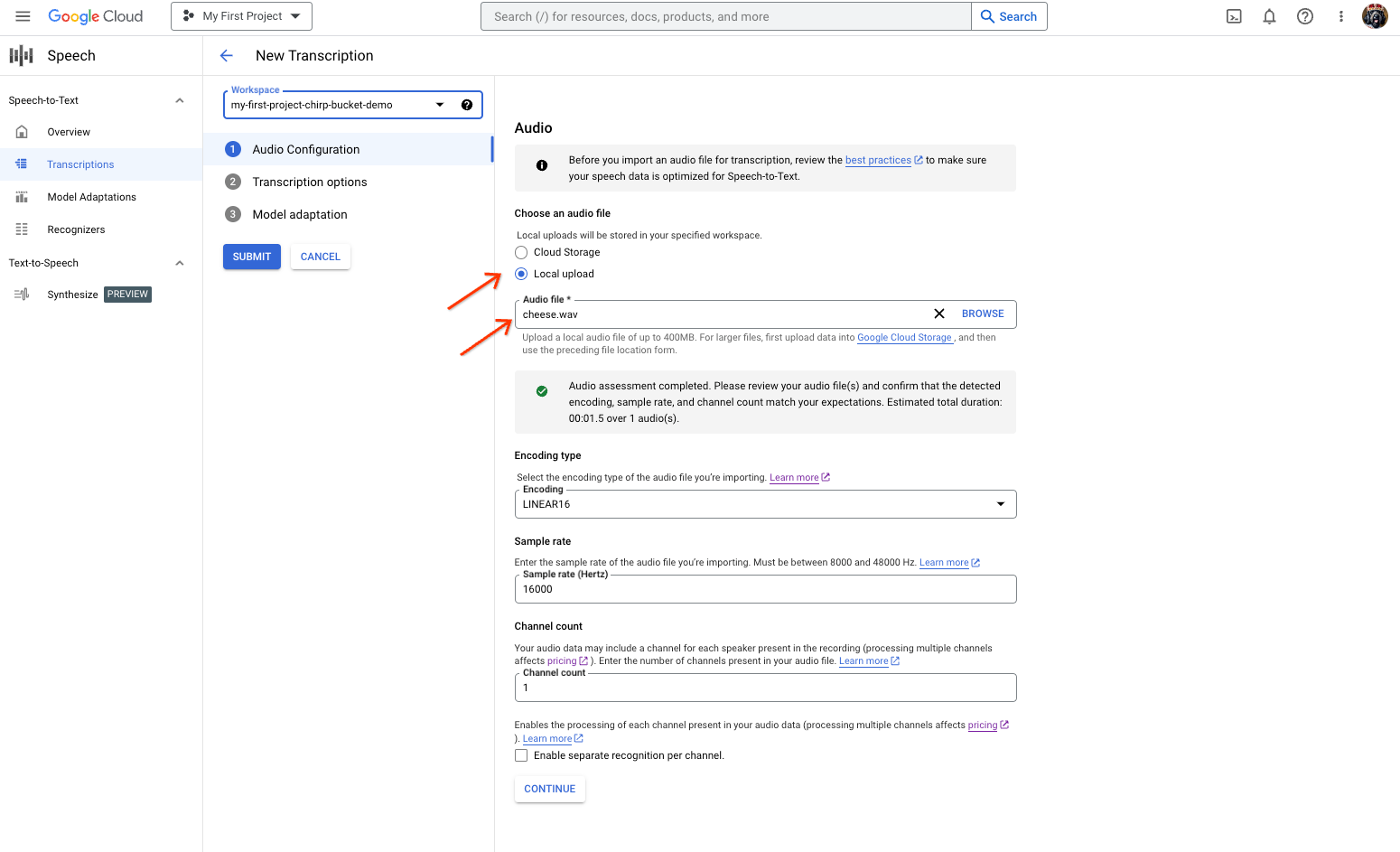
「語音轉文字轉錄稿」建立頁面,顯示檔案選取或上傳選項。 在「New Transcription」(新轉錄內容) 頁面中,選取音訊檔案,方法是上傳檔案 (「Local upload」(本機上傳)) 或指定現有的 Cloud Storage 檔案 (「Cloud storage」(Cloud Storage))。
按一下「繼續」,前往「轉錄選項」。
從先前建立的辨識器中,選取您打算用於 Chirp 辨識的說話語言。
在模型下拉式選單中,選取「chirp_3」chirp_3。
在「辨識器」下拉式選單中,選取新建立的辨識器。
按一下「提交」,使用
chirp_3執行第一個辨識要求。
查看 Chirp 3 語音轉錄結果。
在「轉錄稿」頁面中,按一下轉錄稿名稱即可查看結果。
在「轉錄詳細資料」頁面中查看轉錄結果,並視需要透過瀏覽器播放音訊。