


本節說明如何使用 Apigee Connect,在混合式管理層與執行階段層的 MART 服務之間進行通訊。
簡介
Apigee Connect 可讓 Apigee Hybrid 管理層安全地連線至執行階段層中的 MART 服務,您不必在網際網路上公開 MART 端點。如果您使用 Apigee Connect,則不必使用主機別名和授權 DNS 憑證設定 MART 輸入閘道。
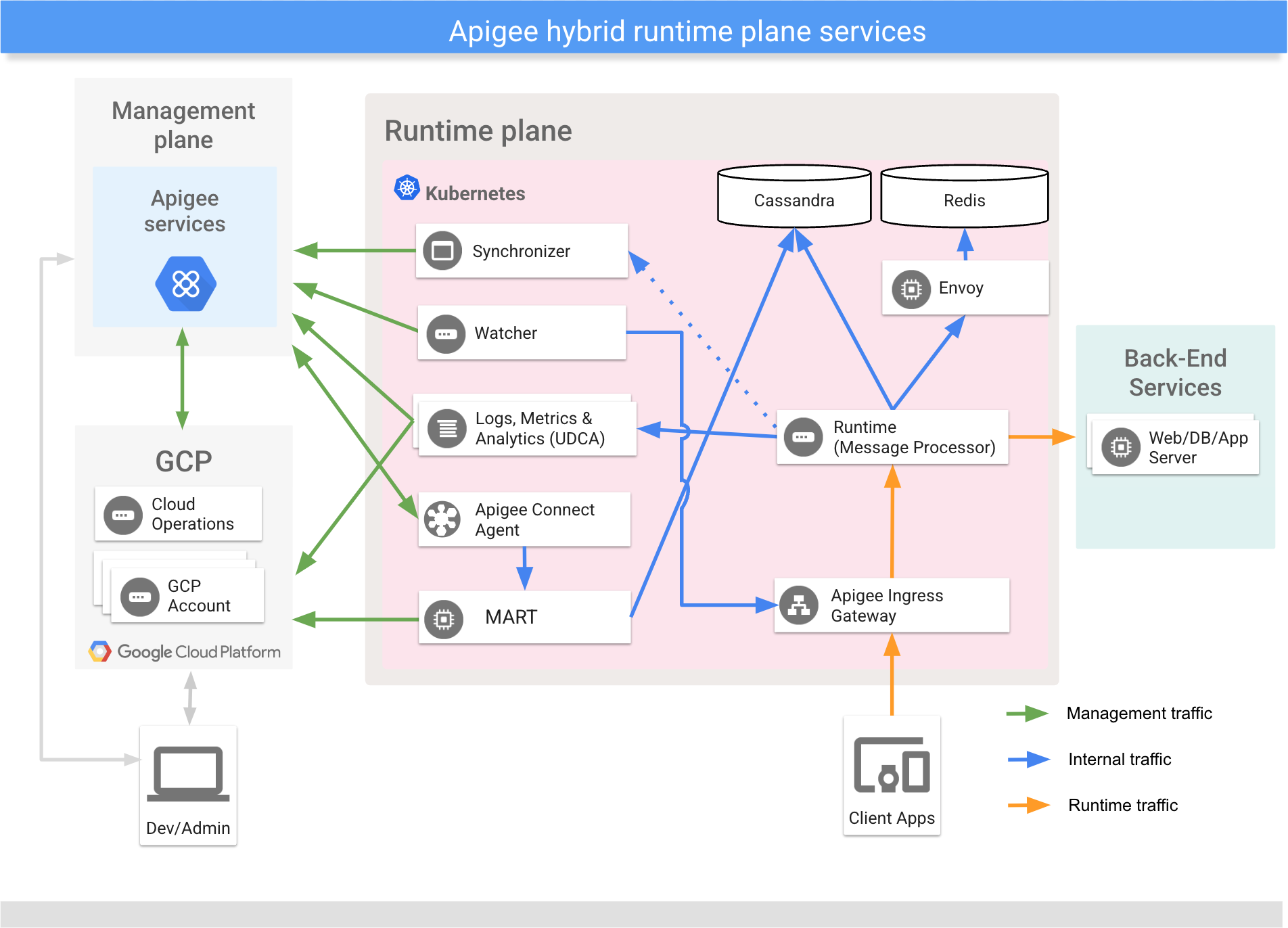
設定 Apigee Connect
使用 connectAgent 設定屬性,在覆寫中設定 Apigee Connect。
服務帳戶
Apigee Connect 會使用 apigee-mart 服務帳戶。這個服務帳戶需要 Apigee Connect 代理 roles/apigeeconnect.Agent 角色。請參閱「混合元件使用的服務帳戶和角色」。
使用 connectAgent.serviceAccountPath 或 connectAgent.serviceAccountRef 設定屬性,指定 apigee-mart 服務帳戶金鑰。或者,您也可以將服務帳戶金鑰儲存在 Hashicorp Vault。
API
Apigee Connect 需要 Google Cloud API 程式庫中的 Apigee Connect API。如要瞭解如何在 Google Cloud 控制台中啟用 API,請參閱「步驟 3:啟用 API」。
正在套用 Apigee Connect 設定
使用下列指令,透過 apigee-org 圖表將變更套用至 Apigee Connect 設定:
helm upgrade ORG_NAME apigee-org/ \
  --namespace apigee \
  --atomic \
  -f OVERRIDES_FILE.yaml
圖片
Apigee Connect 使用 gcr.io/apigee-release/hybrid/apigee-connect-agent:1.15.9 映像檔。如要使用私人映像檔存放區,請參閱「搭配使用私人映像檔存放區與 Apigee hybrid」。
檢查 Apigee Connect 記錄
查看 Apigee Connect 代理記錄。
kubectl logs -n namespace apigee-connect-agent-pod-name
Apigee Connect 代理程式會回報下列記錄類別:
| 稽核記錄類別 | 作業 |
|---|---|
| DATA_READ | ConnectionService.ListConnections |
| DATA_WRITE | Tether.Egress |
您可以使用 connectAgent.logLevel 設定屬性來設定記錄層級。