


訓練及測試專為偵測洗錢活動設計的模型
本快速入門導覽課程會逐步引導您,使用 Anti Money Laundering AI (AML AI) API,端對端實作洗錢偵測模型。在本指南中,您將瞭解如何透過下列步驟訓練及測試模型,偵測洗錢行為:
- 準備 Cloud 環境並建立 AML AI 執行個體。
- 以 BigQuery 表格的形式提供合成交易資料。
- 使用輸入資料訓練及回溯測試模型。
- 註冊參與者並進行模型預測。
建立預測結果後,本指南會分析一個案例,說明某個範例當事人如何透過資金結構化手法洗錢。
事前準備
本節說明如何設定 Google Cloud 帳戶、啟用必要Google Cloud 服務,以及授予必要權限來執行快速入門。
如要使用不屬於您的現有專案,管理員可能需要授予您特定權限,才能存取該專案。詳情請參閱「建立與管理專案」。
- 登入 Google Cloud 帳戶。如果您是 Google Cloud新手,歡迎 建立帳戶,親自體驗產品的實際應用成效。新客戶還能獲得價值 $300 美元的免費抵免額,能用於執行、測試及部署工作負載。
-
安裝 Google Cloud CLI。
-
如果您使用外部識別資訊提供者 (IdP),請先 使用聯合身分登入 gcloud CLI。
-
執行下列指令,初始化 gcloud CLI:
gcloud init -
選取或建立專案所需的角色
- 選取專案:選取專案時,不需要具備特定 IAM 角色,只要您在專案中獲派角色,即可選取該專案。
-
建立專案:如要建立專案,您需要專案建立者角色 (
roles/resourcemanager.projectCreator),其中包含resourcemanager.projects.create權限。瞭解如何授予角色。
-
建立 Google Cloud 專案:
gcloud projects create PROJECT_ID
將
PROJECT_ID替換為要建立的專案名稱。 Google Cloud -
選取您建立的 Google Cloud 專案:
gcloud config set project PROJECT_ID
將
PROJECT_ID替換為 Google Cloud 專案名稱。
啟用必要的 API (如果尚未啟用):
啟用 API 時所需的角色
如要啟用 API,您必須具備
serviceusage.services.enable權限。如果您建立了專案,可能已透過「擁有者」角色 (roles/owner) 取得這項權限。否則,您可以透過「服務使用管理員」角色 (roles/serviceusage.serviceUsageAdmin) 取得這項權限。瞭解如何授予角色。gcloud services enable financialservices.googleapis.com
bigquery.googleapis.com cloudkms.googleapis.com bigquerydatatransfer.googleapis.com -
如果您使用本機殼層,請為使用者帳戶建立本機驗證憑證:
gcloud auth application-default login
如果您使用 Cloud Shell,則不需要執行這項操作。
如果系統傳回驗證錯誤,且您使用外部識別資訊提供者 (IdP),請確認您已 使用聯合身分登入 gcloud CLI。
-
將角色授予使用者帳戶。針對下列每個 IAM 角色,執行一次下列指令:
roles/financialservices.admin, roles/cloudkms.admin, roles/bigquery.admingcloud projects add-iam-policy-binding PROJECT_ID --member="user:USER_IDENTIFIER" --role=ROLE
更改下列內容:
PROJECT_ID:專案 ID。USER_IDENTIFIER:使用者帳戶的 ID。 例如:myemail@example.com。ROLE:授予使用者帳戶的 IAM 角色。
-
安裝 Google Cloud CLI。
-
如果您使用外部識別資訊提供者 (IdP),請先 使用聯合身分登入 gcloud CLI。
-
執行下列指令,初始化 gcloud CLI:
gcloud init -
選取或建立專案所需的角色
- 選取專案:選取專案時,不需要具備特定 IAM 角色,只要您在專案中獲派角色,即可選取該專案。
-
建立專案:如要建立專案,您需要專案建立者角色 (
roles/resourcemanager.projectCreator),其中包含resourcemanager.projects.create權限。瞭解如何授予角色。
-
建立 Google Cloud 專案:
gcloud projects create PROJECT_ID
將
PROJECT_ID替換為要建立的專案名稱。 Google Cloud -
選取您建立的 Google Cloud 專案:
gcloud config set project PROJECT_ID
將
PROJECT_ID替換為 Google Cloud 專案名稱。
啟用必要的 API (如果尚未啟用):
啟用 API 時所需的角色
如要啟用 API,您必須具備
serviceusage.services.enable權限。如果您建立了專案,可能已透過「擁有者」角色 (roles/owner) 取得這項權限。否則,您可以透過「服務使用管理員」角色 (roles/serviceusage.serviceUsageAdmin) 取得這項權限。瞭解如何授予角色。gcloud services enable financialservices.googleapis.com
bigquery.googleapis.com cloudkms.googleapis.com bigquerydatatransfer.googleapis.com -
如果您使用本機殼層,請為使用者帳戶建立本機驗證憑證:
gcloud auth application-default login
如果您使用 Cloud Shell,則不需要執行這項操作。
如果系統傳回驗證錯誤,且您使用外部識別資訊提供者 (IdP),請確認您已 使用聯合身分登入 gcloud CLI。
-
將角色授予使用者帳戶。針對下列每個 IAM 角色,執行一次下列指令:
roles/financialservices.admin, roles/cloudkms.admin, roles/bigquery.admingcloud projects add-iam-policy-binding PROJECT_ID --member="user:USER_IDENTIFIER" --role=ROLE
更改下列內容:
PROJECT_ID:專案 ID。USER_IDENTIFIER:使用者帳戶的 ID。 例如:myemail@example.com。ROLE:授予使用者帳戶的 IAM 角色。
- 本指南中的 API 要求使用相同的 Google Cloud 專案和位置,並採用硬式編碼的資源 ID,方便您完成指南。資源 ID 遵循
my-resource-type 模式 (例如my-key-ring和my-model)。請務必為本指南定義下列取代項目:
PROJECT_ID:您的 Google Cloud 專案 ID,列於「IAM 設定」PROJECT_NUMBER:與PROJECT_ID相關聯的專案編號。您可以在「IAM Settings」(IAM 設定) 頁面中找到專案編號。LOCATION: :API 資源的位置;請使用支援的區域之一。顯示地區us-central1us-east1europe-west2europe-west6
所需權限
如要完成本快速入門導覽課程,您必須具備下列權限:
| 權限 | 說明 |
|---|---|
resourcemanager.projects.get | 取得 Google Cloud 專案 |
resourcemanager.projects.list | 列出 Google Cloud 專案 |
cloudkms.keyRings.create | 建立 Cloud KMS 金鑰環 |
cloudkms.cryptoKeys.create | 建立 Cloud KMS 金鑰 |
financialservices.v1instances.create | 建立 AML AI 執行個體 |
financialservices.operations.get | 取得 AML AI 作業 |
cloudkms.cryptoKeys.getIamPolicy | 取得 Cloud KMS 金鑰的 IAM 政策 |
cloudkms.cryptoKeys.setIamPolicy | 設定 Cloud KMS 金鑰的 IAM 政策 |
bigquery.datasets.create | 建立 BigQuery 資料集 |
bigquery.datasets.get | 取得 BigQuery 資料集 |
bigquery.transfers.get | 取得 BigQuery 資料移轉服務移轉作業 |
bigquery.transfers.update | 建立或刪除 BigQuery 資料移轉服務移轉作業 |
bigquery.datasets.setIamPolicy | 在 BigQuery 資料集上設定 IAM 政策 |
bigquery.datasets.update | 更新 BigQuery 資料集 |
financialservices.v1datasets.create | 建立 AML AI 資料集 |
financialservices.v1engineconfigs.create | 建立 AML AI 引擎設定 |
financialservices.v1models.copyFrom | 從 AML AI 模型複製 |
financialservices.v1models.copyTo | 複製到 AML AI 執行個體 |
financialservices.v1models.create | 建立 AML AI 模型 |
financialservices.v1backtests.create | 建立 AML AI 回溯測試結果 |
financialservices.v1backtests.exportMetadata | 從 AML AI 回溯測試結果匯出中繼資料 |
financialservices.v1instances.importRegisteredParties | 將已註冊的當事人匯入 AML AI 執行個體 |
financialservices.v1predictions.create | 建立 AML AI 預測結果 |
bigquery.jobs.create | 建立 BigQuery 工作 |
bigquery.tables.getData | 從 BigQuery 資料表取得資料 |
financialservices.v1predictions.delete | 刪除 AML AI 預測結果 |
financialservices.v1backtests.delete | 刪除 AML AI 回溯測試結果 |
financialservices.v1models.delete | 刪除 AML AI 模型 |
financialservices.v1engineconfigs.delete | 刪除 AML AI 引擎設定 |
financialservices.v1datasets.delete | 刪除 AML AI 資料集 |
financialservices.v1instances.delete | 刪除 AML AI 執行個體 |
bigquery.datasets.delete | 刪除 BigQuery 資料集 |
建立執行個體
本節說明如何建立執行個體。AML AI 執行個體位於所有其他 AML AI 資源的根層級。每個執行個體都需要一個相關聯的客戶自行管理的加密金鑰 (CMEK),用於加密 AML AI 建立的任何資料。
建立金鑰環
如要建立金鑰環,請使用 projects.locations.keyRings.create 方法。
REST
如要傳送要求,請選擇以下其中一個選項:
curl
執行下列指令:
curl -X POST \
     -H "Authorization: Bearer $(gcloud auth print-access-token)" \
     -H "Content-Type: application/json; charset=utf-8" \
     -d "" \
     "https://cloudkms.googleapis.com/v1/projects/PROJECT_ID/locations/LOCATION/keyRings?key_ring_id=my-key-ring"
PowerShell
執行下列指令:
$cred = gcloud auth print-access-token
$headers = @{ "Authorization" = "Bearer $cred" }

Invoke-WebRequest `
    -Method POST `
    -Headers $headers `
    -Uri "https://cloudkms.googleapis.com/v1/projects/PROJECT_ID/locations/LOCATION/keyRings?key_ring_id=my-key-ring" | Select-Object -Expand Content
您應該會收到如下的 JSON 回覆:
{
  "name": "projects/PROJECT_ID/locations/LOCATION/keyRings/my-key-ring",
  "createTime": CREATE_TIME
}
gcloud
執行下列指令:
Linux、macOS 或 Cloud Shell
gcloud kms keyrings create my-key-ring \
  --location LOCATION
Windows (PowerShell)
gcloud kms keyrings create my-key-ring `
  --location LOCATION
Windows (cmd.exe)
gcloud kms keyrings create my-key-ring ^
  --location LOCATION
$
建立金鑰
如要建立金鑰,請使用 projects.locations.keyRings.cryptoKeys 方法。
REST
JSON 要求內文:
{
  "purpose": "ENCRYPT_DECRYPT"
}
如要傳送要求,請選擇以下其中一個選項:
curl
將要求主體儲存在名為 request.json 的檔案中。
在終端機中執行下列指令,在目前目錄中建立或覆寫這個檔案:
cat > request.json << 'EOF'
{
  "purpose": "ENCRYPT_DECRYPT"
}
EOF
然後執行下列指令,傳送 REST 要求:
curl -X POST \
     -H "Authorization: Bearer $(gcloud auth print-access-token)" \
     -H "Content-Type: application/json; charset=utf-8" \
     -d @request.json \
     "https://cloudkms.googleapis.com/v1/projects/PROJECT_ID/locations/LOCATION/keyRings/my-key-ring/cryptoKeys?crypto_key_id=my-key"
PowerShell
將要求主體儲存在名為 request.json 的檔案中。
在終端機中執行下列指令,在目前目錄中建立或覆寫這個檔案:
@'
{
  "purpose": "ENCRYPT_DECRYPT"
}
'@  | Out-File -FilePath request.json -Encoding utf8
然後執行下列指令,傳送 REST 要求:
$cred = gcloud auth print-access-token
$headers = @{ "Authorization" = "Bearer $cred" }

Invoke-WebRequest `
    -Method POST `
    -Headers $headers `
    -ContentType: "application/json; charset=utf-8" `
    -InFile request.json `
    -Uri "https://cloudkms.googleapis.com/v1/projects/PROJECT_ID/locations/LOCATION/keyRings/my-key-ring/cryptoKeys?crypto_key_id=my-key" | Select-Object -Expand Content
您應該會收到如下的 JSON 回覆:
{
  "name": "projects/PROJECT_ID/locations/LOCATION/keyRings/my-key-ring/cryptoKeys/my-key",
  "primary": {
    "name": "projects/PROJECT_ID/locations/LOCATION/keyRings/my-key-ring/cryptoKeys/my-key/cryptoKeyVersions/1",
    "state": "ENABLED",
    "createTime": CREATE_TIME,
    "protectionLevel": "SOFTWARE",
    "algorithm": "GOOGLE_SYMMETRIC_ENCRYPTION",
    "generateTime": GENERATE_TIME
  },
  "purpose": "ENCRYPT_DECRYPT",
  "createTime": CREATE_TIME,
  "versionTemplate": {
    "protectionLevel": "SOFTWARE",
    "algorithm": "GOOGLE_SYMMETRIC_ENCRYPTION"
  },
  "destroyScheduledDuration": "86400s"
}
gcloud
使用下列任何指令資料之前,請先替換以下項目:
LOCATION:金鑰環的位置;請使用其中一個支援的地區。顯示地區us-central1us-east1europe-west2europe-west6
執行下列指令:
Linux、macOS 或 Cloud Shell
gcloud kms keys create my-key \
  --keyring my-key-ring \
  --location LOCATION \
  --purpose "encryption"
Windows (PowerShell)
gcloud kms keys create my-key `
  --keyring my-key-ring `
  --location LOCATION `
  --purpose "encryption"
Windows (cmd.exe)
gcloud kms keys create my-key ^
  --keyring my-key-ring ^
  --location LOCATION ^
  --purpose "encryption"
$
使用 API 建立執行個體
如要建立執行個體,請使用 projects.locations.instances.create 方法。
JSON 要求內文:
{
  "kmsKey": "projects/PROJECT_ID/locations/LOCATION/keyRings/my-key-ring/cryptoKeys/my-key"
}
如要傳送要求,請選擇以下其中一個選項:
curl
將要求主體儲存在名為 request.json 的檔案中。
在終端機中執行下列指令,在目前目錄中建立或覆寫這個檔案:
cat > request.json << 'EOF'
{
  "kmsKey": "projects/PROJECT_ID/locations/LOCATION/keyRings/my-key-ring/cryptoKeys/my-key"
}
EOF
然後執行下列指令,傳送 REST 要求:
curl -X POST \
     -H "Authorization: Bearer $(gcloud auth print-access-token)" \
     -H "Content-Type: application/json; charset=utf-8" \
     -d @request.json \
     "https://financialservices.googleapis.com/v1/projects/PROJECT_ID/locations/LOCATION/instances?instance_id=my-instance"
PowerShell
將要求主體儲存在名為 request.json 的檔案中。
在終端機中執行下列指令,在目前目錄中建立或覆寫這個檔案:
@'
{
  "kmsKey": "projects/PROJECT_ID/locations/LOCATION/keyRings/my-key-ring/cryptoKeys/my-key"
}
'@  | Out-File -FilePath request.json -Encoding utf8
然後執行下列指令,傳送 REST 要求:
$cred = gcloud auth print-access-token
$headers = @{ "Authorization" = "Bearer $cred" }

Invoke-WebRequest `
    -Method POST `
    -Headers $headers `
    -ContentType: "application/json; charset=utf-8" `
    -InFile request.json `
    -Uri "https://financialservices.googleapis.com/v1/projects/PROJECT_ID/locations/LOCATION/instances?instance_id=my-instance" | Select-Object -Expand Content
您應該會收到如下的 JSON 回覆:
{
  "name": "projects/PROJECT_ID/locations/LOCATION/operations/OPERATION_ID",
  "metadata": {
    "@type": "type.googleapis.com/google.cloud.financialservices.v1.OperationMetadata",
    "createTime": CREATE_TIME,
    "target": "projects/PROJECT_ID/locations/LOCATION/instances/my-instance",
    "verb": "create",
    "requestedCancellation": false,
    "apiVersion": "v1"
  },
  "done": false
}
如果成功,回應主體會包含長時間執行的作業,其中包含可用於擷取非同步作業目前狀態的 ID。複製傳回的 OPERATION_ID,以便在下一節中使用。
查看結果
使用 projects.locations.operations.get 方法檢查執行個體是否已建立。如果回應包含 "done": false,請重複執行指令,直到回應包含 "done": true 為止。
本指南中的作業可能需要幾分鐘到數小時才能完成。 您必須等待作業完成,才能繼續進行本指南的後續步驟,因為 API 會將某些方法的輸出內容做為其他方法的輸入內容。
使用任何要求資料之前,請先修改下列項目的值:
OPERATION_ID:作業的 ID
如要傳送要求,請選擇以下其中一個選項:
curl
執行下列指令:
curl -X GET \
     -H "Authorization: Bearer $(gcloud auth print-access-token)" \
     "https://financialservices.googleapis.com/v1/projects/PROJECT_ID/locations/LOCATION/operations/OPERATION_ID"
PowerShell
執行下列指令:
$cred = gcloud auth print-access-token
$headers = @{ "Authorization" = "Bearer $cred" }

Invoke-WebRequest `
    -Method GET `
    -Headers $headers `
    -Uri "https://financialservices.googleapis.com/v1/projects/PROJECT_ID/locations/LOCATION/operations/OPERATION_ID" | Select-Object -Expand Content
您應該會收到如下的 JSON 回覆:
{
  "name": "projects/PROJECT_ID/locations/LOCATION/operations/OPERATION_ID",
  "metadata": {
    "@type": "type.googleapis.com/google.cloud.financialservices.v1.OperationMetadata",
    "createTime": CREATE_TIME,
    "endTime": END_TIME,
    "target": "projects/PROJECT_ID/locations/LOCATION/instances/my-instance",
    "verb": "create",
    "requestedCancellation": false,
    "apiVersion": "v1"
  },
  "done": true,
  "response": {
    "@type": "type.googleapis.com/google.cloud.financialservices.v1.Instance",
    "name": "projects/PROJECT_ID/locations/LOCATION/instances/my-instance",
    "createTime": CREATE_TIME,
    "updateTime": UPDATE_TIME,
    "kmsKey": "projects/KMS_PROJECT_ID/locations/LOCATION/keyRings/my-key-ring/cryptoKeys/my-key",
    "state": "ACTIVE"
  }
}
授予 CMEK 金鑰存取權
API 會在專案中自動建立服務帳戶。服務帳戶必須有權存取 CMEK 金鑰,才能使用該金鑰加密及解密基礎資料。授予金鑰存取權。
gcloud kms keys add-iam-policy-binding "projects/PROJECT_ID/locations/LOCATION/keyRings/my-key-ring/cryptoKeys/my-key" \
  --keyring "projects/PROJECT_ID/locations/LOCATION/keyRings/my-key-ring" \
  --location "LOCATION" \
  --member "serviceAccount:service-PROJECT_NUMBER@gcp-sa-financialservices.iam.gserviceaccount.com" \
  --role="roles/cloudkms.cryptoKeyEncrypterDecrypter" \
  --project="PROJECT_ID"
建立 BigQuery 資料集
本節說明如何建立輸入和輸出 BigQuery 資料集,然後將銀行範例資料複製到輸入資料集。
建立輸出資料集
建立資料集,用於將 AML 管道輸出內容傳送至該資料集。
Bash
bq mk \
  --location=LOCATION \
  --project_id=PROJECT_ID \
  my_bq_output_dataset
PowerShell
bq mk `
  --location=LOCATION `
  --project_id=PROJECT_ID `
  my_bq_output_dataset
建立輸入資料集
建立資料集,將銀行範例資料表複製到其中。
Bash
bq mk \
  --location=LOCATION \
  --project_id=PROJECT_ID \
  my_bq_input_dataset
PowerShell
bq mk `
  --location=LOCATION `
  --project_id=PROJECT_ID `
  my_bq_input_dataset
複製範例資料集
我們在 Google 的共用資料集專案中,以 BigQuery 資料集的形式提供銀行範例資料。您必須有 AML AI API 的存取權,才能存取這個資料集。這個資料集的主要功能包括:
- 100,000 個派對
- 2020 年 1 月 1 日至 2023 年 1 月 1 日的時間範圍
- 每月 300 個負面風險案例和 20 個正面風險案例
- 具有下列屬性的風險案件:
- 正向風險案例中,有一半是發生在
AML_PROCESS_START事件前兩個月的結構性活動 - 另一半則涵蓋
AML_PROCESS_START活動前兩個月內,收到最多款項的派對 - 系統會隨機產生負面案例
- 風險案例有 0.1% 的機率會以相反狀態產生 (例如隨機一方為陽性,或一方有結構性活動或最高收入,但回報為陰性)
- 正向風險案例中,有一半是發生在
- AML 結構定義在 AML 輸入資料模型中定義。
將範例銀行資料複製到您建立的輸入資料集。
Bash
bq mk --transfer_config \
  --project_id=PROJECT_ID \
  --data_source=cross_region_copy \
  --target_dataset="my_bq_input_dataset" \
  --display_name="Copy the AML sample dataset." \
  --schedule=None \
  --params='{
    "source_project_id":"bigquery-public-data",
    "source_dataset_id":"aml_ai_input_dataset",
    "overwrite_destination_table":"true"
  }'
PowerShell
bq mk --transfer_config `
--project_id=PROJECT_ID `
--data_source=cross_region_copy `
--target_dataset="my_bq_input_dataset" `
--display_name="Copy the AML sample dataset." `
--schedule=None `
--params='{\"source_project_id\":\"bigquery-public-data\",\"source_dataset_id\":\"aml_ai_input_dataset\",\"overwrite_destination_table\":\"true\"}'
監控資料移轉工作。
Bash
bq ls --transfer_config \
--transfer_location=LOCATION \
--project_id=PROJECT_ID \
--filter="dataSourceIds:cross_region_copy"
PowerShell
bq ls --transfer_config `
--transfer_location=LOCATION `
--project_id=PROJECT_ID `
--filter="dataSourceIds:cross_region_copy"
轉移完成後,系統會建立顯示名稱為
Copy the AML sample dataset的資料移轉工作。您也可以使用 Google Cloud 控制台,查看轉移狀態。
您看到的輸出內容應如下所示。
                     name                           displayName         dataSourceId       state
-------------------------------------------  -----------------------  -----------------  ---------
projects/294024168771/locations/us-central1  Copy AML sample dataset  cross_region_copy  SUCCEEDED
授予 BigQuery 資料集存取權
API 會在專案中自動建立服務帳戶。服務帳戶必須有權存取 BigQuery 輸入和輸出資料集。
授予輸入資料集及其資料表的讀取權限。
Bash
bq query --project_id=PROJECT_ID --use_legacy_sql=false \
  'GRANT `roles/bigquery.dataViewer` ON SCHEMA `PROJECT_ID.my_bq_input_dataset` TO "serviceAccount:service-PROJECT_NUMBER@gcp-sa-financialservices.iam.gserviceaccount.com"'
PowerShell
bq query --project_id=PROJECT_ID --use_legacy_sql=false "GRANT ``roles/bigquery.dataViewer`` ON SCHEMA ``PROJECT_ID.my_bq_input_dataset`` TO 'serviceAccount:service-PROJECT_NUMBER@gcp-sa-financialservices.iam.gserviceaccount.com'"授予輸出資料集的寫入權限。
Bash
bq query --project_id=PROJECT_ID --use_legacy_sql=false \
  'GRANT `roles/bigquery.dataEditor` ON SCHEMA `PROJECT_ID.my_bq_output_dataset` TO "serviceAccount:service-PROJECT_NUMBER@gcp-sa-financialservices.iam.gserviceaccount.com"'
PowerShell
bq query --project_id=PROJECT_ID --use_legacy_sql=false "GRANT ``roles/bigquery.dataEditor`` ON SCHEMA ``PROJECT_ID.my_bq_output_dataset`` TO 'serviceAccount:service-PROJECT_NUMBER@gcp-sa-financialservices.iam.gserviceaccount.com'"
建立 AML AI 資料集
建立 AML AI 資料集,指定要使用的輸入 BigQuery 資料集資料表和日期範圍。
如要建立資料集,請使用 projects.locations.instances.datasets.create 方法。
JSON 要求內文:
{
  "tableSpecs": {
    "party": "bq://PROJECT_ID.my_bq_input_dataset.party",
    "account_party_link": "bq://PROJECT_ID.my_bq_input_dataset.account_party_link",
    "transaction": "bq://PROJECT_ID.my_bq_input_dataset.transaction",
    "risk_case_event": "bq://PROJECT_ID.my_bq_input_dataset.risk_case_event",
    "party_supplementary_data": "bq://PROJECT_ID.my_bq_input_dataset.party_supplementary_data"
  },
  "dateRange": {
    "startTime": "2020-01-01T00:00:0.00Z",
    "endTime": "2023-01-01T00:00:0.00Z"
  },
  "timeZone": {
    "id": "UTC"
  }
}
如要傳送要求,請選擇以下其中一個選項:
curl
將要求主體儲存在名為 request.json 的檔案中。
在終端機中執行下列指令,在目前目錄中建立或覆寫這個檔案:
cat > request.json << 'EOF'
{
  "tableSpecs": {
    "party": "bq://PROJECT_ID.my_bq_input_dataset.party",
    "account_party_link": "bq://PROJECT_ID.my_bq_input_dataset.account_party_link",
    "transaction": "bq://PROJECT_ID.my_bq_input_dataset.transaction",
    "risk_case_event": "bq://PROJECT_ID.my_bq_input_dataset.risk_case_event",
    "party_supplementary_data": "bq://PROJECT_ID.my_bq_input_dataset.party_supplementary_data"
  },
  "dateRange": {
    "startTime": "2020-01-01T00:00:0.00Z",
    "endTime": "2023-01-01T00:00:0.00Z"
  },
  "timeZone": {
    "id": "UTC"
  }
}
EOF
然後執行下列指令,傳送 REST 要求:
curl -X POST \
     -H "Authorization: Bearer $(gcloud auth print-access-token)" \
     -H "Content-Type: application/json; charset=utf-8" \
     -d @request.json \
     "https://financialservices.googleapis.com/v1/projects/PROJECT_ID/locations/LOCATION/instances/my-instance/datasets?dataset_id=my-dataset"
PowerShell
將要求主體儲存在名為 request.json 的檔案中。
在終端機中執行下列指令,在目前目錄中建立或覆寫這個檔案:
@'
{
  "tableSpecs": {
    "party": "bq://PROJECT_ID.my_bq_input_dataset.party",
    "account_party_link": "bq://PROJECT_ID.my_bq_input_dataset.account_party_link",
    "transaction": "bq://PROJECT_ID.my_bq_input_dataset.transaction",
    "risk_case_event": "bq://PROJECT_ID.my_bq_input_dataset.risk_case_event",
    "party_supplementary_data": "bq://PROJECT_ID.my_bq_input_dataset.party_supplementary_data"
  },
  "dateRange": {
    "startTime": "2020-01-01T00:00:0.00Z",
    "endTime": "2023-01-01T00:00:0.00Z"
  },
  "timeZone": {
    "id": "UTC"
  }
}
'@  | Out-File -FilePath request.json -Encoding utf8
然後執行下列指令,傳送 REST 要求:
$cred = gcloud auth print-access-token
$headers = @{ "Authorization" = "Bearer $cred" }

Invoke-WebRequest `
    -Method POST `
    -Headers $headers `
    -ContentType: "application/json; charset=utf-8" `
    -InFile request.json `
    -Uri "https://financialservices.googleapis.com/v1/projects/PROJECT_ID/locations/LOCATION/instances/my-instance/datasets?dataset_id=my-dataset" | Select-Object -Expand Content
您應該會收到如下的 JSON 回覆:
{
  "name": "projects/PROJECT_ID/locations/LOCATION/operations/OPERATION_ID",
  "metadata": {
    "@type": "type.googleapis.com/google.cloud.financialservices.v1.OperationMetadata",
    "createTime": CREATE_TIME,
    "target": "projects/PROJECT_ID/locations/LOCATION/instances/my-instance/datasets/my-dataset",
    "verb": "create",
    "requestedCancellation": false,
    "apiVersion": "v1"
  },
  "done": false
}
您可以使用新的作業 ID 檢查作業結果。(您可以對本指南中使用的其餘 API 要求執行這項操作)。
建立引擎設定
建立 AML AI 引擎設定,根據指定的引擎版本和提供的資料,自動調整超參數。引擎版本會定期發布,並對應不同的模型邏輯 (例如,以零售業務範圍為目標,而非商業業務範圍)。
如要建立引擎設定,請使用 projects.locations.instances.engineConfigs.create 方法。
這個階段會進行超參數調整,因此可能需要一些時間才能完成。 如果資料沒有大幅變動,這個步驟可用於建立及測試多個模型。
JSON 要求內文:
{
  "engineVersion": "projects/PROJECT_ID/locations/LOCATION/instances/my-instance/engineVersions/aml-commercial.default.v004.008.202411-001",
  "tuning": {
    "primaryDataset": "projects/PROJECT_ID/locations/LOCATION/instances/my-instance/datasets/my-dataset",
    "endTime": "2021-07-01T00:00:00Z"
  },
  "performanceTarget": {
    "partyInvestigationsPerPeriodHint": "30"
  }
}
如要傳送要求,請選擇以下其中一個選項:
curl
將要求主體儲存在名為 request.json 的檔案中。
在終端機中執行下列指令,在目前目錄中建立或覆寫這個檔案:
cat > request.json << 'EOF'
{
  "engineVersion": "projects/PROJECT_ID/locations/LOCATION/instances/my-instance/engineVersions/aml-commercial.default.v004.008.202411-001",
  "tuning": {
    "primaryDataset": "projects/PROJECT_ID/locations/LOCATION/instances/my-instance/datasets/my-dataset",
    "endTime": "2021-07-01T00:00:00Z"
  },
  "performanceTarget": {
    "partyInvestigationsPerPeriodHint": "30"
  }
}
EOF
然後執行下列指令,傳送 REST 要求:
curl -X POST \
     -H "Authorization: Bearer $(gcloud auth print-access-token)" \
     -H "Content-Type: application/json; charset=utf-8" \
     -d @request.json \
     "https://financialservices.googleapis.com/v1/projects/PROJECT_ID/locations/LOCATION/instances/my-instance/engineConfigs?engine_config_id=my-engine-config"
PowerShell
將要求主體儲存在名為 request.json 的檔案中。
在終端機中執行下列指令,在目前目錄中建立或覆寫這個檔案:
@'
{
  "engineVersion": "projects/PROJECT_ID/locations/LOCATION/instances/my-instance/engineVersions/aml-commercial.default.v004.008.202411-001",
  "tuning": {
    "primaryDataset": "projects/PROJECT_ID/locations/LOCATION/instances/my-instance/datasets/my-dataset",
    "endTime": "2021-07-01T00:00:00Z"
  },
  "performanceTarget": {
    "partyInvestigationsPerPeriodHint": "30"
  }
}
'@  | Out-File -FilePath request.json -Encoding utf8
然後執行下列指令,傳送 REST 要求:
$cred = gcloud auth print-access-token
$headers = @{ "Authorization" = "Bearer $cred" }

Invoke-WebRequest `
    -Method POST `
    -Headers $headers `
    -ContentType: "application/json; charset=utf-8" `
    -InFile request.json `
    -Uri "https://financialservices.googleapis.com/v1/projects/PROJECT_ID/locations/LOCATION/instances/my-instance/engineConfigs?engine_config_id=my-engine-config" | Select-Object -Expand Content
您應該會收到如下的 JSON 回覆:
{
  "name": "projects/PROJECT_ID/locations/LOCATION/operations/OPERATION_ID",
  "metadata": {
    "@type": "type.googleapis.com/google.cloud.financialservices.v1.OperationMetadata",
    "createTime": CREATE_TIME,
    "target": "projects/PROJECT_ID/locations/LOCATION/instances/my-instance/engineConfigs/my-engine-config",
    "verb": "create",
    "requestedCancellation": false,
    "apiVersion": "v1"
  },
  "done": false
}
建立模型
在這個步驟中,您會使用 2021 年 7 月 1 日前 12 個月的資料,訓練 AML AI 模型。
如要建立模型,請使用 projects.locations.instances.models.create 方法。
JSON 要求內文:
{
    "engineConfig": "projects/PROJECT_ID/locations/LOCATION/instances/my-instance/engineConfigs/my-engine-config",
    "primaryDataset": "projects/PROJECT_ID/locations/LOCATION/instances/my-instance/datasets/my-dataset",
    "endTime": "2021-07-01T00:00:00Z"
}
如要傳送要求,請選擇以下其中一個選項:
curl
將要求主體儲存在名為 request.json 的檔案中。
在終端機中執行下列指令,在目前目錄中建立或覆寫這個檔案:
cat > request.json << 'EOF'
{
    "engineConfig": "projects/PROJECT_ID/locations/LOCATION/instances/my-instance/engineConfigs/my-engine-config",
    "primaryDataset": "projects/PROJECT_ID/locations/LOCATION/instances/my-instance/datasets/my-dataset",
    "endTime": "2021-07-01T00:00:00Z"
}
EOF
然後執行下列指令,傳送 REST 要求:
curl -X POST \
     -H "Authorization: Bearer $(gcloud auth print-access-token)" \
     -H "Content-Type: application/json; charset=utf-8" \
     -d @request.json \
     "https://financialservices.googleapis.com/v1/projects/PROJECT_ID/locations/LOCATION/instances/my-instance/models?model_id=my-model"
PowerShell
將要求主體儲存在名為 request.json 的檔案中。
在終端機中執行下列指令,在目前目錄中建立或覆寫這個檔案:
@'
{
    "engineConfig": "projects/PROJECT_ID/locations/LOCATION/instances/my-instance/engineConfigs/my-engine-config",
    "primaryDataset": "projects/PROJECT_ID/locations/LOCATION/instances/my-instance/datasets/my-dataset",
    "endTime": "2021-07-01T00:00:00Z"
}
'@  | Out-File -FilePath request.json -Encoding utf8
然後執行下列指令,傳送 REST 要求:
$cred = gcloud auth print-access-token
$headers = @{ "Authorization" = "Bearer $cred" }

Invoke-WebRequest `
    -Method POST `
    -Headers $headers `
    -ContentType: "application/json; charset=utf-8" `
    -InFile request.json `
    -Uri "https://financialservices.googleapis.com/v1/projects/PROJECT_ID/locations/LOCATION/instances/my-instance/models?model_id=my-model" | Select-Object -Expand Content
您應該會收到如下的 JSON 回覆:
{
  "name": "projects/PROJECT_ID/locations/LOCATION/operations/OPERATION_ID",
  "metadata": {
    "@type": "type.googleapis.com/google.cloud.financialservices.v1.OperationMetadata",
    "createTime": CREATE_TIME,
    "target": "projects/PROJECT_ID/locations/LOCATION/instances/my-instance/models/my-model",
    "verb": "create",
    "requestedCancellation": false,
    "apiVersion": "v1"
  },
  "done": false
}
建立回測結果
回溯測試預測會使用現有歷來資料訓練模型。根據 2023 年 1 月前 12 個月的資料建立回溯測試結果,這些資料未用於訓練。這些月份用於判斷,如果我們在 2022 年 1 月至 12 月期間,使用在 2021 年 7 月訓練的模型進行生產,可能需要處理多少案件。
如要建立回測結果,請使用 projects.locations.instances.backtestResults.create 方法。
JSON 要求內文:
{
    "model": "projects/PROJECT_ID/locations/LOCATION/instances/my-instance/models/my-model",
    "dataset": "projects/PROJECT_ID/locations/LOCATION/instances/my-instance/datasets/my-dataset",
    "endTime": "2023-01-01T00:00:00Z",
    "backtestPeriods": 12,
    "performanceTarget": {
      "partyInvestigationsPerPeriodHint": "150"
    }
}
如要傳送要求,請選擇以下其中一個選項:
curl
將要求主體儲存在名為 request.json 的檔案中。
在終端機中執行下列指令,在目前目錄中建立或覆寫這個檔案:
cat > request.json << 'EOF'
{
    "model": "projects/PROJECT_ID/locations/LOCATION/instances/my-instance/models/my-model",
    "dataset": "projects/PROJECT_ID/locations/LOCATION/instances/my-instance/datasets/my-dataset",
    "endTime": "2023-01-01T00:00:00Z",
    "backtestPeriods": 12,
    "performanceTarget": {
      "partyInvestigationsPerPeriodHint": "150"
    }
}
EOF
然後執行下列指令,傳送 REST 要求:
curl -X POST \
     -H "Authorization: Bearer $(gcloud auth print-access-token)" \
     -H "Content-Type: application/json; charset=utf-8" \
     -d @request.json \
     "https://financialservices.googleapis.com/v1/projects/PROJECT_ID/locations/LOCATION/instances/my-instance/backtestResults?backtest_result_id=my-backtest-results"
PowerShell
將要求主體儲存在名為 request.json 的檔案中。
在終端機中執行下列指令,在目前目錄中建立或覆寫這個檔案:
@'
{
    "model": "projects/PROJECT_ID/locations/LOCATION/instances/my-instance/models/my-model",
    "dataset": "projects/PROJECT_ID/locations/LOCATION/instances/my-instance/datasets/my-dataset",
    "endTime": "2023-01-01T00:00:00Z",
    "backtestPeriods": 12,
    "performanceTarget": {
      "partyInvestigationsPerPeriodHint": "150"
    }
}
'@  | Out-File -FilePath request.json -Encoding utf8
然後執行下列指令,傳送 REST 要求:
$cred = gcloud auth print-access-token
$headers = @{ "Authorization" = "Bearer $cred" }

Invoke-WebRequest `
    -Method POST `
    -Headers $headers `
    -ContentType: "application/json; charset=utf-8" `
    -InFile request.json `
    -Uri "https://financialservices.googleapis.com/v1/projects/PROJECT_ID/locations/LOCATION/instances/my-instance/backtestResults?backtest_result_id=my-backtest-results" | Select-Object -Expand Content
您應該會收到如下的 JSON 回覆:
{
  "name": "projects/PROJECT_ID/locations/LOCATION/operations/OPERATION_ID",
  "metadata": {
    "@type": "type.googleapis.com/google.cloud.financialservices.v1.OperationMetadata",
    "createTime": CREATE_TIME,
    "target": "projects/PROJECT_ID/locations/LOCATION/instances/my-instance/backtestResults/my-backtest-results",
    "verb": "create",
    "requestedCancellation": false,
    "apiVersion": "v1"
  },
  "done": false
}
匯出回測結果中繼資料
回溯測試執行完畢後,您必須將結果匯出至 BigQuery 才能查看。如要從回溯測試結果匯出中繼資料,請使用 projects.locations.instances.backtestResults.exportMetadata 方法。
JSON 要求內文:
{
  "structuredMetadataDestination": {
    "tableUri": "bq://PROJECT_ID.my_bq_output_dataset.my_backtest_results_metadata",
    "writeDisposition": "WRITE_TRUNCATE"
  }
}
如要傳送要求,請選擇以下其中一個選項:
curl
將要求主體儲存在名為 request.json 的檔案中。
在終端機中執行下列指令,在目前目錄中建立或覆寫這個檔案:
cat > request.json << 'EOF'
{
  "structuredMetadataDestination": {
    "tableUri": "bq://PROJECT_ID.my_bq_output_dataset.my_backtest_results_metadata",
    "writeDisposition": "WRITE_TRUNCATE"
  }
}
EOF
然後執行下列指令,傳送 REST 要求:
curl -X POST \
     -H "Authorization: Bearer $(gcloud auth print-access-token)" \
     -H "Content-Type: application/json; charset=utf-8" \
     -d @request.json \
     "https://financialservices.googleapis.com/v1/projects/PROJECT_ID/locations/LOCATION/instances/my-instance/backtestResults/my-backtest-results:exportMetadata"
PowerShell
將要求主體儲存在名為 request.json 的檔案中。
在終端機中執行下列指令,在目前目錄中建立或覆寫這個檔案:
@'
{
  "structuredMetadataDestination": {
    "tableUri": "bq://PROJECT_ID.my_bq_output_dataset.my_backtest_results_metadata",
    "writeDisposition": "WRITE_TRUNCATE"
  }
}
'@  | Out-File -FilePath request.json -Encoding utf8
然後執行下列指令,傳送 REST 要求:
$cred = gcloud auth print-access-token
$headers = @{ "Authorization" = "Bearer $cred" }

Invoke-WebRequest `
    -Method POST `
    -Headers $headers `
    -ContentType: "application/json; charset=utf-8" `
    -InFile request.json `
    -Uri "https://financialservices.googleapis.com/v1/projects/PROJECT_ID/locations/LOCATION/instances/my-instance/backtestResults/my-backtest-results:exportMetadata" | Select-Object -Expand Content
您應該會收到如下的 JSON 回覆:
{
  "name": "projects/PROJECT_ID/locations/LOCATION/operations/OPERATION_ID",
  "metadata": {
    "@type": "type.googleapis.com/google.cloud.financialservices.v1.OperationMetadata",
    "createTime": CREATE_TIME,
    "target": "projects/PROJECT_ID/locations/LOCATION/instances/my-instance/backtestResults/my-backtest-results",
    "verb": "exportMetadata",
    "requestedCancellation": false,
    "apiVersion": "v1"
  },
  "done": false
}
作業完成後,請執行下列操作:
在 Google Cloud 控制台中開啟 BigQuery。
在「Explorer」窗格中,找出並展開專案。
展開「my_bq_output_dataset」,然後點選「my_backtest_results_metadata」。
按一下選單列中的「預覽」。
在「name」欄中,找出「ObservedRecallValues」的資料列。
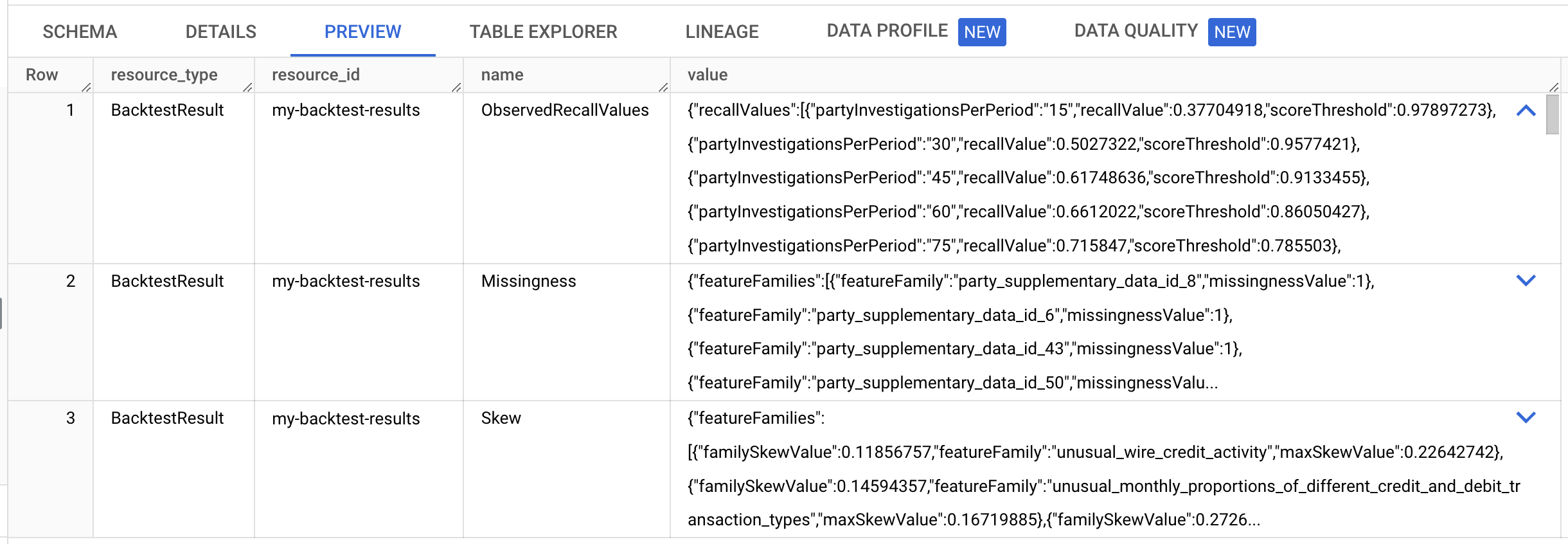
假設您每月可進行 120 項調查。使用
"partyInvestigationsPerPeriod": "120"找出召回值物件。以以下範例值為例,如果您將調查範圍限制在風險分數大於 0.53 的當事人,則每月預計會調查 120 位新當事人。在 2022 年的回溯測試期間,您會發現 86% 的案件是先前的系統所識別 (可能還有其他案件,但目前的程序未識別)。{ "recallValues": [ ... { "partyInvestigationsPerPeriod": "105", "recallValue": 0.8142077, "scoreThreshold": 0.6071321 }, { "partyInvestigationsPerPeriod": "120", "recallValue": 0.863388, "scoreThreshold": 0.5339603 }, { "partyInvestigationsPerPeriod": "135", "recallValue": 0.89071035, "scoreThreshold": 0.4739899 }, ... ] }
如要進一步瞭解其他欄位,請參閱回溯測試結果。
變更 partyInvestigationsPerPeriodHint 欄位即可修改回溯測試產生的調查次數。如要取得分數以供調查,請註冊當事人並根據他們產生預測。
匯入已註冊的當事人
建立預測結果前,請先匯入已註冊的當事人 (也就是資料集中的顧客)。
如要匯入已註冊的當事人,請使用 projects.locations.instances.importRegisteredParties 方法。
JSON 要求內文:
{
  "partyTables": [
     "bq://PROJECT_ID.my_bq_input_dataset.party_registration"
  ],
  "mode": "REPLACE",
  "lineOfBusiness": "COMMERCIAL"
}
如要傳送要求,請選擇以下其中一個選項:
curl
將要求主體儲存在名為 request.json 的檔案中。
在終端機中執行下列指令,在目前目錄中建立或覆寫這個檔案:
cat > request.json << 'EOF'
{
  "partyTables": [
     "bq://PROJECT_ID.my_bq_input_dataset.party_registration"
  ],
  "mode": "REPLACE",
  "lineOfBusiness": "COMMERCIAL"
}
EOF
然後執行下列指令,傳送 REST 要求:
curl -X POST \
     -H "Authorization: Bearer $(gcloud auth print-access-token)" \
     -H "Content-Type: application/json; charset=utf-8" \
     -d @request.json \
     "https://financialservices.googleapis.com/v1/projects/PROJECT_ID/locations/LOCATION/instances/my-instance:importRegisteredParties"
PowerShell
將要求主體儲存在名為 request.json 的檔案中。
在終端機中執行下列指令,在目前目錄中建立或覆寫這個檔案:
@'
{
  "partyTables": [
     "bq://PROJECT_ID.my_bq_input_dataset.party_registration"
  ],
  "mode": "REPLACE",
  "lineOfBusiness": "COMMERCIAL"
}
'@  | Out-File -FilePath request.json -Encoding utf8
然後執行下列指令,傳送 REST 要求:
$cred = gcloud auth print-access-token
$headers = @{ "Authorization" = "Bearer $cred" }

Invoke-WebRequest `
    -Method POST `
    -Headers $headers `
    -ContentType: "application/json; charset=utf-8" `
    -InFile request.json `
    -Uri "https://financialservices.googleapis.com/v1/projects/PROJECT_ID/locations/LOCATION/instances/my-instance:importRegisteredParties" | Select-Object -Expand Content
您應該會收到如下的 JSON 回覆:
{
  "name": "projects/PROJECT_ID/locations/LOCATION/operations/OPERATION_ID",
  "metadata": {
    "@type": "type.googleapis.com/google.cloud.financialservices.v1.OperationMetadata",
    "createTime": CREATE_TIME,
    "target": "projects/PROJECT_ID/locations/LOCATION/instances/my-instance",
    "verb": "importRegisteredParties",
    "requestedCancellation": false,
    "apiVersion": "v1"
  },
  "done": false
}
請持續檢查該作業的結果,直到作業完成為止。完成後,您應該會看到 JSON 輸出內容中已註冊 10,000 個當事人。
建立預測結果
根據資料集最後 12 個月的資料建立預測結果;這些月份的資料不會用於訓練。建立預測結果後,系統會為所有預測期間內每個月的每個當事人建立分數。
如要建立預測結果,請使用 projects.locations.instances.predictionResults.create 方法。
JSON 要求內文:
{
    "model": "projects/PROJECT_ID/locations/LOCATION/instances/my-instance/models/my-model",
    "dataset": "projects/PROJECT_ID/locations/LOCATION/instances/my-instance/datasets/my-dataset",
    "endTime": "2023-01-01T00:00:00Z",
    "predictionPeriods": "12",
    "outputs": {
      "predictionDestination": {
        "tableUri": "bq://PROJECT_ID.my_bq_output_dataset.my_prediction_results",
        "writeDisposition": "WRITE_TRUNCATE"
      },
      "explainabilityDestination": {
        "tableUri": "bq://PROJECT_ID.my_bq_output_dataset.my_prediction_results_explainability",
        "writeDisposition": "WRITE_TRUNCATE"
      }
    }
}
如要傳送要求,請選擇以下其中一個選項:
curl
將要求主體儲存在名為 request.json 的檔案中。
在終端機中執行下列指令,在目前目錄中建立或覆寫這個檔案:
cat > request.json << 'EOF'
{
    "model": "projects/PROJECT_ID/locations/LOCATION/instances/my-instance/models/my-model",
    "dataset": "projects/PROJECT_ID/locations/LOCATION/instances/my-instance/datasets/my-dataset",
    "endTime": "2023-01-01T00:00:00Z",
    "predictionPeriods": "12",
    "outputs": {
      "predictionDestination": {
        "tableUri": "bq://PROJECT_ID.my_bq_output_dataset.my_prediction_results",
        "writeDisposition": "WRITE_TRUNCATE"
      },
      "explainabilityDestination": {
        "tableUri": "bq://PROJECT_ID.my_bq_output_dataset.my_prediction_results_explainability",
        "writeDisposition": "WRITE_TRUNCATE"
      }
    }
}
EOF
然後執行下列指令,傳送 REST 要求:
curl -X POST \
     -H "Authorization: Bearer $(gcloud auth print-access-token)" \
     -H "Content-Type: application/json; charset=utf-8" \
     -d @request.json \
     "https://financialservices.googleapis.com/v1/projects/PROJECT_ID/locations/LOCATION/instances/my-instance/predictionResults?prediction_result_id=my-prediction-results"
PowerShell
將要求主體儲存在名為 request.json 的檔案中。
在終端機中執行下列指令,在目前目錄中建立或覆寫這個檔案:
@'
{
    "model": "projects/PROJECT_ID/locations/LOCATION/instances/my-instance/models/my-model",
    "dataset": "projects/PROJECT_ID/locations/LOCATION/instances/my-instance/datasets/my-dataset",
    "endTime": "2023-01-01T00:00:00Z",
    "predictionPeriods": "12",
    "outputs": {
      "predictionDestination": {
        "tableUri": "bq://PROJECT_ID.my_bq_output_dataset.my_prediction_results",
        "writeDisposition": "WRITE_TRUNCATE"
      },
      "explainabilityDestination": {
        "tableUri": "bq://PROJECT_ID.my_bq_output_dataset.my_prediction_results_explainability",
        "writeDisposition": "WRITE_TRUNCATE"
      }
    }
}
'@  | Out-File -FilePath request.json -Encoding utf8
然後執行下列指令,傳送 REST 要求:
$cred = gcloud auth print-access-token
$headers = @{ "Authorization" = "Bearer $cred" }

Invoke-WebRequest `
    -Method POST `
    -Headers $headers `
    -ContentType: "application/json; charset=utf-8" `
    -InFile request.json `
    -Uri "https://financialservices.googleapis.com/v1/projects/PROJECT_ID/locations/LOCATION/instances/my-instance/predictionResults?prediction_result_id=my-prediction-results" | Select-Object -Expand Content
您應該會收到如下的 JSON 回覆:
{
  "name": "projects/PROJECT_ID/locations/LOCATION/operations/OPERATION_ID",
  "metadata": {
    "@type": "type.googleapis.com/google.cloud.financialservices.v1.OperationMetadata",
    "createTime": CREATE_TIME,
    "target": "projects/PROJECT_ID/locations/LOCATION/instances/my-instance/predictionResults/my-prediction-results",
    "verb": "create",
    "requestedCancellation": false,
    "apiVersion": "v1"
  },
  "done": false
}
在 Google Cloud 控制台中分析單一結構化案件
在 Google Cloud 控制台中開啟 BigQuery。
在詳細資料窗格中,按一下「未命名的查詢」分頁標籤,即可查看編輯器。
將下列 SQL 陳述式複製到編輯器,然後點選「執行」。
SELECT *
FROM `PROJECT_ID.my_bq_input_dataset.transaction`
WHERE account_id = '1E60OAUNKP84WDKB' AND DATE_TRUNC(book_time, MONTH) = "2022-08-01"
ORDER by book_time
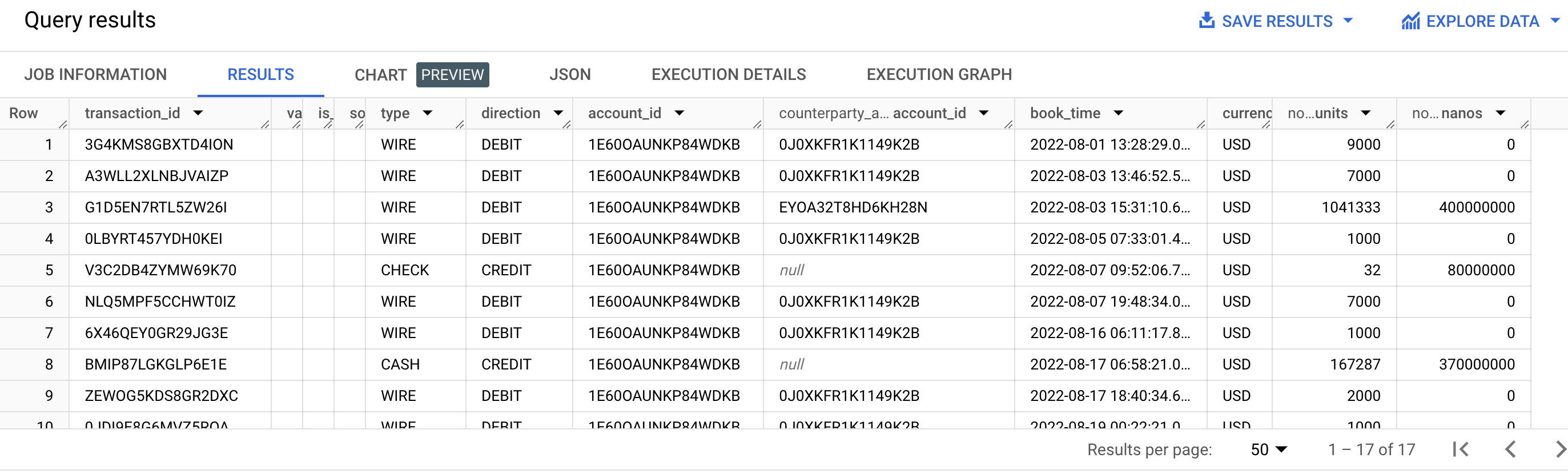
這份對帳單會檢查 2022 年 8 月的帳戶 ID
1E60OAUNKP84WDKB。這個帳戶已連結至 Party IDEGS4NJD38JZ8NTL8。如要找出特定帳戶 ID 的當事人 ID,請使用 AccountPartyLink 資料表。交易資料顯示,大筆現金存入後不久,單一帳戶即頻繁進行整數交易,這看起來很可疑。這些交易可能表示有「化整為零」的行為 (也就是將大筆金額拆成多筆小額交易),或有結構性交易。
將下列 SQL 陳述式複製到編輯器,然後點選「執行」。
SELECT *
FROM `PROJECT_ID.my_bq_input_dataset.risk_case_event`
WHERE party_id = 'EGS4NJD38JZ8NTL8'
這份聲明指出,有風險案件導致該政黨退出。可疑活動發生兩個月後,風險案件開始。

將下列 SQL 陳述式複製到編輯器,然後點選「執行」。
SELECT *
FROM `PROJECT_ID.my_bq_output_dataset.my_prediction_results`
WHERE party_id = 'EGS4NJD38JZ8NTL8'
ORDER BY risk_period_end_time
查看預測結果後,您會發現派對的風險評分從接近零 (請注意指數值) 躍升至高值,時間點就在可疑活動發生後的幾個月。實際結果可能與顯示的結果不同。
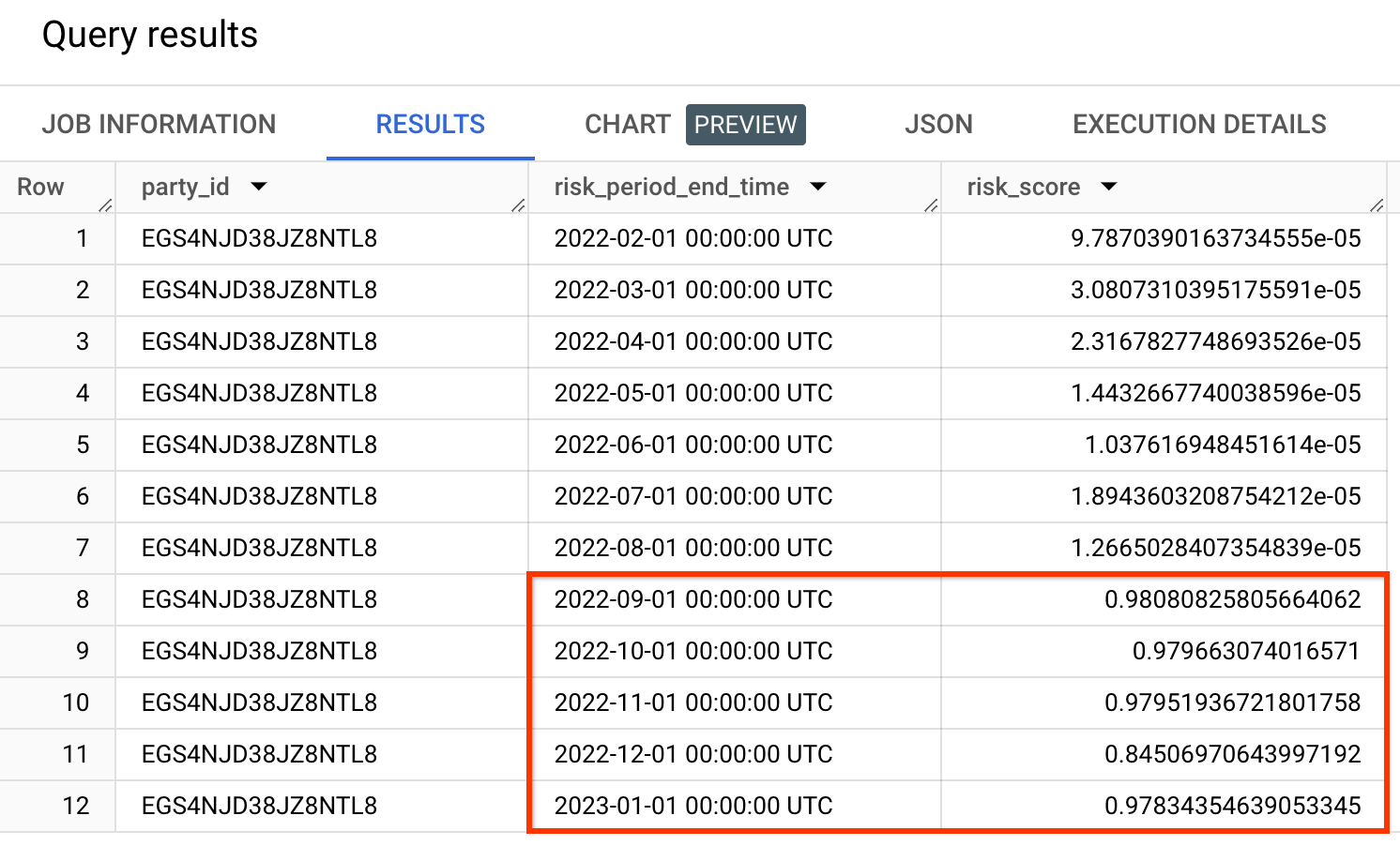
風險分數並非機率。風險分數一律應相對於其他風險分數進行評估。舉例來說,如果其他風險分數較低,看似很小的分數可能就是正面結果。
將下列 SQL 陳述式複製到編輯器,然後點選「執行」。
SELECT *
FROM `PROJECT_ID.my_bq_output_dataset.my_prediction_results_explainability`
WHERE party_id = 'EGS4NJD38JZ8NTL8'
AND risk_period_end_time = '2022-10-01'
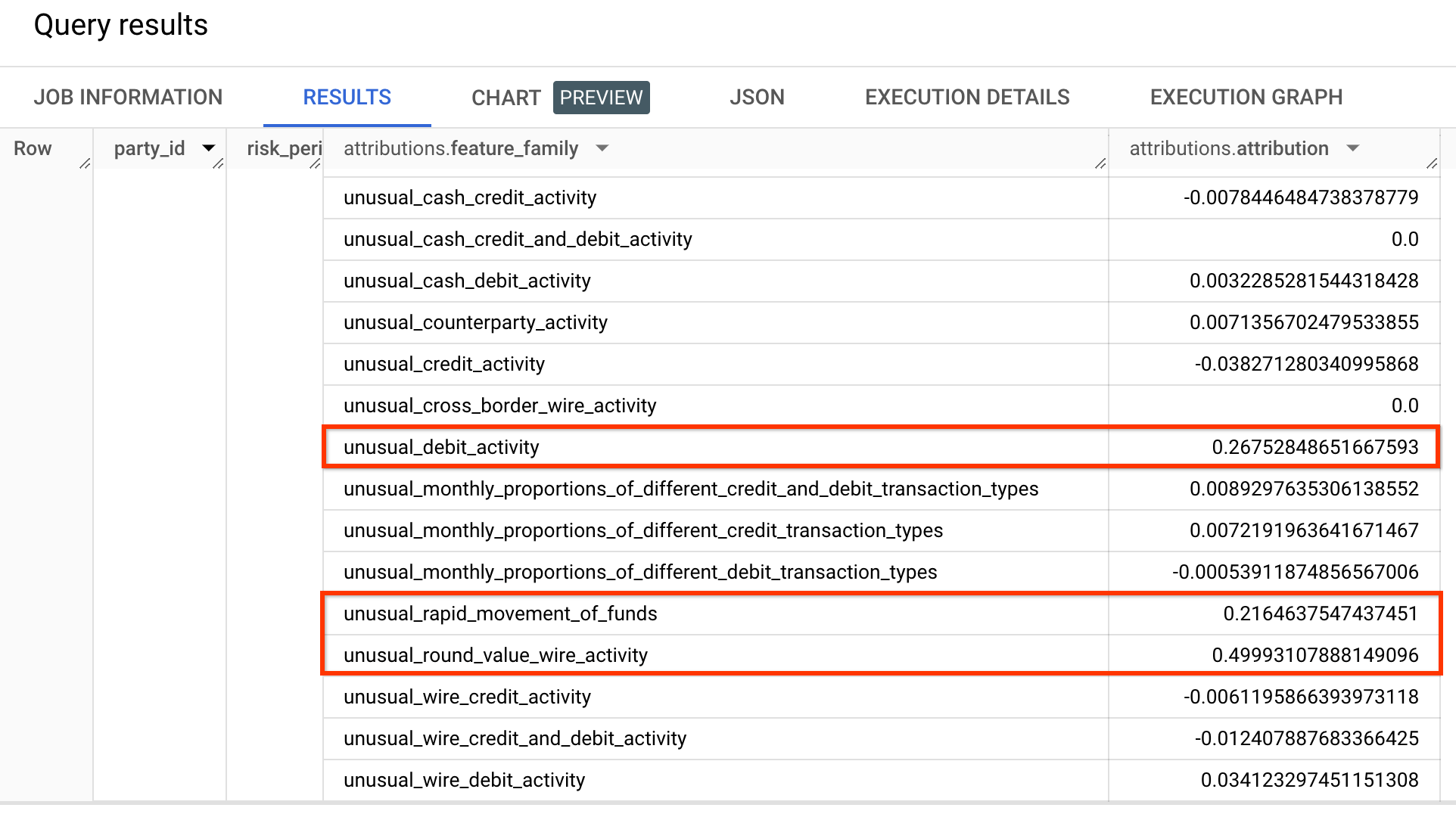
查看可解釋性結果後,您會發現正確的特徵系列獲得最高值。
清除所用資源
為了避免系統向您的 Google Cloud 帳戶收取本頁面所用資源的費用,請刪除含有這些資源的 Google Cloud 專案。
刪除預測結果
如要刪除預測結果,請使用 projects.locations.instances.predictionResults.delete 方法。
如要傳送要求,請選擇以下其中一個選項:
curl
執行下列指令:
curl -X DELETE \
     -H "Authorization: Bearer $(gcloud auth print-access-token)" \
     "https://financialservices.googleapis.com/v1/projects/PROJECT_ID/locations/LOCATION/instances/my-instance/predictionResults/my-prediction-results"
PowerShell
執行下列指令:
$cred = gcloud auth print-access-token
$headers = @{ "Authorization" = "Bearer $cred" }

Invoke-WebRequest `
    -Method DELETE `
    -Headers $headers `
    -Uri "https://financialservices.googleapis.com/v1/projects/PROJECT_ID/locations/LOCATION/instances/my-instance/predictionResults/my-prediction-results" | Select-Object -Expand Content
您應該會收到如下的 JSON 回覆:
{
  "name": "projects/PROJECT_ID/locations/LOCATION/operations/OPERATION_ID",
  "metadata": {
    "@type": "type.googleapis.com/google.cloud.financialservices.v1.OperationMetadata",
    "createTime": CREATE_TIME,
    "target": "projects/PROJECT_ID/locations/LOCATION/instances/my-instance/predictionResults/my-prediction-results",
    "verb": "delete",
    "requestedCancellation": false,
    "apiVersion": "v1"
  },
  "done": false
}
刪除回測結果
如要刪除回測結果,請使用 projects.locations.instances.backtestResults.delete 方法。
如要傳送要求,請選擇以下其中一個選項:
curl
執行下列指令:
curl -X DELETE \
     -H "Authorization: Bearer $(gcloud auth print-access-token)" \
     "https://financialservices.googleapis.com/v1/projects/PROJECT_ID/locations/LOCATION/instances/my-instance/backtestResults/my-backtest-results"
PowerShell
執行下列指令:
$cred = gcloud auth print-access-token
$headers = @{ "Authorization" = "Bearer $cred" }

Invoke-WebRequest `
    -Method DELETE `
    -Headers $headers `
    -Uri "https://financialservices.googleapis.com/v1/projects/PROJECT_ID/locations/LOCATION/instances/my-instance/backtestResults/my-backtest-results" | Select-Object -Expand Content
您應該會收到如下的 JSON 回覆:
{
  "name": "projects/PROJECT_ID/locations/LOCATION/operations/OPERATION_ID",
  "metadata": {
    "@type": "type.googleapis.com/google.cloud.financialservices.v1.OperationMetadata",
    "createTime": CREATE_TIME,
    "target": "projects/PROJECT_ID/locations/LOCATION/instances/my-instance/backtestResults/my-backtest-results",
    "verb": "delete",
    "requestedCancellation": false,
    "apiVersion": "v1"
  },
  "done": false
}
刪除模型
如要刪除模型,請使用 projects.locations.instances.models.delete 方法。
如要傳送要求,請選擇以下其中一個選項:
curl
執行下列指令:
curl -X DELETE \
     -H "Authorization: Bearer $(gcloud auth print-access-token)" \
     "https://financialservices.googleapis.com/v1/projects/PROJECT_ID/locations/LOCATION/instances/my-instance/models/my-model"
PowerShell
執行下列指令:
$cred = gcloud auth print-access-token
$headers = @{ "Authorization" = "Bearer $cred" }

Invoke-WebRequest `
    -Method DELETE `
    -Headers $headers `
    -Uri "https://financialservices.googleapis.com/v1/projects/PROJECT_ID/locations/LOCATION/instances/my-instance/models/my-model" | Select-Object -Expand Content
您應該會收到如下的 JSON 回覆:
{
  "name": "projects/PROJECT_ID/locations/LOCATION/operations/OPERATION_ID",
  "metadata": {
    "@type": "type.googleapis.com/google.cloud.financialservices.v1.OperationMetadata",
    "createTime": CREATE_TIME,
    "target": "projects/PROJECT_ID/locations/LOCATION/instances/my-instance/models/my-model",
    "verb": "delete",
    "requestedCancellation": false,
    "apiVersion": "v1"
  },
  "done": false
}
刪除引擎設定
如要刪除引擎設定,請使用 projects.locations.instances.engineConfigs.delete 方法。
如要傳送要求,請選擇以下其中一個選項:
curl
執行下列指令:
curl -X DELETE \
     -H "Authorization: Bearer $(gcloud auth print-access-token)" \
     "https://financialservices.googleapis.com/v1/projects/PROJECT_ID/locations/LOCATION/instances/my-instance/engineConfigs/my-engine-config"
PowerShell
執行下列指令:
$cred = gcloud auth print-access-token
$headers = @{ "Authorization" = "Bearer $cred" }

Invoke-WebRequest `
    -Method DELETE `
    -Headers $headers `
    -Uri "https://financialservices.googleapis.com/v1/projects/PROJECT_ID/locations/LOCATION/instances/my-instance/engineConfigs/my-engine-config" | Select-Object -Expand Content
您應該會收到如下的 JSON 回覆:
{
  "name": "projects/PROJECT_ID/locations/LOCATION/operations/OPERATION_ID",
  "metadata": {
    "@type": "type.googleapis.com/google.cloud.financialservices.v1.OperationMetadata",
    "createTime": CREATE_TIME,
    "target": "projects/PROJECT_ID/locations/LOCATION/instances/my-instance/engineConfigs/my-engine-config",
    "verb": "delete",
    "requestedCancellation": false,
    "apiVersion": "v1"
  },
  "done": false
}
刪除資料集
如要刪除資料集,請使用 projects.locations.instances.datasets.delete 方法。
如要傳送要求,請選擇以下其中一個選項:
curl
執行下列指令:
curl -X DELETE \
     -H "Authorization: Bearer $(gcloud auth print-access-token)" \
     "https://financialservices.googleapis.com/v1/projects/PROJECT_ID/locations/LOCATION/instances/my-instance/datasets/my-dataset"
PowerShell
執行下列指令:
$cred = gcloud auth print-access-token
$headers = @{ "Authorization" = "Bearer $cred" }

Invoke-WebRequest `
    -Method DELETE `
    -Headers $headers `
    -Uri "https://financialservices.googleapis.com/v1/projects/PROJECT_ID/locations/LOCATION/instances/my-instance/datasets/my-dataset" | Select-Object -Expand Content
您應該會收到如下的 JSON 回覆:
{
  "name": "projects/PROJECT_ID/locations/LOCATION/operations/OPERATION_ID",
  "metadata": {
    "@type": "type.googleapis.com/google.cloud.financialservices.v1.OperationMetadata",
    "createTime": CREATE_TIME,
    "target": "projects/PROJECT_ID/locations/LOCATION/instances/my-instance/datasets/my-dataset",
    "verb": "delete",
    "requestedCancellation": false,
    "apiVersion": "v1"
  },
  "done": false
}
刪除執行個體
如要刪除執行個體,請使用 projects.locations.instances.delete 方法。
如要傳送要求,請選擇以下其中一個選項:
curl
執行下列指令:
curl -X DELETE \
     -H "Authorization: Bearer $(gcloud auth print-access-token)" \
     "https://financialservices.googleapis.com/v1/projects/PROJECT_ID/locations/LOCATION/instances/my-instance"
PowerShell
執行下列指令:
$cred = gcloud auth print-access-token
$headers = @{ "Authorization" = "Bearer $cred" }

Invoke-WebRequest `
    -Method DELETE `
    -Headers $headers `
    -Uri "https://financialservices.googleapis.com/v1/projects/PROJECT_ID/locations/LOCATION/instances/my-instance" | Select-Object -Expand Content
您應該會收到如下的 JSON 回覆:
{
  "name": "projects/PROJECT_ID/locations/LOCATION/operations/OPERATION_ID",
  "metadata": {
    "@type": "type.googleapis.com/google.cloud.financialservices.v1.OperationMetadata",
    "createTime": CREATE_TIME,
    "target": "projects/PROJECT_ID/locations/LOCATION/instances/my-instance",
    "verb": "delete",
    "requestedCancellation": false,
    "apiVersion": "v1"
  },
  "done": false
}
刪除 BigQuery 資料集
bq rm -r -f -d PROJECT_ID:my_bq_input_dataset
bq rm -r -f -d PROJECT_ID:my_bq_output_dataset
刪除轉移工作設定
列出專案中的轉移工作。
Bash
bq ls --transfer_config \
  --transfer_location=LOCATION \
  --project_id=PROJECT_ID  \
  --filter="dataSourceIds:cross_region_copy"
PowerShell
bq ls --transfer_config `
  --transfer_location=LOCATION `
  --project_id=PROJECT_ID `
  --filter="dataSourceIds:cross_region_copy"
系統應會傳回類似下列內容的輸出內容。
name                                                                                       displayName                    dataSourceId       state
------------------------------------------------------------------------------------------------------------------------------------------------------------------------------
projects/PROJECT_NUMBER/locations/LOCATION/transferConfigs/TRANSFER_CONFIG_ID    Copy the AML sample dataset.   cross_region_copy   SUCCEEDED
複製完整名稱,開頭為
projects/,結尾為TRANSFER_CONFIG_ID。刪除轉移設定。
Bash
bq rm --transfer_config TRANSFER_CONFIG_NAMEPowerShell
bq rm --transfer_config TRANSFER_CONFIG_NAME