


CodeMender 可以扫描持续集成和持续交付 (CI/CD) 流水线中的每个拉取请求。如果 CodeMender 在拉取请求更改的代码中发现严重程度为 CRITICAL 或 HIGH 的漏洞,则检查会失败。拉取请求未更改的代码中的发现结果会显示在报告中,但不会导致检查失败。
本页面介绍如何完成以下任务:
- 使用 GitHub Actions 扫描拉取请求,并让 CodeMender 打开包含修复内容的拉取请求。
- 使用 Cloud Build 扫描拉取请求。
- 在每次提交之前,使用 Git 预提交钩子扫描更改。
- 从 Cloud Run 作业和 Cloud Build 步骤将结构化令牌和会话遥测数据导出到 Cloud Logging。
拉取请求扫描的工作原理
如需扫描拉取请求,请运行带有 --diff 标志和拉取请求的基础分支的 cm find:
cm find . --diff=origin/main
CodeMender 会执行以下操作来响应此命令:
- 将拉取请求分支与基础分支进行比较,并扫描修改后的源文件以及直接依赖于这些文件的文件(例如调用方和导入方)。
- 将拉取请求引入或暴露的新漏洞与预先存在的发现结果(标记为
[LEGACY /
UNTOUCHED]
)区分开来。CI 检查仅会阻止由拉取请求引起的漏洞。 - 当拉取请求导致的发现结果与
--fail-on中的严重级别匹配时,退出并显示状态 1。默认值为CRITICAL,HIGH。
如需详细了解 --diff 与其他扫描模式的对比情况,请参阅 CodeMender 查找模式。
准备工作
CodeMender 目前处于公开预览阶段,仅面向部分客户提供。 请与您的销售团队联系以获取访问权限。
- 登录您的 Google Cloud 账号。如果您是 Google Cloud新手,请 创建一个账号来评估我们的产品在实际场景中的表现。新客户还可获享 $300 赠金,用于运行、测试和部署工作负载。
-
In the Google Cloud console, on the project selector page, select or create a Google Cloud project.
Roles required to select or create a project
- Select a project: Selecting a project doesn't require a specific IAM role—you can select any project that you've been granted a role on.
-
Create a project: To create a project, you need the Project Creator role
(
roles/resourcemanager.projectCreator), which contains theresourcemanager.projects.createpermission. Learn how to grant roles.
-
If you're using an existing project for this guide, verify that you have the permissions required to complete this guide. If you created a new project, then you already have the required permissions.
-
Verify that billing is enabled for your Google Cloud project.
Enable the Agent Platform API and Cloud Resource Manager API APIs, if any are not already enabled.
Roles required to enable APIs
To enable APIs, you need the
serviceusage.services.enablepermission. If you created the project, then you likely already have this permission through the Owner role (roles/owner). Otherwise, you can get this permission through the Service Usage Admin role (roles/serviceusage.serviceUsageAdmin). Learn how to grant roles.-
Install the Google Cloud CLI.
-
If you're using an external identity provider (IdP), you must first sign in to the gcloud CLI with your federated identity.
-
To initialize the gcloud CLI, run the following command:
gcloud init -
In the Google Cloud console, on the project selector page, select or create a Google Cloud project.
Roles required to select or create a project
- Select a project: Selecting a project doesn't require a specific IAM role—you can select any project that you've been granted a role on.
-
Create a project: To create a project, you need the Project Creator role
(
roles/resourcemanager.projectCreator), which contains theresourcemanager.projects.createpermission. Learn how to grant roles.
-
If you're using an existing project for this guide, verify that you have the permissions required to complete this guide. If you created a new project, then you already have the required permissions.
-
Verify that billing is enabled for your Google Cloud project.
Enable the Agent Platform API and Cloud Resource Manager API APIs, if any are not already enabled.
Roles required to enable APIs
To enable APIs, you need the
serviceusage.services.enablepermission. If you created the project, then you likely already have this permission through the Owner role (roles/owner). Otherwise, you can get this permission through the Service Usage Admin role (roles/serviceusage.serviceUsageAdmin). Learn how to grant roles.-
Install the Google Cloud CLI.
-
If you're using an external identity provider (IdP), you must first sign in to the gcloud CLI with your federated identity.
-
To initialize the gcloud CLI, run the following command:
gcloud init
确保您的 CodeMender CLI 版本支持拉取请求扫描。本文档中的流水线每次运行时都会下载最新的稳定版本。如需检查本地安装,请运行 cm find --help 并查找 --diff 标志。如需更新 CLI,请运行 cm update。如需了解详情,请参阅安装和配置 CLI。
所需的角色
如需获得为 CodeMender 设置 CI/CD 集成所需的权限,请让管理员向您授予项目的以下 IAM 角色:
- Service Account Admin (
roles/iam.serviceAccountAdmin) - Project IAM Admin (
roles/resourcemanager.projectIamAdmin) -
为 GitHub Actions 设置工作负载身份联合:Workload Identity Pool Admin (
roles/iam.workloadIdentityPoolAdmin) -
创建 Cloud Build 构建触发器:
- Cloud Build Editor (
roles/cloudbuild.builds.editor) - Service Account User (
roles/iam.serviceAccountUser)
- Cloud Build Editor (
-
在本地运行 Git 预提交钩子:
Agent Platform User (
roles/aiplatform.user)
如需详细了解如何授予角色,请参阅管理对项目、文件夹和组织的访问权限。
如需确保 CI/CD 服务账号具有在 CI/CD 流水线中运行 CodeMender 所需的权限,请让您的管理员为 CI/CD 服务账号授予以下 IAM 角色:
- 项目的 Agent Platform User (
roles/aiplatform.user) -
写入 Cloud Build 构建日志:项目的 Logs Writer (
roles/logging.logWriter) -
将 SARIF 报告保存在 Cloud Storage 存储桶中:针对存储桶的 Storage Object User (
roles/storage.objectUser)
如需详细了解如何授予角色,请参阅管理对项目、文件夹和组织的访问权限。
您的管理员也可以通过自定义角色或其他预定义角色向 CI/CD 服务账号授予所需的权限。
安全注意事项
在 GitHub Actions 工作流、Cloud Build 构建触发器或 Git 预提交钩子中运行 CodeMender 时,CodeMender 会在不请求确认的情况下运行。在设置这些集成之前,请考虑以下事项:
- 确认提示:
--yes标志会关闭要求您确认智能体命令和文件写入的提示。设置--sandbox=false(或使用--yes运行cm fix或cm verify)时,--bypass-warning标志会跳过警告,即代理可以修改文件并在系统上运行命令。当cm find在启用默认操作系统级沙盒和默认网络隔离 (permissive-closed) 的情况下运行时,工作区会以只读方式装载,并且cm find会自动跳过命令确认提示和警告。在使用这些标志之前,请阅读本文档开头的预览版条款,包括有关停用人工确认的条款。 - 沙盒和政策边界:CI 流水线使用
--sandbox=false关闭 CodeMender 沙盒。智能体运行的命令(例如在修复发现结果时执行的构建和测试)具有与作业相同的访问权限,包括其 Google Cloud 凭据和网络访问权限。Linux 沙盒使用用户命名空间,而某些 CI 环境(例如无特权容器)不支持该命名空间。即使设置了--sandbox=false,CodeMender 仍会强制执行工作区路径边界和command_policy.yaml屏蔽名单,除非您明确传递--allow-all-paths或--allow-all-commands。仅在隔离的一次性环境中关闭沙盒。如果您的 CI 环境支持沙盒,请移除--sandbox=false。 - 运行器:在 GitHub 托管的运行器(例如
ubuntu-24.04)上运行 GitHub Actions 工作流,这些运行器会在新的虚拟机中运行每个作业。请勿使用在作业之间重复使用的自托管运行器。 - 不可信代码:拉取请求中的代码可能包含试图引导智能体的文本。GitHub Actions 工作流仅扫描来自同一代码库中分支的拉取请求,只有具有写入权限的用户才能创建这些分支。对于 Cloud Build,请使用评论控制,以便所有者或协作者必须批准来自其他贡献者的拉取请求的构建。
- 访问权限:仅向每个服务账号授予其流水线所需的 Identity and Access Management (IAM) 角色。
使用 GitHub Actions 扫描拉取请求
本部分中的工作流会扫描 GitHub.com 上代码库中的每个拉取请求。当 CodeMender 在拉取请求的更改中发现严重级别为 CRITICAL 或 HIGH 的漏洞时,工作流会执行以下操作:
- 未通过 CodeMender 扫描检查。
- 针对每个发现结果运行
cm fix,并打开一个拉取请求,将修复内容合并到拉取请求的分支中。
该工作流还会将发现结果上传到 GitHub 代码扫描。
设置工作负载身份联合
工作流使用工作负载身份联合向 Google Cloud 进行身份验证,因此您无需在 GitHub 中存储服务账号密钥。使用 Google Cloud CLI 运行以下命令:
为项目和制品库设置 shell 变量:
PROJECT_ID="PROJECT_ID"
GITHUB_ORG="GITHUB_ORG"
REPO="GITHUB_ORG/REPOSITORY"
替换以下内容:
PROJECT_ID:您的 Google Cloud 项目 ID。GITHUB_ORG:您的 GitHub 组织名称,或个人账号中代码库的 GitHub 用户名。REPOSITORY:GitHub 代码库的名称。
启用工作负载身份联合使用的 API:
gcloud services enable iam.googleapis.com \
    cloudresourcemanager.googleapis.com iamcredentials.googleapis.com \
    sts.googleapis.com --project="${PROJECT_ID}"
为工作流创建服务账号,并向其授予 Agent Platform User IAM 角色 (
roles/aiplatform.user):gcloud iam service-accounts create codemender-ci \ --project="${PROJECT_ID}" \ --display-name="CodeMender CI" gcloud projects add-iam-policy-binding "${PROJECT_ID}" \ --member="serviceAccount:codemender-ci@${PROJECT_ID}.iam.gserviceaccount.com" \ --role="roles/aiplatform.user"创建工作负载身份池。如果您已有 GitHub Actions 的池,请跳过此步骤,并在以下步骤中使用池的 ID,而不是
github。gcloud iam workload-identity-pools create github \ --project="${PROJECT_ID}" \ --location="global" \ --display-name="GitHub Actions"在池中为 GitHub 创建提供方。属性条件仅接受来自
GITHUB_ORG拥有的代码库的令牌。gcloud iam workload-identity-pools providers create-oidc codemender \ --project="${PROJECT_ID}" \ --location="global" \ --workload-identity-pool="github" \ --display-name="CodeMender" \ --attribute-mapping="google.subject=assertion.sub,attribute.repository=assertion.repository,attribute.repository_owner=assertion.repository_owner" \ --attribute-condition="assertion.repository_owner == '${GITHUB_ORG}'" \ --issuer-uri="https://token.actions.githubusercontent.com"让代码库中的工作流使用该服务账号:
POOL_ID=$(gcloud iam workload-identity-pools describe github \
    --project="${PROJECT_ID}" \
    --location="global" \
    --format="value(name)")

gcloud iam service-accounts add-iam-policy-binding \
    "codemender-ci@${PROJECT_ID}.iam.gserviceaccount.com" \
    --project="${PROJECT_ID}" \
    --role="roles/iam.workloadIdentityUser" \
    --member="principalSet://iam.googleapis.com/${POOL_ID}/attribute.repository/${REPO}"
获取提供商的全名。您将在下一部分中用到该地址。
gcloud iam workload-identity-pools providers describe codemender \
    --project="${PROJECT_ID}" \
    --location="global" \
    --workload-identity-pool="github" \
    --format="value(name)"
输出如下所示:
projects/123456789/locations/global/workloadIdentityPools/github/providers/codemender
对工作负载身份联合和 IAM 的更改最长可能需要 5 分钟才能生效。如需了解详情,请参阅使用部署流水线配置工作负载身份联合。
添加代码库密钥
在代码库中,依次前往设置 > 密钥和变量 > 操作,然后添加以下代码库密钥:
| Secret | 值 |
|---|---|
GCP_PROJECT_ID |
您的项目 ID。 |
GCP_WIF_PROVIDER |
上一部分中提供者的全名。 |
GCP_WIF_SERVICE_ACCOUNT |
codemender-ci@PROJECT_ID.iam.gserviceaccount.com,其中 PROJECT_ID 是您的项目 ID。
|
如需了解详情,请参阅在 GitHub Actions 中使用 Secret。
配置代码库设置
- 如需让自动修复作业打开拉取请求,请依次前往设置 > 操作 > 常规。在工作流权限下,选择允许 GitHub Actions 创建和批准拉取请求,然后点击保存。组织中的代码库会从组织继承此设置。如果您无法更改,请咨询组织所有者。如果您不使用自动修复功能,请跳过此步骤。如需了解详情,请参阅管理代码库的 GitHub Actions 设置。
- 确保 GitHub 代码扫描功能可用于该代码库。对于私有和内部代码库,代码扫描需要使用 GitHub Code Security。如果代码扫描功能不可用,请从扫描作业中删除将结果上传到代码扫描步骤以及
security-events和actions权限。否则,上传会失败,扫描作业也会失败。 如需了解详情,请参阅将 SARIF 文件上传到 GitHub。
添加工作流
将以下工作流作为 .github/workflows/codemender.yml 提交到您的代码库:
name: CodeMender

on:
  pull_request:

permissions: {}

defaults:
  run:
    shell: bash

env:
  CM_DOWNLOAD_URL: https://artifactregistry.googleapis.com/download/v1/projects/cmoc-prod/locations/us/repositories/codemender-cli-production/files/cm%3Astable%3Acm-linux-amd64.zip:download?alt=media

jobs:
  scan:
    name: CodeMender scan
    # Workflows for fork and Dependabot pull requests can't read this
    # repository's secrets, so they can't authenticate to Google Cloud.
    if: >-
      github.event.pull_request.head.repo.full_name == github.repository &&
      github.actor != 'dependabot[bot]'
    runs-on: ubuntu-24.04
    timeout-minutes: 15
    permissions:
      contents: read
      id-token: write         # Workload Identity Federation
      security-events: write  # Upload SARIF to code scanning
      actions: read           # Upload SARIF from a private repository
    outputs:
      findings: ${{ steps.scan.outputs.findings }}
    steps:
      - uses: actions/checkout@v7
        with:
          fetch-depth: 0  # cm needs the base branch history
          persist-credentials: false

      - uses: google-github-actions/auth@v3
        with:
          project_id: ${{ secrets.GCP_PROJECT_ID }}
          workload_identity_provider: ${{ secrets.GCP_WIF_PROVIDER }}
          service_account: ${{ secrets.GCP_WIF_SERVICE_ACCOUNT }}

      - name: Install the CodeMender CLI
        run: |
          curl -fsSL -o "$RUNNER_TEMP/cm.zip" "$CM_DOWNLOAD_URL"
          unzip -q -o "$RUNNER_TEMP/cm.zip" -d "$RUNNER_TEMP/cm"
          echo "$RUNNER_TEMP/cm" >> "$GITHUB_PATH"

      - name: Scan the pull request
        id: scan
        env:
          BASE_REF: ${{ github.base_ref }}
          FAIL_ON: CRITICAL,HIGH
        run: |
          cm init
          status=0
          cm find . \
            --diff="origin/$BASE_REF" \
            --diff-workers=16 \
            --fail-on="$FAIL_ON" \
            --format=sarif \
            --output=codemender.sarif \
            --sandbox=false \
            --yes \
            --bypass-warning || status=$?

          # Save the findings that failed the scan for the autofix job. Like the
          # CI gate, skip findings labeled [LEGACY / UNTOUCHED]: they're in code
          # that the pull request didn't change.
          echo '[]' > "$RUNNER_TEMP/codemender-findings.json"
          if [ "$status" -ne 0 ]; then
            cm report --format=json --status=OPEN \
              | jq --arg fail_on "$FAIL_ON" '
                  ($fail_on | ascii_upcase | split(",")) as $severities
                  | [.[]
                     | select(.title | startswith("[LEGACY / UNTOUCHED]") | not)
                     | select(.severity | ascii_upcase | IN($severities[]))]' \
              > "$RUNNER_TEMP/codemender-findings.json"
          fi
          echo "findings=$(jq length "$RUNNER_TEMP/codemender-findings.json")" >> "$GITHUB_OUTPUT"
          exit "$status"

      - name: Upload results to code scanning
        if: ${{ !cancelled() && hashFiles('codemender.sarif') != '' }}
        uses: github/codeql-action/upload-sarif@v4
        with:
          sarif_file: codemender.sarif
          category: codemender

      - name: Save findings for autofix
        if: ${{ !cancelled() && steps.scan.outputs.findings > 0 }}
        uses: actions/upload-artifact@v7
        with:
          name: codemender-findings
          path: ${{ runner.temp }}/codemender-findings.json
          retention-days: 1

  autofix:
    name: CodeMender autofix
    needs: scan
    if: ${{ !cancelled() && needs.scan.outputs.findings > 0 }}
    runs-on: ubuntu-24.04
    timeout-minutes: 60
    permissions:
      contents: write        # Push the fix branch
      pull-requests: write   # Open the fix pull request
      id-token: write        # Workload Identity Federation
    steps:
      - uses: actions/checkout@v7
        with:
          ref: ${{ github.head_ref }}
          persist-credentials: false

      - uses: google-github-actions/auth@v3
        with:
          project_id: ${{ secrets.GCP_PROJECT_ID }}
          workload_identity_provider: ${{ secrets.GCP_WIF_PROVIDER }}
          service_account: ${{ secrets.GCP_WIF_SERVICE_ACCOUNT }}

      - name: Install the CodeMender CLI
        run: |
          curl -fsSL -o "$RUNNER_TEMP/cm.zip" "$CM_DOWNLOAD_URL"
          unzip -q -o "$RUNNER_TEMP/cm.zip" -d "$RUNNER_TEMP/cm"
          echo "$RUNNER_TEMP/cm" >> "$GITHUB_PATH"

      - uses: actions/download-artifact@v8
        with:
          name: codemender-findings
          path: ${{ runner.temp }}/codemender

      - name: Fix findings
        run: |
          # Keep CodeMender state and the auth action's credentials file out of
          # the commits, and out of the `git clean` that cm fix runs.
          printf '%s\n' .cm_project 'gha-creds-*.json' >> .git/info/exclude

          cm init
          # Fix in the repository root instead of each file's directory.
          printf 'project_paths:\n  - "%s"\n' "$GITHUB_WORKSPACE" \
            >> ~/.codemender/config.yaml
          cm report import -f "$RUNNER_TEMP/codemender/codemender-findings.json"

          git config user.name "github-actions[bot]"
          git config user.email \
            "41898282+github-actions[bot]@users.noreply.github.com"

          cm report --format=json --status=OPEN \
            | jq -r '.[] | [.finding_id, .title] | @tsv' \
            > "$RUNNER_TEMP/findings.tsv"
          while IFS=$'\t' read -r id title; do
            # cm fix exits 0 when it makes no edits, so also check for changes.
            if cm fix "$id" \
                 --sandbox=false --yes --bypass-warning < /dev/null &&
               ! git diff --quiet; then
              git commit -q -a -m "Fix $title" -m "CodeMender finding $id"
            else
              echo "::warning::CodeMender didn't fix \"$title\" ($id)."
            fi
            # Discard files the fix agent created, such as test output.
            git reset -q --hard
            git clean -q -fd
          done < "$RUNNER_TEMP/findings.tsv"

      - uses: peter-evans/create-pull-request@v8
        with:
          branch: codemender/fix-pr-${{ github.event.pull_request.number }}
          base: ${{ github.head_ref }}
          title: "CodeMender fixes for #${{ github.event.pull_request.number }}"
          body: |
            CodeMender generated these fixes for findings in #${{ github.event.pull_request.number }}.
            Review each commit before you merge this pull request into `${{ github.head_ref }}`.
工作流详细信息
下图展示了拉取请求扫描和自动修复作业如何交互:
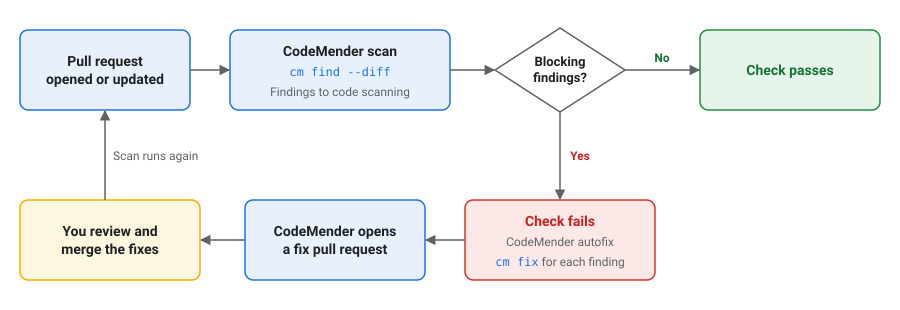
CodeMender 扫描作业会执行以下操作:
- 检出拉取请求及其完整历史记录。对于拉取请求,GitHub 会将拉取请求分支的合并提交检出到基础分支。
- 向 Google Cloud 进行身份验证,并下载 CodeMender CLI 的最新稳定版本。
- 针对基础分支运行
cm find --diff。如果 CodeMender 在拉取请求的更改中发现严重级别在FAIL_ON中列出的漏洞,则作业会失败。 - 即使扫描导致作业失败,也会将报告上传到 GitHub 代码扫描。该报告包含标记为
[LEGACY / UNTOUCHED]的发现结果。当发现结果的所有行都位于拉取请求的差异中时,代码扫描还会在拉取请求的检查中显示发现结果。 - 保存导致自动修复作业失败的发现结果。
扫描作业不会针对来自派生或 Dependabot 的拉取请求运行,因为这些拉取请求的工作流无法读取代码库的密钥。GitHub 会将跳过的作业报告为成功,因此即使您将此检查设为必需检查,它也不会阻止这些拉取请求。自行审核这些拉取请求,或使用 cm find --diff 在本地扫描。
CodeMender 自动修复作业会在扫描作业保存发现结果时运行。它会执行以下操作:
- 检出拉取请求分支。
- 针对每个发现结果运行
cm fix,并单独提交每个修复。如果 CodeMender 未修复发现结果,则作业会记录警告。该作业仅提交对代码库中已有文件的更改,并舍弃修复代理创建的所有文件,例如测试输出。 - 打开从
codemender/fix-pr-NUMBER分支到拉取请求分支的拉取请求,其中NUMBER是拉取请求编号。如果修复拉取请求已存在,作业会更新该请求。如果 CodeMender 未修复任何发现结果,或者作业达到 60 分钟超时,则作业不会打开拉取请求。
查看并合并修复
GitHub 不会自动为工作流使用 GITHUB_TOKEN 创建的拉取请求运行工作流。如需扫描修复拉取请求,对代码库具有写入权限的用户需在修复拉取请求中点击批准要运行的工作流。
合并修复拉取请求后,拉取请求分支会发生变化,工作流会再次扫描原始拉取请求。
自定义工作流
您可以通过以下方式自定义工作流:
- 如需更改导致检查失败的严重级别,请在扫描拉取请求步骤中,将
FAIL_ON设置为以英文逗号分隔的严重级别列表(不含空格),例如CRITICAL,HIGH,MEDIUM。有效值为CRITICAL、HIGH、MEDIUM和LOW。 - 如需在不使检查失败的情况下报告发现结果,请设置
FAIL_ON: ""。工作流仍会将发现结果上传到代码扫描,但不会运行自动修复作业。 如需仅扫描某些分支的拉取请求,请向
pull_request触发器添加branches过滤条件。然后,工作流不会扫描修复拉取请求,因为其基础是拉取请求分支:on: pull_request: branches: [main]如需关闭自动修复功能,请删除
autofix作业和保存发现结果以进行自动修复步骤。如需在运行扫描之前(或在预定的监控工作流中)验证凭据、配置、网络可达性和 IAM 权限,请运行
cm health --strict(添加--json以获得机器可读的输出)。如需了解退出代码和标志详情,请参阅检查服务连接和权限。如需输出不含表情符号、Unicode 符号或终端颜色的纯 ASCII 日志,请将
CM_PLAIN: "true"添加到工作流env块,或将--plain传递给每个cm命令。如需了解优先级规则和报告格式详情,请参阅配置纯文本输出。
使用 Cloud Build 扫描拉取请求
本部分中的构建会扫描连接到 Cloud Build 的 GitHub 代码库中的每个拉取请求。当 CodeMender 在拉取请求的更改中发现严重级别为 CRITICAL 或 HIGH 的漏洞时,构建及其 GitHub 检查会失败。构建不会修复发现结果。
在开始之前,请执行以下操作:
- 将代码库作为第二代代码库连接到 Cloud Build。如需了解详情,请参阅连接到 GitHub 代码库。
在有权访问 CodeMender 的项目中启用 Cloud Build API 和 IAM API。该 build 会在运行该 build 的项目中使用 CodeMender。
PROJECT_ID="PROJECT_ID"
gcloud services enable cloudbuild.googleapis.com iam.googleapis.com \
    --project="${PROJECT_ID}"
将
PROJECT_ID替换为您的 Google Cloud项目 ID。
创建服务账号
为构建创建服务账号。向其授予 Agent Platform User IAM 角色 (roles/aiplatform.user) 以使用 CodeMender,并授予 Logs Writer 角色 (roles/logging.logWriter) 以写入构建日志:
SA="codemender-build@${PROJECT_ID}.iam.gserviceaccount.com"

gcloud iam service-accounts create codemender-build \
    --project="${PROJECT_ID}" \
    --display-name="CodeMender Cloud Build"

gcloud projects add-iam-policy-binding "${PROJECT_ID}" \
    --member="serviceAccount:${SA}" \
    --role="roles/aiplatform.user"

gcloud projects add-iam-policy-binding "${PROJECT_ID}" \
    --member="serviceAccount:${SA}" \
    --role="roles/logging.logWriter"
如需将 SARIF 报告保存在 Cloud Storage 存储桶中,还需向服务账号授予对该存储桶的访问权限:
BUCKET="BUCKET"

gcloud storage buckets add-iam-policy-binding "gs://${BUCKET}" \
    --member="serviceAccount:${SA}" \
    --role="roles/storage.objectUser"
将 BUCKET 替换为您的 Cloud Storage 存储分区的名称。
添加 build 配置
将以下 build 配置作为 cloudbuild.yaml 提交到代码库的根目录:
# Scans a pull request with CodeMender. The build fails when CodeMender finds
# a CRITICAL or HIGH vulnerability in the pull request's changes.
steps:
  - id: install-codemender
    name: gcr.io/google.com/cloudsdktool/google-cloud-cli:slim
    script: |
      #!/usr/bin/env bash
      set -euo pipefail
      curl -fsSL -o /tmp/cm.zip "$_CM_DOWNLOAD_URL"
      python3 -m zipfile -e /tmp/cm.zip /workspace/.codemender-cli
      chmod +x /workspace/.codemender-cli/cm

  - id: fetch-history
    name: gcr.io/google.com/cloudsdktool/google-cloud-cli:slim
    script: |
      #!/usr/bin/env bash
      set -euo pipefail
      : "${_BASE_BRANCH:?Run this build from a pull request trigger.}"
      # Triggers check out only the pull request's commit. CodeMender needs the
      # history back to where the pull request branched from the base branch.
      # Fetch from origin, or from GitHub if origin isn't configured.
      refspec="+refs/heads/$_BASE_BRANCH:refs/remotes/origin/$_BASE_BRANCH"
      git fetch --quiet --unshallow origin "$refspec" ||
        git fetch --quiet --unshallow \
          "https://github.com/$REPO_FULL_NAME.git" "$refspec"
      merge_base=$(git merge-base HEAD "origin/$_BASE_BRANCH")
      echo "Merge base with $_BASE_BRANCH: $merge_base"

  - id: scan
    name: gcr.io/google.com/cloudsdktool/google-cloud-cli:slim
    script: |
      #!/usr/bin/env bash
      set -uo pipefail
      export PATH="/workspace/.codemender-cli:$PATH"
      # The project that has access to CodeMender.
      export GOOGLE_CLOUD_PROJECT="$PROJECT_ID"
      cm init || exit 1
      status=0
      cm find . \
        --diff="origin/$_BASE_BRANCH" \
        --diff-workers=16 \
        --fail-on=CRITICAL,HIGH \
        --format=sarif \
        --output=codemender.sarif \
        --sandbox=false \
        --yes \
        --bypass-warning || status=$?

      # cm find writes the SARIF report when the scan completes.
      if [ -f codemender.sarif ]; then
        # cm find doesn't print finding details, so print them here.
        cm report --status=OPEN --format=md
        if [ -n "${_REPORT_BUCKET:-}" ]; then
          gcloud storage cp codemender.sarif \
            "gs://$_REPORT_BUCKET/codemender/$BUILD_ID.sarif" || status=1
        fi
      fi
      exit "$status"

substitutions:
  _CM_DOWNLOAD_URL: https://artifactregistry.googleapis.com/download/v1/projects/cmoc-prod/locations/us/repositories/codemender-cli-production/files/cm%3Astable%3Acm-linux-amd64.zip:download?alt=media
  _REPORT_BUCKET: ''  # Optional: a bucket to save the SARIF report in.

timeout: 1200s
options:
  automapSubstitutions: true
  logging: CLOUD_LOGGING_ONLY
创建触发器
创建一个触发器,用于针对每个拉取请求运行构建,并将其合并到 main 中:
REGION="REGION"
CONNECTION="CONNECTION"
REPOSITORY="REPOSITORY"

gcloud builds triggers create github \
    --project="${PROJECT_ID}" \
    --region="${REGION}" \
    --name="codemender-scan" \
    --repository="projects/${PROJECT_ID}/locations/${REGION}/connections/${CONNECTION}/repositories/${REPOSITORY}" \
    --pull-request-pattern='^main$' \
    --comment-control=COMMENTS_ENABLED_FOR_EXTERNAL_CONTRIBUTORS_ONLY \
    --build-config=cloudbuild.yaml \
    --service-account="projects/${PROJECT_ID}/serviceAccounts/${SA}"
替换以下内容:
REGION:Cloud Build 代码库连接的区域。CONNECTION:Cloud Build 代码库连接的名称。REPOSITORY:Cloud Build 中已连接的代码库的名称。
请注意以下选项:
--pull-request-pattern是拉取请求的基本分支的正则表达式。使用^和$匹配整个分支名称。- 使用
--comment-control=COMMENTS_ENABLED_FOR_EXTERNAL_CONTRIBUTORS_ONLY时,系统会自动针对来自代码库所有者和协作者的拉取请求运行构建。对于来自其他贡献者的拉取请求,在所有者或协作者对拉取请求评论/gcbrun后,系统会运行构建。 - 如需将 SARIF 报告保存在存储桶中,请添加
--substitutions=_REPORT_BUCKET="${BUCKET}"。
您也可以在 Google Cloud 控制台中创建触发器。如需了解详情,请参阅从 GitHub 构建代码库。
如需在 GitHub 中显示构建日志,请在创建触发器时添加 --include-logs-with-status,并向服务账号授予 Logs Viewer 角色 (roles/logging.viewer)。然后,任何可以在 GitHub 中查看检查结果的人都可以读取构建日志,包括发现结果。
构建的工作原理
该 build 包含三个步骤:
install-codemender会下载 CodeMender CLI 的最新稳定版本。fetch-history会提取 CodeMender 所需的基础分支和历史记录。Cloud Build 仅检出启动构建的提交。 此步骤会从origin远程分支提取。如果未配置origin,该步骤将从 GitHub 提取内容,而无需凭据,这仅适用于公共代码库。在这种情况下,私有代码库需要凭据,例如 SSH 密钥。如需了解详情,请参阅使用 SSH 密钥从构建访问 GitHub。scan针对基础分支运行cm find --diff。扫描完成后,该步骤会在构建日志中输出所有发现结果。如果您设置了_REPORT_BUCKET,该步骤还会将 SARIF 报告复制到gs://BUCKET/codemender/BUILD_ID.sarif。
如需更改导致构建失败的严重级别,请修改 scan 步骤中的 --fail-on。如果您在没有拉取请求触发器的情况下运行构建,则构建会失败,并显示消息 Run this build from a pull request trigger.
如需输出不含表情符号或 Unicode 符号的纯 ASCII 构建日志和 Markdown 报告,请将 export CM_PLAIN=true 添加到 scan 步骤,或将 --plain 传递给 cm 命令。如需了解详情,请参阅配置纯文本输出。
在每次提交前进行扫描
Git 预提交钩子可以扫描暂存的更改,并在 CodeMender 发现严重级别为 CRITICAL 或 HIGH 的漏洞时阻止提交。开发者可以跳过钩子,因此请在 CI 中扫描的同时使用钩子,而不是用钩子取代扫描。
使用该钩子的每个开发者都需要满足以下条件:
- CodeMender CLI,已按照安装和配置 CLI 中的说明进行安装和设置,包括
gcloud auth application-default login和cm init。该钩子需要PATH上的cm。 - 在有权访问 CodeMender 的项目中拥有 Agent Platform User 角色 (
roles/aiplatform.user)。CodeMender 会使用GOOGLE_CLOUD_PROJECT环境变量中的项目。如果未设置该变量,CodeMender 会使用应用默认凭据中的项目或 gcloud CLI 默认项目。
如需添加钩子,请将以下脚本作为 .git/hooks/pre-commit 保存在代码库中:
#!/bin/sh
# Scans staged changes with CodeMender before each commit.
if ! cm find . --diff --staged --fail-on=CRITICAL,HIGH \
    --yes --bypass-warning; then
  echo "CodeMender blocked this commit. To see the findings, run:" >&2
  echo "  cm report --status=OPEN" >&2
  echo "To commit anyway, run git commit --no-verify." >&2
  exit 1
fi
使脚本可执行,然后将 .cm_project 添加到 .gitignore 文件中,这样您就不会提交 CodeMender 为跟踪代码库而创建的文件:
chmod +x .git/hooks/pre-commit
echo .cm_project >> .gitignore
当您运行 git commit 时,钩子会扫描包含暂存更改的文件。扫描可能需要几分钟时间。该钩子不会关闭 CodeMender 沙盒。
如需在不扫描的情况下提交,请运行 git commit --no-verify。
扫描标志
以下 cm find 标志用于控制拉取请求扫描。如需查看所有标志,请运行 cm
find --help:
| 标志 | 默认 | 说明 |
|---|---|---|
--diff[=REF] |
关闭 |
扫描与 REF(例如 origin/main)相比发生的更改。如果不使用 REF,则扫描对跟踪文件的未提交更改(与 HEAD 进行比较)。不能与 --deep 或 --quick 一起使用。
|
--staged |
关闭 | 使用 --diff 时,仅扫描暂存的更改。 |
--diff-workers COUNT |
4 |
同时扫描的文件数量,范围为 1 到 16。 |
--diff-max-neighbors COUNT |
10 |
要扫描的依赖文件的数量上限。 |
--fail-on SEVERITIES |
CRITICAL,HIGH |
使用 --diff 时,导致 cm find 以状态 1 退出的严重级别。如果值为空,则发现结果不会影响退出状态。
|
--fail-on-truncation |
关闭 |
如果 CodeMender 找到的依赖文件数量超过 --diff-max-neighbors 允许的数量,则使用 --diff 退出,状态为 1。
|
--format FORMAT |
table |
报告格式:table、json 或 sarif。
|
--output FILE |
标准输出 | 要将报告写入的文件。 |
--plain |
关闭 |
输出仅包含 ASCII 字符的日志和 table 报告,不含表情符号、Unicode 符号或终端颜色。您还可以为所有 cm 命令设置 CM_PLAIN=true。
|
将令牌遥测数据导出到 Logging
在 Cloud Run 作业和 Cloud Build 步骤等临时容器中,容器退出后,~/.codemender/logs/sessions/ 下的本地文件不会保留。Cloud Run 作业和 Logging 代理会自动将写入标准输出 (stdout) 或标准错误 (stderr) 的每个单行 JSON 对象解析为结构化 jsonPayload 日志条目。在 Cloud Build 中,步骤输出默认写入为 textPayload;在 cloudbuild.yaml 文件中设置 options.enableStructuredLogging: true,以便 Cloud Build 将 JSON 行解析为 jsonPayload。
如需在共享中央 Google Cloud项目的团队之间归因 token 使用情况,请使用 --team-id、CM_TEAM_ID 环境变量或 ~/.codemender/config.yaml 中的 team_id 设置团队标识符(1 到 63 个字符,与 [A-Za-z0-9._-] 匹配)。
发出预汇总的运行摘要
在每次运行都有一个全新 ~/.codemender 目录的一次性容器(例如 Cloud Run 作业任务)中,在 EXIT 陷阱中运行 cm stats --jsonl,以便容器在所有轮次和多工作器 cm find --deep 或 cm find --diff 会话中写入一个单行 JSON 摘要,即使 cm find 因发现结果而以状态 1 退出也是如此:
export CM_TEAM_ID="TEAM_ID"
trap 'cm stats --jsonl' EXIT

cm init
cm find . \
  --diff="origin/$BASE_REF" \
  --format=sarif \
  --output=codemender.sarif \
  --sandbox=false \
  --yes \
  --bypass-warning
将 TEAM_ID 替换为您的团队标识符,例如 payments-security。
cm stats --jsonl 行包含 team_id(或 team_ids)、model(或 models)、token 总数(input_tokens、output_tokens、cached_tokens、thought_tokens、total_tokens)、cache_hit_percent 和 duration_seconds,无需通过 jq -c 传输。在 Logs Explorer 中,使用 jsonPayload.team_id、jsonPayload.model 和 jsonPayload.total_tokens 等字段过滤结构化条目。
发出精细的逐轮会话事件
如果您还希望在 Logging 中记录单个 session_metadata、interaction 和 session_summary 事件,请在容器退出之前使用 jq -c 过滤本地 JSONL 会话文件:
shopt -s nullglob
session_logs=(~/.codemender/logs/sessions/*/*.jsonl)
if (( ${#session_logs[@]} > 0 )); then
  jq -c 'select(.type == "session_metadata" or .type == "interaction" or .type == "session_summary")' "${session_logs[@]}"
fi
如需详细了解 cm stats 标志,请参阅跟踪令牌用量。
问题排查
本部分介绍了如何解决在 CI/CD 流水线中运行 CodeMender 时的常见问题。
没有权限
日志会显示如下所示的一行:
[1/1] ❌ src/app.py: start session failed: StartSession failed with HTTP 403 Forbidden.
该消息还可以包含 Permission 'aiplatform.interactions.create'
denied。请检查以下各项:
- 该项目有权访问 CodeMender。
- 服务账号或用户在项目中拥有 Agent Platform User 角色 (
roles/aiplatform.user)。 - 项目中已启用 Agent Platform API。
- CodeMender 使用正确的项目。在 GitHub Actions 中,检查
GCP_PROJECT_ID密钥。Cloud Build 使用运行构建的项目。在本地,检查GOOGLE_CLOUD_PROJECT环境变量,如果未设置该变量,则检查默认项目。
如需确定故障是由凭据(退出代码 10)、配置(退出代码 20)、网络可达性(退出代码 30)还是项目 IAM 权限(退出代码 40)引起,请在流水线步骤中运行 cm health
--strict。如需了解详情,请参阅检查服务连接和权限。
正在设置资源
如果日志显示 Resource setup has just started. Please try again shortly. 或 Resource setup is in progress. Please try again shortly.,则表示 CodeMender 正在为您的项目设置资源,这通常需要几分钟时间。稍后再次运行作业。
未知标志:--diff
如果 cm find 失败并显示 Error: unknown flag: --diff,则表示您的 CLI 版本不支持拉取请求扫描。运行 cm update,或下载最新版本。
未找到基础分支
如果 cm find 失败并显示如下错误,则表示基础分支不在结账中:
Error: retrieving VCS diff: git diff failed: exit status 128: fatal: ambiguous argument 'origin/main': unknown revision or path not in the working tree.
在运行 cm find 之前,先提取基础分支及其历史记录。在 GitHub Actions 中,在 actions/checkout 中设置 fetch-depth: 0。
未扫描的文件
带有 ❌ 的行(例如 [1/1] ❌ src/app.py: start session failed)表示 CodeMender 无法扫描该文件。检查该行中的错误,然后再次运行作业。
没有修复拉取请求
如果工作流未打开修复拉取请求,请检查以下各项:
- 如果自动修复作业在创建拉取请求时失败,请开启允许 GitHub Actions 创建和批准拉取请求。如需了解详情,请参阅配置代码库设置。
- 如果自动修复作业成功完成,但未打开拉取请求,则表示 CodeMender 未修复任何发现结果。对于 CodeMender 未修复的每个发现结果,作业日志都会显示一条警告。
代码扫描上传失败
如果上传步骤失败并显示 GitHub Code Security or GitHub Advanced Security
must be enabled for this repository to use code scanning,请为代码库启用 GitHub 代码安全,或删除上传步骤。如需了解详情,请参阅配置代码库设置。
警告未确认
如果 cm 失败并显示 warning not acknowledged. Please run interactively once to
acknowledge or pass --bypass-warning,则 CodeMender 需要确认它无法在非交互式环境中请求。将 --bypass-warning 添加到命令中。在执行此操作之前,请先阅读本页顶部的预览版条款。
如需更多帮助,请与您的销售团队联系。