


Gemini Robotics ER 2 可以使用以下两项功能,通过连续视频画面跟踪任务进度:
- 时刻查找:识别关键事件发生的确切时间戳。
- 进度分类:将每个视频分配到五个完成度区间(0-20%、20-40%、40-60%、60-80%、80-100%)之一。
时刻查找
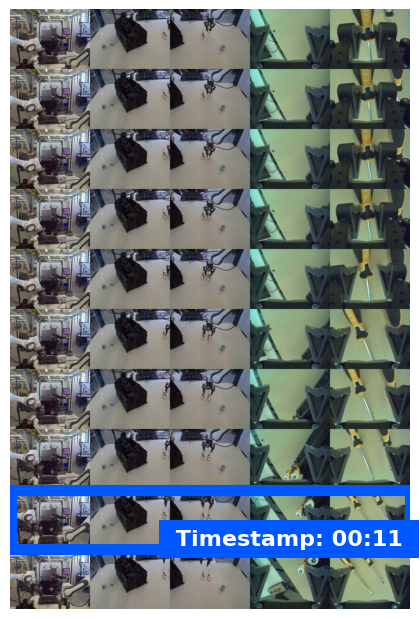
时刻查找功能可识别发生关键事件的确切视频帧,例如,杯子装满或打结的时刻。机器人会使用这些信息来验证是否成功、对步骤进行排序以及触发更正。
以下示例提示要求模型识别视频中给定任务的完成时刻:
Python
from google import genai
from google.genai import types

client = genai.Client(
    enterprise=True,
    project="your-project-id",
    location="global",
)

with open("task_video.mp4", "rb") as f:
    video_bytes = f.read()

prompt = """
At what timestamp (in seconds) does the task reach successful completion?
Return a JSON object: {"completion_time_seconds": <float>}.
If the task is not completed, return {"completion_time_seconds": null}.
"""

response = client.models.generate_content(
    model="gemini-robotics-er-2-preview",
    contents=[
        types.Part.from_bytes(data=video_bytes, mime_type="video/mp4"),
        prompt,
    ],
)

print(response.text)
以下示例展示了时刻查找视频中的帧,其中模型识别出了任务完成时间戳:
进度分类
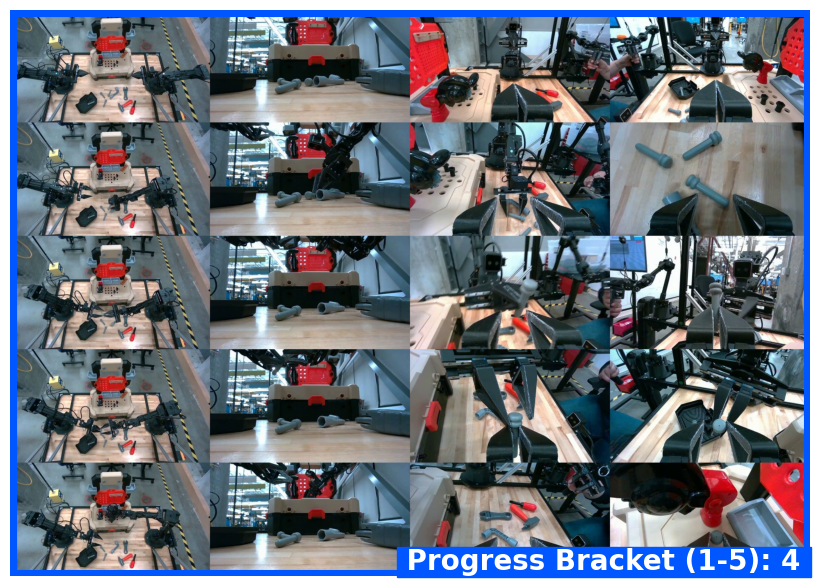
进度分类会将视频分配到五个完成度区间之一:0-20%、20-40%、40-60%、60-80% 或 80-100%。这让机器人具备实时情境感知能力,能够调整动作或重试失败的步骤,而无需重启整个工作流程。
以下示例提示要求模型对视频中的当前进度级别进行分类:
Python
from google import genai
from google.genai import types

client = genai.Client(
    enterprise=True,
    project="your-project-id",
    location="global",
)

with open("task_video.mp4", "rb") as f:
    video_bytes = f.read()

prompt = """
Watch this video and classify the task progress level at the final frame.
Return a JSON object with the progress bracket:
{"progress_level": "0-20" | "20-40" | "40-60" | "60-80" | "80-100"}.
"""

response = client.models.generate_content(
    model="gemini-robotics-er-2-preview",
    contents=[
        types.Part.from_bytes(data=video_bytes, mime_type="video/mp4"),
        prompt,
    ],
)

print(response.text)
以下示例展示了进度分类视频中的帧,模型会分配进度范围:
完整示例
如需查看完整的可运行示例(包括多步任务跟踪),请参阅机器人技术指南。
后续步骤
如需详细了解 Gemini Robotics ER 2,请参阅以下资源:
- 任务编排:具有空间推理能力的长跨度任务。
- 空间推理:指向、跟踪和边界框示例。
- Gemini Robotics ER 2 概览:功能和快速入门。
- Gemini Robotics ER 2 模型信息:技术规格、词元限制和支持的功能。