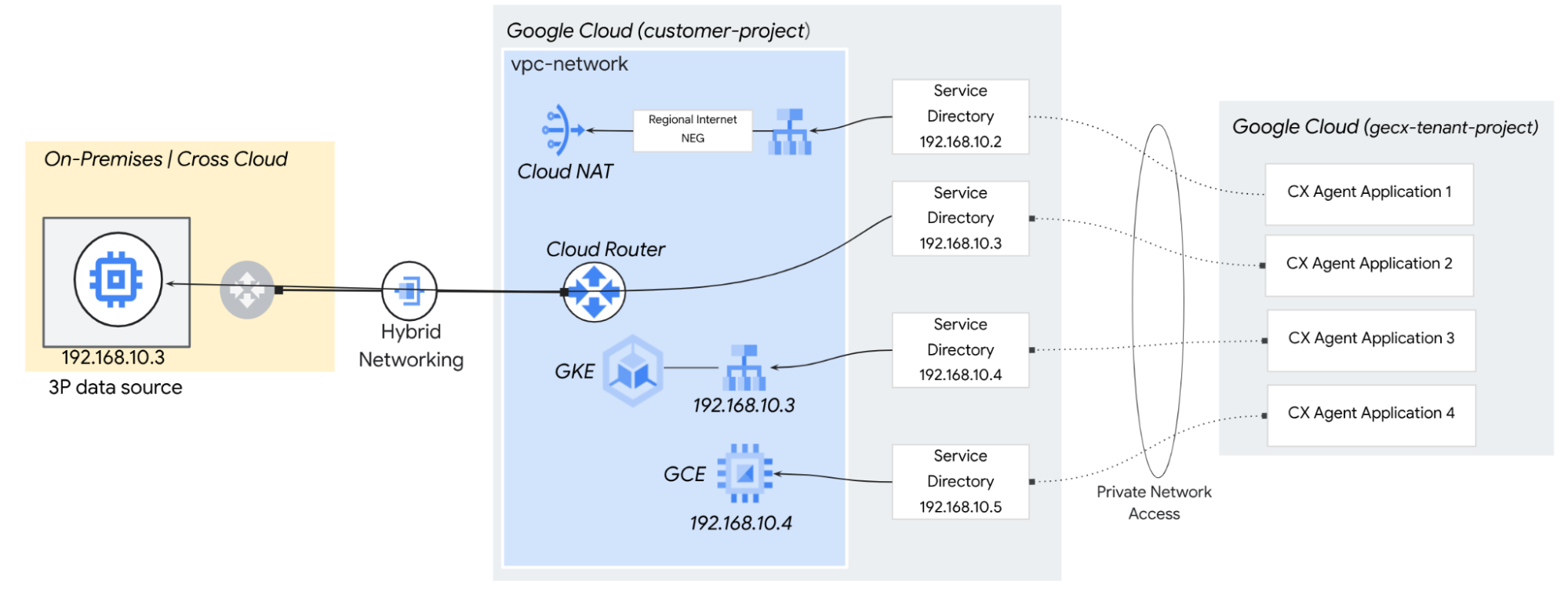
Agents often require real-time API access to external, public-facing software-as-a-service (SaaS) platforms to retrieve interaction histories or trigger immediate operational workflows. This is accomplished by configuring tools and callbacks.
Egress categories
To deliver context-aware, real-time interactions, CX Agent Studio must seamlessly interface with a diverse ecosystem of data sources and workflow automation platforms. This requires robust, secure egress routing mechanisms capable of traversing both public internet boundaries and highly restricted private networks. Integration architectures generally fall into two primary egress categories:
Public and hybrid SaaS egress
By default, CX Agent Studio agents operate within a Google-managed tenant project that routes egress internet traffic through a shared, dynamic pool of public IP addresses. If your security architecture relies on firewall allow-listing and must accommodate this default path, you can retrieve the full list of public IP ranges allocated to Google APIs and services.
However, because Google manages these IP addresses globally, the published ranges are broad, shared across multiple Google Cloud customers, and subject to frequent changes. It is not possible to isolate specific IP blocks dedicated exclusively to your individual agent application instance using this method.
To track these dynamic changes and maintain firewall synchronization, you must implement an automated sync process:
Google publishes its IP ranges for default domains in a JSON payload. Because these ranges shift frequently without prior notification, you should configure a daily automated script (such as a cron job or Cloud Function) to fetch the payload, parse the CIDR blocks, and programmatically update your enterprise firewall rules.
Private, multicCloud, and on-premises egress
For highly sensitive or proprietary data, agent applications can be configured to securely route traffic into isolated environments. This includes interfacing with privately hosted Model Context Protocol (MCP) tools, custom middleware, and core databases or public SaaS platforms that comply with strict ingress firewalls by leveraging a stable, static external IP address. Supported network topologies include:
- Cross-Cloud Interconnect (CCI) connects agent applications directly to private endpoints hosted on secondary cloud providers (such as AWS, Azure, or OCI) over a dedicated physical link, bypassing the public internet entirely to ensure low latency and high security.
- Cloud Interconnect and High Availability VPN (HA-VPN) connects GECX agents to on-premises networks by bridging the Google-managed tenant project into your VPC, then routing traffic directly to your data center over a private, physical fiber connection.
- Public Saas: To provide a stable, static external IP address for internet egress, you can deploy dedicated infrastructure inside your own self-managed VPC and expose it to your agent application using Service Directory. This architecture bridges the Google-managed tenant project to your private network, allowing GECX to route outbound internet traffic through your managed gateways (such as Cloud NAT, Network Virtual Appliance) where you can assign and control permanent, static external IP addresses.
Service Directory and Private network access
CX Agent Studio integrates with Service Directory, a managed registry that allows organizations to register and resolve services for secure egress into their VPC. For CX Agent Studio, Service Directory acts as the foundational routing registry, mapping connections from the Google-managed tenant project directly to your private environment.
Private network access
CX Agent Studio leverages Private network access to establish a secure, isolated egress path for agent tools. When an agent tool invokes an API referencing Service Directory, the system bypasses normal public routing and secures the data path using the following:
- CX Agent Studio facilitates direct traffic routing within your Virtual Private Cloud (VPC) by associating egress data with a designated private IP address from the Service Directory endpoint. This configuration creates a private gateway that efficiently transfers requests to the your internal network infrastructure.
- Instead of routing traffic over the public internet—which introduces latency and security risks—CX Agent Studio establishes a secure, private, point-to-point tunnel. This traffic travels entirely over Google's internal network backbone, ensuring that sensitive data never touches public infrastructure.
- By combining Private Networking Access with Service Directory, this architecture enables agents to securely reach private endpoints, legacy on-premises tools, and isolated multicloud resources. Organizations can seamlessly grant AI agents operational access to internal APIs, or securely route traffic to public APIs using predictable, static external IP addresses for strict firewall access control.
CX Agent Studio tools can be configured to use Service Directory for private network connectivity. Alternatively, they can use the default internet egress path from the tenant network.
The following table outlines the compatibility for each CX Agent Studio feature based on these connectivity options:
| CX Agent Studio feature | Private | Public |
|---|---|---|
| OpenAPI | ✅ Private network access | ✅ Using Public Internet |
| MCP Server | ✅ Private network access | ✅ Using Public Internet |
| Salesforce tool | ✅ Private network access | ✅ Using Public Internet |
| ServiceNow tool | ✅ Private network access | ✅ Using Public Internet |
| Python code tool | ❌ | ✅ Using Public Internet |
| Python callback | ❌ | ✅ Using Public Internet |
Using Service Directory for private network access
Service Directory private network access enables CX Agent Studio to communicate with your Virtual Private Cloud (VPC) network resource once a Tool configured with Service Directory. The requests are sent over the private network while enforcing Identity and Access Management(IAM) and VPC Service Controls.
The network resources supported as destinations are:
- On-premises IP addresses, reached through Cloud Interconnect or Cloud VPN
- Regional internal Application Load Balancers
- Virtual machine (VM) instances
- Internal passthrough Network Load Balancers
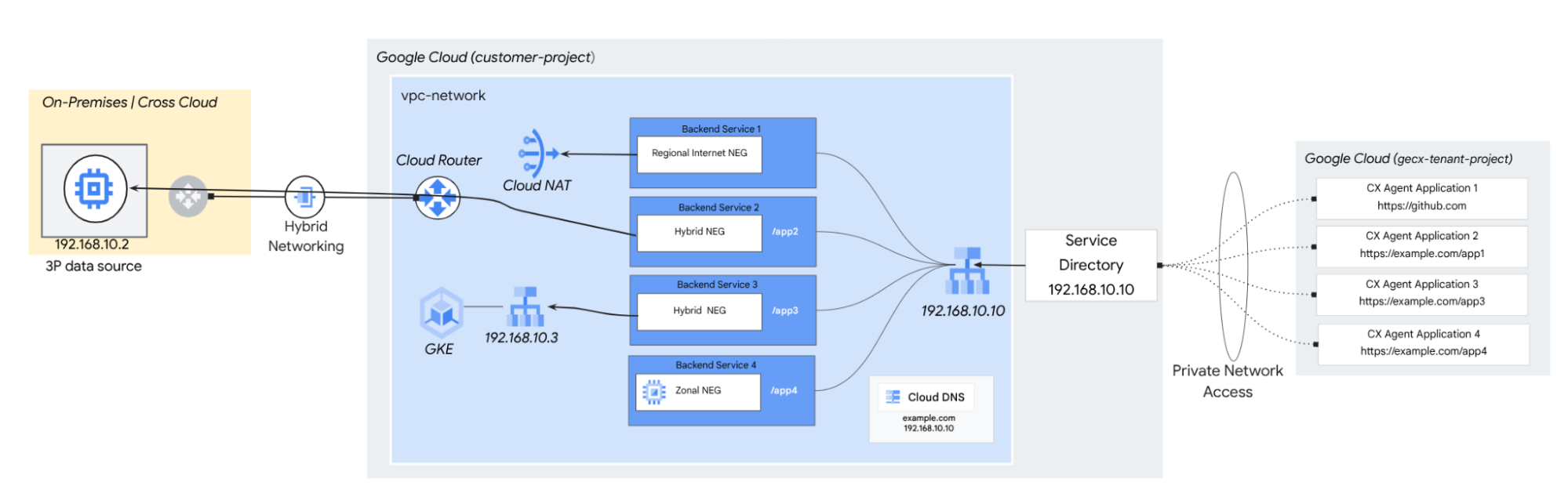
For more information, see Using Service Directory for private network access.
Service Directory limitations:
- The Service Directory operates as a regional service.
- Each CX Agent Studio agent application is limited to a single Service Directory configuration.
- Service Directory does not support targeting a PSC Endpoint
Outbound networking patterns
To optimize connectivity, configure a Service Directory entry to target an internal application load balancer (ALB). This approach provides centralized access to multiple egress endpoints, leveraging URL maps and Server Name Indication (SNI) routing to direct traffic across your backend services.