


本文說明如何透過 Compute Advisor (由 Gemini 提供技術支援的 AI 輔助介面),規劃及設計叢集。如要進一步瞭解建立 GKE 叢集前或建立時必須設定的元件,請參閱 GKE 總覽。
Compute Advisor 可協助您評估硬體選項、估算部署費用,以及查看叢集的建議設定。為提供量身打造的建議,Compute Advisor 會評估Google Cloud 專案,檢查配額限制、現有預留項目、承諾使用折扣 (CUD)、預設區域和可用區,以及任何資源位置限制。在建立或修改 GKE 叢集前,您可以使用 Compute Advisor 協助規劃,為工作負載找出最佳設定。
限制
在 Google Cloud 控制台提示 Compute Advisor 時,無法直接建立、修改或刪除資源。
事前準備
使用 Google Cloud 控制台存取 Google Cloud 服務和 API 時,不需要設定驗證機制。
必要的角色
如要取得存取及提示 Gemini 所需的權限,請要求管理員授予您專案的「Kubernetes Engine 叢集檢視者」 (roles/container.clusterViewer) IAM 角色。如要進一步瞭解如何授予角色,請參閱「管理專案、資料夾和組織的存取權」。
這個預先定義的角色具備存取及提示 Gemini 所需的權限。如要查看確切的必要權限,請展開「Required permissions」(必要權限) 部分:
所需權限
如要存取 Gemini 並輸入提示,必須具備下列權限:
-
如要查看叢集清單,請按照下列步驟操作:
container.clusters.list
在 Google Cloud 控制台存取 Compute Advisor
如要在 Google Cloud 控制台存取 Compute Advisor,請完成下列步驟:
前往 Google Cloud 控制台的「Overview」(總覽) 頁面。
在「Design your infrastructure with Compute Advisor」(運用 Compute Advisor 設計基礎架構) 部分,您可以查看下列內容:
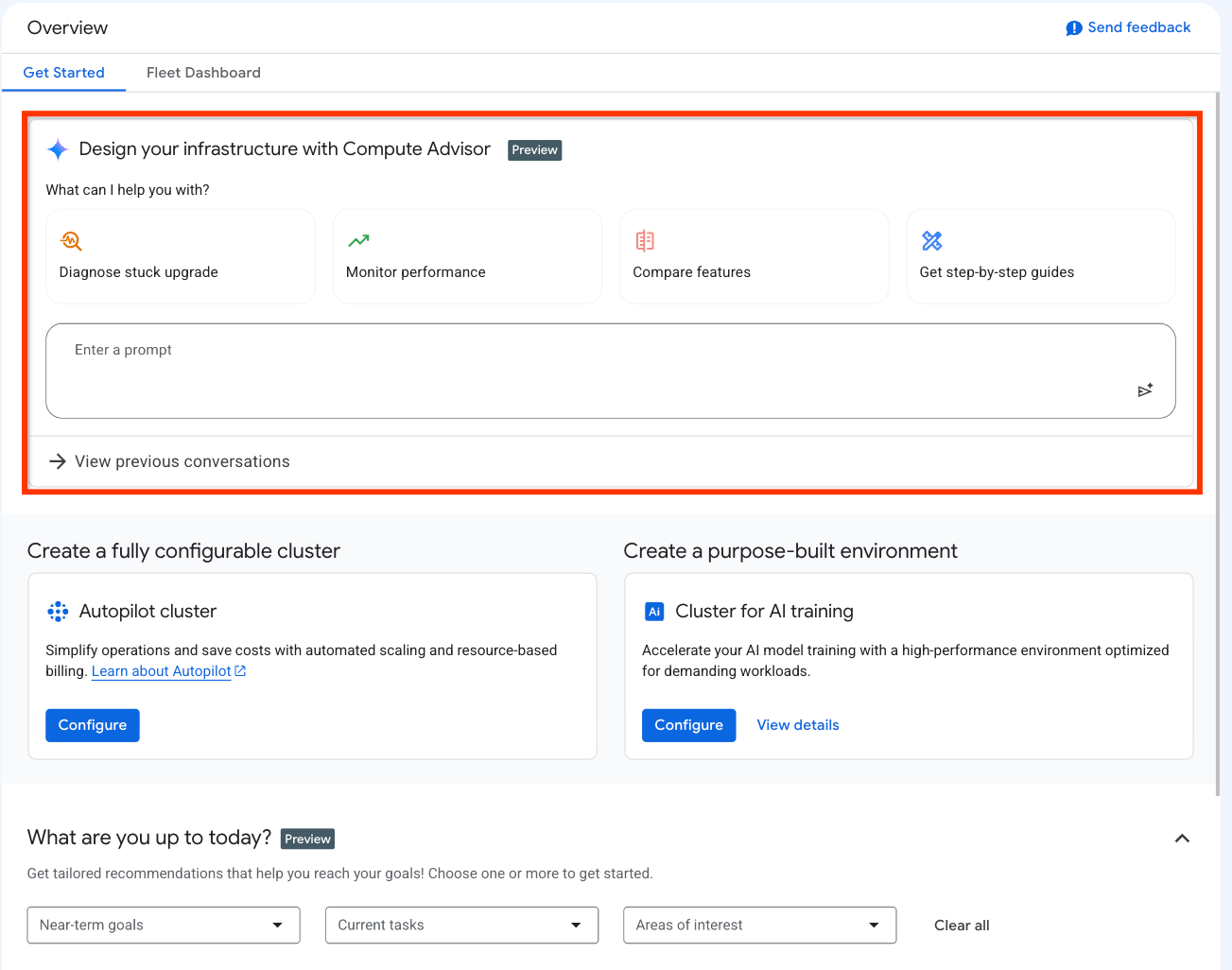
上圖顯示的 UI 元素如下:
快速操作提示資訊卡:一組資訊卡,每張都包含範例提示。點選資訊卡後,控制台會自動在提示方塊中填入範例提示。 Google Cloud
提示詞輸入框:這個欄位可供輸入及提交提示詞。如要提交提示,請按一下「提交提示」。
查看先前的對話:這項功能可讓你查看先前的對話詳細資料、繼續對話,或刪除不再需要的對話。
對話記錄側邊面板:顯示近期對話。只有在「Overview」(總覽) 頁面開始提示後,才會顯示這個面板。您可以透過下列方式與這個面板互動:
如要發起新對話,請點按「新對話」。
如要繼續最近的對話,請在「近期對話」部分點選該對話。
如要查看所有對話清單,請按一下「查看全部」。在「我的記錄」頁面,您可以查看過往對話的詳細資料並繼續對話,或刪除不再需要的對話。
提示 Compute Advisor
提交提示後,Compute Advisor 會開始生成回覆。 Google Cloud 控制台會顯示一個窗格,並在其中顯示提示的回應,如下方螢幕截圖所示:
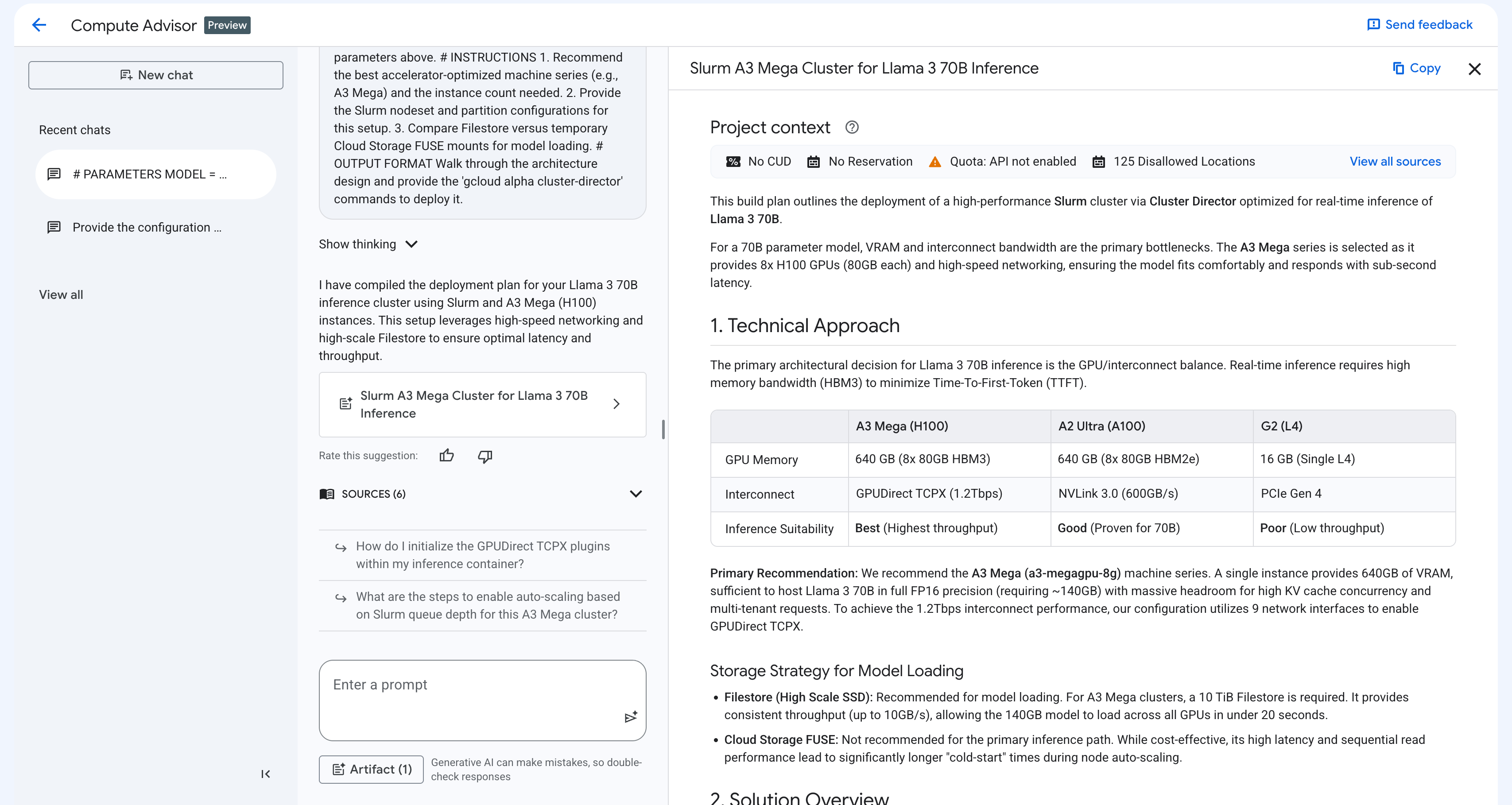
根據提示,回覆窗格會包含下列元素:
情境基礎:Compute Advisor 會自動評估專案情境,提供高度客製化的建議,包括配額限制、現有預訂、CUD、預設區域和可用區,以及任何資源位置限制。
互動式程式碼片段:Compute Advisor 會產生 gcloud 指令、REST API 方法或 Terraform 資源。您可以複製並貼上這些程式碼片段,或在 Cloud Shell 中執行。
視覺化畫布:Compute Advisor 會將建議整理成結構化表格和並排比較,這個檢視畫面可協助您評估產品功能和架構方法。並提供您用途的導入計畫。
以下各節將說明撰寫提示的最佳做法,以及您在建立或修改 GKE 叢集前可使用的提示範例。
提示詞最佳做法
如要從 Compute Advisor 取得最準確且可執行的建議,建議您以程式碼區塊的結構編寫提示。這種做法會使用明確的參數宣告、角色定義、具體指令和明確的輸出格式,引導生成式 AI。
提示 Compute Advisor 時,請考量下列最佳做法:
著重於設計和規劃:建議您不要提示 Compute Advisor 疑難排解 GKE 叢集錯誤。如要解決這些錯誤,請改為參閱「排解 GKE 問題」。
指定角色:宣告目標角色,例如 IT 管理員、AI 研究人員或平台工程師,供 Compute Advisor 採用。這項做法會引導系統生成建議時的語氣、深度和專業程度。
提供明確的編號指令:將目標分解為具體的逐步問題或工作。這種做法可建構 Compute Advisor 的推理程序,並協助確保 Compute Advisor 滿足所有需求。
定義特定輸出格式:明確說明您希望建議採用的格式,例如逐步說明、Markdown 比較表,或可直接使用的 gcloud 程式碼區塊。
運用自動情境建立功能:您不必在提示中加入預設區域或可用區、可用配額、CUD 或資源位置限制。Compute Advisor 可以存取 Google Cloud 專案中的這項資訊。
反覆修正設計:您可以傳送新提示,修改或擴充 Compute Advisor 生成的回覆。舉例來說,您可以要求助理在部署計畫中加入網路建議,或修改儲存空間需求,而不必開啟新的對話。
範例提示詞
以下列舉幾個可使用的提示,協助您設計及最佳化 GKE 叢集:
叢集拓撲和節點集區設定:如要判斷工作負載的最佳 GKE 模式、機型和節點集區設定,請使用類似下列的提示:
Act as a cloud architect. I need to design a GKE cluster topology for a scalable microservices application that requires both GPU nodes for AI inference and CPU nodes for general-purpose APIs. Please provide the following: 1. A comparison of running this workload on GKE Autopilot versus GKE Standard. 2. Recommendations for GKE machine types for the GPU node pool. 3. The optimal autoscaling and auto-provisioning settings. 4. A YAML manifest that configures tolerations for GPU taints, which are required for AI workloads. Format the comparison as a Markdown table, and provide the cluster creation steps as a ready-to-use gcloud CLI command.佈建模式和成本最佳化:如要評估佈建模式,並盡可能提高批次處理工作負載的資源使用率,請使用下列提示:
Act as an IT administrator. I need to design a cost-optimized GKE cluster to run large-scale batch processing workloads that are fault-tolerant. Please provide the following: 1. A cost and reliability comparison of using Spot VMs versus standard VMs in GKE node pools. 2. An explanation of how to configure Kueue for queueing training jobs. 3. A warning about the risk of latency for real-time inference when using Spot VMs. 4. A YAML manifest to deploy the workloads onto Spot VM nodes. Format the comparison as a Markdown table, and provide the manifest as a ready-to-use code block.有狀態磁碟拓撲:如要為 GKE 上的高可用性資料庫尋找最佳化的永久儲存空間架構,請使用類似下列的提示:
Act as a storage engineer. I need to design a StatefulSet topology in
GKE for a distributed database that relies on Persistent Disks.

Please provide the following:
1. A comparison of regional Persistent Disks versus zonal Persistent Disks.
2. An explanation of how the standard-rwo StorageClass prevents deadlocks in zonal Persistent Disks.
3. A YAML manifest that shows how to deploy a stateful workload with the "volumeBindingMode: WaitForFirstConsumer" field.

Format the response with Markdown headers, and provide the deployment
manifest as a ready-to-use code block.
Karpenter 遷移提示詞:如要規劃從 AWS Karpenter 遷移至 GKE 自動調整資源配置功能,請使用下列提示詞:
Act as a Kubernetes migration specialist. I am migrating an EKS cluster
that uses Karpenter to GKE. Please translate my AWS Karpenter
NodePool into a GKE custom ComputeClass.

Please provide the following:
1. A summary that maps Karpenter concepts to GKE Node Auto-Provisioning (NAP) and ComputeClasses.
2. A YAML manifest that shows how a ComputeClass provides the same variety of instance types and weighting for  Spot VMs as Karpenter.
3. The changes required in the Pod manifest to use the new ComputeClass.

Format the mapping as a Markdown table, and provide the GKE
manifests as code blocks that are ready to use.