

Clients can connect to a Google Cloud Managed Service for Apache Kafka cluster from any Virtual Private Cloud (VPC) network in your Google Cloud projects. You can also turn on access from trusted IP ranges over the public internet.
This page explains how networking is configured in Managed Service for Apache Kafka, how to turn on connections between Kafka clients and your cluster, and how to privately connect clients and clusters across different projects.
A VPC network is a virtual version of a physical network, implemented inside Google Cloud. It provides secure, private network connectivity for your VM instances, container workloads, and other resources. For more information, see the VPC networks overview.
Overview
When you create a cluster, the service places the cluster brokers and network endpoints in a VPC network within a Google-managed project. This project is called the tenant project, and the network is called the tenant network. In contrast, your resources, client applications, and client VPC networks reside in your own project, which is called the consumer project. Each Managed Service for Apache Kafka cluster has its own isolated tenant network.
VPC networks are divided into partitions called subnetworks (subnets). Each subnet defines a range of IP addresses in a specific region of your cloud network. To let client applications communicate with the cluster, you connect subnets within your VPC networks to the tenant network, or optionally turn on public cluster access to connect over the public internet.
The following diagram shows two Google Cloud projects, project-1 and
project-2. A Managed Service for Apache Kafka cluster is located in
project-1.
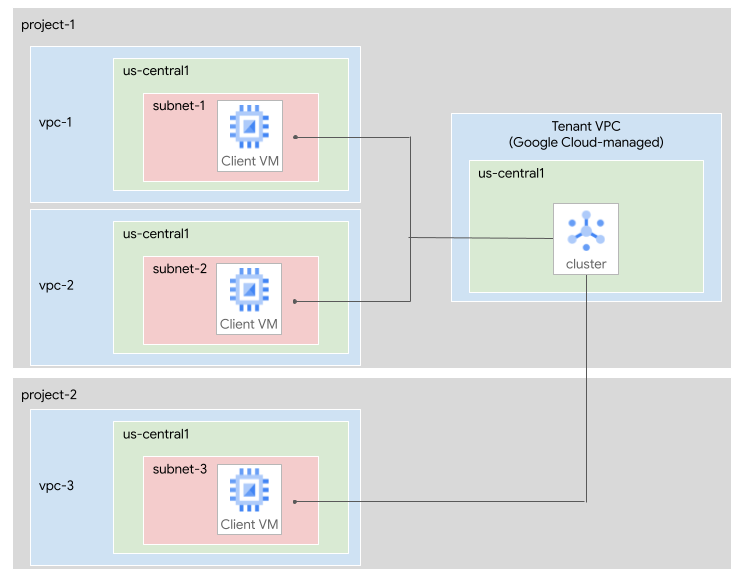
The following subnets are connected to the cluster:
subnet-1, in the VPC networkvpc-1inproject-1.subnet-2, in the VPC networkvpc-2inproject-1.subnet-3, in the VPC networkvpc-3inproject-2.
Connect subnets to a cluster
When you first create a Managed Service for Apache Kafka cluster, you must specify at least one subnet. Later, you can update the cluster to add or remove subnets.
Connected subnets can belong to the same consumer project as the cluster or a different consumer project. Client applications in any region within connected VPC networks can connect to the cluster. For more information about subnet locations and counts, see Limitations.
For more information about how to view connected subnetworks, see View a cluster.
Cluster DNS entries
When you connect a subnet to a cluster, the service creates DNS entries within that subnet network for the cluster's bootstrap address and brokers. Kafka clients use the bootstrap address to locate the brokers and establish a connection. When the bootstrap server redirects a client to a particular broker, it uses the broker URL rather than an IP address.
The bootstrap and broker URLs are fixed for the lifetime of a cluster, but the format of the URLs might be different for different clusters. To get a cluster's bootstrap address, see View a cluster's bootstrap address.
The DNS names are the same across all connected subnets, although they correspond to different IP addresses in each subnet. Because the DNS names are consistent, all of your Kafka client applications can use the same bootstrap address.
For examples of client applications that connect to Managed Service for Apache Kafka, see the following tutorials:
Subnet sizing
When you add a subnet to a cluster, the subnet must have enough IP addresses available. Each subnet requires one IP address for each Kafka broker, plus one IP address for the bootstrap address. The minimum cluster size for Managed Service for Apache Kafka has three brokers, so each subnet needs at least four usable IP addresses including the bootstrap address.
If your cluster has more than 45 vCPUs, then the cluster has one broker for every 15 vCPUs. In that case, calculate the minimum number of IP addresses for each subnet as follows:
- Divide the number of vCPUs by 15.
- Round up to the nearest whole number.
- Add 1 to account for the bootstrap address.
For example, a cluster with 60 vCPUs needs at least (60/15 + 1) = 5 usable IP addresses.
Google might change the ratio of brokers to vCPUs. To accommodate any changes, we recommend that you allocate three times the number of IP addresses calculated in the previous step.
When you plan the subnet size, base your calculations on the maximum size that you expect to scale your cluster to.
If you plan to use Kafka Connect, then also consider the subnet requirements for the Connect cluster. For more information, see worker subnet.
Privately used public IP ranges
You can connect your cluster to subnets that use the non-RFC 1918 address space. Such IP address ranges are called privately used public IP (PUPI) ranges.
You don't need additional configuration to connect to PUPI subnets. The PUPI subnets must use a valid IPv4 range that isn't a prohibited IPv4 subnet range.
Connect clients and clusters privately across projects
If you want to privately connect Kafka clients in different Google Cloud projects to your cluster, you can use one of the following methods:
The following sections describe these options.
Connect a cluster across projects
You can connect subnets from other projects to your cluster. To turn on cross-project access, you must grant permissions to the Google-managed service account that is associated with the cluster. For each project where you want Kafka clients to access the cluster, the service account must have the Managed Kafka Service Agent IAM role on that project. This role lets the cluster access Google Cloud resources, so that it can create network resources and DNS entries.
For example, if project-1 contains the cluster, and you want clients in
project-2 to access the cluster, then grant the Managed Kafka service account
for project-1 the Managed Kafka Service Agent role on project-2. Then
connect a subnet from project-2 to the cluster, as described in Connect
subnets to the cluster.
To grant the necessary roles, perform the following steps:
Console
Determine the Google Cloud projects where you want your Kafka clients to access the Managed Service for Apache Kafka cluster.
For each project, in the Google Cloud console, go to the IAM page for that project:
Click Grant access.
In the New principals field, enter the following:
service-CLUSTER_PROJECT_NUMBER@gcp-sa-managedkafka.iam.gserviceaccount.comReplace CLUSTER_PROJECT_NUMBER with the project number of the project that contains the Managed Service for Apache Kafka cluster.
Click Add roles.
In the Search for roles field, enter
Managed Kafka Service Agent. The service agent name appears in the search results.In the search results, select Managed Kafka Service Agent.
Click Apply.
Click Save.
gcloud
Determine the Google Cloud projects where you want your Kafka clients to access the Managed Service for Apache Kafka cluster.
For each project, run the
gcloud projects add-iam-policy-bindingcommand:gcloud projects add-iam-policy-binding CLIENT_PROJECT_ID \ --member=serviceAccount:service-CLUSTER_PROJECT_NUMBER@gcp-sa-managedkafka.iam.gserviceaccount.com \ --role=roles/managedkafka.serviceAgentReplace the following:
- CLIENT_PROJECT_ID: the name of the project that contains the VPC network to connect
- CLUSTER_PROJECT_NUMBER: the project number of the project that contains the Managed Service for Apache Kafka cluster
Use Shared VPC to connect projects
Shared VPC lets an organization connect resources from multiple projects to a common VPC network. To use Shared VPC with Managed Service for Apache Kafka, perform the following steps:
Create a Managed Service for Apache Kafka cluster.
Grant the Managed Kafka service account the required roles in the Shared VPC host project, as described in the previous section.
Connect the Managed Service for Apache Kafka cluster to a subnet in the Shared VPC network.
Clients in the Shared VPC host project or in the service projects can connect to the cluster.
For information about when to use Shared VPC in your network architectures, see Best practices and reference architectures for VPC design.
Connect clients to a public cluster
If you have client applications outside of your VPC network, you can turn on public access to your cluster. A public cluster still requires a connected subnet. However, you don't need to send traffic through it.
When you turn on the public cluster feature, the service provisions external IPv4 addresses for the cluster's broker and bootstrap endpoints. The service also makes the cluster DNS entries publicly resolvable to these public IP addresses. This means that external clients can use the same bootstrap address to locate the brokers and establish a connection. This implementation uses split-horizon DNS. Clients in VPC networks that contain a connected subnet continue to resolve the private endpoints, while clients in other networks resolve the public endpoints. Turning on the public cluster feature doesn't create additional resources in your consumer project.
When you turn on the public cluster feature, you must provide one or more allowed source IP ranges. For more information about allowed range sizes and limits, see Public clusters or Limitations.
You can add or remove allowed source IP ranges by updating your cluster. Managed Service for Apache Kafka uses Cloud Next Generation Firewall to restrict access to public clusters. Removing allowed source IP ranges applies only to new connections (see effects on existing traffic).
The service takes several precautions to help ensure the security of your public clusters. All connections are encrypted in transit using TLS, and all connections require authentication. You must authenticate using an IAM identity with SASL or a client certificate with mTLS. Anonymous access isn't allowed. For more information, see Authentication types for Kafka brokers.
Security administrators can prohibit public clusters by enabling the
Restrict Managed Kafka Public Clusters (constraints/managedkafka.managed.restrictPublicClusters)
managed organizational policy constraint. For more information about managed constraints,
see Managed constraints.
Configure egress firewalls from external networks
In some scenarios, you might need to determine the external IPv4 addresses of your broker and bootstrap endpoints. For instructions on how to retrieve these values, see Public cluster details.
The service makes this information available in the following ways:
The external IPv4 addresses associated with your cluster are available in the Managed Service for Apache Kafka API,
gcloud, and Terraform.The service maintains one or more discovery DNS records. These are DNS
Arecords that contain all the external IPv4 addresses associated with your cluster. You can use these records in FQDN-based firewalls, such as Cloud NGFW, which automatically update rules when the list of endpoints changes. The list of discovery endpoints is available in the API,gcloud, and Terraform.
Consider the following when you use the public IP addresses associated with your cluster:
The list of public IPv4 addresses associated with your cluster might change or grow. For this reason, automate how you consume this information, or define a process to account for new discovery DNS records when scaling up your cluster. Changes can occur when:
You scale your cluster. Scaling up might add one or more external IPv4 addresses as new brokers are added. To understand how the vCPU count influences the number of brokers, see Subnet sizing.
You turn off and then turn on the public cluster feature. This action assigns a new set of external IPv4 addresses to the cluster.
Each discovery DNS record contains a maximum of 30 IP addresses. This stays within common limits enforced by FQDN firewalls. Clusters with 29 or fewer brokers have one discovery DNS record that contains 30 external IPv4 addresses (including the bootstrap record). The service adds one discovery DNS record for every additional 30 brokers. To understand how the vCPU count influences the number of brokers, see Subnet sizing.
Don't configure your Kafka clients to connect to discovery DNS records; instead, configure clients to connect to the bootstrap address. For more information, see Limitations.
If you use this information to configure egress firewalls, allow connectivity to TCP ports
9092(SASL) and9192(mTLS).
Network architecture of a cluster
This section describes the details of the networking architecture used in Managed Service for Apache Kafka.
A Kafka cluster spans a tenant network and one or more consumer networks.
In the tenant network, the cluster has a single bootstrap IP address and URL. This bootstrap address corresponds to a load balancer connected to all the brokers in the cluster. Each broker individually can also act as a bootstrap server, but we recommend you use the bootstrap address for reliability.
Within each consumer network, the service creates a Private Service Connect endpoint for the bootstrap address and one endpoint for each broker.
The URL for the bootstrap address is the same across the VPC networks to which a cluster is connected. The IP address is local to the consumer network.
Clients connect to Kafka brokers by using DNS names. These names are registered automatically in every VPC network to which a Kafka cluster is connected. The bootstrap address and its port number are available as a property of the cluster.
Clients use the bootstrap address to retrieve broker URLs. These URLs are resolved to IP addresses local to each VPC network. You can find the actual broker IP addresses and URLs in Cloud DNS.
The following diagram shows a sample architecture of a Managed Service for Apache Kafka cluster network.
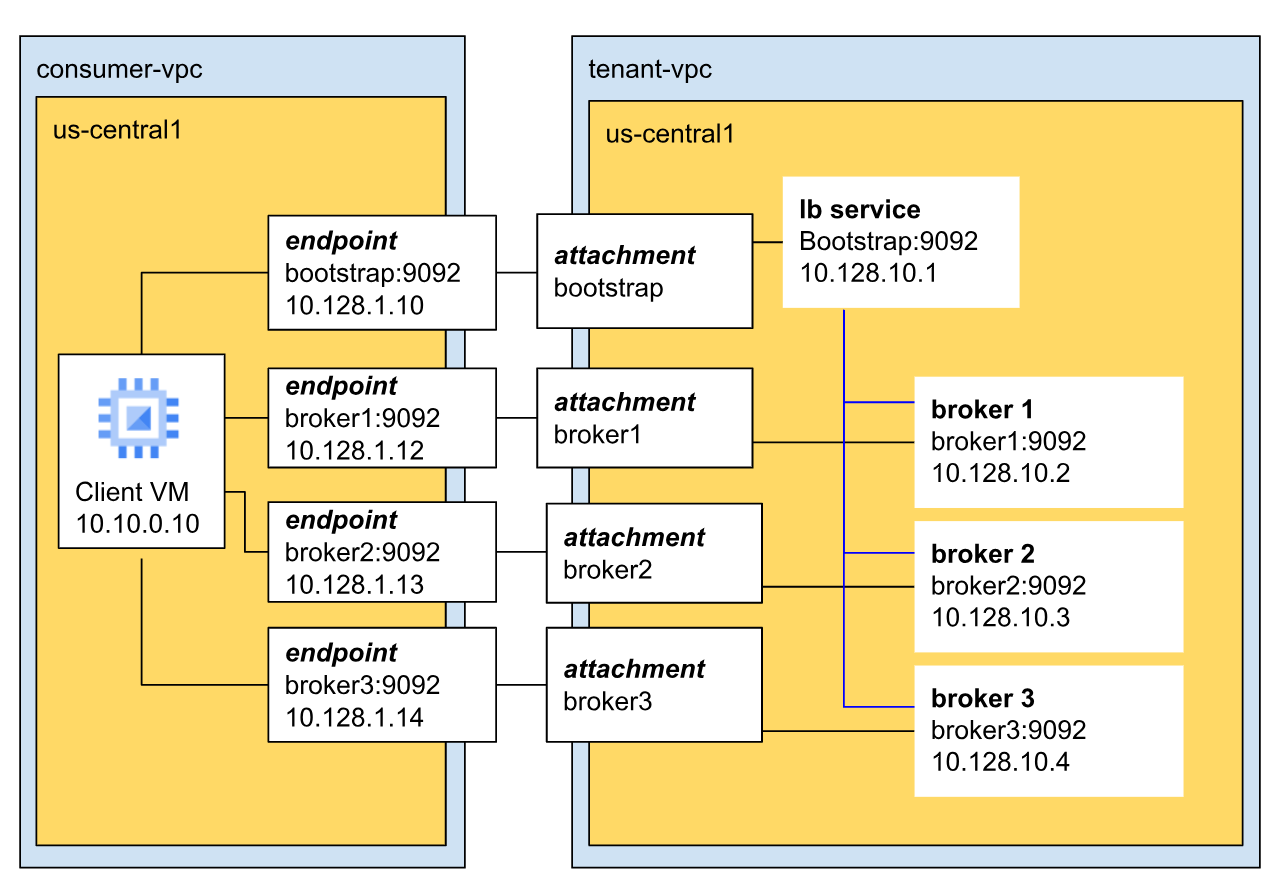 *
In this example, the cluster has three brokers and the cluster is in the tenant
VPC.
*
In this example, the cluster has three brokers and the cluster is in the tenant
VPC.
Brokers communicate with clients over the default Kafka port (9092) and have unique IP addresses. In this example, the three brokers have IP addresses 10.128.10.2, 10.128.10.3, and 10.128.10.4 respectively.
All three brokers connect to the bootstrap load balancer. This ensures high availability and regional fault tolerance, because the bootstrap address isn't confined to a single broker or zone.
Limitations
The following limitations apply to VPC connections and public clusters:
Subnet region. Connected subnets must be in the same region as your cluster.
Subnet count. You can connect a minimum of one and a maximum of ten subnets to a cluster.
Subnets per network. You can connect at most one subnet per VPC network to a cluster.
Subnet size. Each connected subnet requires at least one IP address for each broker plus one IP address for the bootstrap address. A minimum of four usable IP addresses is required. For more information, see Subnet sizing.
Connected subnets for public clusters. To turn on public access, your cluster must still have at least one connected subnet, although you don't need to send traffic through it.
Allowed source IP ranges. Each allowed source IP range for a public cluster must be specified in IPv4 CIDR notation. Each CIDR subnet size must be between
/16and/32. CIDR ranges must not overlap. IPv6 addresses aren't supported. You can specify a maximum of 500 allowed source IP ranges.Discovery record DNS resolution. Discovery DNS records are designed only to configure FQDN-based egress firewalls. Don't configure your Kafka clients to connect to these discovery records; instead, configure clients to connect to the bootstrap address.
Troubleshoot
For information about how to troubleshoot networking issues, see Networking errors.
What's next?
For more information about how to create a cluster, see Create a Managed Service for Apache Kafka cluster.
For more information about how to update a cluster, see Update a Managed Service for Apache Kafka cluster.
For more information about how to view a cluster's subnetworks and active brokers, see View a cluster.
For more information about how to publish and consume messages, see Publish and consume messages.