


Managed Service for Apache Spark 精細的 IAM 功能,可讓您在叢集、工作、作業或工作流程範本,或是自動調度資源政策層級授予權限。
範例:您可以將叢集檢視者角色授予某使用者,讓該使用者查看專案中的叢集,然後將工作編輯者角色授予另一位使用者,讓此使用者更新、取消及查看工作。如要瞭解每個 Managed Service for Apache Spark 精細 IAM 角色所提供的特定 Google Cloud CLI 指令,請參閱「精細 IAM 提供的 SDK 指令」。
Managed Service for Apache Spark 精細的 IAM 角色和權限
Managed Service for Apache Spark 精細 IAM 可以設定下列角色,在 Managed Service for Apache Spark 資源上獲得下列權限。
叢集角色
| 角色 | 權限 |
|---|---|
| 檢視者 | dataproc.clusters.get |
| 編輯者 | dataproc.clusters.get dataproc.clusters.list dataproc.clusters.delete dataproc.clusters.update dataproc.clusters.use dataproc.clusters.start dataproc.clusters.stop |
| 擁有者 | dataproc.clusters.get dataproc.clusters.list dataproc.clusters.delete dataproc.clusters.update dataproc.clusters.use dataproc.clusters.start dataproc.clusters.stop dataproc.clusters.setIamPolicy dataproc.clusters.getIamPolicy |
工作角色
| 角色 | 權限 |
|---|---|
| 檢視者 | dataproc.jobs.get |
| 編輯者 | dataproc.jobs.get dataproc.jobs.cancel dataproc.jobs.delete dataproc.jobs.update |
| 擁有者 | dataproc.jobs.get dataproc.jobs.cancel dataproc.jobs.delete dataproc.jobs.update dataproc.jobs.setIamPolicy dataproc.jobs.getIamPolicy |
作業角色
| 角色 | 權限 |
|---|---|
| 檢視者 | dataproc.operations.get |
| 編輯者 | dataproc.jobs.get dataproc.operations.cancel dataproc.operations.delete |
| 擁有者 | dataproc.jobs.get dataproc.operations.cancel dataproc.operations.delete dataproc.operations.setIamPolicy dataproc.operations.getIamPolicy |
工作流程範本角色
| 角色 | 權限 |
|---|---|
| 檢視者 | dataproc.workflowTemplates.get |
| 編輯者 | dataproc.workflowTemplates.get dataproc.workflowTemplates.delete dataproc.workflowTemplates.update |
| 擁有者 | dataproc.workflowTemplates.get dataproc.workflowTemplates.delete dataproc.workflowTemplates.update dataproc.workflowTemplates.setIamPolicy dataproc.workflowTemplates.getIamPolicy |
自動調度資源政策角色
| 角色 | 權限 |
|---|---|
| 檢視者 | dataproc.autoscalingPolicies.get |
| 編輯者 | dataproc.autoscalingPolicies.get dataproc.autoscalingPolicies.use dataproc.autoscalingPolicies.delete dataproc.autoscalingPolicies.update |
| 擁有者 | dataproc.autoscalingPolicies.get dataproc.autoscalingPolicies.use dataproc.autoscalingPolicies.delete dataproc.autoscalingPolicies.update dataproc.autoscalingPolicies.setIamPolicy dataproc.autoscalingPolicies.getIamPolicy |
使用 Managed Service for Apache Spark 細部 IAM
本節說明如何使用 Managed Service for Apache Spark 精細的 IAM,在現有的 Managed Service for Apache Spark 資源上將角色指派給使用者。如要進一步瞭解如何更新及移除 Identity and Access Management (IAM) 角色,請參閱「管理專案、資料夾和機構的存取權」。
gcloud 指令
- 取得資源的 IAM 政策,並寫入 JSON 檔案 (resource-type 可以是「clusters」、「jobs」、「operations」、「workflow-templates」或「autoscaling-policies」):
gcloud dataproc resource-type get-iam-policy  resource-id \
    --region=region \
    --format=json > iam.json
- JSON 檔案的內容與以下類似:
{ "bindings": [ { "role": "roles/editor", "members": [ "user:mike@example.com", "group:admins@example.com", "domain:google.com", "serviceAccount:my-other-app@appspot.gserviceaccount.com" ] } ], "etag": "string" } - 使用文字編輯器,在繫結陣列新增繫結物件,定義使用者以及使用者的資源存取權角色。例如,如要將檢視者角色 (
roles/viewer) 授予sean@example.com使用者,請變更上述範例,新增繫結物件 (如下方範例中的粗體字所示)。 注意:請務必傳回您從gcloud dataproc resource-type get-iam-policy收到的etag值。請參閱 etag 說明文件。{ "bindings": [ { "role": "roles/editor", "members": [ "user:mike@example.com", "group:admins@example.com", "domain:google.com", "serviceAccount:my-other-app@appspot.gserviceaccount.com" ] }, { "role": "roles/viewer", "members": [ "user:sean@example.com" ] } ], "etag": "value-from-get-iam-policy" } - 執行下列指令,使用新的繫結陣列更新叢集政策 (resource-type 可以是「clusters」、「jobs」、「operations」、「workflow-templates」或「autoscaling-policies」):
gcloud dataproc resource-type set-iam-policy resource-name \
    --region=region \
    --format=json iam.json
- 指令會輸出更新後的政策:
{
  "bindings": [
    {
      "role": "roles/editor",
      "members": [
        "user:mike@example.com",
        "group:admins@example.com",
        "domain:google.com",
        "serviceAccount:my-other-app@appspot.gserviceaccount.com"
      ]
    },
    {
      "role": "roles/viewer",
      "members": [
        "user:sean@example.com"
      ]
    }
  ],
  "etag": "string"
}
REST API
- 發出 resource-type ("clusters" or "jobs" or "operations" or "workflowTemplates" or "autoscalingPolicies") getIamPolicy 要求,取得資源的 IAM 政策。
叢集 getIamPolicy 範例:
GET https://dataproc.googleapis.com/v1/projects/projectName/regions/region/clusters/clusterName:getIamPolicy
- JSON 檔案的內容與以下類似:
{ "bindings": [ { "role": "roles/editor", "members": [ "user:mike@example.com", "group:admins@example.com", "domain:google.com", "serviceAccount:my-other-app@appspot.gserviceaccount.com" ] } ], "etag": "string" } - 使用文字編輯器,建構下列 JSON 政策物件,納入您剛剛從 Managed Service for Apache Spark 服務接收的繫結陣列。請務必傳回您在 getIamPolicy 回應中接收到的「etag」值 (請參閱 etag 說明文件)。現在,請在繫結陣列新增繫結物件,定義使用者以及使用者的叢集存取權角色。例如,若要將檢視者角色 (
roles/viewer) 授予sean@example.com使用者,您可以變更上述範例以新增繫結物件 (如下方粗體字所示)。{ "policy": { "version": "", "bindings": [ { "role": "roles/editor", "members": [ "user:mike@example.com", "group:admins@example.com", "domain:google.com", "serviceAccount:my-other-app@appspot.gserviceaccount.com" ] }, { "role": "roles/viewer", "members": [ "user:sean@example.com" ] } ], "etag": "value-from-getIamPolicy" } } - 發出
setIamPolicy要求,設定資源的更新政策。叢集 setIamPolicy 範例:
POST https://dataproc.googleapis.com/v1/projects/projectName/regions/region/clusters/clusterName:setIamPolicy Request body
{ "policy": { "version": "", "bindings": [ { "role": "roles/editor", "members": [ "user:mike@example.com", "group:admins@example.com", "domain:google.com", "serviceAccount:my-other-app@appspot.gserviceaccount.com" ] }, { "role": "roles/viewer", "members": [ "user:sean@example.com" ] } ], "etag": "value-from-getIamPolicy" } } - JSON 回應的內容與下方類似:
回應
{
  "bindings": [
    {
      "role": "roles/editor",
      "members": [
        "user:mike@example.com",
        "group:admins@example.com",
        "domain:google.com",
        "serviceAccount:my-other-app@appspot.gserviceaccount.com"
      ]
    },
    {
      "role": "roles/viewer",
      "members": [
        "user:sean@example.com"
      ]
    }
  ],
  "etag": "string"
}
控制台
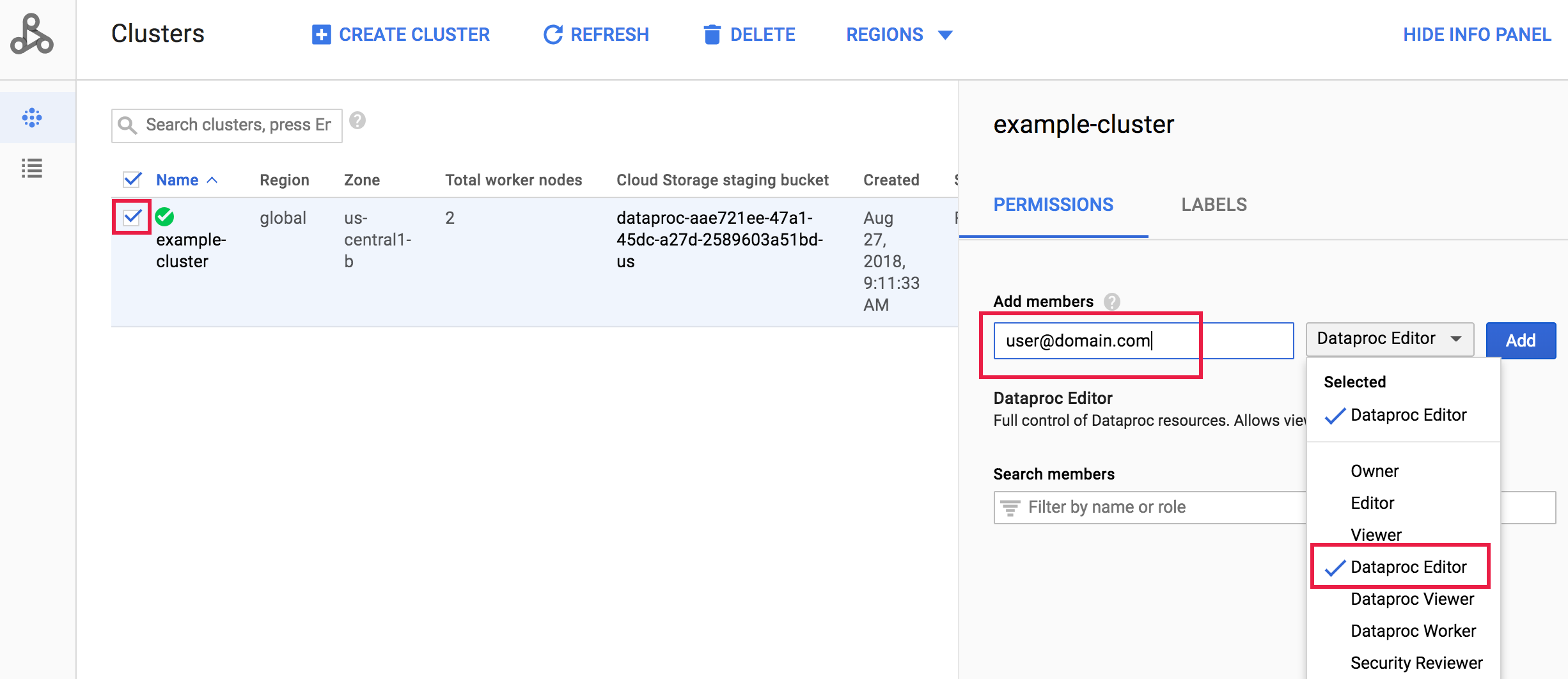
前往 Google Cloud 控制台的「Managed Service for Apache Spark Clusters」(Managed Service for Apache Spark 叢集) 頁面,然後按一下叢集名稱左側的方塊,開啟「Permissions/Labels」(權限/標籤) 面板 (如果沒有顯示此面板,請按一下頁面右上方的「SHOW INFO PANEL」(顯示資訊面板))。在「Permissions」(權限) 分頁下方,選取 Managed Service for Apache Spark 角色,在「Add principals」(新增主體) 方塊中新增一或多個帳戶地址,然後按一下「Add」(新增)。
精細的 IAM 提供的 SDK 指令
本節介紹每個精細的 IAM 角色,對 Managed Service for Apache Spark 資源提供的 gcloud dataproc 指令。
叢集
| IAM 角色 | 指令 |
|---|---|
| 檢視者 | gcloud dataproc clusters describe cluster-name |
| 編輯者 | gcloud dataproc clusters describe cluster-namegcloud dataproc clusters listgcloud dataproc clusters delete cluster-namegcloud dataproc clusters diagnose cluster-namegcloud dataproc clusters update cluster-namegcloud beta dataproc clusters start cluster-namegcloud beta dataproc clusters stop cluster-name |
| 擁有者 | gcloud dataproc clusters describe cluster-namegcloud dataproc clusters listgcloud dataproc clusters delete cluster-namegcloud dataproc clusters diagnose cluster-namegcloud dataproc clusters update cluster-namegcloud beta dataproc clusters start cluster-namegcloud beta dataproc clusters stop cluster-namegcloud dataproc clusters get-iam-policy cluster-namegcloud dataproc clusters set-iam-policy cluster-name |
工作
| IAM 角色 | 指令 |
|---|---|
| 檢視者 | gcloud dataproc jobs describe job-id |
| 編輯者 | gcloud dataproc jobs delete job-idgcloud dataproc jobs describe job-idgcloud dataproc jobs kill job-idgcloud dataproc jobs update job-idgcloud dataproc jobs wait job-id |
| 擁有者 | gcloud dataproc jobs delete job-idgcloud dataproc jobs describe job-idgcloud dataproc jobs kill job-idgcloud dataproc jobs update job-idgcloud dataproc jobs wait job-idgcloud dataproc jobs get-iam-policy job-idgcloud dataproc jobs set-iam-policy job-id |
作業
| IAM 角色 | 指令 |
|---|---|
| 檢視者 | gcloud dataproc operations describe operation-id |
| 編輯者 | gcloud dataproc operations delete operation-idgcloud dataproc operations describe operation-idgcloud dataproc operations cancel operation-id |
| 擁有者 | gcloud dataproc operations delete operation-idgcloud dataproc operations describe operation-idgcloud dataproc operations cancel operation-idgcloud dataproc operations get-iam-policy operation-idgcloud dataproc operations set-iam-policy operation-id |
工作流程範本
| IAM 角色 | 指令 |
|---|---|
| 檢視者 | gcloud dataproc workflow-templates describe template-id |
| 編輯者 | gcloud dataproc workflow-templates delete template-idgcloud dataproc workflow-templates describe template-idgcloud dataproc workflow-templates remove-job template-idgcloud dataproc workflow-templates run template-id |
| 擁有者 | gcloud dataproc workflow-templates delete template-idgcloud dataproc workflow-templates describe template-idgcloud dataproc workflow-templates remove-job template-idgcloud dataproc workflow-templates run template-idgcloud dataproc workflow-templates get-iam-policy template-idgcloud dataproc workflow-templates set-iam-policy template-id |
自動調度資源政策
| IAM 角色 | 指令 |
|---|---|
| 檢視者 | gcloud dataproc autoscaling-policies describe policy-id |
| 編輯者 | gcloud dataproc autoscaling-policies delete policy-idgcloud dataproc autoscaling-policies describe policy-idgcloud dataproc autoscaling-policies update policy-idgcloud dataproc clusters create cluster-name --autoscaling-policy policy-id |
| 擁有者 | gcloud dataproc autoscaling-policies delete policy-idgcloud dataproc autoscaling-policies describe policy-idgcloud dataproc autoscaling-policies update policy-idgcloud dataproc clusters create cluster-name --autoscaling-policy policy-idgcloud dataproc autoscaling-policies get-iam-policy policy-idgcloud dataproc autoscaling-policies set-iam-policy policy-id |
使用精細的 IAM 提交工作
如要讓主體 (使用者、群組或服務帳戶) 使用 Managed Service for Apache Spark 精細的 IAM 提交工作給指定叢集,除了將叢集的編輯者角色授予使用者外,還必須在專案層級設定額外的權限。請採取下列步驟,允許主體在指定的 Managed Service for Apache Spark 叢集提交工作:
- 建立 Cloud Storage bucket,讓叢集可用其連線至 Cloud Storage。
- 在 bucket 層級政策新增主體,為主體選取 Storage 物件檢視者角色 (請參閱
roles/storage.objectViewer),該角色包含下列權限:storage.objects.getstorage.objects.list
- 建立叢集時,請使用
--bucket參數,將您剛剛建立的 bucket 名稱傳送至叢集 (請參閱gcloud dataproc clusters create --bucket)。 - 建立叢集後,請在叢集設定政策,將編輯者或擁有者角色授予主體 (請參閱「使用 Managed Service for Apache Spark 精細的 IAM」)。
- 建立 IAM 自訂角色,並授予下列權限:
dataproc.jobs.createdataproc.jobs.get
- 在 Google Cloud 控制台的 IAM 頁面選取或新增主體,然後選取自訂角色並套用到主體。