

NCC Gateway is a spoke type that can be attached to the Network Connectivity Center (NCC) hub. It is a regional product that enables security for Cross-Cloud Network traffic. NCC Gateway lets you enable security functions such as third-party Security Service Edge (SSE), a cloud-delivered security component of secure access service edge (SASE). NCC Gateway spokes support direct connectivity to Cloud Interconnect VLAN attachments.
NCC Gateway offers the following features:
- Streamlined SSE integration: you can integrate SSE, like Palo Alto Networks Prisma Access and Symantec Cloud Secure Web Gateway (Preview) seamlessly with transparent steering for improved user-to-application protection and performance. NCC Gateway lets you enable security functions for cross-cloud traffic.
- High availability: you can use NCC Gateway for an uptime SLA of 99.9% to minimize disruptions.
- Regional deployment: you can deploy NCC Gateway to a variety of regions based on physical proximity to data centers, third-party SSE providers, or other cloud providers where your applications reside.
- Secure remote workforce: You can securely connect remote workforces—such as those in branches, data centers, and remote offices—to private applications in Google Cloud, on-premises, or other cloud providers and to public applications.
Benefits
NCC Gateway provides the following benefits:
Optimal application experience with reduced latency: high bandwidth cloud-first consumption of SSE service with NCC Gateway and enhanced performance through Google's private backbone.
Unified security for all user traffic: improved security posture with single unified security stack and reduced attack surface by limiting ingress and egress points.
Simplified management through NCC.
Key terms
To understand NCC Gateway, familiarize yourself with the following terminology:
Hybrid attachment: VLAN attachments that you associate with an NCC Gateway.
Security service function: services that are attached to NCC Gateway. For example, for user-to-application protection, you must attach an SSE service to NCC Gateway.
Application or workload Virtual Private Cloud (VPC) network: a workload VPC network is typically a network that uses Compute Engine virtual machine (VM) or Google Kubernetes Engine (GKE) containers as workloads. Workload VPC networks can be regular VPC networks or Shared VPC networks with a host project and multiple service projects. The workload VPC networks must be configured as spokes in the hub.
Spoke groups: a way to group spokes within an NCC hub. Spoke groups let you segregate spokes into different routing domains. A spoke group can contain multiple spokes, but a spoke can only belong to one group. For detailed information about spoke groups for different topologies, see Preset connectivity topologies.
Hybrid inspection topology: lets you add NCC Gateway spokes to a group to apply policies. For information about hybrid inspection topology, see Hybrid inspection topology.
Secure Access Connect: lets you connect third-party SSE products to NCC Gateway for security processing and secure internet egress. For information about Secure Access Connect, see Secure Access Connect overview.
Supported SSE products
NCC Gateway supports connections to the following SSE products:
Use cases
NCC Gateway is ideal for organizations that want to secure hybrid workforce access to applications. NCC Gateway provides security for hybrid workforce through an integrated partner ecosystem to let you connect to SSE providers of your choice. This approach is applicable to both new (greenfield) and existing (brownfield) NCC deployments.
NCC Gateway lets you secure your access to private applications hosted in Google Cloud, on-premises, in other cloud providers, and to public applications hosted on internet and SaaS applications. NCC Gateway lets you create regional deployments for optimal data center proximity and manage cross-region traffic on Google Cloud's private backbone.
Use cases for Google Cloud users include support for the following connection modes:
- Branch users to the internet
- Branch users to private applications
- Private applications to the internet
Use cases for some supported partners include connecting one or more of the following:
- Mobile users to the internet
- Mobile users to private applications
- Branch users to partner applications
- Private applications to partner applications
Traffic flows
This section describes the traffic flow paths in NCC Gateway depending on each use case.
Traffic flow in the use cases for Google Cloud users
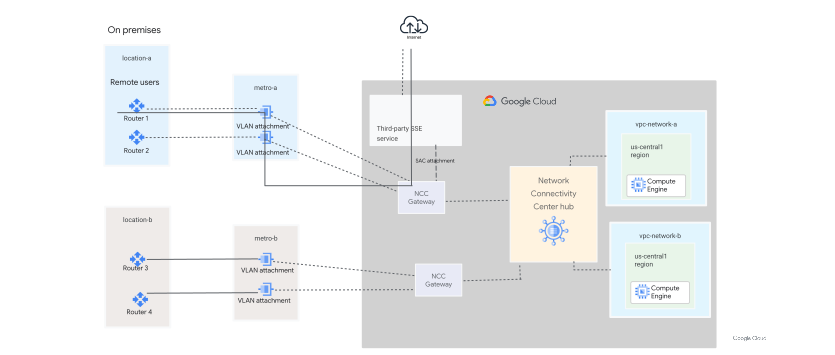
Branch users to the internet
In the following diagram, the traffic flows from an on-premises branch user through the NCC Gateway and the third-party SSE stack to the internet.
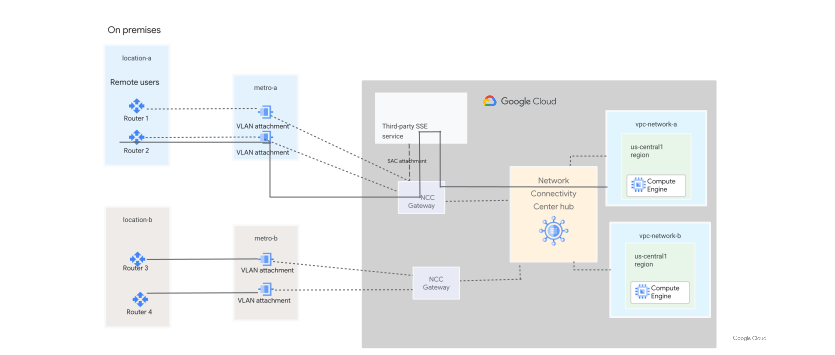
Branch users to private applications
In the following diagram, the traffic flows from the on-premises branch user through the NCC Gateway, traverses the third-party SSE, and then goes back through the NCC Gateway to a private application.
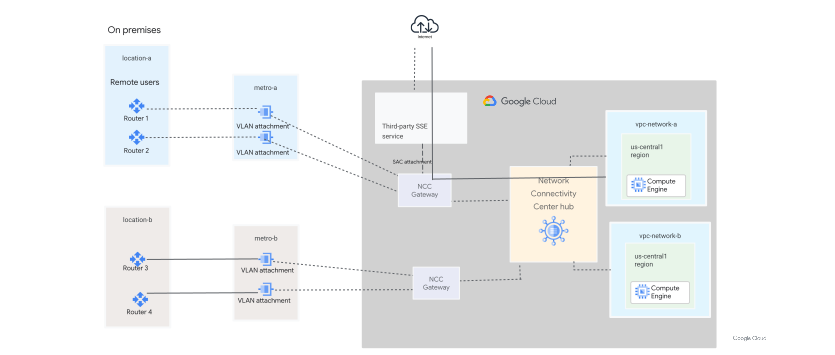
Private applications to the internet
In the following diagram, the traffic flows from Google Cloud through the NCC Gateway, traverses the third-party SSE to the internet, then goes back to the NCC Gateway to the VM.
Traffic flow in the use cases for supported partners
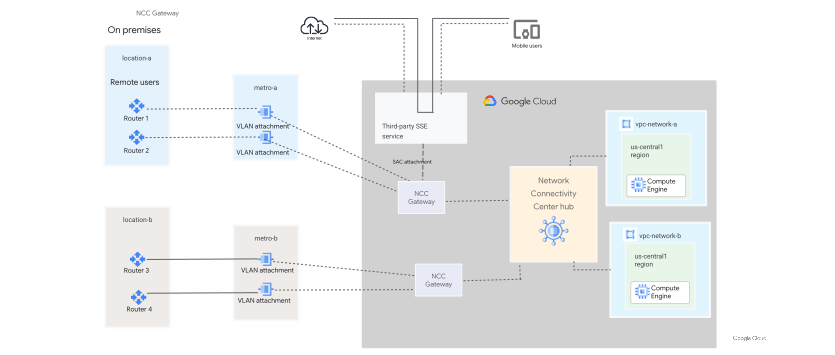
Mobile users to the internet
In the following diagram, traffic flows from mobile users through the third-party SSE to the internet. In this case, traffic doesn't go through NCC Gateway.
Mobile users to private applications
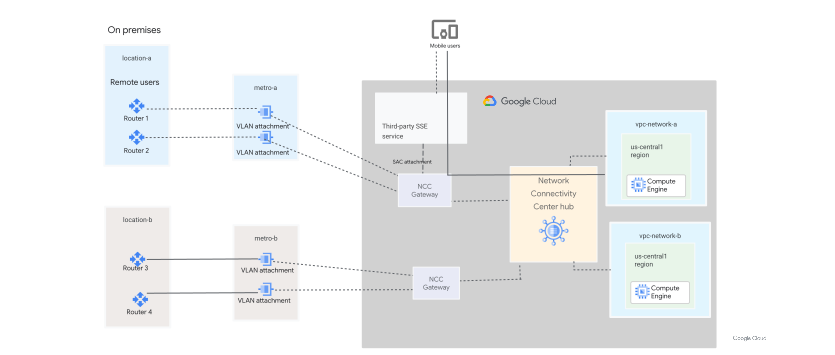
In the following diagram, traffic flows from mobile users through the third-party SSE service and the NCC Gateway to a private application hosted in a VPC network.
Branch users to partner applications
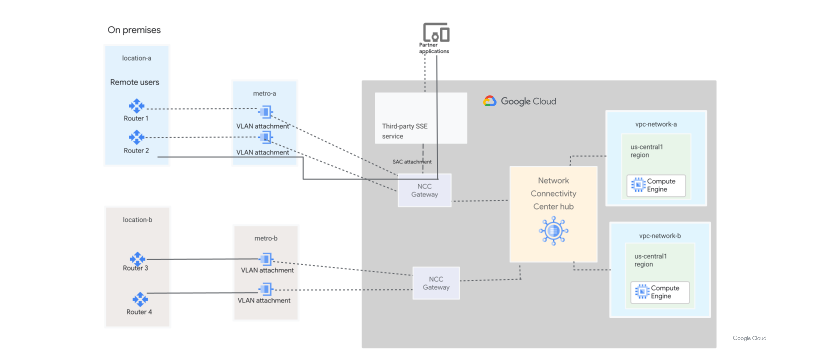
In the following diagram, the traffic flows from the on-premises branch user through the NCC Gateway, traverses the third-party SSE, and then goes back through the NCC Gateway to the on-premises branch.
Mobile users to private applications in the branch
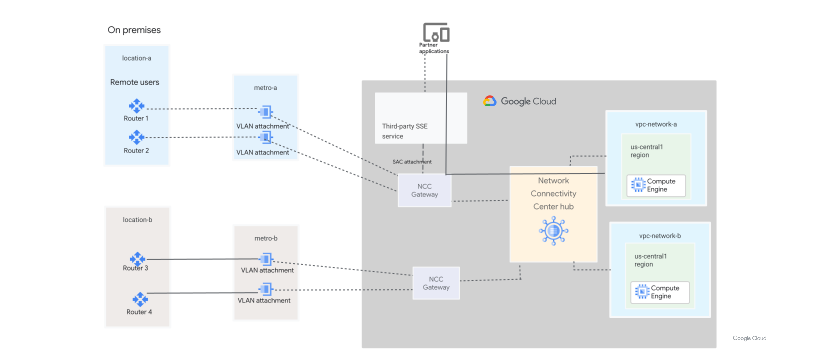
In the following diagram, the traffic flows from mobile users to private applications in the branch through NCC Gateway.
Processing capacity
The processing capacity of an NCC Gateway spoke is its provisioned bandwidth. You must provision enough bandwidth to account for each traffic flow direction, keeping in mind that packets might enter and leave the gateway spoke more than once for each flow direction for some traffic flows.
Consider the following examples to calculate the required processing capacity of a gateway spoke.
Example: Branch users to the internet
Suppose that a branch's on-premises network is connected to the internet as shown in the Branch users to the internet use case. The packets are traversing NCC Gateway once in each direction and the branch and the internet need 1 Gbps full-duplex bandwidth: 1 Gbps for traffic from the branch on-premises network to the internet and 1 Gbps for traffic from the internet to the branch network. In this case, the user needs 2 Gbps of processing capacity. This example also assumes that the SSE partner doesn't drop any packets. If your chosen SSE partner recommends higher bandwidth than what this example calculates, follow the partner's recommendation.
Example: Branch users to private applications
Suppose that a branch's on-premises network is connected to Google Cloud as shown in the Branch users to private applications use case, and that the branch and private applications need 1 Gbps full-duplex bandwidth: 1 Gbps for traffic from the branch to the applications and 1 Gbps for traffic from the applications to the branch. This example also assumes that the SSE partner doesn't drop any packets. If your chosen SSE partner recommends higher bandwidth than what this example calculates, follow the partner's recommendation.
The NCC Gateway spoke that connects the branch's on-premises network to the NCC hub needs two 1 Gbps VLAN attachments in order to meet Cloud Interconnect SLA requirements. This way, it's possible for one VLAN attachment to provide 1 Gbps of full-duplex bandwidth between the branch and private applications even when one VLAN attachment is offline (for example, due to interconnect connection maintenance).
The required processing capacity of the gateway spoke is 4 Gbps for the following reasons:
Traffic from the branch on-premises network to the NCC hub requires 1 Gbps of bandwidth. This traffic requires 2 Gbps of gateway bandwidth because it is processed by the gateway in the following two places:
- 1 Gbps as packets from the VLAN attachments that connect to the branch enter the gateway spoke
- 1 Gbps as packets leave the gateway spoke and enter the hub
Traffic from the NCC hub to the branch on-premises network also requires 1 Gbps of bandwidth. This traffic requires an additional 2 Gbps of gateway bandwidth because it is processed by the gateway in the following two places:
- 1 Gbps as packets leave the hub and enter the gateway spoke
- 1 Gbps as packets leave the gateway spoke and are sent to the VLAN attachments that connect to the branch
We recommend the following strategy for configuring gateway processing capacity and VLAN attachment bandwidth:
- The gateway processing capacity is the sum of bandwidth required, in each direction, among all gateway NICs.
- Unlike gateway processing capacity, VLAN attachment bandwidth is full-duplex. Always provision a sufficient number of VLAN attachments to support your required bandwidth even if the VLAN attachments that use a common interconnect connection are down.
Considerations
To use NCC Gateway, the following limitations apply:
- You can only attach Cloud Interconnect VLAN attachments to NCC Gateway spokes. Cloud VPN tunnels and Router appliances aren't supported.
- NCC Gateway spokes for all regions must be in the same gateways spoke group. For a greenfield deployment of NCC Gateway, NCC hubs must use the preset hybrid inspection topology. For a brownfield deployment, you can use the existing star or full mesh topology.
- Only one service can be attached to an NCC Gateway at a time.
- A Cloud Router must be linked to an NCC Gateway in the same region.
- Only Cloud Interconnect VLAN attachments created with a Cloud Router linked to an NCC Gateway are attached to the gateway.
- You can only have one NCC Gateway spoke per region per hub.
- NCC Gateway spokes and hub must be in the same project.
- You must specify the processing capacity at the time of gateway spoke creation. The processing capacity can be changed later, if needed.
- You can't change assigned IP address ranges. Some IP address ranges are reserved for SSE partners.
- There is no traffic steering policy to bypass a subset of traffic from NCC Gateway.
- If you configure a gateway advertised route in the gateway spoke, you must create an active SSE gateway to propagate this route to the NCC hub route table.
- You can view gateway advertised routes in the VPC network route table or the hub route table of the spoke group that the VPC network is in.
If the same on-premises prefix is advertised to NCC Gateway spokes in more than one region, you must set one region as the preferred region. Advertise the prefix with a lower MED value (indicating higher priority) from the region that you want traffic to enter Google Cloud, and with a higher MED (indicating lower priority) from the other regions. Return traffic for a prefix follows the most preferred region regardless of the region that the traffic entered. Advertising the same prefix with equal MED values from multiple regions can cause asymmetric routing and drop stateful sessions.
For information on how to change MED values, see Change the MED values for all custom learned routes on a BGP session.
Gateway advertised routes are programmed using the standard best path selection mode:
- The priority of gateway advertised routes in the hub route table
reflects the effective Andromeda route priority, such as,
65536or65537. The priority that the gateway advertised route is created with is taken into account when calculating the effective Andromeda route priority. - Static routes always have a priority between
0-65535, and therefore take precedence over gateway advertised routes for the same destination prefix. So, if you want to direct internet traffic to the gateway using a gateway advertised route with a0/0destination, then you might need to remove the system-generated default route. If you remove the default route with default internet gateway next hop, you must create special routes for Google APIs and services or use Private Service Connect endpoints for global Google APIs
- The priority of gateway advertised routes in the hub route table
reflects the effective Andromeda route priority, such as,
Capacity-based limitations
The following limitations are based on the available link capacity in a region:
- Some partners might not support 100Gbps.
- Some regions might only support 1 Gbps and 10 Gbps, but not 100 Gbps.
MTU limitations
Cloud Interconnect VLAN attachments that are associated with an NCC Gateway spoke must use an MTU of 1500 bytes.
IP address range updates not supported
After spoke creation, you can't change assigned IP addresses. Some IP address ranges are reserved for SSE partners.
Health checks
Health checks provide an indication of service degradation in a region so that you can take appropriate action. The system extracts an aggregated health signal triggered by unhealthiness in key components, including active data plane probing to monitor the end-to-end data path health through partner services.
NCC Gateway health status is available as a monitoring metric with a label of either healthy or unhealthy.
When the NCC Gateway is determined to be unhealthy, BGP sessions on the Cloud Router to the partner are shut down. The NCC Gateway attempts to re-establish BGP sessions when it returns to a healthy state.
You can set up alerts based on the NCC Gateway health status metric.
Effective routes view for gateways and hub route tables
When you view a hub route table, you must select a region. Routes shown in a region of the hub route table include priorities that take into account inter-region costs, if applicable.
Gateway spokes have their own route tables where you must select a gateway interface and traffic direction. For more information, see view gateway spoke routes.
Example user journey
If you are a new user and don't have pre-existing connectivity set up, see Set up NCC Gateway for new users.
Billing
For pricing information for NCC Gateway, see NCC Gateway pricing.
What's next
- To learn how to configure NCC Gateway, see NCC Gateway setup overview.
- To learn how to configure Secure Access Connect, see Create a realm.
- To find solutions for common issues, see Troubleshoot NCC.
- To get details about API and gcloud CLI commands, see APIs and reference.