

As described in Query execution plans, SQL compiler transforms a SQL statement into a query execution plan, which is used to obtain the results of the query. This page describes best practices for constructing SQL statements to help Spanner find efficient execution plans. Refer to the [Query Tuning][query_tuning] Guide for assistance in improving query performance.
The example SQL statements shown in this page use the following sample schema:
GoogleSQL
CREATE TABLE Singers (
 SingerId   INT64 NOT NULL,
 FirstName  STRING(1024),
 LastName   STRING(1024),
 SingerInfo BYTES(MAX),
 BirthDate  DATE
) PRIMARY KEY (SingerId);

CREATE TABLE Albums (
 SingerId     INT64 NOT NULL,
 AlbumId      INT64 NOT NULL,
 AlbumTitle   STRING(MAX),
 ReleaseDate  DATE
) PRIMARY KEY (SingerId, AlbumId),
INTERLEAVE IN PARENT Singers ON DELETE CASCADE;
For the complete SQL reference, refer to Statement syntax, Functions and operators, and Lexical structure and syntax.
PostgreSQL
CREATE TABLE Singers (
 SingerId   BIGINT PRIMARY KEY,
 FirstName  VARCHAR(1024),
 LastName   VARCHAR(1024),
 SingerInfo BYTEA,
 BirthDate  TIMESTAMPTZ
);

CREATE TABLE Albums (
 SingerId        BIGINT NOT NULL,
 AlbumId         BIGINT NOT NULL,
 AlbumTitle      VARCHAR(1024),
 ReleaseDate     DATE,
 PRIMARY KEY(SingerId, AlbumId),
 FOREIGN KEY (SingerId) REFERENCES Singers(SingerId)
) INTERLEAVE IN PARENT Singers ON DELETE CASCADE;
For more information, refer to The PostgreSQL language in Spanner.
Use query parameters
Spanner supports query parameters to increase performance and help prevent SQL injection when queries are constructed using user input. You can use query parameters as substitutes for arbitrary expressions but not as substitutes for identifiers, column names, table names, or other parts of the query.
Parameters can appear anywhere that a literal value is expected. The same parameter name can be used more than once in a single SQL statement.
In summary, query parameters support query execution in the following ways:
- Pre-optimized plans: Queries that use parameters can be executed faster on each invocation because the parameterization makes it easier for Spanner to cache the execution plan.
- Simplified query composition: You don't need to escape string values when providing them in query parameters. Query parameters also reduce the risk of syntax errors.
- Security: Query parameters make your queries more secure by protecting you from various SQL injection attacks. This protection is especially important for queries that you construct from user input.
To improve performance, Spanner converts literal values hardcoded in SQL into parameters if the optimal query execution plan doesn't depend on the specific literal values. This lets Spanner reduce latency and CPU costs by caching and reusing the query plan. However, this doesn't offer the same SQL injection protections and simpler query composition benefits. Using query parameters in the application code is the best practice.
Understand how Spanner executes queries
Spanner lets you query databases using declarative SQL statements that specify what data you want to retrieve. If you want to understand how Spanner obtains the results, examine the execution plan for the query. A query execution plan displays the computational cost associated with each step of the query. Using those costs, you can debug query performance issues and optimize your query. To learn more, see Query execution plans.
You can retrieve query execution plans through the Google Cloud console or the client libraries.
To get a query execution plan for a specific query using the Google Cloud console, follow these steps:
Open the Spanner instances page.
Select the names of the Spanner instance and the database that you want to query.
Click Spanner Studio in the left navigation panel.
Type the query in the text field, and then click Run query.
Click Explanation
. The Google Cloud console displays a visual execution plan for your query.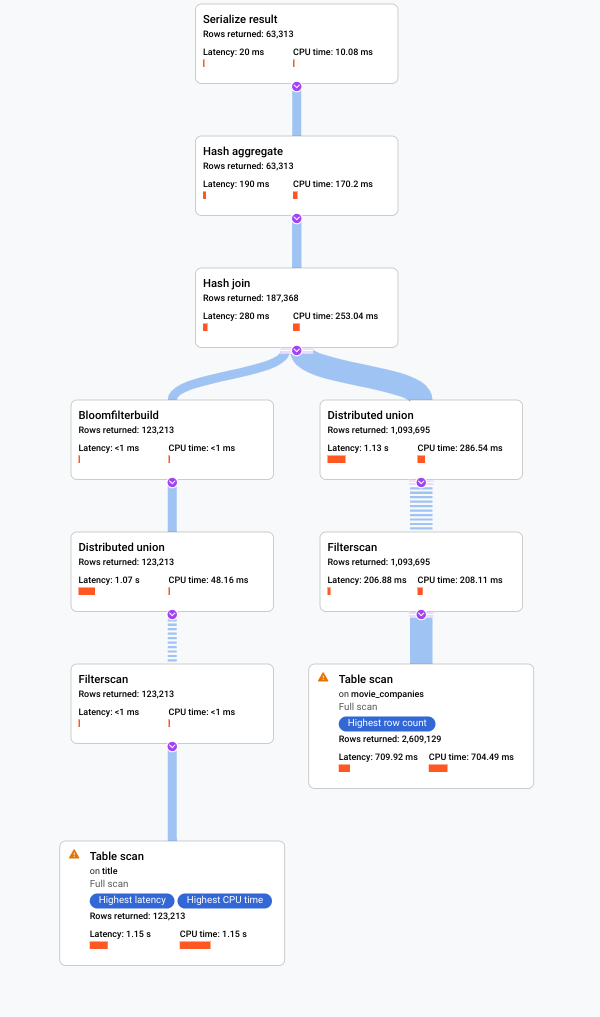
For more information on how to understand visual plans and use them to debug your queries, see Tune a query using the query plan visualizer.
You can also view samples of historic query plans and compare the performance of a query over time for certain queries. To learn more, see Sampled query plans.
Use secondary indexes
Like other relational databases, Spanner offers secondary indexes, which you can use to retrieve data using either a SQL statement or Spanner's read interface. Using a secondary index in a SQL query lets you specify how you want Spanner to obtain the results. Specifying a secondary index can speed up query execution.
For example, suppose you wanted to fetch the IDs of all the singers with a specific last name. One way to write such a SQL query is:
SELECT s.SingerId
FROM Singers AS s
WHERE s.LastName = 'Smith';
This query would return the results that you expect, but it might take a long
time to return the results. The timing would depend on the number of rows in the
Singers table and how many satisfy the predicate WHERE s.LastName = 'Smith'.
If there is no secondary index that contains the LastName column to read from,
the query plan would read the entire Singers table to find rows that match the
predicate. Reading the entire table is called a full table scan. A full table
scan is an expensive way to obtain the results when the table contains only a
small percentage of Singers with that last name.
You can improve the performance of this query by defining a secondary index on the last name column:
CREATE INDEX SingersByLastName ON Singers (LastName);
Because the secondary index SingersByLastName contains the indexed table
column LastName and the primary key column SingerId, Spanner
can fetch all the data from the much smaller index table instead of scanning the
full Singers table.
In this scenario, Spanner automatically uses the secondary index
SingersByLastName when executing the query (as long as three days have passed
since database creation; see A note about new databases).
However, it's best to explicitly tell Spanner to use that index
by specifying an index directive in the FROM clause:
GoogleSQL
SELECT s.SingerId
FROM Singers@{FORCE_INDEX=SingersByLastName} AS s
WHERE s.LastName = 'Smith';
PostgreSQL
SELECT s.SingerId
FROM Singers /*@ FORCE_INDEX=SingersByLastName */ AS s
WHERE s.LastName = 'Smith';
If you're using named schemas,
use the following syntax for the FROM clause:
GoogleSQL
FROM NAMED_SCHEMA_NAME.TABLE_NAME@{FORCE_INDEX="NAMED_SCHEMA_NAME.TABLE_INDEX_NAME"}
PostgreSQL
FROM NAMED_SCHEMA_NAME.TABLE_NAME /*@ FORCE_INDEX = TABLE_INDEX_NAME */
Now suppose you also wanted to fetch the singer's first name in addition to the
ID. Even though the FirstName column is not contained in the index, you should
still specify the index directive as before:
GoogleSQL
SELECT s.SingerId, s.FirstName
FROM Singers@{FORCE_INDEX=SingersByLastName} AS s
WHERE s.LastName = 'Smith';
PostgreSQL
SELECT s.SingerId, s.FirstName
FROM Singers /*@ FORCE_INDEX=SingersByLastName */ AS s
WHERE s.LastName = 'Smith';
You still get a performance benefit from using the index because
Spanner doesn't need to do a full table scan when executing the
query plan. Instead, it selects the subset of rows that satisfy the predicate
from the SingersByLastName index, and then does a lookup from the base table
Singers to fetch the first name for only that subset of rows.
If you want Spanner to not have to fetch any rows from the base
table at all, you can store a copy of the FirstName column in the index
itself:
GoogleSQL
CREATE INDEX SingersByLastName ON Singers (LastName) STORING (FirstName);
PostgreSQL
CREATE INDEX SingersByLastName ON Singers (LastName) INCLUDE (FirstName);
Using a STORING clause (for the GoogleSQL dialect) or an INCLUDE
clause (for the PostgreSQL dialect) like this costs extra storage but
it provides the following advantages:
- SQL queries that use the index and select columns stored in the
STORINGorINCLUDEclause don't require an extra join to the base table. - Read calls that use the index can read columns stored in the
STORINGorINCLUDEclause.
The preceding examples illustrate how secondary indexes can speed up queries
when the rows chosen by the WHERE clause of a query can be quickly identified
using the secondary index.
Another scenario in which secondary indexes can offer performance benefits is for certain queries that return ordered results. For example, suppose you want to fetch all album titles and their release dates in ascending order of release date and descending order of album title. You could write a SQL query as follows:
SELECT a.AlbumTitle, a.ReleaseDate
FROM Albums AS a
ORDER BY a.ReleaseDate, a.AlbumTitle DESC;
Without a secondary index, this query requires a potentially expensive sorting step in the execution plan. You could speed up query execution by defining this secondary index:
CREATE INDEX AlbumsByReleaseDateTitleDesc on Albums (ReleaseDate, AlbumTitle DESC);
Then, rewrite the query to use the secondary index:
GoogleSQL
SELECT a.AlbumTitle, a.ReleaseDate
FROM Albums@{FORCE_INDEX=AlbumsByReleaseDateTitleDesc} AS a
ORDER BY a.ReleaseDate, a.AlbumTitle DESC;
PostgreSQL
SELECT a.AlbumTitle, a.ReleaseDate
FROM Albums /*@ FORCE_INDEX=AlbumsByReleaseDateTitleDesc */ AS s
ORDER BY a.ReleaseDate, a.AlbumTitle DESC;
This query and index definition meet both of the following criteria:
- To remove the sorting step, ensure that the column list in the
ORDER BYclause is a prefix of the index key list. - To avoid joining back from the base table to fetch any missing columns, ensure that the index covers all columns in the table that the query uses.
Although secondary indexes can speed up common queries, adding secondary indexes can add latency to your commit operations, because each secondary index typically requires involving an extra node in each commit. For most workloads, having a few secondary indexes is fine. However, you should consider whether you care more about read or write latency, and consider which operations are most critical for your workload. Benchmark your workload to ensure that it's performing as you expect.
For the complete reference on secondary indexes, refer to Secondary indexes.
Optimize range key lookups
A common use of a SQL query is to read multiple rows from Spanner based on a list of known keys.
The following best practices help you write efficient queries when fetching data by a range of keys:
If the list of keys is sparse and not adjacent, use query parameters and
UNNESTto construct your query.For example, if your key list is
{1, 5, 1000}, write the query like this:GoogleSQL
SELECT *
FROM Table AS t
WHERE t.Key IN UNNEST (@KeyList)
PostgreSQL
SELECT *
FROM Table AS t
WHERE t.Key IN UNNEST ($1)
Notes:
The array UNNEST operator flattens an input array into rows of elements.
The query parameter, which is
@KeyListfor GoogleSQL and$1for PostgreSQL, can speed up your query as discussed in the preceding best practice.It is better to use an UNNEST with a single parameter, rather than OR with multiple parameters.
If the list of keys is adjacent and within a range, specify the lower and higher limits of the key range in the
WHEREclause.For example, if your key list is
{1,2,3,4,5}, construct the query as follows:GoogleSQL
SELECT *
FROM Table AS t
WHERE t.Key BETWEEN @min AND @max
PostgreSQL
SELECT *
FROM Table AS t
WHERE t.Key BETWEEN $1 AND $2
This query is only more efficient if the keys in the key range are adjacent. In other words, if your key list is
{1, 5, 1000}, don't specify the lower and higher limits like in the preceding query because the resulting query would scan through every value between 1 and 1000.
Optimize joins
Join operations can be expensive because they can significantly increase the number of rows that your query needs to scan, which results in slower queries. In addition to the techniques that you're accustomed to using in other relational databases to optimize join queries, here are some best practices for a more efficient JOIN when using Spanner SQL:
- If possible, join data in interleaved tables by primary key. For example:
SELECT s.FirstName, a.ReleaseDate
FROM Singers AS s JOIN Albums AS a ON s.SingerId = a.SingerId;
The rows in the interleaved table `Albums` are physically
stored in the same splits as the parent row in `Singers`, as discussed in
[Schema and Data Model](/spanner/docs/schema-and-data-model). Therefore, joins can be
completed locally without sending lots of data across the network.
Use the join directive if you want to force the order of the join. For example:
GoogleSQL
SELECT *
FROM Singers AS s JOIN@{FORCE_JOIN_ORDER=TRUE} Albums AS a
ON s.SingerId = a.Singerid
WHERE s.LastName LIKE '%x%' AND a.AlbumTitle LIKE '%love%';
PostgreSQL
SELECT *
FROM Singers AS s JOIN/*@ FORCE_JOIN_ORDER=TRUE */ Albums AS a
ON s.SingerId = a.Singerid
WHERE s.LastName LIKE '%x%' AND a.AlbumTitle LIKE '%love%';
The join directive
FORCE_JOIN_ORDERtells Spanner to use the join order specified in the query (that is,Singers JOIN Albums, notAlbums JOIN Singers). The returned results are the same, regardless of the order that Spanner chooses. However, you might want to use this join directive if you notice in the query plan that Spanner has changed the join order and caused undesirable consequences, such as larger intermediate results, or has missed opportunities for seeking rows.Use a join directive to choose a join implementation. When you use SQL to query multiple tables, Spanner automatically uses a join method that is likely to make the query more efficient. However, Google advises you to test with different join algorithms. Choosing the right join algorithm can improve latency, memory consumption, or both. This query demonstrates the syntax for using a JOIN directive with the
JOIN_METHODhint to choose aHASH JOIN:GoogleSQL
SELECT *
FROM Singers s JOIN@{JOIN_METHOD=HASH_JOIN} Albums AS a
ON a.SingerId = a.SingerId
PostgreSQL
SELECT *
FROM Singers s JOIN/*@ JOIN_METHOD=HASH_JOIN */ Albums AS a
ON a.SingerId = a.SingerId
If you're using a
HASH JOINorAPPLY JOINand if you have aWHEREclause that is highly selective on one side of yourJOIN, put the table that produces the smallest number of rows as the first table in theFROMclause of the join. This structure helps because inHASH JOIN, Spanner always picks the left-hand side table as build and the right-hand side table as probe. Similarly, forAPPLY JOIN, Spanner picks the left-hand side table as outer and the right-hand side table as inner. See more about these join types: [Hash join][hash_join] and [Apply join][apply_join].For queries that are critical for your workload, specify the most performant join method and join order in your SQL statements for more consistent performance.
Optimize queries with timestamp predicate pushdown
Timestamp predicate pushdown is a query optimization technique used in Spanner to improve the efficiency of queries that use timestamps and data with an age-based tiered storage policy. When you enable this optimization, the filtering operations on timestamp columns are performed as early as possible in the query execution plan. This can significantly reduce the amount of data that is processed and improves overall query performance.
With timestamp predicate pushdown, the database engine analyzes the query and identifies the timestamp filter. It then "pushes down" this filter to the storage layer, so that only the relevant data based on the timestamp criteria is read from SSD. This minimizes the amount of data that is processed and transferred, resulting in faster query execution.
To optimize queries to only access data stored on SSD, the following must apply:
- The query must have the timestamp predicate pushdown enabled. For more information, see GoogleSQL statement hints and PostgreSQL statement hints
The query must use an age-based restriction equal to or less than the age specified in the data's spill policy (set with the
ssd_to_hdd_spill_timespanoption in theCREATE LOCALITY GROUPorALTER LOCALITY GROUPDDL statement). For more information, see GoogleSQLLOCALITY GROUPstatements and PostgreSQLLOCALITY GROUPstatements.The column being filtered in the query must be a timestamp column that contains the commit timestamp. For details on how to create a commit timestamp column, see Commit timestamps in GoogleSQL and Commit timestamps in PostgreSQL. These columns must be updated alongside the timestamp column, and reside within the same the same locality group, which has an age-based tiered storage policy.
If, for a given row, some of the columns being queried reside on SSD and some of the columns reside on HDD (due to columns being updated at different times and aging to HDD at different times), then the performance of the query might be worse when you use the hint. This is because the query has to fill in data from the different storage layers. As a result of using the hint, Spanner ages data at the individual cell-level (row-and-column granularity level) based on the commit timestamp of each cell, slowing down the query. To prevent this issue, make sure to routinely update all columns being queried using this optimization technique in the same transaction so all columns share the same commit timestamp and benefit from the optimization.
To enable timestamp predicate pushdown at the statement level, use a statement hint in your query. For example:
GoogleSQL
@{allow_timestamp_predicate_pushdown=TRUE}
SELECT s.SingerInfo
FROM Singers s
WHERE s.ModificationTime > TIMESTAMP_SUB(CURRENT_TIMESTAMP(), INTERVAL 12 HOUR);
PostgreSQL
/*@allow_timestamp_predicate_pushdown=TRUE*/
SELECT s.SingerInfo
FROM Singers s
WHERE s.ModificationTime > CURRENT_TIMESTAMP - INTERVAL '12 hours';
Avoid large reads inside read-write transactions
Read-write transactions allow a sequence of zero or more reads or SQL queries, and can include a set of mutations, before a call to commit. To maintain the consistency of your data, Spanner acquires locks when reading and writing rows in your tables and indexes. For more information about locking, see Life of Reads and Writes.
Because of the way locking works in Spanner, performing a read or
SQL query that reads a large number of rows (for example SELECT * FROM
Singers) means that no other transactions can write to the rows that you've
read until your transaction is either committed or aborted.
Furthermore, because your transaction is processing a large number of rows, it's
likely to take longer than a transaction that reads a much smaller range of rows
(for example SELECT LastName FROM Singers WHERE SingerId = 7), which further
exacerbates the problem and reduces system throughput.
So, try to avoid large reads (for example, full table scans or massive join operations) in your transactions, unless you're willing to accept lower write throughput.
In some cases, the following pattern can yield better results:
- Do your large reads inside a read-only transaction. Read-only transactions allow for higher aggregate throughput because they don't use locks.
- Optional: Do any processing required on the data you just read.
- Start a read-write transaction.
- Verify that the critical rows have not changed values since you performed
the read-only transaction in step 1.
- If the rows have changed, roll back your transaction and start again at step 1.
- If everything looks okay, commit your mutations.
One way to ensure that you're avoiding large reads in read-write transactions is to look at the execution plans that your queries generate.
Use ORDER BY to ensure the ordering of your SQL results
If you're expecting a certain ordering for the results of a SELECT query,
explicitly include the ORDER BY clause. For example, if you want to list all
singers in primary key order, use this query:
SELECT * FROM
Singers
ORDER BY SingerId;
Spanner guarantees result ordering only if the ORDER BY clause
is present in the query. In other words, consider this query without the ORDER
BY:
SELECT * FROM Singers;
Spanner does not guarantee that the results of this query will be
in primary key order. Furthermore, the ordering of results can change at any
time and is not guaranteed to be consistent from invocation to invocation. If a
query has an ORDER BY clause, and Spanner uses an index that
provides the required order, then Spanner doesn't explicitly sort
the data. Therefore, don't worry about the performance impact of including this
clause. You can check whether an explicit sort operation is included in the
execution by looking at the query plan.
Use STARTS_WITH instead of LIKE
Because Spanner does not evaluate parameterized LIKE patterns
until execution time, Spanner must read all rows and evaluate
them against the LIKE expression to filter out rows that don't match.
When a LIKE pattern has the form foo% (for example, it starts with a fixed
string and ends with a single wildcard percent) and the column is indexed, use
STARTS_WITH instead of LIKE. This option allows Spanner t
more effectively optimize the query execution plan.
Not recommended:
GoogleSQL
SELECT a.AlbumTitle FROM Albums a
WHERE a.AlbumTitle LIKE @like_clause;
PostgreSQL
SELECT a.AlbumTitle FROM Albums a
WHERE a.AlbumTitle LIKE $1;
Recommended:
GoogleSQL
SELECT a.AlbumTitle FROM Albums a
WHERE STARTS_WITH(a.AlbumTitle, @prefix);
PostgreSQL
SELECT a.AlbumTitle FROM Albums a
WHERE STARTS_WITH(a.AlbumTitle, $2);
Use commit timestamps
If your application needs to query data written after a particular time, add
commit timestamp columns to the relevant tables. Commit timestamps enable a
Spanner optimization that can reduce the I/O of queries whose
WHERE clauses restrict results to rows written more recently than a specific
time.
Learn more about this optimization with GoogleSQL-dialect databases or with PostgreSQL-dialect databases.