

Principal Access Boundary (PAB) policies let you define the resources that principals can access.
Other access-related policies, like allow and deny policies, are attached to resources. These policies define who is allowed to access the resource that they're attached to. In contrast, Principal Access Boundary policies are attached to principal sets and control what the principals in the principal set are allowed to do.
For example, you can use Principal Access Boundary policies to prevent your principals from accessing resources in other organizations, which can help prevent phishing attacks or data exfiltration.
How Principal Access Boundary policies work
By default, principals are eligible to access any Google Cloud resource. This means that, if an allow policy grants a principal access to a resource and no deny policies block that access, then the principal can access the resource.
With Principal Access Boundary policies, you can define the resources that a principal is eligible to access. If a principal is ineligible to access a resource, then their access to that resource is limited, regardless of the roles they've been granted. For more information about using Principal Access Boundary policies to define the resources that a principal is eligible to access, see Define eligible resources.
Principal Access Boundary policies only block access attempts that involve supported permissions. If a Principal Access Boundary policy can't block a permission, then principals are eligible to use that permission to access any resource, regardless of the policies that they're subject to. For more information, see Permissions that Principal Access Boundary policies can block.
Use cases
Principal Access Boundary policies are useful in circumstances like the following:
- Preventing principals from accessing resources that you don't own
- Keeping certain principal types, like service accounts, limited to certain projects
For detailed examples of how you can use Principal Access Boundary policies in situations like these, see Example use cases for Principal Access Boundary policies.
Principal Access Boundary policy components
Principal Access Boundary policies consist of individual rules. Each rule defines a set of resources that principals are eligible to access. Each policy can have up to 500 rules.
Policies also contain other information, including metadata and configuration details. For more information, see Structure of a Principal Access Boundary policy.
After you create a Principal Access Boundary policy, you apply that policy to sets of principals by creating policy bindings. All principals in those principal sets are then subject to that Principal Access Boundary policy, meaning they're eligible to access the resources listed in the policy. You can bind a Principal Access Boundary policy to any number of principal sets.
You can create up to 1000 principal access boundary policies in your organization.
Permissions that Principal Access Boundary policies block
Principal Access Boundary policies can block all permissions that are included in the policy's enforcement version. If a Principal Access Boundary policy can block a permission, then it can prevent ineligible principals from using that permission to access resources.
You specify a policy's enforcement version when you create the policy. Updating the enforcement version updates the permissions that the policy can block. For a full list of the permissions that each enforcement version blocks, see the enforcement version reference.
If a Principal Access Boundary policy can't block a permission, then the policy has no effect on whether principals can use the permission. In other words, IAM can't enforce the policy for access attempts involving that permission.
For example, imagine that a principal, Lee (lee@example.com), is granted the
Dataflow Developer role (roles/dataflow.developer). This role includes the
dataflow.googleapis.com/jobs.snapshot permission, which lets Lee take
snapshots of Dataflow jobs. Lee is also subject to a Principal Access Boundary
policy that makes them ineligible to access resources outside of example.com.
However, if that Principal Access Boundary policy can't block the
dataflow.jobs.snapshot permission, then Lee can still take snapshots of
Dataflow jobs in organizations outside of example.com.
Manage enforcement versions
Periodically, IAM adds new enforcement versions that can block additional permissions. Each new version can also block all of the permissions in the previous version.
To block the permissions in a new enforcement version, you must update your Principal Access Boundary policies to use the new version.
If you want a policy's enforcement version to update automatically as new
versions are released, you can use the value latest when creating the policy.
However, we don't recommend using this value, because it might cause principals
to lose access to resources unexpectedly.
Policies that use latest for the version number use the default enforcement
version. The default enforcement version is typically the most recent version.
However, it can take up to 4 weeks for a new version to
become the default enforcement version. To learn which enforcement version is
the default, see the enforcement version reference.
The default enforcement version is also used for new Principal Access Boundary policies that don't specify a version number.
Define eligible resources
Principals can be affected by, or subject to, any number of Principal Access Boundary policies. Together, these policies define the resources that the principal is eligible to access.
Principal Access Boundary policies are additive. This means that the resources that a principal is eligible to access are the union of all resources in all Principal Access Boundary policies that the principal is subject to. In other words, if a single Principal Access Boundary policy makes a principal eligible to access a resource, then they're eligible to access the resource, regardless of the other Principal Access Boundary policies they're subject to.
If a principal isn't subject to any Principal Access Boundary policies, then they're eligible to access any Google Cloud resource.
The following sections describe how to customize the set of resources that a principal is eligible to access.
Add eligible resources
There are several ways to make a principal eligible to access a resource that they're ineligible to access:
- Add the resource to a Principal Access Boundary policy that the principal is subject to.
- Create a new Principal Access Boundary policy with the additional resource and bind the policy to a principal set that includes the principal.
- Remove or delete all Principal Access Boundary policies that the principal is subject to. This action makes the principal eligible to access all Google Cloud resources.
Remove eligible resources
There are several ways to make a principal ineligible to access a resource that they're eligible to access.
First, find all of the Principal Access Boundary policies that the principal is subject to that include the resource. Based on the policies that you find, you can then do one of the following:
If the principal isn't subject to any Principal Access Boundary policies, then create a new Principal Access Boundary policy that includes only the resources that you want the principal to be eligible to access. Then, bind that policy to a principal set that contains the principal.
After you apply the policy, the principal goes from being eligible to access all resources to only being eligible to access the resources listed in the policy.
If the principal is already subject to one or more Principal Access Boundary policies, then you must ensure that none of the Principal Access Boundary policies that they're subject to include the resource. For step-by-step instructions, see Reduce the resources that principals are eligible to access.
During this process, you must ensure that the principal is always subject to at least one Principal Access Boundary policy. Otherwise, the principal might become eligible to access all resources.
Principal Access Boundary policies and cached resources
Certain Google Cloud services cache publicly visible resources. For example, Cloud Storage caches objects that are publicly readable.
Whether a Principal Access Boundary policy can prevent ineligible principals from viewing a publicly visible resource depends on whether the resource is cached:
- If the resource is cached, then Principal Access Boundary policies can't prevent principals from viewing the resource
- If the resource isn't cached, then Principal Access Boundary prevents ineligible principals from viewing the resource
In all cases, Principal Access Boundary policies still prevent ineligible principals from modifying or deleting publicly visible resources.
Principal Access Boundary policy evaluation
When a principal attempts to access a resource, IAM evaluates the relevant Principal Access Boundary policies to determine whether to block the access attempt. A policy is relevant if the principal making the access attempt is subject to the policy.
Principal Access Boundary policies can only block or not block access—they can't grant access. Only allow policies can actually grant principals access to resources. To learn about how different policy types impact principals' access to resources, see Policy types.
IAM doesn't block access if any of the following are true:
- The principal isn't subject to any Principal Access Boundary policies
- The relevant Principal Access Boundary policies can't block the permission in the request
- A Principal Access Boundary policy makes the principal eligible to access the resource
IAM does block access if the principal is subject to at least one Principal Access Boundary policy, but none of the relevant policies make the principal eligible to access the resource.
Fail-closed evaluation
Principal Access Boundary policies fail closed. This means that, if IAM encounters an error when evaluating a Principal Access Boundary policy, then IAM prevents the principal from accessing the resource.
The most common reason that IAM encounters an error when evaluating Principal Access Boundary policies is that a principal's details are still propagating through the system. This is most likely to occur for newly created users. To resolve this issue, have the new principal wait and try to access the resource again later.
Apply Principal Access Boundary policies to principal sets
To apply a Principal Access Boundary policy to a principal set, you create a policy binding that specifies both the Principal Access Boundary policy that you want to apply and the principal set that you want to apply it to. This policy binding binds the policy to the principal set.
After you bind a policy to a principal set, the principals in that principal set can access only the resources listed in the Principal Access Boundary policies that they're subject to.
You can bind a Principal Access Boundary policy to any number of principal sets. Each principal set can have up to 10 Principal Access Boundary policies bound to it.
You can only create bindings for existing Principal Access Boundary policies. Trying to create a binding for a deleted Principal Access Boundary policy will fail. If you recently deleted a Principal Access Boundary policy, you can sometimes successfully create a binding, but the binding won't have any effect. IAM cleans up these bindings automatically.
To learn how to manage Principal Access Boundary policies, see Create and apply Principal Access Boundary policies.
Supported principal sets
The following table lists the types of principal sets that you can bind Principal Access Boundary policies to. Each row contains the following:
- The type of principal set
- The principals in that type of principal set
- The format of IDs for that type of principal set
- The Resource Manager resource (project, folder, or organization) that parents policy bindings for that type of principal set
| Principal set | Details | Policy bindings' parent resource |
|---|---|---|
| Workforce identity pool |
Contains all identities in the specified workforce identity pool.
Format: |
The organization that contains the workforce identity pool |
| Workload identity pool |
Contains all identities in the specified workload identity pool.
Format: |
The project that contains the workload identity pool |
| Google Workspace domain |
Contains all identities in the specified Google Workspace domain.
Format: You can find your customer ID by using the following methods:
|
The organization that's associated with the Google Workspace domain |
| Project's principal set |
Contains all service accounts, workload identity pools, and agent identities in the specified project.
Format: |
The project |
| Folder's principal set |
Contains all service accounts, all workload identity pools, and all agent identities in any project in the specified folder.
Format: |
The folder |
| Organization's principal set |
Contains the following identities:
Format: |
The organization |
| Agent identities |
All agent identities in the specified project's trust domain. By default, a project's trust domain contains all agent identities in the project. Formats:
|
The project |
Policy inheritance and principal sets
Principal Access Boundary policies are attached to principal sets, not resources. As a result, they aren't inherited through the resource hierarchy in the same way that allow and deny policies are.
However, principal sets for folders and organizations always include all of the principals in their descendants' principal sets. So, for example, if a principal is included in a project's principal set, it is also included in the principal sets of any parent folders or organizations.
For example, consider an organization, example.com. This organization is
associated with the domain example.com, and has the following resources:
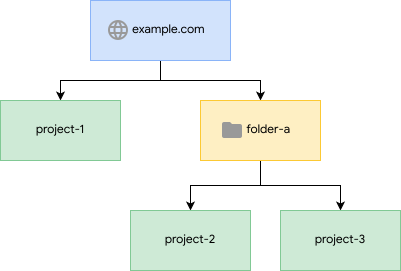
- An organization,
example.com - A project,
project-1, that's a child of the organization - A folder,
folder-a, that's a child of the organization - Two projects,
project-2andproject-3, that are children offolder-a
These resources' principal sets contain the following identities:
| Principal set | Google Workspace identities in the example.com domain |
Workforce identity federation pools in example.com |
Service accounts, workload identity pools, and agent identities in project-1 |
Service accounts, workload identity pools, and agent identities in project-2 |
Service accounts, workload identity pools, and agent identities in project-3 |
|---|---|---|---|---|---|
Principal set for example.com |
|||||
Principal set for folder-a |
|||||
Principal set for project-1 |
|||||
Principal set for project-2 |
|||||
Principal set for project-3 |
As a result, the following principals are affected by the following Principal Access Boundary policies:
A Google Workspace identity in the
example.comdomain is in the principal set forexample.comand will be affected by Principal Access Boundary policies bound to that principal set.A service account in
project-1is in the principal sets forproject-1andexample.comand will be affected by Principal Access Boundary policies bound to either of those principal sets.An agent identity in
project-3is in the principal sets forproject-3,folder-a, andexample.com, and will be affected by Principal Access Boundary policies bound to any of those principal sets.
Conditional policy bindings for Principal Access Boundary policies
You can use condition expressions in policy bindings for Principal Access Boundary policies to further refine which principals the policy applies to.
Condition expressions for policy bindings consist of one or more statements
joined by up to 10 logical
operators (&&, ||, or !). Each statement expresses an attribute-based
control rule that applies to the policy binding, and ultimately determines
whether the policy applies.
You can use the principal.type and principal.subject attributes in
conditions for policy bindings. No other attributes are supported.
The
principal.typeattribute refers to the type of the principal that made the request—for example, a service account or an agent identity. You can use conditions with this attribute to control which types of principals a Principal Access Boundary policy applies to.For example, if you add the following condition expression to a binding for a Principal Access Boundary policy, then the policy only applies to service accounts:
principal.type == 'iam.googleapis.com/ServiceAccount'The
principal.subjectattribute refers to the identity of the principal that made the request—for example,cruz@example.com. You can use conditions with this attribute to control exactly which principals are subject to a Principal Access Boundary policy.For example, if you add the following condition expression to a binding for a Principal Access Boundary policy, then the policy won't apply for the user
special-admin@example.com:principal.subject != 'special-admin@example.com'
To learn more about the values that you can use for these conditions, see the conditions attribute reference.
For an example of how to use these conditions in your Principal Access Boundary policies, see Make service accounts eligible to access resources in a single project.
Cross-organization policy bindings
You can't create a cross-organization policy binding for a Principal Access Boundary policy. A cross-organization policy binding is a policy binding that binds a policy in one organization to a principal set in another organization.
IAM periodically deletes any existing cross-organization policy bindings. Cross-organization policy bindings can occur when you move a project from one organization to another. For example, consider the following situation:
- You have a project,
example-project, in the organizationexample.com. - You want principals in
example-projectto be eligible to access resources inexample.com. To do this, you create a Principal Access Boundary policy inexample.comthat makes principals eligible to access resources inexample.comand bind that policy to the principal set forexample-project. - You move
example-projectfromexample.comtocymbalgroup.com.
In this situation, moving the project creates a cross-organization policy
binding. This is because the Principal Access Boundary policy in example.com is
bound to a principal set in cymbalgroup.com. If you don't delete the binding
manually, IAM eventually deletes it automatically. Deleting
this binding helps ensure that cymbalgroup.com administrators have access to
all Principal Access Boundary policies bound to their principals.
Structure of a Principal Access Boundary policy
A Principal Access Boundary policy is a collection of metadata and Principal Access Boundary policy details. The metadata provides information like the policy name and when the policy was created. The policy details define what the policy does—for example, the resources that affected principals are eligible to access.
For example, the following Principal Access Boundary policy makes the principals who
are subject to the policy eligible to access the resources in the organization
with the ID 0123456789012.
{
  "name": "organizations/0123456789012/locations/global/principalAccessBoundaryPolicies/example-policy",
  "uid": "puid_0123456789012345678",
  "etag": "W/\"Gh/PcTdJD/AWHUhPW45kdw==\"",
  "displayName": "Example policy",
  "annotations": {
    "example-key": "example-value"
  },
  "createTime": "2024-01-02T15:01:23Z",
  "updateTime": "2024-01-02T15:01:23Z",
  "details": {
    "rules": [
      {
        "description": "Example principal access boundary policy rule",
        "resources": [
          "//cloudresourcemanager.googleapis.com/organizations/0123456789012"
        ],
        "effect": "ALLOW"
      }
    ],
    "enforcementVersion": "4"
  }
}
The following sections describe the fields in a Principal Access Boundary policy's metadata and details.
Metadata
Principal Access Boundary policies contain the following metadata:
name: The name of the Principal Access Boundary policy. This name has the formatorganizations/ORGANIZATION_ID/locations/global/principalAccessBoundaryPolicies/PAB_POLICY_ID, whereORGANIZATION_IDis the numeric ID of the organization where the Principal Access Boundary policy was created andPAB_POLICY_IDis the Principal Access Boundary policy's alphanumeric ID.uid: A unique ID assigned to the Principal Access Boundary policy.etag: An identifier for the policy's current state. This value changes when you update the policy. To prevent conflicting updates, theetagvalue must match the value that is stored in IAM. If theetagvalues don't match, the request fails.displayName: A human-readable name for the Principal Access Boundary policy.annotations: Optional. A list of user-defined key-value pairs. You can use these annotations to add extra metadata to the policy—for example, who created the policy, or whether the policy was deployed by an automated pipeline. For more information about annotations, see Annotations.createTime: The time when the Principal Access Boundary policy was created.updateTime: The time when the Principal Access Boundary policy was last updated.
Details
Each Principal Access Boundary policy contains a details field. This field contains
the Principal Access Boundary rules and enforcement version:
rules: A list of Principal Access Boundary rules, which define the resources that affected principals are eligible to access. Each rule contains the following fields:description: A human-readable description for the rule.resources: A list of Resource Manager resources (projects, folders, and organizations) that you want principals to be eligible to access. Any principal that is subject to this policy is eligible to access these resources.Each Principal Access Boundary policy can reference a maximum of 500 resources across all rules in the policy.
effect: The relationship that principals have with the resources listed in theresourcesfield. The only effect that you can specify in Principal Access Boundary rules is"ALLOW". This relationship makes the principals eligible to access the resources listed in the rule.
enforcementVersion: The enforcement version that IAM uses when enforcing the policy. The Principal Access Boundary policy version determines which permissions the Principal Access Boundary policy can block.For more information about how to set and manage enforcement versions, see Manage enforcement versions on this page.
Structure of a policy binding
A policy binding for a Principal Access Boundary policy contains the name of a policy, the name of the principal set to bind the policy to, and metadata describing the policy binding. It can also contain conditions that modify the exact principals that the policy applies to.
For example, the following policy binding binds the policy example-policy to
all principals in the example.com organization, which has the ID
0123456789012. The policy binding also contains a condition that prevents the
policy from being enforced for the principal super-admin@example.com.
{
  "name": "organizations/0123456789012/locations/global/policyBindings/example-policy-binding",
  "uid": "buid_01234567890123456789",
  "etag": "W/\"cRMdDXbT82aLuZlvoL9Gqg==\"",
  "displayName": "Example policy binding",
  "annotations": {
    "example-key": "example-value"
  },
  "target": {
    "principalSet": "//cloudresourcemanager.googleapis.com/organizations/0123456789012"
  },
  "policyKind": "PRINCIPAL_ACCESS_BOUNDARY",
  "policy": "organizations/0123456789012/locations/global/principalAccessBoundaryPolicies/example-policy",
  "policyUid": "puid_0123456789012345678",
  "condition": {
    "title": "Exempt principal",
    "description": "Don't enforce the policy for super-admin@example.com",
    "expression": "principal.subject != 'super-admin@example.com'"
  },
  "createTime": "2024-01-02T17:00:16Z",
  "updateTime": "2024-01-02T17:00:16Z"
}
Each policy binding contains the following fields:
name: The name of the policy binding. This name has the formatRESOURCE_TYPE/RESOURCE_ID/locations/global/policyBindings/BINDING_ID, whereRESOURCE_TYPE/RESOURCE_IDis the type and ID of the policy binding's parent resource andBINDING_IDis the policy binding's alphanumeric ID.uid: A unique ID assigned to the policy binding.etag: An identifier for the policy's current state. This value changes when you update the policy. To prevent conflicting updates, theetagvalue must match the value that is stored in IAM. If theetagvalues don't match, the request fails.displayName: A human-readable name for the policy binding.annotations: Optional. A list of user-defined key-value pairs. You can use these annotations to add extra metadata to the policy binding—for example, who created the policy binding, or whether the policy binding was deployed by an automated pipeline. For more information about annotations, see Annotations.target: The principal set to bind the policy to. The value has the format{"principalSet": PRINCIPAL_SET}, wherePRINCIPAL_SETis the ID of the principal set that you want to bind the policy to.Each target can have up to 10 policies bound to it.
policyKind: The type of policy that the policy binding references. For policy bindings for Principal Access Boundary policies, this value is alwaysPRINCIPAL_ACCESS_BOUNDARY.policy: The Principal Access Boundary policy to bind to the target principal set.policyUid: A unique ID assigned to the Principal Access Boundary policy referenced in thepolicyfield.condition: Optional. A logic expression that affects which principals IAM enforces the policy for. If the condition evaluates to true or cannot be evaluated, Identity and Access Management enforces the policy for the principal making the request. If the condition evaluates to false, Identity and Access Management doesn't enforce the policy for the principal. For more information, see Principal Access Boundary and conditions on this page.createTime: The time when the policy binding was created.updateTime: The time when the policy binding was last updated.
What's next
- Learn more about the use cases for Principal Access Boundary policies.
- Learn how to create and apply Principal Access Boundary policies.
- Review the permission each Principal Access Boundary policy enforcement version blocks.