

The following are common situations where you might want to use Principal Access Boundary policies and examples of the policies and policy bindings that you might create in each situation. To learn how to create Principal Access Boundary policies and bind them to principal sets, see Create and apply Principal Access Boundary policies.
Prevent users from accessing resources outside of your organization
Because Principal Access Boundary policies are associated with principals and not with resources, you can use them to prevent principals from accessing resources that you don't own. For example, consider the following scenario:
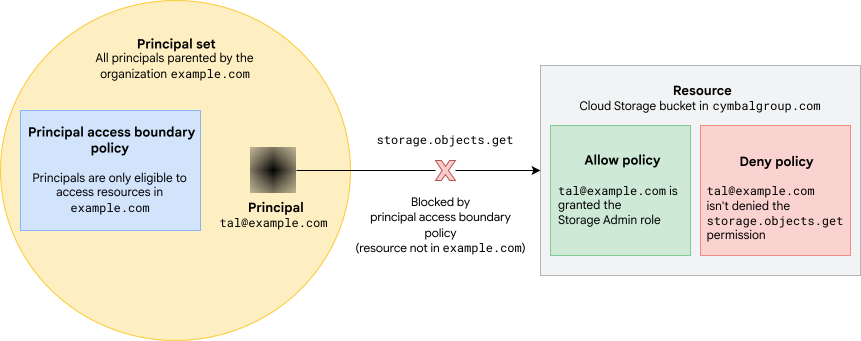
- The principal Tal (
tal@example.com) is part of the Google Workspace organizationexample.com. - Tal is granted the Storage Admin (
roles/storage.admin) role on a Cloud Storage bucket in a different organization,cymbalgroup.com. This role contains thestorage.objects.getpermission, which is required to view objects in the bucket. - There are no deny policies in
cymbalgroup.comthat prevent Tal from using thestorage.objects.getpermission.
The example.com administrators can't use allow and deny policies to prevent
Tal from viewing objects in this external bucket. No example.com principals
have permission to edit the bucket's allow policy, so they can't revoke Tal's
role. They also don't have permission to create any deny policies in
cymbalgroup.com, so they can't use a deny policy to prevent Tal from accessing
the bucket.
However, with Principal Access Boundary policies, example.com administrators can
prevent Tal from viewing objects in the cymbalgroup.com bucket, or any
bucket outside of example.com.
To do this, the administrators can create a
Principal Access Boundary policy saying that example.com principals are only
eligible to access resources in example.com:
{
  "name": "organizations/0123456789012/locations/global/principalAccessBoundaryPolicies/example-org-only",
  "displayName": "Boundary for principals in example.org",
  "details": {
    "rules": [
      {
        "description": "Principals are only eligible to access resources in example.org",
        "resources": [
            "//cloudresourcemanager.googleapis.com/organizations/0123456789012"
        ],
        "effect": "ALLOW"
      }
    ],
    "enforcementVersion": "4"
  }
}
Then, they can create a policy binding to attach this policy to all principals
in the organization example.com:
{
  "name": "organizations/0123456789012/locations/global/policyBindings/example-org-only-binding",
  "displayName": "Bind policy to all principals in example.com",
  "target": {
    "principalSet": "//cloudresourcemanager.googleapis.com/organizations/0123456789012"
  },
  "policyKind": "PRINCIPAL_ACCESS_BOUNDARY",
  "policy": "organizations/0123456789012/locations/global/principalAccessBoundaryPolicies/example-org-only"
}
The principals that are in example.com include all
identities in the example.com domain, all workforce identity pools in
example.com, and all service accounts and workload identity pools in any
project in example.com.
With this policy in place, the principals in example.com can't use permissions
that are blocked by the Principal Access Boundary policy to
access resources outside of example.com, even if they have those permissions
on those resources.
In this case, the Principal Access Boundary policy uses enforcement version
4, so it's able to block the storage.objects.get permission. As
a result, Tal won't be able to view objects in the cymbalgroup.com bucket,
even though they're granted the Storage Admin role on the bucket.
Make service accounts eligible to access resources in a single project
You can also use Principal Access Boundary policies to make subsets of principals eligible to access subsets of resources in your organization.
For example, imagine that you have a project, example-dev, with the project
number 901234567890. You want to ensure that the service accounts in
example-dev are only eligible to access resources in example-dev.
To do this, you first create a new Principal Access Boundary policy that
makes principals eligible to access resources in dev-project:
{
  "name": "organizations/0123456789012/locations/global/principalAccessBoundaryPolicies/example-dev-only",
  "displayName": "Boundary for principals in example-dev",
  "details": {
    "rules": [
      {
        "description": "Principals are only eligible to access resources in example-dev",
        "resources": [
          "//cloudresourcemanager.googleapis.com/projects/example-dev"
        ],
        "effect": "ALLOW"
      }
    ],
    "enforcementVersion": "4"
  }
}
This Principal Access Boundary policy uses the enforcement version 4, meaning that
it's able to block all of the permissions supported in enforcement version
4.
After you create the Principal Access Boundary policy, you create a policy binding to
bind the new policy to all principals in example-dev, and add a
condition so that the policy binding only applies for service
accounts:
{
  "name": "organizations/0123456789012/locations/global/policyBindings/example-dev-only-binding",
  "displayName": "Bind policy to all service accounts in example-dev",
  "target": {
    "principalSet": "//cloudresourcemanager.googleapis.com/projects/example-dev"
  },
  "policyKind": "PRINCIPAL_ACCESS_BOUNDARY",
  "policy": "organizations/0123456789012/locations/global/principalAccessBoundaryPolicies/example-dev-only",
  "condition": {
    "title": "Only service accounts",
    "description": "Only enforce the policy if the principal in the request is a service account",
    "expression": "principal.type == 'iam.googleapis.com/ServiceAccount'"
  }
}
If this is the only Principal Access Boundary policy that the service accounts are
subject to, then the service accounts will be ineligible to use any
permissions that the Principal Access Boundary policy can block to access any resources
outside of example-dev.
Manage eligibility for different groups of principals
You can use multiple Principal Access Boundary policies in the same organization to make different principals eligible to access different resources. When using multiple Principal Access Boundary policies, use conditions in your policy bindings to ensure that each policy only applies to the principals that you want it to apply to.
For example, imagine that you want most principals to be eligible to access all
resources in your organization, as shown in Prevent users from accessing
resources outside of your organization. However, you also
want to make sure the service accounts in example-dev are only eligible to
access resources in example-dev, as shown in Make service accounts eligible
to access resources in a single project.
To achieve this goal, you do the following:
Following the example in Prevent users from accessing resources outside of your organization, you create a Principal Access Boundary policy that makes principals eligible to access resources in
example.comand bind it to the organization principal set.Following the example in Make service accounts eligible to access resources in a single project, you create a Principal Access Boundary policy that makes service accounts in
example-develigible to access resources inexample-devand bind it to the service accounts inexample-dev.You exempt the service accounts in
example-devfrom the Principal Access Boundary policy that makes principals eligible to access all resources inexample.com. To do this, you add the following condition to the policy binding that attaches that Principal Access Boundary policy to the organization's principal set:"condition": { "title": "Exempt example-dev service accounts", "description": "Don't enforce the policy for service accounts in the example-dev project", "expression": "principal.type != 'iam.googleapis.com/ServiceAccount' || (!principal.subject.endsWith('@example-dev.iam.gserviceaccount.com') && principal.subject != 'example-dev@appspot.gserviceaccount.com' && principal.subject != '901234567890-compute@developer.gserviceaccount.com')" }
This last step is critical—if you don't exempt the example-dev service
accounts from the initial Principal Access Boundary policy, then that policy will make
them eligible to access all resources in example.com, regardless of the other
Principal Access Boundary policies they're subject to. For more information, see
Defining eligible resources.
It's also important to create and attach a new Principal Access Boundary policy to
the example-dev service accounts before exempting them from the initial
Principal Access Boundary policy. Following this procedure ensures that the service
accounts are always subject to at least one Principal Access Boundary policy, which
prevents them from becoming eligible to access all Google Cloud
resources. For more information about safely reducing
the resources that a principal is eligible to access, see Reduce the resources
that principals are eligible to access.
What's next
- Learn how to create and apply Principal Access Boundary policies.
- Review the permissions each Principal Access Boundary policy enforcement version blocks.