

This document describes how to design, plan, and implement upgrades in a multi-cluster Google Kubernetes Engine (GKE) environment. While this document uses Multi Cluster Ingress for upgrades, the concepts can be applied to other solutions. This document is intended for Google Cloud administrators who are responsible for maintaining fleets for GKE clusters.
GKE cluster lifecycle management
Cluster lifecycle management can be defined as the strategies and the planning required to maintain a healthy and updated fleet of Kubernetes clusters without violating service SLOs. With proper strategies and planning in place, cluster lifecycle management should be routine, expected, and uneventful.
For more information about managing the GKE version of a cluster, see About GKE cluster upgrades. For more information about managing all types of changes during the lifecycle of a cluster, see Manage cluster lifecycle changes to minimize disruption.
GKE multi-cluster lifecycle management
This section describes various GKE multi-cluster lifecycle management strategies and how to plan for them.
Planning and design considerations
GKE multi-cluster architecture plays a part in selecting a cluster lifecycle management strategy. Before discussing these strategies, it is important to discuss certain design decisions that might affect or be affected by the cluster lifecycle management strategy.
Type of clusters
If you're using the GKE auto-upgrade as a cluster lifecycle management strategy, the type of cluster can matter. For example, regional clusters have multiple control plane nodes where control plane nodes are auto upgraded one at a time whereas zonal clusters have a single control plane node. If you're not using GKE auto-upgrade and if you consider all Kubernetes clusters as disposable infrastructure, then it might not matter what type of cluster you choose when deciding on a cluster lifecycle management strategy. You can apply the strategies discussed in the next section, GKE multi-cluster lifecycle management to any type of cluster.
Cluster placement and footprint
Consider the following factors when you decide on the cluster placement and footprint:
- Zones and regions that clusters are required to be in.
- Number and size of clusters needed.
The first factor is usually easy to address because the zones and regions are dictated by your business and the regions in which you serve your users.
Addressing the number and size of clusters typically falls in the following categories, each with advantages and disadvantages:
- Small number of large clusters. You can choose to use the redundancy and resiliency provided by regional clusters and place one (or two) large regional clusters per region. The benefit of this approach is low operational overhead of managing multiple clusters. The downside is that it can affect a large number of services at once due to its large impact area.
- Large number of small clusters. You can create a large number of small clusters to reduce the cluster impact area because your services are split across many clusters. This approach also works well for short-lived ephemeral clusters (for example, clusters running a batch workload). The downside of this approach is higher operational overhead because there are more clusters to upgrade. There can also be additional costs associated with a higher number of control plane nodes. You can offset the costs and the high-operational overhead with automation, predictable schedule and strategy, and careful coordination between the teams and services that are affected.
This document doesn't recommend one approach over the other; they are options. In some cases, you can choose both design patterns for different categories of services.
The following strategies work with either design choice.
Capacity planning
When planning for capacity, it is important to consider the chosen cluster lifecycle strategy. Capacity planning must consider the following normal service load and maintenance events:
- Planned events like cluster upgrades
- Unplanned events like cluster outages, for example, bad configuration pushes and bad rollouts
When capacity planning, you must consider any total or partial outages. If you design for only planned maintenance events, then all distributed Services must have one additional cluster than required so that you can take one cluster out of rotation at a time for upgrades without degrading the service. This approach is also referred to as N+1 capacity planning. If you design for planned and unplanned maintenance events, then all distributed services must have two (or more) additional clusters than required to serve intended capacity—one for the planned event and one for an unplanned event in case it occurs during the planned maintenance window. This approach is also referred to as N+2 capacity planning.
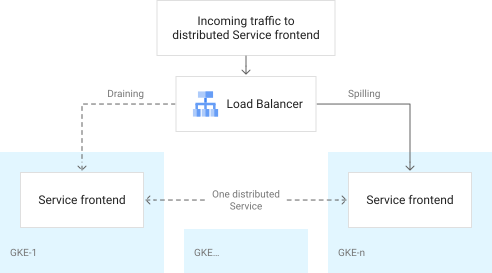
In multi-cluster architectures, the terms draining and spilling are often used. These terms refer to the process of removing (or draining) traffic from a cluster and redirecting (or spilling) traffic onto other clusters during upgrades and maintenance events. This process is accomplished by using networking solutions like multi-cluster Ingress or other load balancing methods. Careful use of draining and spilling is at the heart of some cluster lifecycle management strategies. When you're capacity planning, you must consider draining and spilling. For example, when a single cluster is drained, you need to consider whether the other clusters have enough capacity to handle the additional spilled traffic. Other considerations include sufficient capacity in the zone or region or a need to send traffic to a different region (if using a single regional cluster per region). The following diagram shows traffic being removed (sometimes referred to as draining a cluster) from one cluster and sent to another cluster running the same distributed service.
Clusters and distributed Services
Services-based cluster design dictates that cluster architecture (number, size, and location) is determined by the Services that are required to run on the clusters. Therefore the placement of your clusters are dictated by where the distributed Services are needed. Consider the following when deciding the placement of distributed Services:
- Location requirement. Which regions does the Service need to be served out of?
- Criticality. How critical is the availability of a Service to the business?
- SLO. What are the service level objectives for the service (typically based on criticality)?
- Resilience. How resilient does the Service need to be? Does it need to withstand cluster, zonal, or even regional failures?
When planning for cluster upgrades, you must consider the number of Services a single cluster affects when it is drained, and you must account for spilling each of these Services to other appropriate clusters. Clusters can be single tenant or multi-tenant. Single-tenant clusters only serve a single Service or a product represented by a set of Services. Single-tenant clusters do not share the cluster with other Services or products. Multi-tenant clusters can run many Services and products that are typically partitioned into namespaces.
Impact to teams
A cluster event not only affects Services but can also impact teams. For example, the DevOps team might need to redirect or halt their CI/CD pipelines during a cluster upgrade. Likewise, support teams can get alerted for planned outages. Automation and tooling must be in place to help ease the impact to multiple teams. A cluster or a cluster fleet upgrade should be considered as routine and uneventful when all teams are informed.
Timing, scheduling, and coordination
Kubernetes releases a new minor version quarterly and maintains the last three releases. You must carefully plan the timing and scheduling of cluster upgrades. There must be an agreement between the service owners, service operators and platform administrators on when these upgrades take place. When planning for upgrades, consider the following questions:
- How often do you upgrade? Do you upgrade every quarter or on a different timeline?
- When do you upgrade? Do you upgrade at the beginning of the quarter when business slows down or during other business downtimes driven by your industry?
- When shouldn't you upgrade? Do you have clear planning around when not to upgrade, for example, avoid peak scale events like Black Friday, Cyber Monday, or during high profile conferences and other industry-specific events.
It is important to have a strategy in place that is clearly communicated with the Service owners as well as the operations and support teams. There should be no surprises and everyone should know when and how the clusters are upgraded. This requires clear coordination with all teams involved. A single Service has multiple teams that interact with it. Typically, these teams can be grouped into the following categories:
- The Service developer, who is responsible for creating and coding the business logic into a Service.
- The Service operator, who is responsible for safely and reliably running the Service. The operators can consist of multiple teams like policy or security administrator, networking administrator, and support teams.
Everyone must be in communication during cluster upgrades so that they can take proper actions during this time. One approach is to plan for upgrades the same way that you plan for an outage incident. You have an incident commander, a chat room, and a retrospective (even if no users were impacted). For more information, see Incident response.
GKE cluster lifecycle strategies
This section discusses the main cluster lifecycle management strategies often used in GKE multi-cluster architecture. It is important to note that one strategy won't work for all scenarios and you might choose multiple strategies for various categories of services and needs of the business.
Rolling upgrades
The following diagram shows the rolling upgrade strategy.
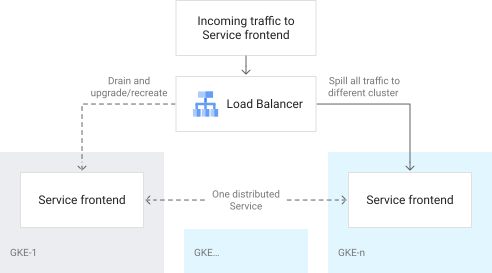
Using a load balancer, one GKE cluster is drained of all traffic and upgraded. The drained traffic load is spilled to a different GKE cluster.
Rolling upgrades are the simplest and the most cost effective strategy out of
the strategies discussed in this document. You start with n number of clusters
running the old_ver (or current production) version. You then drain m
clusters at a time, where m is less than n. You then delete and recreate new
clusters with the new version, or upgrade the drained clusters.
The decision between deleting and upgrading new clusters depends upon the size of the clusters as well as if you consider that clusters are immutable infrastructure. Immutable infrastructure dictates that instead of constantly upgrading a cluster, which might produce unwanted results over time, that you create new clusters and avoid any unforeseen configuration drift.
If you use GKE, you can create a GKE cluster with a single command or an API call. New cluster strategy requires that you have the entire cluster configuration (cluster manifests) stored outside of the cluster, typically in Git. You can then use the same configuration template on the new cluster. If this is a new cluster, ensure that your CI/CD pipelines are pointing to the correct cluster. After the cluster is properly configured, you can then push traffic back onto the cluster slowly while monitoring the Services' SLOs.
The process is repeated for all clusters. Depending upon your capacity planning, you can upgrade multiple clusters at a time without violating Service SLOs.
If you value simplicity and cost over resiliency, use the rolling upgrades strategy. During this strategy, you never exceed the GKE fleet's required capacity for all distributed services.
The following diagram compares the timeline and the Service capacity requirement during a GKE cluster upgrade in a multi-cluster architecture.
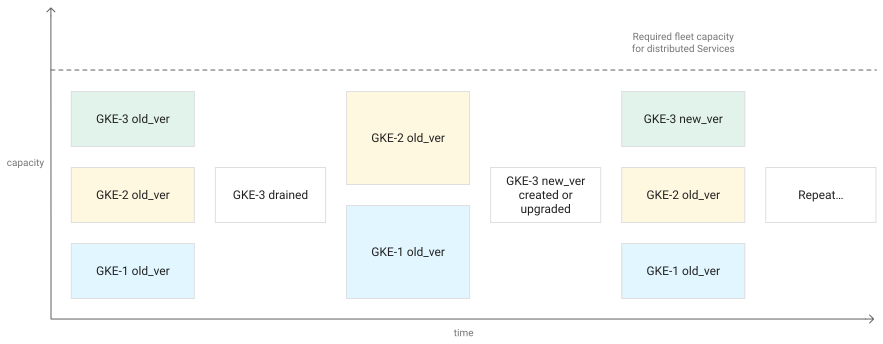
The preceding diagram shows that throughout the GKE upgrade process, the capacity to support the services never goes below what is required. When the GKE cluster to be upgraded is taken out of rotation, the other clusters are scaled up to support the load.
Blue/green upgrades
The following diagram shows a blue/green upgrade strategy.
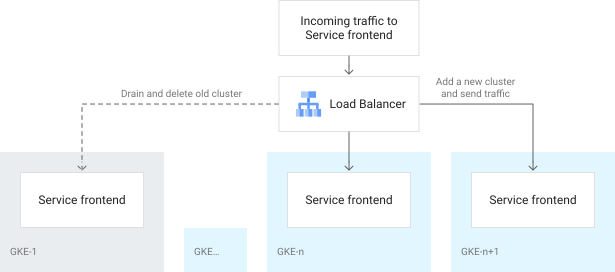
In the preceding diagram, a new GKE cluster running the new version is added. Then a load balancer is used to send traffic to the new cluster while slowly draining one of the old clusters until no traffic is sent to it. The fully drained old cluster can then be removed. The same process can be followed for the remaining clusters.
The blue/green upgrade strategy provide some added resiliency.
This strategy is similar to rolling upgrades, but it is more costly. The only
difference is that instead of draining existing clusters
first, you create new m clusters with the version first, where m is
less than or equal to n. You add the new clusters to the CI/CD pipelines, and
then slowly spill traffic over while monitoring the Service SLOs. When the new
clusters are fully taking traffic, you drain and delete clusters with the older
version.
The blue/green strategy to upgrade clusters is similar to a blue/green strategy typically used for Services. Creating multiple new clusters at a time increases the overall cost but gives you the benefit of speeding up the fleet upgrade time. The added cost is only for the duration of the upgrade when additional clusters are used. The benefit of creating new clusters first is that in case of a failure, you can roll back. You can also test the new cluster before sending production traffic to it. Because these clusters coexist with their old version counterparts for a small period of time, the additional costs are minimal.
If you value simplicity and resiliency over cost, use the blue/green upgrade strategy. Additional clusters are added first and exceed the GKE fleet's required capacity for the duration of the upgrades.
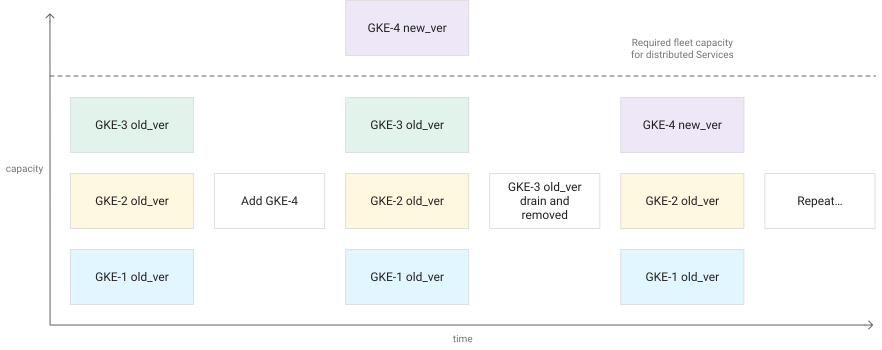
In the preceding diagram, adding a new cluster first temporarily increases the available capacity over the required capacity while another cluster in the fleet is drained and removed from the fleet. However, after removing one of the old (fully drained) clusters, the capacity goes back to what is needed. This capacity change is highlighted because there can be an increase in cost with this model, depending upon the number and size of clusters in the fleet.
Canary cluster upgrades
A canary cluster upgrade is the most resilient and complex strategy of those discussed in this document. This strategy completely abstracts cluster lifecycle management from the Services lifecycle management, thereby offering the lowest risk and highest resilience for your services. In the previous rolling and blue/green upgrade strategies, you maintain your entire GKE fleet on a single version. In this strategy, you maintain two or perhaps three fleets of GKE clusters that are running different versions. Instead of upgrading the clusters, you migrate Services from one fleet of clusters to the other fleet over time. When the oldest GKE fleet is drained (meaning that all Services have been migrated to the next versioned GKE fleet), you delete the fleet.
This strategy requires that you maintain a minimum of two GKE fleets—one for the current production and one for the next production candidate version. You can also maintain more than two GKE fleets. Extra fleets give you more flexibility, but your cost and operational overhead also goes up. These extra fleets are not the same as having clusters in different environments, for example development, staging, and production environments. Non-production environments are great for testing the Kubernetes features and Services with non-production traffic.
This strategy of using canary cluster upgrades dictates that you maintain multiple GKE fleet versions in the production environment. This is similar to canary release strategies that are often used by Services. With canary Service deployments, the Service owner can always pinpoint issues to a particular version of the Service. With canary clusters, the Service owner must also take into account the GKE fleet versions that their Services are running on. A single distributed Service version can potentially run on multiple GKE fleet versions. The migration of a Service can happen gradually so that you can see the effects of the Service on the new fleet before sending all traffic for the Service to the new versioned clusters.
The following diagram shows that managing different fleets of GKE clusters can completely abstract the cluster lifecycle from the services lifecycle.
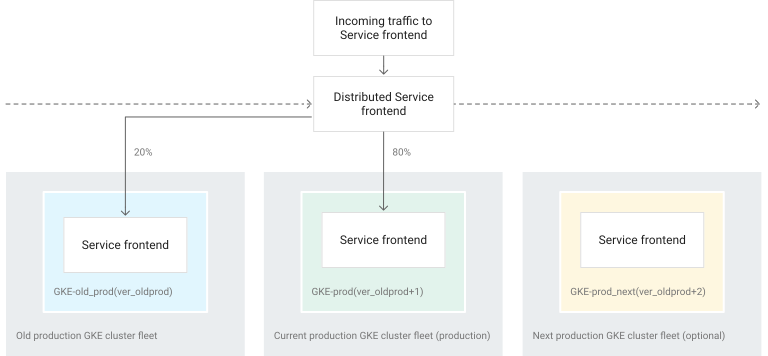
The preceding diagram shows a Distributed Service frontend being slowly migrated
from one fleet of GKE clusters to the next fleet running
the new version until the older fleet is completely drained over time. After the
fleet is drained, it can be removed and a new fleet is created. All services are
migrated to the next fleet, removing the older fleets as they are drained.
If you value resilience over everything else, use the canary cluster upgrade strategy.
Choose an upgrade strategy
The following diagram can help you determine which strategy is best for you based on the Service and business needs.
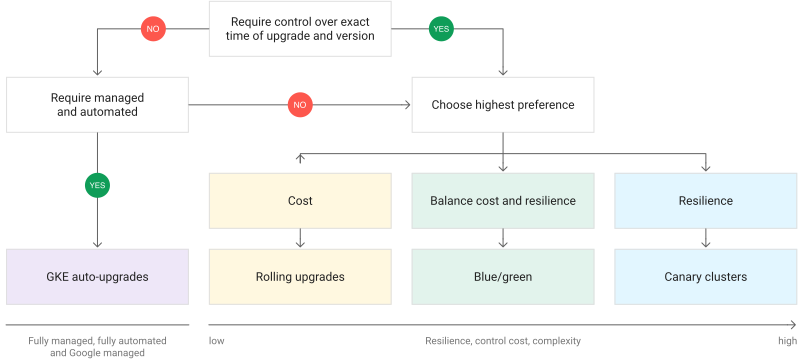
The preceding diagram is a decision tree to help you pick the upgrade strategy that is right for you:
- If you do not require complete control over the exact version and time of upgrade, you can choose the auto-upgrade feature available in GKE.
- If your priority is low cost, you can choose the rolling upgrade strategy.
- If your priority is balancing cost and resilience, you can choose the blue/green strategy.
- If your priority is resilience over cost, you can choose the canary cluster upgrade strategy.
Multi-cluster traffic management for GKE cluster lifecycle
To maintain service availability during multi-cluster upgrades, you must drain and reroute traffic between clusters. You can manage this traffic using either multi-cluster Gateway (recommended) or Multi Cluster Ingress. Multi-cluster Gateway is the successor to Multi Cluster Ingress, and provides a more expressive and role-oriented approach to service networking.
Use multi-cluster Gateway for cluster lifecycle management
Multi-cluster Gateway (MCG) uses Gateway API to manage traffic for services deployed across multiple GKE clusters within a fleet.
The GKE Gateway controller is a Google-hosted service that watches for Gateway and HTTPRoute resources in a designated config cluster. The controller automatically provisions and maintains load-balancing infrastructure, providing a single unified entry point for applications across clusters in the fleet. This architecture lets you decouple the lifecycle of the load balancer from the individual GKE clusters where the workloads reside.
For GKE cluster lifecycle management, multi-cluster Gateway enables advanced traffic control strategies:
- Blue-green upgrades: deploy a new "green" cluster and gradually shift traffic from the "blue" cluster by modifying weights in the HTTPRoute resource.
- Capacity-based load balancing: automatically redirect traffic when a service in one cluster reaches its defined capacity limit, which helps protect it from overload during rolling upgrades.
- Health-based failover: monitor the health of backends across all clusters and automatically reroute traffic away from a cluster that is being drained or experiencing issues.
For more information, follow the tutorial to deploy a multi-cluster Gateway for weighted traffic splitting.
Use Multi Cluster Ingress for cluster lifecycle management
Another solution for multi-cluster traffic management is Multi Cluster Ingress. Multi Cluster Ingress is a Google Cloud-hosted multi-cluster ingress controller for GKE clusters that supports deploying shared load balancing resources across clusters and across regions. Multi Cluster Ingress is a solution to get client traffic to a distributed service running in many clusters across many regions. Like Ingress for GKE, it uses Cloud Load Balancing to send traffic to a backend service. The backend service is the distributed Service. The backend Service sends traffic to multiple backends, which are Kubernetes Services running on multiple GKE clusters. For Service-to-Service traffic across clusters, you can use service mesh technologies like Cloud Service Mesh or Istio, which provide similar functionality across distributed Services.
For more information, follow the tutorial to upgrade a multi-cluster GKE environment with Multi Cluster Ingress.
What's next
- Learn more about multi-cluster Gateway.
- Learn more about Multi Cluster Ingress.