


本頁面說明 Google Kubernetes Engine (GKE) 如何使用 Service Extensions,將自訂邏輯新增至 Cloud Load Balancing。
本頁面適用於 GKE Identity 和帳戶管理員,以及需要使用 Service Extensions 設定自訂流量管理邏輯的開發人員。
閱讀本頁內容前,請務必先熟悉下列事項:
總覽
GKE 會使用服務擴充功能,將自訂邏輯新增至 Cloud Load Balancing。您可以使用 Service Extensions 執行進階流量分配、自訂驗證或要求記錄等工作。
GKE Gateway 控制器支援下列 Service 擴充功能:
- GCPRoutingExtension:這項擴充功能會在 Cloud Load Balancing 中新增自訂邏輯,以控管流量路徑。
- GCPTrafficExtension:這項擴充功能會將自訂邏輯插入 Cloud Load Balancing,以修改流量。選取服務後,系統會將這項邏輯套用至流量。負載平衡器可以新增或變更 HTTP 要求和回應的標頭和酬載。GCPTrafficExtension 不會影響服務選取或服務安全性政策。
- GCPEdgeExtension:這項擴充功能可讓您修改要求標頭,影響後端服務選取和 Cloud CDN 快取鍵。這項功能僅適用於全域外部受管理負載平衡器。
- GCPAuthzExtension:這項擴充功能可讓您將授權決策委派給自訂或第三方授權引擎 (例如外部網頁應用程式防火牆) 或 Identity-Aware Proxy。這項擴充功能會與 GCPAuthzPolicy 資源搭配使用,對進入閘道的流量強制執行存取控管,並指定何時應呼叫擴充功能。
擴充功能會附加至閘道。如果是單一叢集 Gateway,擴充功能會參照 Service 資源、GCPWasmPlugin 資源或 GoogleAPIServiceName 資源。如果是多叢集 Gateway,擴充功能會參照 ServiceImport 資源或 GoogleAPIServiceName 資源。
參照 Service 資源或 ServiceImport 資源:在這個模型中,您會將自訂邏輯部署為獨立的後端應用程式,並公開為 Kubernetes Service。負載平衡器會呼叫這項服務來處理流量。這種做法用途廣泛,可讓您實作自訂路由邏輯或執行流量操控,例如修改標頭或檢查酬載。
參照 GCPWasmPlugin 資源:如需高效能,您可以使用 WebAssembly (Wasm) 模組,將使用者編寫的自訂邏輯直接插入Google Cloud 負載平衡器的資料路徑。您定義的 GCPWasmPlugin 資源會指向 Artifact Registry 中 Wasm 模組的映像檔。這個方法僅適用於 GCPTrafficExtension 和 GCPEdgeExtension 資源,以及全域外部應用程式負載平衡器
參照 Google API 服務:您也可以使用 GCPTrafficExtension 或 GCPAuthzExtension 中的
googleAPIServiceName欄位,直接參照 Google API 服務。
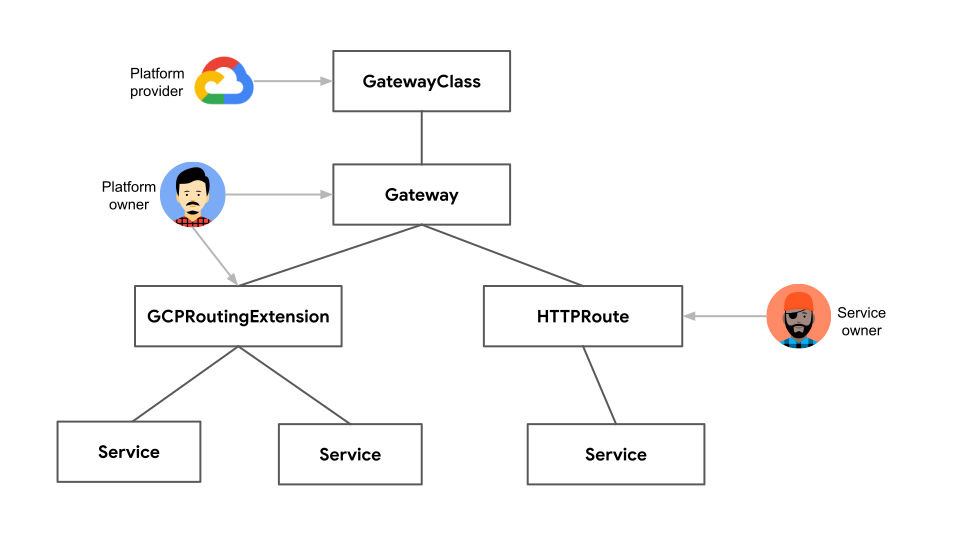
在下圖中,GCPRoutingExtension 資源會附加至 Gateway,並參照多項服務。擴充功能會控管服務的流量路徑。
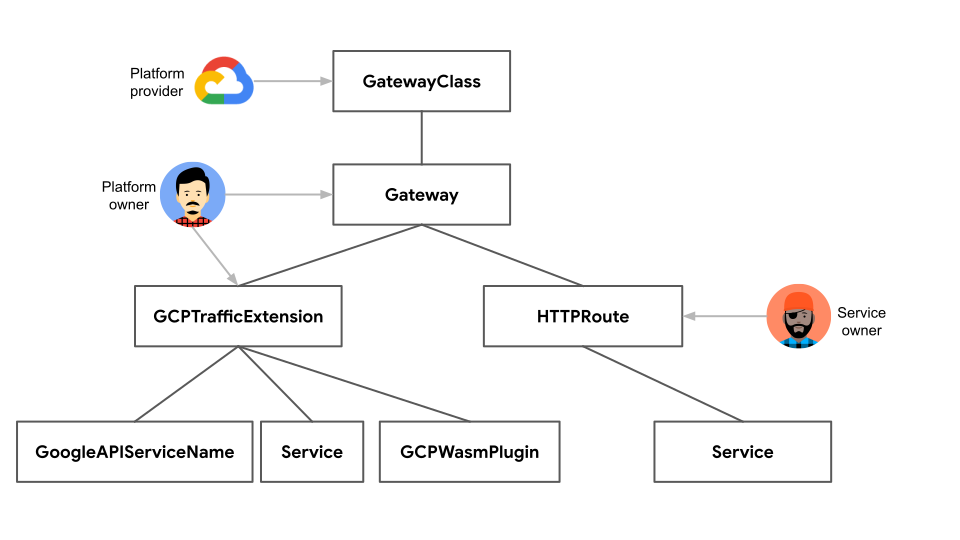
在下圖中,GCPTrafficExtension 資源附加至閘道,並參照 Service、GoogleAPIServiceName 或 GCPWasmPlugin。擴充功能會變更要求和回應的標頭和酬載。
事前準備
開始之前,請務必先完成下列工作:
- 啟用 Google Kubernetes Engine API。 啟用 Google Kubernetes Engine API
- 如要使用 Google Cloud CLI 執行這項工作,請安裝並初始化 gcloud CLI。如果您先前已安裝 gcloud CLI,請執行
gcloud components update指令,取得最新版本。較舊的 gcloud CLI 版本可能不支援執行本文件中的指令。
視需要啟用 Compute Engine API、Network Services API 和 Model Armor API。
前往「啟用 API 存取權」,然後按照操作說明進行。
如要進一步瞭解 Service Extensions 的定價,請參閱「定價」。 Google Cloud
請詳閱 服務擴充功能配額中的配額和限制。
如要使用一般運算語言 (CEL) 比對器,請參閱 CEL 比對器語言參考資料,瞭解支援的屬性和運算子。
查看服務擴展功能的限制。
GKE Gateway 控制器需求
- 叢集必須使用 GKE 1.33 以上版本。
- 如要使用 GCPWasmPlugin,叢集必須使用 GKE 1.33.3 以上版本。
- 如要使用 ServiceImport 資源,叢集必須使用 GKE 1.34.3 以上版本。
- 您必須為內部多叢集閘道設定閘道資源。 這個資源可以是全域外部應用程式負載平衡器、跨區域內部應用程式負載平衡器、區域外部應用程式負載平衡器,或區域內部應用程式負載平衡器閘道。
- 叢集必須啟用 Gateway API。
- 您必須設定 Gateway 資源。這項資源可以是全域外部應用程式負載平衡器、區域性外部應用程式負載平衡器,或區域性內部應用程式負載平衡器閘道。如果使用 GCPWasmPlugin 資源,則只能部署全域外部應用程式負載平衡器閘道。
- 您必須已設定 HTTPRoute 資源。
規定與限制
下表列出在 GKE 中設定 Gateway 服務擴充功能時的相關限制:
| 類別 | 規定與限制 |
|---|---|
| 負載平衡器 |
下列負載平衡器支援 GCPRoutingExtension:
gke-l7-global-external-managed 閘道類別)。
|
| 擴充功能鏈結和規格 |
|
| 逾時 |
|
| MatchCondition |
|
| 標題 |
|
| 中繼資料 |
|
| 事件 |
|
| RequestBodySendMode |
|
| ResponseBodySendMode |
|
| 資源參照 |
|
| GCPWasmPlugin |
|
| GCPAuthzPolicy 和 GCPAuthzExtension |
|
googleAPIServiceName |
|
backendRef |
在擴充功能中參照使用 backendRef 的服務時,必須符合下列條件:
|
observabilityMode |
observabilityMode 欄位可在 Extension 上設定,但有下列限制:
|
推薦服務
在 Service Extensions 中,您可以參照託管自訂邏輯的服務,讓負載平衡器執行該邏輯。閘道預設沒有 Service Extensions。
如要設定 GKE 服務擴充功能,請按照下列步驟操作:
部署後端呼叫服務:建立 Kubernetes Service,代表執行自訂邏輯的後端服務。負載平衡器會叫用這項服務。
設定服務擴充功能: 根據負載平衡器類型使用適當的擴充功能。
區域閘道的 GCPRoutingExtension:將這項擴充功能用於區域性外部應用程式負載平衡器和區域性內部應用程式負載平衡器,在區域內實作自訂轉送邏輯。
適用於全域外部、區域外部和內部閘道的 GCPTrafficExtension:使用這個擴充功能,對全域外部應用程式負載平衡器、區域外部應用程式負載平衡器和區域內部應用程式負載平衡器執行流量操控,例如修改標頭或檢查酬載,適用於各種負載平衡器類型。
部署後端呼叫服務
呼叫服務會為 GKE 中的 Gateway 服務擴充功能實作自訂邏輯。閘道會根據 GCPTrafficExtension 或 GCPRoutingExtension 設定,叫用這些後端應用程式來修改或轉送流量。
您部署呼叫服務,將自訂邏輯新增至閘道。這項獨立服務會處理自訂處理作業,例如標頭操控、酬載轉換或流量路徑。
如要部署可做為閘道呼叫的服務,請按照下列步驟操作:
(選用) 為 TLS 建立密鑰: 這個指令會建立 TLS 類型的 Kubernetes 密鑰,其中包含 TLS 憑證和私密金鑰。
如要為回呼服務建立 TLS 密鑰,請替換下列項目:
SECRET_NAME:呼叫服務的 Secret 名稱path-to-cert:憑證的檔案路徑path-to-key:金鑰的檔案路徑
執行下列指令,確認是否已新增 Secret:
kubectl get secrets SECRET_NAME將
SECRET_NAME替換為呼叫服務的 Secret 名稱。畫面會顯示如下的輸出內容:
NAME            TYPE                DATA   AGE
SECRET_NAME     kubernetes.io/tls   2      12s
定義 Deployment 和 Service 資源。
您必須定義下列項目:
- 部署:管理含有 Service Extensions 自訂邏輯的應用程式 Pod。
- Service:將 Deployment 管理的應用程式 Pod 公開為網路服務。
建立範例資訊清單
extension-service-app.yaml,其中包含 Deployment 和 Service 定義:apiVersion: apps/v1 kind: Deployment metadata: name: extension-service-app spec: selector: matchLabels: app: store replicas: 1 template: metadata: labels: app: store spec: containers: - name: serviceextensions image: us-docker.pkg.dev/service-extensions-samples/callouts/python-example-basic:public-image-e42d951 ports: - containerPort: 8080 - containerPort: 443 volumeMounts: - name: certs mountPath: "/etc/certs/" readOnly: true env: - name: POD_NAME valueFrom: fieldRef: fieldPath: metadata.name - name: NAMESPACE valueFrom: fieldRef: fieldPath: metadata.namespace - name: TLS_SERVER_CERT_PATH value: "/etc/certs/path-to-cert" - name: TLS_SERVER_PRIVKEY value: "/etc/certs/path-to-key" resources: requests: cpu: 10m volumes: - name: certs secret: secretName: SECRET_NAME optional: false --- apiVersion: v1 kind: Service metadata: name: extension-service spec: ports: - port: 443 targetPort: 443 appProtocol: HTTP2 selector: app: store更改下列內容:
POD_NAME:Pod 名稱。SECRET_NAME:呼叫服務的 Secret 名稱。TLS_SERVER_CERT_PATH:Pod 內 TLS 伺服器憑證的路徑。TLS_SERVER_PRIVKEY:Pod 內 TLS 伺服器私密金鑰的路徑。
套用
extension-service-app.yaml資訊清單:kubectl apply -f extension-service-app.yaml
驗證設定:
確認應用程式已部署:
kubectl get pod --selector app=store應用程式開始執行後,輸出內容會類似下列內容:
NAME                                     READY   STATUS    RESTARTS   AGE
extension-service-app-85f466bc9b-b5mf4   1/1     Running   0          7s
確認服務是否已部署:
kubectl get service extension-service輸出內容大致如下,顯示每個商店 Deployment 的 Service:
NAME                TYPE        CLUSTER-IP     EXTERNAL-IP   PORT(S)   AGE
extension-service   ClusterIP   34.118.225.9   <none>        443/TCP   2m40s
設定 Service Extensions
您可以設定 GCPRoutingExtension 或 GCPTrafficExtension,自訂流量流程。
為區域閘道設定 GCPRoutingExtension
您可以使用 GCPRoutingExtension 重新轉送流量。如要設定 GCPRoutingExtension,請更新 HTTPRoute,指定 service-extensions.com 主機的要求。
更新 HTTPRoute。修改 HTTPRoute,加入會觸發轉送擴充功能的主機名稱或路徑。
將下列範例資訊清單儲存為
store-route.yaml檔案:kind: HTTPRoute apiVersion: gateway.networking.k8s.io/v1 metadata: name: store spec: parentRefs: - kind: Gateway name:GATEWAY_NAME hostnames: - "store.example.com" - "service-extensions.example.com" rules: - backendRefs: - name: store-v1 port: 8080 - matches: - headers: - name: env value: canary backendRefs: - name: store-v2 port: 8080 - matches: - path: value: /de backendRefs: - name: store-german port: 8080將
GATEWAY_NAME替換為您的閘道名稱。套用
store-route.yaml資訊清單:kubectl apply -f store-route.yaml
定義 GCPRoutingExtension。
在範例
gcp-routing-extension.yaml檔案中儲存 GCPRoutingExtension 設定:kind: GCPRoutingExtension apiVersion: networking.gke.io/v1 metadata: name: my-gateway-extension namespace: default spec: targetRefs: - group: "gateway.networking.k8s.io" kind: Gateway name: GATEWAY_NAME extensionChains: - name: chain1 matchCondition: celExpressions: - celMatcher: request.path.contains("serviceextensions") extensions: - name: ext1 authority: "myext.com" timeout: 1s backendRef: group: "" kind: Service name: extension-service port: 443將
GATEWAY_NAME替換為閘道名稱。將範例資訊清單套用至叢集:
kubectl apply -f gcp-routing-extension.yaml
驗證 GCPRoutingExtension 的設定,以及其與 Gateway 的繫結。
檢查 GCPRoutingExtension 部署作業:
kubectl describe gcproutingextension my-gateway-extension輸出結果會與下列內容相似:
Name:         my-gateway-extension
Namespace:    default
Labels:       <none>
Annotations:  <none>
API Version:  networking.gke.io/v1
Kind:         GCPRoutingExtension
Metadata:
  Creation Timestamp:  2025-03-02T17:12:30Z
  Generation:        1
  Resource Version:  31283253
  UID:               ec8efaa0-d8e7-4e1b-9fd4-0ae0ef3c74d0
Spec:
  Extension Chains:
    Extensions:
      Authority:    myext.com
      Backend Ref:
        Group:
        Kind: Service
        Name: extension-service
        Port: 443
      Name:       ext1
      Timeout:    1s
    Match Condition:
      Cel Expressions:
        Cel Matcher: request.path.contains("serviceextensions")
    Name:  chain1
  Target Refs:
    Group: gateway.networking.k8s.io
    Kind: Gateway
    Name: GATEWAY_NAME
Events:  <none>
輸出內容會顯示預設命名空間中名為
my-gateway-extension的 GCPRoutingExtension 詳細資料。輸出內容會顯示Spec欄位,其中包含擴充功能的行為定義。驗證 Gateway 繫結:
確認 GCPRoutingExtension 已繫結至 Gateway。這可能需要幾分鐘:
kubectl describe gateway GATEWAY_NAME將
GATEWAY_NAME替換為您的閘道名稱。輸出結果會與下列內容相似:
Name:         GATEWAY_NAME
Namespace:    default
Labels:       none
Annotations:  networking.gke.io/addresses: /projects/1234567890/regions/us-central1/addresses/test-hgbk-default-internal-http-5ypwen3x2gcr
              networking.gke.io/backend-services:
                /projects/1234567890/regions/us-central1/backendServices/test-hgbk-default-extension-service-443-rduk21fwhoj0, /projects/1234567890/re...
              networking.gke.io/firewalls: /projects/1234567890/global/firewalls/test-hgbk-l7-default-us-central1
              networking.gke.io/forwarding-rules: /projects/1234567890/regions/us-central1/forwardingRules/test-hgbk-default-internal-http-qn7dk9i9zm73
              networking.gke.io/health-checks:
                /projects/1234567890/regions/us-central1/healthChecks/test-hgbk-default-extension-service-443-rduk21fwhoj0, /projects/1234567890/regio...
              networking.gke.io/last-reconcile-time: 2025-03-02T17:15:02Z
              networking.gke.io/lb-route-extensions:
                /projects/1234567890/locations/us-central1/lbRouteExtensions/test-hgbk-default-internal-http-lwh0op4qorb0
              networking.gke.io/lb-traffic-extensions:
              networking.gke.io/ssl-certificates:
              networking.gke.io/target-http-proxies:
                /projects/1234567890/regions/us-central1/targetHttpProxies/test-hgbk-default-internal-http-2jzr7e3xclhj
              networking.gke.io/target-https-proxies:
              networking.gke.io/url-maps: /projects/1234567890/regions/us-central1/urlMaps/test-hgbk-default-internal-http-2jzr7e3xclhj
API Version:  gateway.networking.k8s.io/v1
Kind:         Gateway
Metadata:
  Creation Timestamp:  2025-03-02T16:37:50Z
  Finalizers:
  gateway.finalizer.networking.gke.io
  Generation:        1
  Resource Version:  31284863
  UID:               fd512611-bad2-438e-abfd-5619474fbf31
...
輸出內容會顯示註解,GKE 會使用這些註解來儲存閘道與基礎Google Cloud 資源之間的連結。
networking.gke.io/lb-route-extensions註解會確認閘道與 GCPRoutingExtension 的繫結。確認 GCPRoutingExtension 具有
Programmed狀態和ProgrammingSucceeded原因,藉此檢查擴充功能狀態。這個指令可能需要幾分鐘才能完成。kubectl describe gcproutingextension my-gateway-extension輸出結果會與下列內容相似:
Name: my-gateway-extension Namespace: default Labels: <none> Annotations: <none> API Version: networking.gke.io/v1 Kind: GCPRoutingExtension Metadata: Creation Timestamp: 2025-03-02T17:12:30Z Generation: 1 Resource Version: 31284378 UID: ec8efaa0-d8e7-4e1b-9fd4-0ae0ef3c74d0 Spec: Extension Chains: Extensions: Authority: myext.com Backend Ref: Group: Kind: Service Name: extension-service Port: 443 Name: ext1 Timeout: 1s Match Condition: Cel Expressions: Cel Matcher: request.path.contains("serviceextensions") Name: chain1 Target Refs: Group: gateway.networking.k8s.io Kind: Gateway Name: GATEWAY_NAME Status: Ancestors: Ancestor Ref: Group: gateway.networking.k8s.io Kind: Gateway Name: GATEWAY_NAME Namespace: default Conditions: Last Transition Time: 2025-03-02T17:14:15Z Message: Reason: Accepted Status: True Type: Accepted Last Transition Time: 2025-03-02T17:14:15Z Message: Reason: ProgrammingSucceeded Status: True Type: Programmed Controller Name: networking.gke.io/gateway Events: Type Reason Age From Message ---- ------ ---- ---- ------- Normal ADD 2m31s sc-gateway-controller default/my-gateway-extension Normal SYNC 51s (x2 over 98s) sc-gateway-controller Attachment of GCPRoutingExtension "default/my-gateway-extension" to AncestorRef {Group: "gateway.networking.k8s.io", Kind: "Gateway", Namespace: "default", Name: GATEWAY_NAME, SectionName: nil, Port: nil} was a success Normal SYNC 23s sc-gateway-controller Reconciliation of GCPRoutingExtension "default/my-gateway-extension" to AncestorRef {Group: "gateway.networking.k8s.io", Kind: "Gateway", Namespace: "default", Name: GATEWAY_NAME, SectionName: nil, Port: nil} was a successStatus.Conditions欄位會顯示Programmed條件,其中包含Status: True和Reason: ProgrammingSucceeded。這項資訊確認擴充功能已成功套用。
將流量傳送至應用程式。
在叢集中部署 Gateway、Route 和應用程式後,即可將流量傳遞至應用程式。
如要存取應用程式,請找出閘道的 IP 位址。
在終端機中使用下列指令:
kubectl get gateways.gateway.networking.k8s.io GATEWAY_NAME -o=jsonpath="{.status.addresses[0].value}"將
GATEWAY_NAME替換為您的閘道名稱。這個指令會輸出閘道的 IP 位址。在後續指令中,請將
GATEWAY_IP_ADDRESS替換為輸出內容中的 IP 位址。前往
store.example.com/serviceextensions的serviceextensions版本商店服務,測試路徑更新:curl http://store.example.com/serviceextensions --resolve store.example.com:80:GATEWAY_IP_ADDRESS -v輸出結果會與下列內容相似:
{ "cluster_name": "gke1", "host_header": "service-extensions.com", "metadata": "store-v1", "pod_name": "store-v1-5d9554f847-cvxpd", "pod_name_emoji": "💇🏼♀️", "project_id": "gateway-demo", "timestamp": "2025-03-15T12:00:00", "zone": "us-central1-c" }
設定 GCPTrafficExtension
您可以使用 GCPTrafficExtension,在 Google Cloud 環境中運用進階流量管理功能。您可以在全域外部應用程式負載平衡器、區域外部應用程式負載平衡器和區域內部應用程式負載平衡器中,設定這項擴充功能。您可以使用 GCPTrafficExtension 實作自訂 HTTP 要求和回應邏輯、複雜的路由、轉換和安全政策。
更新 HTTPRoute。修改 HTTPRoute,加入會觸發流量擴充功能的主機名稱或路徑。
將下列範例資訊清單儲存為
store-route.yaml檔案:kind: HTTPRoute apiVersion: gateway.networking.k8s.io/v1 metadata: name: store spec: parentRefs: - kind: Gateway name: GATEWAY_NAME hostnames: - "store.example.com" - "service-extensions.example.com" rules: - backendRefs: - name: store-v1 port: 8080 - matches: - headers: - name: env value: canary backendRefs: - name: store-v2 port: 8080 - matches: - path: value: /de backendRefs: - name: store-german port: 8080將
GATEWAY_NAME替換為閘道名稱,例如internal-http、external-http或global-external-http。將
store-route.yaml資訊清單套用至叢集:kubectl apply -f store-route.yaml
定義 GCPTrafficExtension。
將 GCPTrafficExtension 設定儲存至範例
gcp-traffic-extension.yaml檔案:kind: GCPTrafficExtension apiVersion: networking.gke.io/v1 metadata: name: my-traffic-extension namespace: default spec: targetRefs: - group: "gateway.networking.k8s.io" kind: Gateway name: GATEWAY_NAME extensionChains: - name: chain1 matchCondition: celExpressions: - celMatcher: request.path.contains("serviceextensions") extensions: - name: ext1 authority: "myext.com" timeout: 1s backendRef: group: "" kind: Service name: extension-service port: 443 supportedEvents: - RequestHeaders - RequestBody - ResponseHeaders - ResponseBody將
GATEWAY_NAME替換為閘道的名稱,例如internal-http、external-http或global-external-http。將範例資訊清單套用至叢集:
kubectl apply -f gcp-traffic-extension.yaml
驗證 GCPTrafficExtension 的設定,以及其與 Gateway 的繫結。
檢查 GCPTrafficExtension 部署作業:
kubectl describe gcptrafficextension my-traffic-extension輸出結果會與下列內容相似:
Name:         my-traffic-extension
Namespace:    default
Labels:       <none>
Annotations:  <none>
API Version:  networking.gke.io/v1
Kind:         GCPTrafficExtension
Metadata:
  Creation Timestamp:  2025-03-02T17:12:30Z
  Generation:        1
  Resource Version:  31283253
  UID:               ec8efaa0-d8e7-4e1b-9fd4-0ae0ef3c74d0
Spec:
  Extension Chains:
    Extensions:
      Authority:    myext.com
      Backend Ref:
        Group:
        Kind: Service
        Name: extension-service
        Port: 443
      Name:       ext1
      Timeout:    1s
    Match Condition:
      Cel Expressions:
        Cel Matcher: request.path.contains("serviceextensions")
    Name:  chain1
  Target Refs:
    Group: gateway.networking.k8s.io
    Kind: Gateway
    Name: GATEWAY_NAME
Events:  <none>
輸出內容會顯示預設命名空間中,名為
my-traffic-extension的 GCPTrafficExtension 詳細資料。其中顯示Spec欄位,包含擴充功能行為的定義。驗證 Gateway 繫結:
確認 GCPTrafficExtension 已繫結至閘道。這個指令可能需要幾分鐘才能完成:
kubectl describe gateway GATEWAY_NAME輸出結果會與下列內容相似:
Name:         GATEWAY_NAME
Namespace:    default
Labels:       <none>
Annotations:  networking.gke.io/addresses: /projects/1234567890/regions/us-central1/addresses/test-hgbk-default-internal-http-5ypwen3x2gcr
              networking.gke.io/backend-services:
                /projects/1234567890/regions/us-central1/backendServices/test-hgbk-default-extension-service-443-rduk21fwhoj0, /projects/1234567890/re...
              networking.gke.io/firewalls: /projects/1234567890/global/firewalls/test-hgbk-l7-default-us-central1
              networking.gke.io/forwarding-rules: /projects/1234567890/regions/us-central1/forwardingRules/test-hgbk-default-internal-http-qn7dk9i9zm73
              networking.gke.io/health-checks:
                /projects/1234567890/regions/us-central1/healthChecks/test-hgbk-default-extension-service-443-rduk21fwhoj0, /projects/1234567890/regio...
              networking.gke.io/last-reconcile-time: 2025-03-02T17:15:02Z
              networking.gke.io/lb-traffic-extensions:
                /projects/1234567890/locations/us-central1/lbTrafficExtensions/test-hgbk-default-internal-http-lwh0op4qorb0
              networking.gke.io/ssl-certificates:
              networking.gke.io/target-http-proxies:
                /projects/1234567890/regions/us-central1/targetHttpProxies/test-hgbk-default-internal-http-2jzr7e3xclhj
              networking.gke.io/target-https-proxies:
              networking.gke.io/url-maps: /projects/1234567890/regions/us-central1/urlMaps/test-hgbk-default-internal-http-2jzr7e3xclhj
API Version:  gateway.networking.k8s.io/v1
Kind:         Gateway
Metadata:
  Creation Timestamp:  2025-03-02T16:37:50Z
  Finalizers:
    gateway.finalizer.networking.gke.io
  Generation:        1
  Resource Version:  31284863
  UID:               fd512611-bad2-438e-abfd-5619474fbf31
...
輸出內容會顯示註解,GKE 會使用這些註解儲存 Gateway 與基礎 Google Cloud 資源之間的連結。
networking.gke.io/lb-traffic-extensions註解會確認繫結。查看擴充功能狀態:
如要檢查 GCPTrafficExtension 的擴充功能狀態,請執行下列指令:
kubectl describe gcptrafficextension my-traffic-extension確認 GCPTrafficExtension 的狀態為
Programmed,且原因為ProgrammingSucceeded。指令可能需要幾分鐘才能完成。GCPTrafficExtension 資源輸出內容類似如下所示:
Name:         my-traffic-extension
Namespace:    default
Labels:       <none>
Annotations:  <none>
API Version:  networking.gke.io/v1
Kind:         GCPTrafficExtension
Metadata:
  Creation Timestamp:  2025-03-02T17:12:30Z
  Generation:          1
  Resource Version:    31284378
  UID:                 ec8efaa0-d8e7-4e1b-9fd4-0ae0ef3c74d0
Spec:
  Extension Chains:
    Extensions:
      Authority:  myext.com
      Backend Ref:
        Group:
        Kind:   Service
        Name:   extension-service
        Port:   443
      Name:     ext1
      Timeout:  1s
    Match Condition:
      Cel Expressions:
        Cel Matcher:  request.path.contains("serviceextensions")
    Name:             chain1
  Target Refs:
    Group:  gateway.networking.k8s.io
    Kind:   Gateway
    Name:   GATEWAY_NAME
Status:
  Ancestors:
    Ancestor Ref:
      Group:      gateway.networking.k8s.io
      Kind:       Gateway
      Name:       GATEWAY_NAME
      Namespace:  default
    Conditions:
      Last Transition Time:  2025-03-02T17:14:15Z
      Message:
      Reason:                Accepted
      Status:                True
      Type:                  Accepted
      Last Transition Time:  2025-03-02T17:14:15Z
      Message:
      Reason:                ProgrammingSucceeded
      Status:                True
      Type:                  Programmed
    Controller Name:         networking.gke.io/gateway
Events:
  Type    Reason  Age                From                   Message
  ----    ------  ----               ----                   -------
  Normal  ADD     2m31s              sc-gateway-controller  default/my-traffic-extension
  Normal  SYNC    51s (x2 over 98s)  sc-gateway-controller  Attachment of GCPTrafficExtension "default/my-gateway-extension" to AncestorRef {Group:       "gateway.networking.k8s.io",
  Kind:        "Gateway",
  Namespace:   "default",
  Name:        GATEWAY_NAME,
  SectionName: nil,
  Port:        nil} was a success
  Normal  SYNC    23s           sc-gateway-controller  Reconciliation of GCPTrafficExtension "default/my-traffic-extension" to AncestorRef {Group:       "gateway.networking.k8s.io",
  Kind:        "Gateway",
  Namespace:   "default",
  Name:        GATEWAY_NAME,
  SectionName: nil,
  Port:        nil} was a success
「
Status.Conditions」欄位會顯示Programmed條件,其中包含Status: True和Reason: ProgrammingSucceeded。這項資訊確認延期已成功套用。
將流量傳送至應用程式。
在叢集中部署 Gateway、Route 和應用程式後,即可將流量傳遞至應用程式。
如要存取應用程式,請找出閘道的 IP 位址。
在終端機中使用下列指令:
kubectl get gateways.gateway.networking.k8s.io GATEWAY_NAME -o=jsonpath="{.status.addresses[0].value}"將
GATEWAY_NAME替換為您的閘道名稱。這個指令會輸出閘道的 IP 位址。在後續指令中,請將
GATEWAY_IP_ADDRESS替換為輸出內容中的 IP 位址。前往
store.example.com/serviceextensions的serviceextensions版本商店服務,測試路徑更新:curl http://store.example.com/serviceextensions --resolve store.example.com:80:GATEWAY_IP_ADDRESS -v輸出結果會與下列內容相似:
{ * Request completely sent off < HTTP/1.1 200 OK < server: Werkzeug/2.3.7 Python/3.11.3 < date: Sun, 02 Mar 2025 16:58:10 GMT < content-type: application/json < access-control-allow-origin: * < hello: service-extensions < via: 1.1 google < transfer-encoding: chunked }
設定 GCPAuthzExtension 資源
您可以搭配使用 GCPAuthzExtension 和 GCPAuthzPolicy,將複雜的授權決策委派給外部服務或 Identity-Aware Proxy (IAP),藉此強制執行授權決策。
定義 GCPAuthzExtension:
您可以設定 GCPAuthzExtension,將自訂擴充功能服務或 IAP 參照為回呼服務。
選項 1:參照自訂擴充功能服務
- 將 GCPAuthzExtension 設定儲存至範例
gcp-authz-extension.yaml檔案:
apiVersion: networking.gke.io/v1 kind: GCPAuthzExtension metadata: name: my-authz-ext namespace: default spec: backendRef: kind: Service name: "${authz-service}" forwardHeaders: - Authorization failOpen: false timeout: "0.1s" wireFormat: EXT_PROC_GRPC在前例中,
"${authz-service}"是擴充服務,必須與 GCPAuthzPolicy 位於相同命名空間。- 套用資訊清單:
kubectl apply -f gcp-authz-extension.yaml- 將 GCPAuthzExtension 設定儲存至範例
選項 2:將 IAP 參照為自訂叫出服務
您也可以在
googleAPIServiceName欄位中指定iap.googleapis.com,將 IAP 設為自訂呼叫服務:- 將 GCPAuthzExtension 設定儲存至範例
authz-extension-iap.yaml檔案:
apiVersion: networking.gke.io/v1 kind: GCPAuthzExtension metadata: name: my-authz-ext-iap namespace: default spec: googleAPIServiceName: iap.googleapis.com timeout: 50ms failOpen: false- 套用資訊清單:
kubectl apply -f authz-extension-iap.yaml- 將 GCPAuthzExtension 設定儲存至範例
定義 GCPAuthzPolicy:
GCPAuthzPolicy 會指定閘道,並指定要對相符流量採取的動作:
設定
CUSTOM授權政策:CUSTOM動作會將授權決策委派給您在上一個步驟中建立的擴充功能。將下列資訊清單儲存至
gcp-authz-policy.yaml:apiVersion: networking.gke.io/v1 kind: GCPAuthzPolicy metadata: name: my-gateway-authz namespace: default spec: enforcementLevel: L7 targetRefs: - group: gateway.networking.k8s.io kind: Gateway name: "GATEWAY_NAME" rules: - from: sources: - principals: - principal_selector: CLIENT_CERT_URI_SANS principal: exact: "spiffee://cluster.local/ns1/pod1" - to: operations: - paths: - exact: "/api/secure-endpoint" action: CUSTOM customProvider: authzExtension: extensionRefs: - group: networking.gke.io kind: GCPAuthzExtension name: my-authz-ext將
GATEWAY_NAME替換為閘道名稱。套用資訊清單:
kubectl apply -f gcp-authz-policy.yaml
參照 GCPWasmPlugin 資源
您可以使用 GCPWasmPlugin,搭配 GCPTrafficExtension 或 GCPEdgeExtension,直接將自訂邏輯注入負載平衡器的資料路徑。這個方法可讓您部署封裝為 Wasm 模組的自訂流量管理功能。
如要設定 GKE Service Extensions,請按照下列步驟操作:
部署 GCPWasmPlugin:建立並部署 GCPWasmPlugin CustomResourceDefinition (CRD),其中包含 Wasm 模組的自訂程式碼。您可以搭配使用 GCPWasmPlugin 與 GCPTrafficExtension 或 GCPEdgeExtension,用於
gke-l7-global-external-managedGatewayClass。設定服務擴充功能:使用 GCPWasmPlugin 設定下列其中一個擴充功能:
部署 GCPWasmPlugin
GCPWasmPlugin 可讓您將使用者編寫的自訂邏輯,直接注入 Google Cloud 負載平衡器的資料路徑。GCPWasmPlugin 資源會指向 Artifact Registry 中的 Wasm 模組映像檔,然後由負載平衡器執行。
繼續執行下列步驟前,請確認您已將 Wasm 模組上傳至 Artifact Registry 存放區。詳情請參閱「準備外掛程式程式碼」。
如要部署 GCPWasmPlugin 資源,請完成下列步驟:
將下列資訊清單儲存為
wasm-plugin.yaml:kind: GCPWasmPlugin apiVersion: networking.gke.io/v1 metadata: name: gcp-wasm-plugin spec: versions: - name: wasm-plugin-version description: "Test wasm plugin version" image: "us-docker.pkg.dev/service-extensions-samples/plugins/local-reply:main" weight: 1000000 logConfig: enabled: true # Configures the sampling rate of activity logs. # The value of the field must be in range [0, 1e6]. sampleRate: 1000000 # Specifies the lowest level of logs that are exported to Cloud Logging. minLogLevel: INFO注意事項:
spec.versions.name:版本名稱在 GCPWasmPlugin 資源中不得重複。最多可列出 10 個版本,且只有一個版本必須具有非零權重。spec.versions.image:參照 Artifact Registry 中儲存的外掛程式碼圖片。spec.versions.weight:指定外掛程式版本的權重。權重必須是介於 0 至 1,000,000 之間的數字 (含)。spec.logConfig:指定是否要為這個外掛程式啟用 Cloud Logging。如未指定值,系統預設會停用 Cloud Logging。spec.logConfig.sampleRate:設定活動記錄的取樣率。 費率必須是介於 0 至 1,000,000 (含) 之間的數字。如果在啟用 Cloud Logging 時未指定,預設值為1,000,000(記錄 100% 的要求)。spec.logConfig.minLogLevel:指定要匯出至 Cloud Logging 的記錄檔最低級別。如果在啟用 Cloud Logging 時未指定值,這個欄位會預設為INFO。
套用
wasm-plugin.yaml資訊清單:kubectl apply -f wasm-plugin.yaml確認外掛程式已部署:
kubectl describe gcpwasmplugins.networking.gke.io gcp-wasm-plugin輸出結果會與下列內容相似:
Name: gcp-wasm-plugin Namespace: default Labels: <none> Annotations: <none> API Version: networking.gke.io/v1 Kind: GCPWasmPlugin Metadata: Creation Timestamp: 2025-08-08T19:54:18Z Generation: 1 Resource Version: 44578 UID: 549a12c7-91d1-43ad-a406-d6157a799b79 Spec: Log Config: Enabled: true Min Log Level: INFO Sample Rate: 1000000 Versions: Description: Test wasm plugin version Image: us-docker.pkg.dev/service-extensions-samples/plugins/local-reply:main Name: wasm-plugin-version Weight: 1000000 Events: <none>
設定 GCPTrafficExtension
如要將自訂邏輯新增至全域外部應用程式負載平衡器,您可以設定 GCPTrafficExtension,以便使用 GCPWasmPlugin。您可以使用 GCPTrafficExtension,在 Google Cloud 環境中使用進階流量管理功能。您可以在全域外部應用程式負載平衡器中設定這項擴充功能。
如要設定 GCPTrafficExtension 使用 GCPWasmPlugin,請完成下列步驟:
定義 GCPTrafficExtension。
將 GCPTrafficExtension 設定儲存為
gcp-traffic-extension-with-plugin.yaml:kind: GCPTrafficExtension apiVersion: networking.gke.io/v1 metadata: name: gcp-traffic-extension-with-plugin namespace: default spec: targetRefs: - group: "gateway.networking.k8s.io" kind: Gateway name: GATEWAY_NAME extensionChains: - name: chain1 matchCondition: celExpressions: - celMatcher: request.path.contains("serviceextensions") extensions: - name: ext1 supportedEvents: - RequestHeaders - ResponseHeaders backendRef: group: "networking.gke.io" kind: GCPWasmPlugin name: gcp-wasm-plugin將
GATEWAY_NAME替換為閘道名稱,例如global-external-http。將範例資訊清單套用至叢集:
kubectl apply -f gcp-traffic-extension-with-plugin.yaml
驗證 GCPTrafficExtension 的設定,以及其與 Gateway 的繫結。
檢查 GCPTrafficExtension 部署作業:
kubectl describe gcptrafficextensions.networking.gke.io gcp-traffic-extension-with-plugin輸出結果會與下列內容相似:
Name: gcp-traffic-extension-with-plugin Namespace: default Labels: <none> Annotations: <none> API Version: networking.gke.io/v1 Kind: GCPTrafficExtension Metadata: Creation Timestamp: 2025-03-02T17:12:30Z Generation: 1 Resource Version: 31283253 UID: ec8efaa0-d8e7-4e1b-9fd4-0ae0ef3c74d0 Spec: Extension Chains: Extensions: Backend Ref: Group: networking.gke.io Kind: GCPWasmPlugin Name: gcp-wasm-plugin Name: ext1 Supported Events: RequestHeaders ResponseHeaders Match Condition: Cel Expressions: Cel Matcher: request.path.contains("serviceextensions") Name: chain1 Target Refs: Group: gateway.networking.k8s.io Kind: Gateway Name: GATEWAY_NAME Events: <none>將
GATEWAY_NAME替換為您的閘道名稱。輸出內容會顯示預設命名空間中名為
gcp-traffic-extension-with-plugin的 GCPTrafficExtension 詳細資料。其中顯示Spec欄位,內含擴充功能行為的定義。驗證 Gateway 繫結:
確認 GCPTrafficExtension 已繫結至 Gateway。這個指令可能需要幾分鐘才能完成:
kubectl describe gateway GATEWAY_NAME將
GATEWAY_NAME替換為您的閘道名稱。輸出結果會與下列內容相似:
Name: GATEWAY_NAME Namespace: default Labels: <none> Annotations: networking.gke.io/addresses: /projects/922988411345/global/addresses/test-k18j-default-external-http-2jfqxrkgd0fm networking.gke.io/backend-services: /projects/922988411345/global/backendServices/test-k18j-default-gw-serve404-80-8zjp3d8cqfsu, /projects/922988411345/global/backendServices... networking.gke.io/certmap: store-example-com-map networking.gke.io/firewalls: /projects/922988411345/global/firewalls/test-k18j-l7-default-global networking.gke.io/forwarding-rules: /projects/922988411345/global/forwardingRules/test-k18j-default-external-http-wt1tl0cwi6zr networking.gke.io/health-checks: /projects/922988411345/global/healthChecks/test-k18j-default-gw-serve404-80-8zjp3d8cqfsu, /projects/922988411345/global/healthChecks/test-... networking.gke.io/last-reconcile-time: 2025-08-08T20:27:35Z networking.gke.io/lb-route-extensions: networking.gke.io/lb-traffic-extensions: projects/922988411345/locations/global/lbTrafficExtensions/test-k18j-default-external-http-0tdum40yts35 networking.gke.io/ssl-certificates: networking.gke.io/target-http-proxies: networking.gke.io/target-https-proxies: /projects/922988411345/global/targetHttpsProxies/test-k18j-default-external-http-jy9mc97xb5yh networking.gke.io/url-maps: /projects/922988411345/global/urlMaps/test-k18j-default-external-http-jy9mc97xb5yh networking.gke.io/wasm-plugin-versions: projects/922988411345/locations/global/wasmPlugins/test-k18j-default-gcp-wasm-plugin-itle20jj9nyk/versions/test-k18j-wasm-plugin-version-i... networking.gke.io/wasm-plugins: projects/922988411345/locations/global/wasmPlugins/test-k18j-default-gcp-wasm-plugin-itle20jj9nyk API Version: gateway.networking.k8s.io/v1 Kind: Gateway Metadata: Creation Timestamp: 2025-03-02T16:37:50Z Finalizers: gateway.finalizer.networking.gke.io Generation: 1 Resource Version: 31284863 UID: fd512611-bad2-438e-abfd-5619474fbf31 Spec: Gateway Class Name: gke-l7-global-external-managed Listeners: Allowed Routes: Namespaces: From: Same Name: https Port: 443 Protocol: HTTPS ...輸出內容會顯示註解,GKE 會使用這些註解儲存 Gateway 與基礎 Google Cloud資源之間的連結。
networking.gke.io/lb-traffic-extensions、networking.gke.io/wasm-plugin-versions和networking.gke.io/wasm-plugins註解會確認繫結。查看擴充功能狀態:
確認 GCPTrafficExtension 的狀態為
Programmed,原因為ProgrammingSucceeded。指令可能需要幾分鐘才能完成。kubectl describe gcptrafficextensions.networking.gke.io gcp-traffic-extension-with-plugin輸出結果會與下列內容相似:
Name: gcp-traffic-extension-with-plugin Namespace: default Labels: <none> Annotations: <none> API Version: networking.gke.io/v1 Kind: GCPTrafficExtension Metadata: Creation Timestamp: 2025-08-08T20:08:09Z Generation: 1 Resource Version: 56528 UID: 1389f790-9663-45ca-ac4e-a2c082f43359 Spec: Extension Chains: Extensions: Backend Ref: Group: networking.gke.io Kind: GCPWasmPlugin Name: gcp-wasm-plugin Name: ext1 Supported Events: RequestHeaders ResponseHeaders Match Condition: Cel Expressions: Cel Matcher: request.path.contains("serviceextensions") Name: chain1 Target Refs: Group: gateway.networking.k8s.io Kind: Gateway Name: external-http Status: Ancestors: Ancestor Ref: Group: gateway.networking.k8s.io Kind: Gateway Name: external-http Namespace: default Conditions: Last Transition Time: 2025-08-08T20:16:13Z Message: Observed Generation: 1 Reason: Accepted Status: True Type: Accepted Last Transition Time: 2025-08-08T20:16:13Z Message: Observed Generation: 1 Reason: ResolvedRefs Status: True Type: ResolvedRefs Last Transition Time: 2025-08-08T20:16:13Z Message: Observed Generation: 1 Reason: ProgrammingSucceeded Status: True Type: Programmed Controller Name: networking.gke.io/gateway Events: Type Reason Age From Message ---- ------ ---- ---- ------- Normal ADD 19m sc-gateway-controller default/gcp-traffic-extension-with-plugin Normal SYNC 3m25s (x4 over 11m) sc-gateway-controller Attachment of GCPTrafficExtension "default/gcp-traffic-extension-with-plugin" to AncestorRef {Group: "gateway.networking.k8s.io", Kind: "Gateway", Namespace: "default", Name: "external-http", SectionName: nil, Port: nil} was a success Normal SYNC 3m25s (x4 over 11m) sc-gateway-controller All the object references were able to be resolved for GCPTrafficExtension "default/gcp-traffic-extension-with-plugin" bound to AncestorRef {Group: "gateway.networking.k8s.io", Kind: "Gateway", Namespace: "default", Name: "external-http", SectionName: nil, Port: nil} Normal SYNC 3m25s (x4 over 11m) sc-gateway-controller Programming of GCPTrafficExtension "default/gcp-traffic-extension-with-plugin" to AncestorRef {Group: "gateway.networking.k8s.io", Kind: "Gateway", Namespace: "default", Name: "external-http", SectionName: nil, Port: nil} was a success檢查外掛程式狀態。
確認 GCPWasmPlugin 資源的
Programmed狀態為ProgrammingSucceeded,這個指令可能需要幾分鐘才能完成。kubectl describe gcpwasmplugins.networking.gke.io gcp-wasm-plugin輸出結果會與下列內容相似:
Name: gcp-wasm-plugin Namespace: default Labels: <none> Annotations: <none> API Version: networking.gke.io/v1 Kind: GCPWasmPlugin Metadata: Creation Timestamp: 2025-08-08T19:54:18Z Generation: 1 Resource Version: 44578 UID: 549a12c7-91d1-43ad-a406-d6157a799b79 Spec: Log Config: Enabled: true Min Log Level: INFO Sample Rate: 1000000 Versions: Description: Test wasm plugin version Image: us-docker.pkg.dev/service-extensions-samples/plugins/local-reply:main Name: wasm-plugin-version Weight: 1000000 Status: Ancestors: Ancestor Ref: Group: gateway.networking.k8s.io Kind: Gateway Name: external-http Namespace: default Conditions: Last Transition Time: 2025-08-08T19:59:06Z Message: Observed Generation: 1 Reason: Accepted Status: True Type: Accepted Last Transition Time: 2025-08-08T19:59:06Z Message: Observed Generation: 1 Reason: ResolvedRefs Status: True Type: ResolvedRefs Last Transition Time: 2025-08-08T19:59:06Z Message: Observed Generation: 1 Reason: ProgrammingSucceeded Status: True Type: Programmed Controller Name: networking.gke.io/gateway Events: Type Reason Age From Message ---- ------ ---- ---- ------- Normal ADD 31m sc-gateway-controller default/gcp-wasm-plugin Normal SYNC 2m1s (x7 over 26m) sc-gateway-controller Attachment of WasmPlugin "default/gcp-wasm-plugin" to AncestorRef {Group: "gateway.networking.k8s.io", Kind: "Gateway", Namespace: "default", Name: "external-http", SectionName: nil, Port: nil} was a success Normal SYNC 2m1s (x7 over 26m) sc-gateway-controller All the object references were able to be resolved for WasmPlugin "default/gcp-wasm-plugin" bound to AncestorRef {Group: "gateway.networking.k8s.io", Kind: "Gateway", Namespace: "default", Name: "external-http", SectionName: nil, Port: nil} Normal SYNC 2m1s (x7 over 26m) sc-gateway-controller Programming of WasmPlugin "default/gcp-wasm-plugin" to AncestorRef {Group: "gateway.networking.k8s.io", Kind: "Gateway", Namespace: "default", Name: "external-http", SectionName: nil, Port: nil} was a success
將流量傳送至應用程式。
在叢集中部署 Gateway、Route 和應用程式後,即可將流量傳遞至應用程式。
如要存取應用程式,請找出閘道的 IP 位址。
在終端機中使用下列指令:
kubectl get gateways.gateway.networking.k8s.io GATEWAY_NAME -o=jsonpath="{.status.addresses[0].value}"將
GATEWAY_NAME替換為您的閘道名稱。這個指令會輸出閘道的 IP 位址。在後續指令中,請將
GATEWAY_IP_ADDRESS替換為輸出內容中的 IP 位址。前往
store.example.com/serviceextensions的serviceextensions版本商店服務,測試路徑更新:curl https://store.example.com/serviceextensions --resolve store.example.com:443:GATEWAY_IP_ADDRESS --cacert cacert.pem -v輸出內容會傳回
Hello World。
使用 GCPWasmPlugin 設定 GCPEdgeExtension
如要使用 WebAssembly (Wasm) 模組,將自訂邏輯新增至全域外部應用程式負載平衡器,請設定參照 GCPWasmPlugin 的 GCPEdgeExtension。
將下列 GCPEdgeExtension 資訊清單儲存為
gcp-edge-extension-with-plugin.yaml:kind: GCPEdgeExtension apiVersion: networking.gke.io/v1 metadata: name: gcp-edge-extension-with-plugin namespace: default spec: targetRefs: - group: "gateway.networking.k8s.io" kind: Gateway name: GATEWAY_NAME extensionChains: - name: chain1 matchCondition: celExpressions: - celMatcher: request.path.startsWith("/serviceextensions") extensions: - name: ext1 supportedEvents: - RequestHeaders backendRef: group: "networking.gke.io" kind: GCPWasmPlugin name: gcp-wasm-plugin將
GATEWAY_NAME替換為閘道名稱。將資訊清單套用至叢集:
kubectl apply -f gcp-edge-extension-with-plugin.yaml驗證 GCPEdgeExtension 的設定及其與閘道的繫結:
查看擴充功能狀態:
如要檢查 GCPEdgeExtension 的擴充功能狀態,請執行下列指令:
kubectl describe gcpedgeextensions.networking.gke.io gcp-edge-extension-with-plugin確認 GCPEdgeExtension 的狀態為
Programmed,原因為ProgrammingSucceeded。這個指令可能需要幾分鐘才能完成。驗證 Gateway 繫結:
執行下列指令:
kubectl describe gateway GATEWAY_NAME將
GATEWAY_NAME替換為您的閘道名稱。確認 GCPEdgeExtension 已繫結至閘道。這個指令可能需要幾分鐘才能完成。輸出內容包含
networking.gke.io/lb-edge-extensions註解,可確認閘道與邊緣擴充功能之間的連結。
將流量傳送至擴充功能
部署 Gateway 和 GCPEdgeExtension 後,請將流量傳送至應用程式,測試轉送邏輯。
如要存取應用程式,請取得閘道的 IP 位址:
kubectl get gateways.gateway.networking.k8s.io external-http -o=jsonpath="{.status.addresses[0].value}"輸出內容就是閘道的 IP 位址。在下列指令中,將
GATEWAY_IP_ADDRESS替換為輸出內容中的 IP 位址。將要求傳送至基準網址:
curl http://store.example.com --resolve store.example.com:80:GATEWAY_IP_ADDRESS -v閘道會將要求轉送至預設服務,例如
store-v1。向 celMatcher 中指定的路徑傳送要求,例如:
/serviceextensions:curl http://store.example.com/serviceextensions --resolve store.example.com:80:GATEWAY_IP_ADDRESS -v擴充功能會觸發 Wasm 外掛程式,將要求轉送至次要服務,例如
store-v2。
管理 GCPWasmPlugin 資源
您可以更新 GCPWasmPlugin CRD 並監控外掛程式。
更新 GCPWasmPlugin
如要更新 GCPWasmPlugin 資源,請按照下列步驟操作:
在 GCPWasmPlugin 資訊清單中進行變更,然後按照「部署 GCPWasmPlugin」一文的步驟操作。
舉例來說,如要讓外掛程式有兩個版本,其中一個版本提供流量,另一個版本不提供,請將
wasm-plugin.yaml檔案更新為以下內容:kind: GCPWasmPlugin apiVersion: networking.gke.io/v1 metadata: name: gcp-wasm-plugin spec: versions: - name: wasm-plugin-version-v1 description: "Serving Wasm Plugin version" image: "us-docker.pkg.dev/service-extensions-samples/plugins/local-reply:main" weight: 1000000 - name: wasm-plugin-version-v2 description: "Non serving Wasm Plugin version" image: "us-docker.pkg.dev/service-extensions-samples/plugins/local-reply:main" weight: 0 logConfig: enabled: true sampleRate: 1000000 minLogLevel: INFO在本範例中,適用下列情況:
wasm-plugin-version-v1的weight為1000000,表示會放送所有流量。wasm-plugin-version-v2的weight為0,表示不會放送任何流量。
為確保閘道已更新,請執行下列指令。這個指令可能需要幾分鐘才能完成:
kubectl describe gateway GATEWAY_NAME將
GATEWAY_NAME替換為閘道名稱。
監控 GCPWasmPlugin
如要在 Google Cloud 控制台中查看 GCPWasmPlugin 的指標,請參閱「從外掛程式角度監控」。
在指南中,當您必須從「Plugin version filter」(外掛程式版本篩選器) 清單中選取值時,請尋找 prefix−WASM_PLUGIN_VERSION_NAME_FROM_FILE−suffix 格式,其中 WASM_PLUGIN_VERSION_NAME_FROM_FILE 是您在 GCPWasmPlugin 設定檔中定義的特定版本名稱。
排解閘道上的流量擴充功能問題
本節提供在閘道設定流量擴充功能的疑難排解提示。
找不到閘道
下列錯誤表示 GCPTrafficExtension、GCPRoutingExtension 或 GCPEdgeExtension 資源的 targetRefs 欄位中指定的閘道資源不存在:
error: failed to create resource: GCPTrafficExtension.networking.gke.io "my-traffic-extension" is invalid: spec.gatewayRef: gateway "my-gateway" not found in namespace "default"
如要解決這個問題,請確認 GCPTrafficExtension 或 GCPRoutingExtension 資源的 targetRefs 欄位中指定的 Gateway 資源,存在於指定的命名空間。
找不到服務或服務埠
下列錯誤表示 GCPTrafficExtension 或 GCPRoutingExtension 資源的 backendRef 欄位中指定的服務或服務埠不存在:
error: failed to create resource: GCPTrafficExtension.networking.gke.io "my-traffic-extension" is invalid: spec.service: service "callout-service" not found in namespace "default"
如要解決這個問題,請確認 GCPTrafficExtension 或 GCPRoutingExtension 資源的 backendRef 欄位中指定的 Service 和 Service 通訊埠,存在於指定的命名空間中。
NEG 中沒有網路端點
如果 NEG 中沒有與 GCPTrafficExtension 或 GCPRoutingExtension 資源的 backendRef 欄位中指定服務相關聯的網路端點,就會顯示下列錯誤:
error: failed to create resource: GCPTrafficExtension.networking.gke.io "my-traffic-extension" is invalid: spec.service: no network endpoints found for service "callout-service"
如要解決這個問題,請確認 GCPTrafficExtension 或 GCPRoutingExtension 資源的 backendRef 欄位中指定的服務具有網路端點。
傳送要求時未收到回覆或收到錯誤回覆
如果傳送要求後沒有收到回覆,或是收到含有錯誤的回覆,可能表示叫用服務無法正常運作。
如要解決這個問題,請檢查呼叫服務的記錄,看看是否有任何錯誤。
JSON 酬載中的錯誤代碼 404
下列錯誤表示找不到呼叫服務,或服務未回應要求:
{
"error": {
"code": 404,
"message": "Requested entity was not found.",
"status": "NOT_FOUND"
}
}
如要解決這個問題,請確認 Service 正在執行、監聽的通訊埠正確無誤,且 GCPTrafficExtension 或 GCPRoutingExtension 資源中的服務設定正確無誤。
JSON 酬載中的錯誤代碼 500
下列錯誤表示叫用服務發生內部伺服器錯誤:
{
"error": {
"code": 500,
"message": "Internal server error.",
"status": "INTERNAL"
}
}
如要解決這個問題,請查看呼叫服務的記錄,找出內部伺服器錯誤的原因。
GCPWasmPlugin 不存在
如果發生下列錯誤,表示 GCPTrafficExtension 或 GCPEdgeExtension 的專案中沒有 GCPWasmPlugin 資源:
Status:
Ancestors:
Ancestor Ref:
Group: gateway.networking.k8s.io
Kind: Gateway
Name: external-http
Namespace: default
Conditions:
Last Transition Time: 2025-03-06T16:27:57Z
Message:
Reason: Accepted
Status:
True
Type: Accepted
Last Transition Time: 2025-03-06T16:27:57Z
Message: error cause: invalid-wasm-plugin: GCPWasmPlugin default/my-wasm-plugin in GCPTrafficExtension default/my-gateway-plugin-extension does not exist
Reason: GCPWasmPluginNotFound
Status: False
Type: ResolvedRefs
Controller Name: networking.gke.io/gateway
如要解決這個問題,請在 Google Cloud 專案中建立對應的 GCPWasmPlugin,或將擴充功能指向現有的 GCPWasmPlugin。
後續步驟
- 瞭解 GKE Inference Gateway。
- 瞭解如何透過 GKE Inference Gateway 提供 LLM。
- 瞭解如何查看可觀測性指標。