

This page describes the recommended architecture for replicating Kafka data across regions for high availability and disaster recovery (HA/DR). It also describes the procedures to fail over to a secondary region during an outage in the primary region.
Overview
Apache Kafka is designed to be fault tolerant and highly available. When you write to a Kafka topic, the data is replicated so that multiple brokers have a copy. Furthermore, Managed Service for Apache Kafka makes sure that replicas are created in different zones, which means your cluster can tolerate the complete loss of a zone.
However, if an entire cluster become unavailable, then producers and consumers can no longer write or read any data. This situation might occur if the cluster becomes unhealthy or if there is a regional outage. To protect your workloads against an entire cluster becoming unavailable, you can replicate the cluster's data to a secondary Kafka cluster in another region.
Architecture
The recommended HA/DR architecture uses an active-passive model. A primary cluster handles all active traffic, and data is replicated to a standby cluster in a separate region. This architecture ensures regional redundancy. If the primary cluster fails or becomes unreachable, you can fail over your workloads to the standby cluster.
The following diagram shows this architecture:
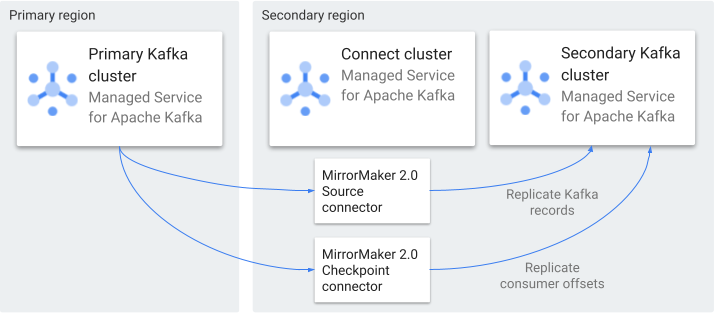
The architecture includes the following components:
Primary Kafka cluster. Under normal operating conditions, this cluster handles all active producer and consumer traffic and acts as the source of truth for the system.
Secondary (standby) Kafka cluster. This cluster is located in a secondary region. It remains idle or in a read-only state until a failover is initiated.
Kafka Connect cluster. This Connect cluster is deployed in the secondary region. It uses MirrorMaker 2.0 connectors to replicate Kafka data:
MirrorMaker 2.0 Source connector. Continuously replicates topic records from the primary cluster to the secondary cluster.
MirrorMaker 2.0 Checkpoint connector. Replicates consumer group offsets from the primary cluster to the secondary cluster. Replicating the offsets enables consumers to resume from the correct position after a failover.
Configure networking
Your failover architecture can use a single VPC network or multiple VPC networks.
A Managed Service for Apache Kafka cluster is connected to one or more subnets in a single region. In each connected subnet, the service creates Private Service Connect endpoints for the cluster's bootstrap address and brokers.
A Connect cluster is connected to a single subnet, called the worker subnet.
Single VPC network
In a single-VPC network architecture, both Kafka clusters are attached to subnets in the same VPC network. Because subnets in the same VPC network are routable, no additional configuration is needed.
Multiple VPC networks
To create a failover architecture that spans two VPC networks, do the following:
Attach the primary cluster to a subnet in the primary VPC network, in the primary region.
Attach the secondary cluster to subnets in both VPC networks, in the secondary region.
Create the Connect cluster in a subnet in the primary VPC network, in the secondary region.
This configuration lets the Connect cluster workers reach the primary cluster while still being resilient to a regional outage. An example configuration is the following:
Networks:
vpc-primaryandvpc-drPrimary cluster subnet:
primary-west-subnet(us-west1) invpc-primarySecondary cluster subnets:
dr-central-subnet(us-central1) invpc-drprimary-central-subnet(us-central1) invpc-primary
Connect cluster workers:
primary-central-subnet
For more information, see Configure networking for Managed Service for Apache Kafka.
Create Google Cloud resources
To create the resources needed for this architecture, see the following pages:
- Create a Managed Service for Apache Kafka cluster
- Create a Connect cluster
- Create a MirrorMaker 2.0 Source connector
- Create a MirrorMaker 2.0 Checkpoint connector
Enable DNS resolution
When you attach a Managed Service for Apache Kafka cluster to a subnet, the service creates DNS entries within that subnet for the cluster's bootstrap address and brokers. To make these DNS entries available to the Connect cluster workers, add the primary cluster's DNS domain to the Connect cluster's list of resolvable DNS domains.
If your architecture spans multiple VPC networks, ensure that private DNS zones are linked across the networks.
Grant IAM roles
Grant the following IAM roles to the Managed Kafka Service Agent that is associated with the Connect cluster:
Managed Kafka Client (
roles/managedkafka.client) on the source cluster's project. This role lets the Connect cluster workers produce and consume data from the source cluster.Service Account Token Creator (
roles/iam.serviceAccountTokenCreator). Grant this role if you use service account impersonation or Workload Identity Federation to authenticate. The role lets the Connect cluster generate short-lived OAuth2 access tokens for SASL OAUTHBEARER authentication.
MirrorMaker 2.0 Source settings
We recommend the following settings for the MirrorMaker 2.0 Source connector in an HA/DR architecture.
| Property | Value | Description |
|---|---|---|
tasks.max |
At least 3 | Scales replication throughput. |
replication.policy.class |
org.apache.kafka.connect.mirror.IdentityReplicationPolicy
|
Retains the original topic names in the secondary cluster, without adding a prefix to the name. This setting makes it easier to switch your client applications to the secondary region. |
target.cluster.producer.acks |
all |
Ensures that data is written to all in-sync replicas before acknowledgement. |
target.cluster.producer.enable.idempotence=true |
true |
Prevents duplicate records during regional network retries. |
target.cluster.producer.max.in.flight.requests.per.connection
|
5 |
Balances ordering and throughput. |
source.cluster.consumer.isolation.level |
read_committed |
Replicates only committed transactions. |
source.cluster.consumer.auto.offset.reset |
earliest |
Ensures that no data is skipped during a gap in replication. |
source.cluster.request.timeout.ms |
60000 |
Sets the request timeout to account for cross-region latency spikes. |
target.cluster.producer.delivery.timeout.ms |
120000 |
Extends the retry window for record delivery. |
MirrorMaker 2.0 Checkpoint settings
We recommend the following settings for the MirrorMaker 2.0 Checkpoint connector in an HA/DR architecture.
| Property | Value | Description |
|---|---|---|
emit.checkpoints.enabled |
true |
Enables replication of consumer offsets to the secondary cluster. This value is the default setting for the Checkpoint connector. |
refresh.groups.interval.seconds |
60 | Sets how often the connector checks for new consumer groups. |
sync.group.offsets.enabled |
true |
Specifies that the connector periodically copies offsets from an
internal topic to the Without this setting, consumers don't have a committed position after a failover, and either re-read from the beginning or skip to the end. For more information, see How the Checkpoint connector works. |
Monitor the primary cluster
To minimize potential downtime, it is critical to monitor the primary cluster and to alert operators before an outage occurs. This section describes the metrics that you should monitor to detect regional degradation. It also describes an alerting strategy to trigger a failover.
We recommend two tiers of signals, where a failure in tier 1 combined with anomalies in tier 2 triggers a failover.
- Tier 1: Infrastructure integrity
This signal is the most critical. It indicates that the primary cluster can no longer manage its own partitions. Any value higher than zero means that producers can't write to specific partitions, leading to data loss or application backpressure.
- Metric:
offline_partitions - Resource type:
managedkafka.googleapis.com/Cluster - Threshold: > 0 for 1 minute or more
- Metric:
- Tier 2: Application consumer lag
This signal measures a consumer's processing backlog. A sustained high lag indicates that consumption isn't keeping up with a high-volume producer, putting you at risk for a larger-than-intended lag if a failure occurs.
- Metric:
offset_lag - Resource Type:
managedkafka.googleapis.com/TopicPartitionConsumerGroup - Filter:
resource.cluster_id=CLUSTER_ID, consumer_group_id=CONSUMER_GROUP_ID Threshold: Set the trigger to a threshold for a specific duration, to avoid false positives during a transient spike.
- Warning: > 100,000 records for 5 minutes
- Critical: > 500,000 records or a 20% increase in 2 minutes
- Metric:
The offset_lag metric doesn't reflect latency introduced by MirrorMaker 2.0
writing Kafka records and checkpoints to the secondary cluster. When calculating
your recovery point object (RPO), include this factor.
Configure alerts
Use the following PromQL queries to define your alerting policies in Cloud Monitoring.
Tier 1: Primary cluster partition failure. Triggers if the primary cluster experiences unassigned or unavailable partitions for more than one minute.
max_over_time(
  managedkafka_googleapis_com:offline_partitions{
    monitored_resource="managedkafka.googleapis.com/Cluster",
    cluster_id="PRIMARY_CLUSTER_ID"
  }[1m]
) > 0
Tier 2: Critical application consumer backlog. Triggers if the total backlog across all partitions for an application consumer group exceeds 500,000 unread messages over a 5-minute evaluation window.
sum by (consumer_group_id) (
  managedkafka_googleapis_com:offset_lag{
    monitored_resource="managedkafka.googleapis.com/TopicPartitionConsumerGroup",
    cluster_id="PRIMARY_CLUSTER_ID",
    consumer_group_id="CONSUMER_GROUP_ID"
  }
) > 500000
Replace the following:
PRIMARY_CLUSTER_ID: The name of your primary Kafka clusterCONSUMER_GROUP_ID: The consumer group ID of the consumer to monitor
Define failover criteria
While it's important to fail over during an outage, it's also important not to fail over in response to false positives. Use more than one signal to trigger a failover. Don't rely on consumer lag as the only signal, because this metric by itself might reflect problems in your consumer applications and not infrastructure failures.
The following table shows some scenarios that you might encounter.
| Scenario | Metrics indicators | Observed behavior | Response |
|---|---|---|---|
| Application processing bottleneck |
|
Producers are normal. Application consumers are falling behind. | No failover. Scale up consumers to handle the load or resolve downstream bottlenecks. |
| Ingress partition or network isolation |
Sustained timeout exceptions ( |
The primary cluster is healthy. External ingress or Private Service Connect routing aren't working. | No failover. Investigate Cloud DNS resolution and VPC firewall rules. |
| Regional outage |
Sustained timeout and network exceptions
( |
The primary cluster can't serve partition traffic. Producers are completely blocked. | Perform a regional failover. Fail over and promote the secondary region. |
Fail over during an outage
The failover process switches applications from the primary region to the secondary region. To minimize your recovery time objective (RTO), the goal is for consumers to resume from the most recent translated offsets.
Fail over to the secondary cluster
To fail over, perform these steps:
Stop all producer processes that are writing to the primary cluster, to prevent data becoming inconsistent between regions.
Monitor the MirrorMaker 2.0 Checkpoint connector logs to ensure that the final batch of offsets is sent to the secondary cluster.
Update producer application configurations to use the secondary cluster's bootstrap address.
Update consumer application configurations to use the secondary cluster's bootstrap address. Consumers automatically use the translated offsets stored in the secondary cluster, resuming near the point of the primary cluster's failure.
Fail back to the primary cluster
When the primary region is stable again, you can perform a failback operation and switch your applications back to the primary cluster.
Verify the health of the primary cluster.
Confirm that all partitions are online in the primary cluster (
offline_partitions==0).Verify network connectivity to ensure that the Connect cluster can reach the primary cluster's bootstrap address.
Stop the MirrorMaker 2.0 connectors.
Synchronize the primary cluster with the secondary cluster. To do this, you can deploy a temporary Connect cluster for the primary cluster, and use MirrorMaker to replicate data in the other direction, from the secondary to the primary cluster.
Monitor the progress of the reverse replication. Verify that the log-end offsets in the primary cluster's topic partitions match the latest offsets in the secondary cluster. If they match, it means the primary cluster is fully caught up with any data produced during the outage.
Switch your applications back to the primary cluster. To ensure there is no data loss during the final switch, perform the cutover as follows:
Stop producers: Stop all writes to the secondary cluster.
Drain and stop secondary consumers: Allow consumers on the secondary cluster to finish processing all remaining in-flight records until group lag reaches 0. Then shut them down to freeze the committed offsets.
Wait for the reverse MirrorMaker 2.0 Source connector to replicate the final records.
Confirm that the reverse MirrorMaker 2.0 Checkpoint connector has written the latest offsets to the primary cluster's
__consumer_offsetstopic.Delete the temporary reverse connectors to prevent circular replication loops and resource overhead.
Update producer and consumer configurations to use the primary cluster's bootstrap address.
In the secondary region, restart the MirrorMaker 2.0 connectors to begin replicating data to the secondary cluster.
What's next
- Kafka Connect overview
- Replicate Kafka topics with MirrorMaker 2.0
- Monitor Kafka clusters for reliability
- Configure networking for Managed Service for Apache Kafka