

In Cloud Billing Reports, you can use the Savings filters to change the view of your cost calculations. You can select all applicable savings options (default) to be included in the cost calculations, or you can clear some or all of the discounts and credit options to exclude those savings from the cost calculations.
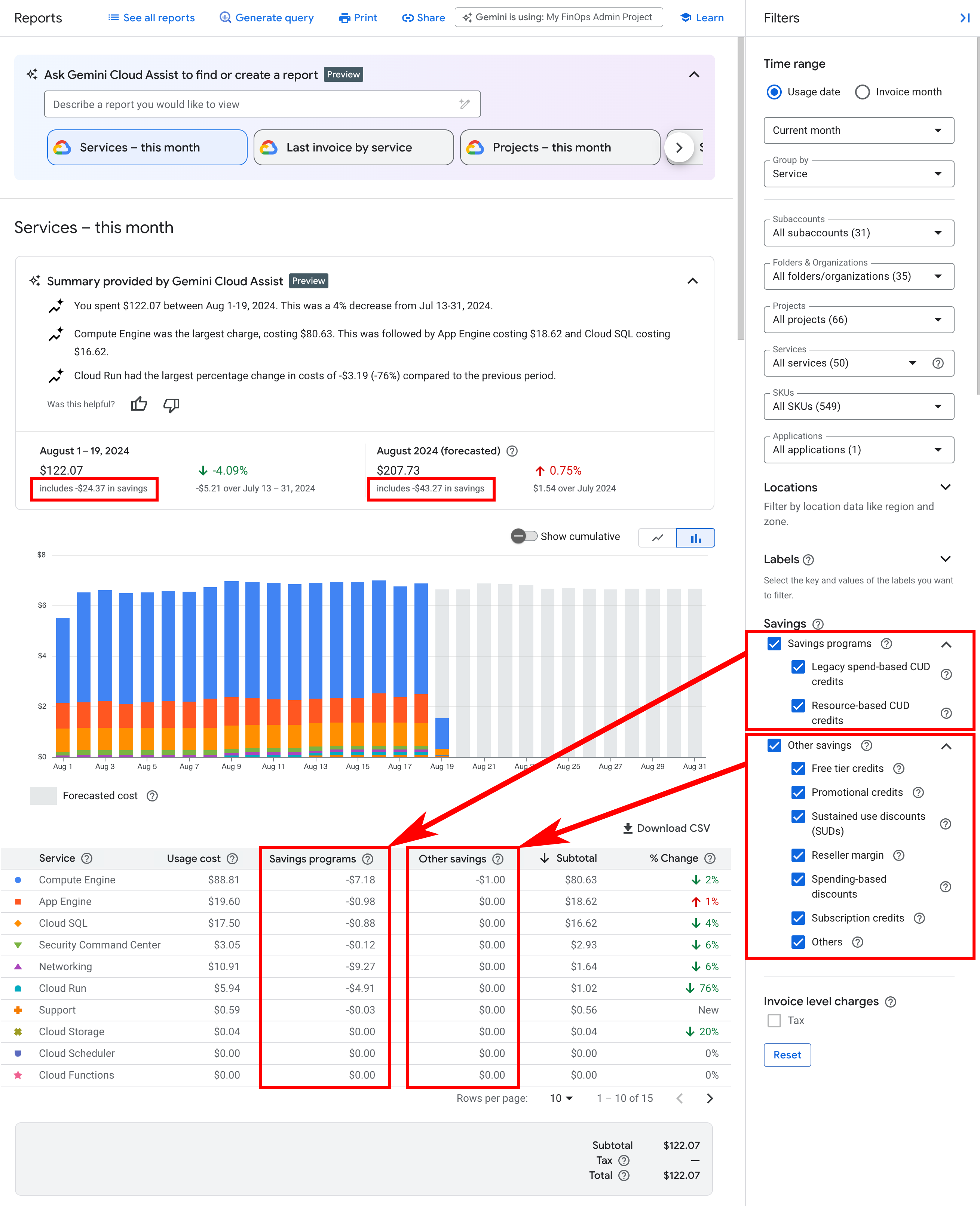
Usage-specific savings are listed in separate columns in the table, and impact the Subtotal value. There are two categories of usage-specific savings: Savings programs and Other savings.
For Cloud Billing accounts associated with a custom pricing contract, you also see a Negotiated savings column.
Savings programs
Savings programs include the various committed use discounts (CUDs) options, which lower the cost of your Google Cloud usage by offering discounts and credits tied to your resource usage or spending.
- Spend-based CUD discounts: Spend-based committed use discounts (CUDs) provide discounted prices on certain Google Cloud services when you commit to spending a minimum amount during a specified term. The discounted price is determined by the consumption model that applies to the SKU usage.
- Legacy spend-based CUD credits: For spend-based committed use discounts (CUDs) that aren't part of the new pricing model, this is the credit earned in exchange for your commitment to spend a minimum amount for a service in a particular region.
- Resource-based CUD credits: Resource-based committed use discounts (CUDs) provide credits on Compute Engine virtual machines (VMs) when you commit to using eligible resources during a specified term.
View the details of your committed use discounts (CUDs)
CUDs reduce the usage costs of Compute Engine and certain other Google Cloud services. The fees and credits from your purchased commitments are applied to your Cloud Billing account using attribution, which describes how they're spread across the account's projects that consumed the eligible discounts. To understand how your commitment fees and credits are applied to your Cloud Billing account and projects, see Attribution of committed use discount fees and credits.
To comprehensively view the details of your CUDs, you should access your Cloud Billing account report using billing-account-level permissions. If you try to analyze your CUDs while your Cloud Billing access is limited to viewing costs for one project at a time, you won't be able to view charges or credits that aren't in the project you're viewing.
Analyze Spend-based CUD discounts
Spend-based CUD discounts provide discounted prices on certain Google Cloud services when you commit to spending a minimum amount during a specified term.
Spend-based CUD discounts are a new CUD model that became available starting July 15, 2025. All customers who have purchased Legacy spend-based CUD credits for affected products will be migrated to the new Spend-based CUD discounts model. A notification in the Billing Overview page shows the date when we will begin the automatic migration from the legacy spend-based CUD model using credits, to the new spend-based CUD model using discounts.
Spend-based CUD discounts use consumption models to help track your cloud spending, promotional offers and discounts. To analyze your Spend-based CUD discounts in reports, you can group by or filter by Spend-based CUDs in the Billing Reports, or view the Cost table report or the Cost breakdown report.
Analyze Resource-based CUD credits and Legacy spend-based CUD credits
When analyzing your Google Cloud costs, it's useful to understand how your purchased commitments are impacting your costs. For example, to understand your ongoing Compute Engine costs, you need to know your VM core and RAM usage costs as well as the sustained use discounts and committed use discounts generated by your core and RAM usage.
Resource-based and Legacy spend-based CUDs consist of three components using a balance sheet format on your bill:
- Commitment fee is the discounted cost of your covered usage.
- On-demand costs are the usage costs for the resources that you consume, billed at the standard list price.
- Committed use discount credits are negative costs that offset the eligible on-demand charges covered by the commitment.
The net impact of these three components is that you receive a discount on the usage covered by your commitment. The sum of your commitment fee (1) and committed use discount credits (3) equals the savings from your CUDs. For more information, see Understanding your invoice or statement.
To configure the report to display the individual components that contain your CUDs, group your costs by SKU. The default report view (not grouped by SKU) doesn't break out the CUD components but instead includes the net of the three components.
To view only your ongoing commitment fees, limit the report results to the relevant commitment fee SKUs using the SKUs filter. For example, select the SKUs filter and type
Commitment [YOUR COMMITMENT TYPE].
Depending on the SKU for which you purchased commitments, the fees and credits are applied to your Cloud Billing account using either proportional attribution or prioritized attribution. To understand how your commitment fees and credits are attributed to your Cloud Billing account and projects, see Attribution of committed use discounts.
Other savings
Other savings offer additional discounts and credits on your Google Cloud usage. Other savings might be recurring or one-time use and reduce the cost of your Google Cloud usage. If applicable to your Cloud Billing account, there are various types of other savings you might earn, such as the following:
- Free tier credits: Some services offer free resource usage up to specified limits. For these services, credits are applied to implement the free tier usage.
Promotional credits: Promotional credits are things like spend-based milestone credits, Google Cloud Free Trial, and marketing campaign credits, or other grants to use Google Cloud. Promotional credits are typically considered a form of payment. When available, promotional credits are automatically applied to reduce your total bill.
Promotional credits for custom pricing contracts: If you have a custom pricing contract with Google Cloud, and received promotional credits that apply to costs at list prices, your report includes a service called
Invoice, with a SKU calledContract billing adjustment. This SKU adjusts your promotional credits so that they apply to the costs at list price. View details about contract billing adjustments in the Cloud Billing data export.To check if your promotional credits apply at list prices, refer to the terms of your contract.
Sustained use discounts: When you run eligible Compute Engine resources throughout the billing month, you automatically earn sustained use discounts (SUDs) credits.
Reseller margin: For resellers only, this is the Reseller Program Discount credit you receive for selling eligible Google Cloud products.
Spending-based discounts: Spending-based discounts offer progressively larger discounts based on your total spend over a defined period, or discounts that are applied after a contractual spending threshold is reached.
Subscription credits: Long-term subscriptions to services that are purchased in exchange for discounts. These credits are typically applied to Base + Overage subscriptions, also known as Non-Unified Commitment Service (Non-UCS) subscriptions.
Others: Other credits or discounts that aren't associated with the current categories.
Negotiated savings
Negotiated savings is a credit type that displays for Cloud Billing accounts that are associated with a custom pricing contract. You receive these savings from custom pricing you've negotiated with Google. The Negotiated savings amount represents your cost savings computed using this equation:
Negotiated savings = Costs at Contract price - Costs at List price
- For usage costs incurred before May 1, 2021, your on-demand rate is based on your contract prices, and includes the savings you earned compared to list prices. When you configure the report using a starting Time range set prior to May 1, 2021, the Negotiated savings column isn't displayed. In these instances, the Usage cost column shows the gross cost of your cloud usage calculated using your contract prices.
For usage costs incurred after May 1, 2021, your on-demand rate is based on the publicly available list prices, and the Usage cost column shows the gross cost of your cloud usage calculated using list prices. The savings you earn with your custom contract prices (compared to list prices) is displayed on the report as a negotiated savings credit.
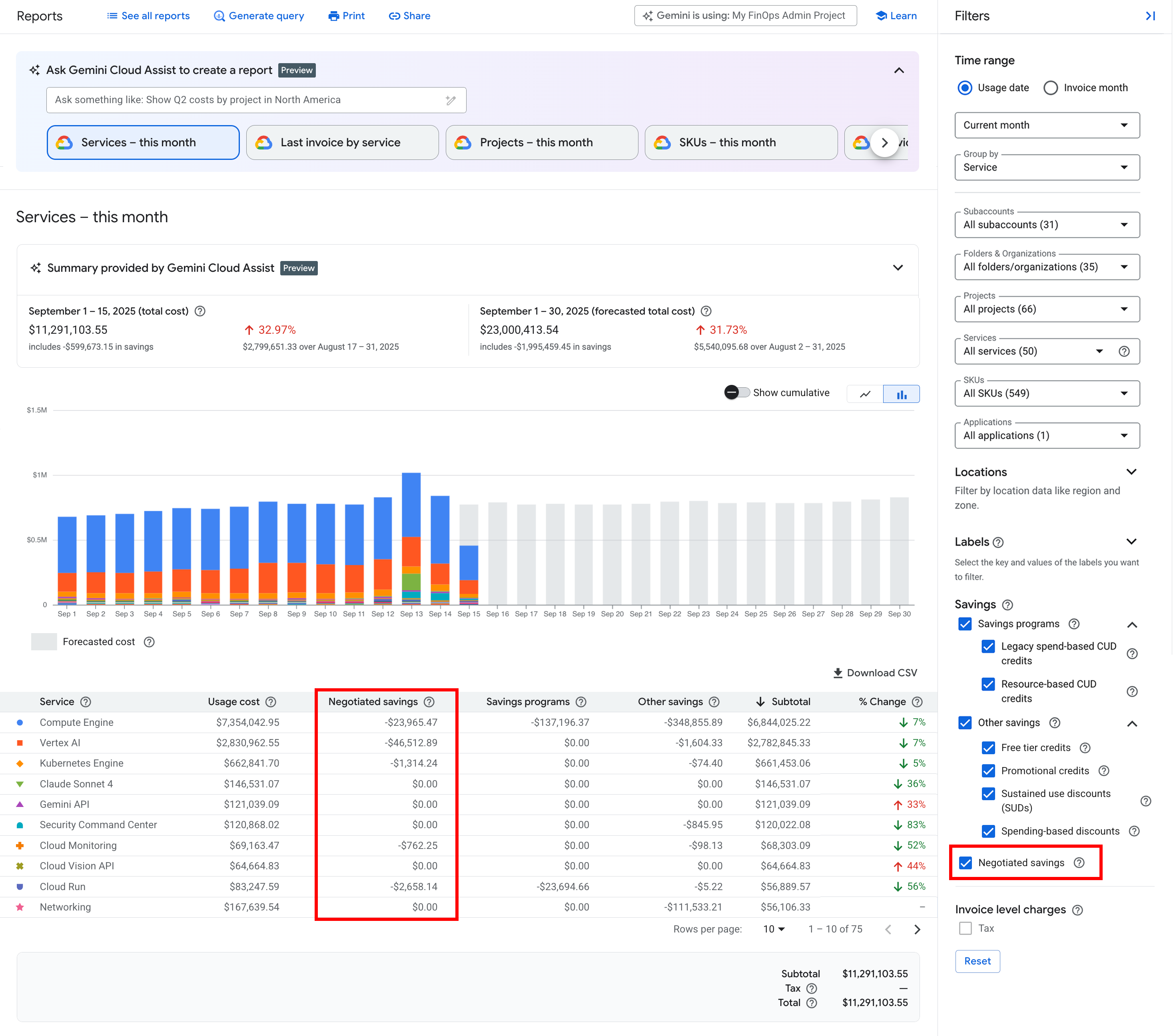
Example of a billing report for a Cloud Billing account that's associated with a custom pricing contract, configured with a Time range starting after May 1, 2021.
Related report
To see an overview of how much your usage-based credits and discounts are saving you, view the Cost Breakdown report.