

You can apply many HTML customizations to a chat dialog.
HTML chat element options
The child element of the df-messenger element can be one of the following:
df-messenger-chat: the agent dialog is always open.df-messenger-chat-bubble: the agent dialog can be opened or closed with an open or close bubble button.
HTML customizations for df-messenger
The df-messenger HTML element has the following attributes:
| Attribute | Input Policy | Value |
|---|---|---|
agent-id |
Required | Agent ID associated with the Dialogflow CX agent. |
allow-feedback |
Optional | Set to all to allow end-users to provide feedback on the agent's answers. |
language-code |
Required | Default language code. |
project-id |
Required | Project ID for the agent. |
location |
Optional | The agent's region. Default value is global. |
intent |
Optional | A custom event that is invoked when the chat dialog is opened. If the chat is open initially (as with df-messenger-chat or expanded/minimized df-messenger-chat-bubble), this triggers on page load. You can use an event handler that is called for this event and produces the first agent message. |
oauth-client-id |
Optional | Required for OAuth authentication. Default is null. If you don't provide this value and enable Dialogflow CX Messenger unauthenticated access, unauthenticated users can interact with the agent. If you provide this value, the agent dialog displays a "Request Authentication" overlay that requires users to sign in before they can use the agent (you can control the text using the request-auth-text attribute). |
storage-option |
Optional | Specifies local storage for conversation messages. Use none if messages shouldn't be stored. Using none clears all messages when the page is refreshed or reloaded. Defaults to sessionStorage. |
session-ttl |
Optional | Set to a duration in seconds to maintain session, must be strictly less than 86400 (1d) and defaults to 1800 (30min). |
url-allowlist |
Optional | Enables images being loaded from a comma-separated list of URL prefixes. Image URLs used in HTML or Markdown responses must start with one of the listed prefixes. Use * to allow all URLs. |
max-query-length |
Optional | Defines the maximum length for a text query. If the value is negative, the length is unlimited. Defaults to 256. Additional documentation. |
HTML customizations for df-messenger-chat
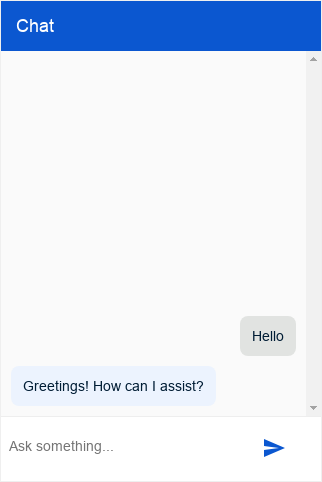
The df-messenger-chat HTML element has the following attributes:
| Attribute | Input Policy | Value |
|---|---|---|
chat-title |
Optional | The title of the chat box. Shown at the top of the chat box. |
chat-subtitle |
Optional | The subtitle of the chat box. Shown below the chat-title. |
chat-title-icon |
Optional | The icon shown in the title of the chat box. Shown above the chat box, left of the chat-title by default. |
bot-writing-text |
Optional | The text that is shown while the agent is writing. |
bot-writing-image |
Optional | The image that is shown while the agent is writing. Takes priority over bot-writing-text. |
request-auth-text |
Optional | The button text in case authentication is required. |
placeholder-text |
Optional | Text to be shown in the input field while it's empty. Defaults to "Ask something…". |
bot-actor-image |
Optional | Image source to use for the agent's actor image. Shown on each group of agent responses. |
user-actor-image |
Optional | Image source to use for the user's actor image. Shown on each user message. |
HTML customizations for df-messenger-chat-bubble
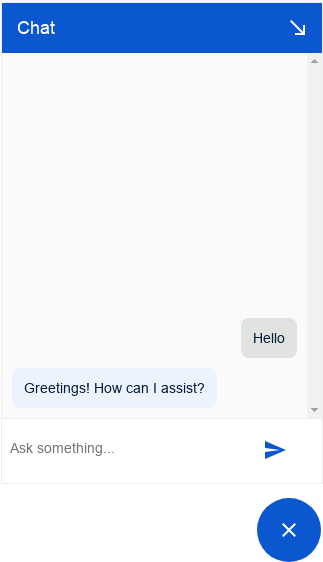
The df-messenger-chat-bubble HTML element has the same attributes as
df-messenger-chat and the following additional attributes:
| Attribute | Input Policy | Value |
|---|---|---|
expanded |
Optional | Boolean that determines whether the chat is initially open. If not set, the chat remembers its last state. |
chat-icon |
Optional | The icon for the chat bubble. Must be a publicly available URI. |
chat-close-icon |
Optional | The close icon for the chat bubble. Must be a publicly available URI. |
chat-collapse-icon |
Optional | The icon for the collapse button in the title bar. Must be a publicly available URI. |
anchor |
Optional | Defines where the chat dialog is placed relative to the open or close bubble. The value is two direction words (top, bottom, left, right) delimited by -. Default value is top-left. The first direction defines the anchoring point, and the second direction defines the main expansion direction away from the bubble. For example: top-left is placed on top of the bubble and expands to the left and upward (away from the bubble). |
chat-width |
Optional | Defines the width of the chat window. Numerical values (in pixel). Defaults to 320px. |
chat-height |
Optional | Defines the height of the chat window. Numerical values (in pixel). Defaults to 480px. |
allow-fullscreen |
Optional | Defines if the chat window can open fullscreen. If set to always, opens in full screen for all screen sizes. If set to small, opens in full screen for screen sizes less than 500px, otherwise opens as a normal window. May override chat-width, chat-height, and anchor if set. |
minimized |
Optional | Determines whether the chat is initially open in a minimized form. Uses the same logic as anchor. If specified, this attribute takes precedence over expanded. This also triggers the initial intent on load. |