


這項整合功能可為代理提供可自訂的對話方塊,您可以將其嵌入網站。
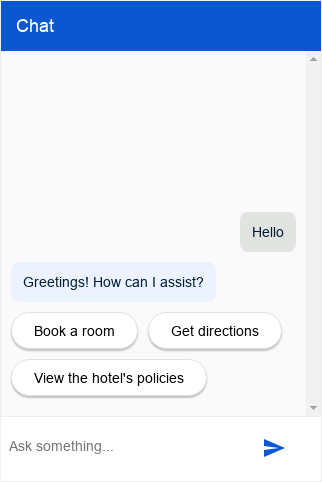
設定
這項整合功能可讓您提供經過驗證或未經驗證的使用者代理程式查詢存取權。
未經驗證的設定
如要設定未經驗證的 Dialogflow CX Messenger 代理存取權,請按照下列步驟操作:
- 前往 Dialogflow CX 控制台。
- 選擇 Google Cloud 專案。
- 選取代理程式。
- 選取「管理」分頁標籤。
- 按一下左側側欄選單中的「整合」。
- 按一下「Dialogflow CX Messenger」上的「連結」。
- 設定對話方塊隨即開啟。
- 如果先前已為這個代理程式設定整合,您會看到可嵌入的 HTML 程式碼。無論您要驗證或不驗證,請按一下對話方塊底部的「Disable...」(停用...) 按鈕,以便在下一個步驟中重新設定。
- 選取「Environment」(環境)。
- 選取「Unauthenticated API」。
- 選取樣式。
- 視需要限制網域存取權。
- 按一下「Enable the unauthenticated API」。
- 對話方塊會顯示可嵌入網站的 HTML 程式碼。複製這組代碼。
- 按一下「完成」。
已驗證設定
如要設定 Dialogflow CX Messenger 代理的驗證存取權,請按照下列步驟操作:
- 前往 Dialogflow CX 控制台。
- 選擇 Google Cloud 專案。
- 選取代理程式。
- 選取「管理」分頁標籤。
- 按一下左側側欄選單中的「整合」。
- 按一下「Dialogflow CX Messenger」上的「連結」。
- 設定對話方塊隨即開啟。
- 如果先前已為這個代理程式設定整合,您會看到可嵌入的 HTML 程式碼。無論您要驗證或不驗證,請按一下對話方塊底部的「Disable...」(停用...) 按鈕,以便在下一個步驟中重新設定。
- 選取「Environment」(環境)。
- 選取「Authorized API」。
- 選取樣式。
- 視需要限制網域存取權。
- 按一下「Enable the authorized API」。
- 對話方塊會顯示可嵌入網站的 HTML 程式碼。複製這組代碼。
- 按一下「完成」。
- 設定 OAuth 用戶端:
- 為組織建立 OAuth 同意畫面。將
https://www.googleapis.com/auth/cloud-platform新增為必要範圍。 - 建立 OAuth 2.0 用戶端 ID。在「Authorized JavaScript origins」(已授權的 JavaScript 來源) 下方,指定允許代管及查詢代理程式的 HTTP 來源。例如:
https://your-company.com。 - 授予使用者查詢代理的權限。將每位使用者或群組新增為主體,並授予 Dialogflow API 用戶端和服務使用情形消費者角色。
- 為組織建立 OAuth 同意畫面。將
嵌入
將上述複製的內嵌程式碼貼到網站網頁中。
<script> 和 <df-messenger> HTML 元素應位於網頁的 <body> 元素中。
如果您使用經過驗證的整合功能,請將 <df-messenger> 的 oauth-client-id 屬性設為 OAuth 用戶端 ID。如要使用使用者身分進行工具驗證,請將 access-token-name 屬性設為任何名稱。然後使用值為 $session.params.ACCESS_TOKEN_NAME 的不記名權杖進行工具驗證。
更新其他需要更新的屬性。
如要允許回應式版面配置,請在 <head> 元素中加入以下內容:
<meta name="viewport" content="width=device-width, initial-scale=1">
自訂
您可以套用多種 HTML 自訂設定和 CSS 自訂設定,調整對話方塊的外觀和行為。
JavaScript
您可以使用許多 JavaScript 事件和 JavaScript 函式與即時通訊對話方塊互動。
範例
以下範例說明 HTML 自訂、CSS 自訂和 JavaScript 事件處理:
<!DOCTYPE html>
<html>
<head>
  <meta charset="utf-8">
  <meta http-equiv="Cache-Control" content="no-cache, no-store, must-revalidate" />
  <meta http-equiv="Pragma" content="no-cache" />
  <meta http-equiv="Expires" content="0" />
  <title>My chat</title>
  <style>
    df-messenger {
      /*
       * Customize as required. df-messenger will fill the
       * space that is provided.
      */
      position: absolute;
      right: 0;
      top: 0;
      bottom: 0;
      width: 320px;
    }
  </style>
  <script src="https://www.gstatic.com/dialogflow-console/fast/df-messenger/prod/v1/df-messenger.js"></script>
</head>
<body>
<df-messenger
    location="global" <!-- TODO: update agent location as needed -->
    project-id="my-project-id" <!-- TODO: update project ID -->
    agent-id="my-agent-id" <!-- TODO: update agent ID -->
    language-code="en" <!-- TODO: update agent language as needed -->
>
  <df-messenger-chat
      chat-title="Agent Name" <!-- TODO: update dialog title as needed -->
  ></df-messenger-chat>
</df-messenger>

<script>
  // An example of handling events: Navigate to the first suggested URL.
  document.addEventListener('df-url-suggested', (event) => {
    if (Array.isArray(event.detail.suggestedUrls) &&
      event.detail.suggestedUrls.length) {
      window.location.href = event.detail.suggestedUrls[0];
  }
});
</script>
</body>
</html>
Fulfillment
代理回覆可使用多種執行要求回覆類型。
答案意見回饋
如果啟用答案意見回饋,對話方塊預設會在使用者介面中加入「喜歡」 和「不喜歡」 按鈕。對話期間,您可以點選這些按鈕,對代理的回覆提供意見。如果點選「不喜歡」,可以選擇提供負面評價的原因。
自訂意見回饋元件
如要指定自訂意見回饋元素,您必須在網站上定義新的自訂元素。如要提交意見回饋,元素必須發出 df-custom-submit-feedback-clicked 事件。包含的 detail 欄位必須是字串。
class CustomFeedbackElement extends HTMLElement {
  constructor() {
    super();
    // It is not strictly required but recommended to contain the custom
    // element in a shadow root.
    this.renderRoot = this.attachShadow({mode: 'open'});
  }

  // Web component Lifecycle method.
  connectedCallback() {
    const wrapper = document.createElement('div');

    // Build the component as required.
    const button = document.createElement('button');
    button.innerText = 'Submit';
    button.addEventListener('click', () => {
      this._onSubmitClick();
    });
    wrapper.appendChild(button);

    this.renderRoot.appendChild(wrapper);
  }

  // Called when Submit button is clicked.
  _onSubmitClick() {
    const event = new CustomEvent("df-custom-submit-feedback-clicked", {
      // `detail` may be any string,
      // this will be sent to the backend to be stored.
      detail: JSON.stringify({
        "usefulness": 2,
        "accuracy": 3,
      }),
      // Required to propagate up the DOM tree
      // https://developer.mozilla.org/en-US/docs/Web/API/Event/bubbles
      bubbles: true,
      // Required to propagate across ShadowDOM
      // https://developer.mozilla.org/en-US/docs/Web/API/Event/composed
      composed: true,
   });
   this.dispatchEvent(event);
  }
}

(function() {
  // Registers the element. This name must be "df-external-custom-feedback".
  customElements.define('df-external-custom-feedback', CustomFeedbackElement);
})();
偵錯
如要在本機使用 Dialogflow CX Messenger 測試代理,請按照下列步驟操作:
- 按照上述說明,在網頁中嵌入 Dialogflow CX Messenger 元素。
- 為該網頁啟動本機 HTTP 伺服器,並指定通訊埠。
- 請前往
http://localhost:port_number開啟該頁面。